Introduction
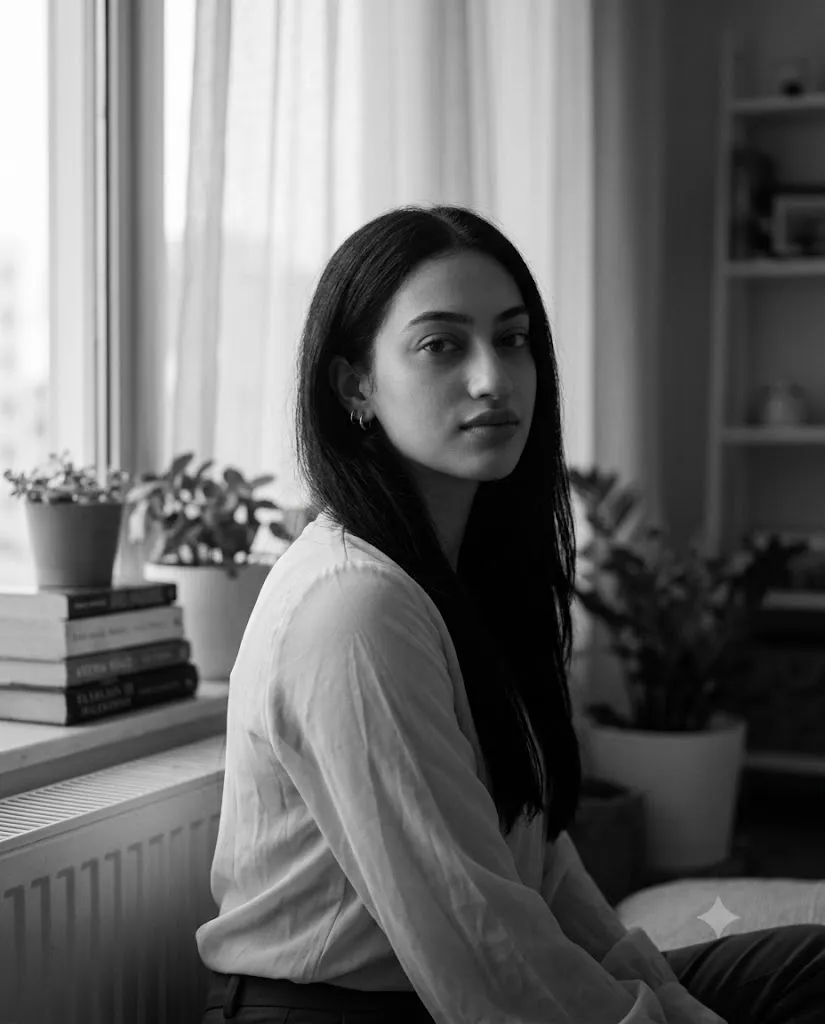
The Window Light Black & White Fine Art Portrait style is one of the most elegant and timeless approaches in portrait photography and AI image generation. Inspired by classic fine art photography, editorial magazines, and cinematic monochrome portraits, this style focuses on emotion, simplicity, and natural light rather than bold colors or dramatic effects. Soft daylight entering through a window creates gentle highlights and delicate shadows that beautifully define facial features while maintaining a calm, intimate atmosphere.
"Window Light Black & White Fine Art Portrait Prompt"
Use the uploaded image as the facial identity reference while preserving facial structure, proportions, hairstyle, and natural expression. Create a realistic black-and-white fine art portrait of a young woman seated beside a large window illuminated by soft natural daylight filtered through sheer curtains. She wears a relaxed long-sleeved blouse with gentle fabric folds, minimal makeup, and small hoop earrings. The subject turns slightly toward the window while calmly looking at the camera with a thoughtful, introspective expression. The background features softly blurred books, indoor plants, shelving, and a radiator beneath the window, creating a cozy interior atmosphere. Apply low-key monochrome lighting with very low brightness, soft tonal transitions, delicate film grain, shallow depth of field, realistic skin texture, cinematic softness, editorial photography style, 85mm portrait lens, DSLR-quality realism, 4:5 aspect ratio, and an ultra-detailed fine art finish.
Unlike colorful portrait styles, black-and-white fine art photography relies on tonal range, lighting, composition, and expression to tell a story. Every detail, from the texture of skin and clothing to the subtle blur of the background, contributes to an image that feels artistic and authentic. Low-key lighting enhances the mood by keeping the overall brightness intentionally dark while preserving important facial details. This technique creates portraits that are quiet, reflective, and emotionally engaging.
With today's AI image generation tools, anyone can recreate this sophisticated look by combining a high-quality reference photo with a carefully written prompt. Whether you're building an AI prompt library, creating portfolio images, designing editorial content, or exploring creative photography, mastering this style will help you produce portraits that appear both professional and timeless.
In this guide, you'll learn how to use AI photo editing, discover the best tools for creating monochrome portraits, explore a sample prompt, and understand the complete editing workflow for producing stunning fine art images.
How To Use Photo Editing?
Photo editing is the final step that transforms an AI-generated portrait into a polished fine art photograph. While AI creates the foundation, editing software refines lighting, contrast, sharpness, and tonal balance.
Step 1: Choose a High-Resolution Portrait
Select a clear reference image with visible facial features and natural lighting. Higher-quality images preserve facial identity more accurately during AI generation.
Step 2: Copy a Detailed Prompt
Write or copy a descriptive prompt that includes lighting, mood, camera lens, clothing, background, facial expression, and monochrome styling.
Step 3: Upload Your Reference Photo
Import the portrait into an AI image generator that supports reference-image guidance or image-to-image editing.
Step 4: Generate Multiple Variations
Produce several versions using the same prompt and compare lighting, composition, facial accuracy, and artistic quality.
Step 5: Select the Strongest Result
Choose the portrait with the most natural expression, smooth tonal transitions, and balanced composition.
Step 6: Refine the Final Image
Complete the portrait using professional editing software to improve tonal depth, sharpen important details, and preserve realistic textures.
Combining AI generation with thoughtful editing creates images that resemble professional fine art photography.
Tools You Can Use For Prompt Copy and Create Photo
Several AI and editing platforms can help create high-quality monochrome portraits.
ChatGPT
An excellent tool for writing detailed prompts describing lighting, composition, mood, camera settings, and portrait style.
Midjourney
Produces artistic editorial portraits with cinematic compositions and beautiful monochrome rendering.
Flux AI
Creates highly realistic faces while preserving natural skin texture and facial identity.
Stable Diffusion
Offers advanced control over image generation through image-to-image workflows, ControlNet, and prompt refinement.
GPT Image
Generates realistic black-and-white portraits directly from descriptive prompts with excellent consistency.
Adobe Photoshop
Ideal for advanced retouching, dodging and burning, sharpening, skin cleanup, and background refinement.
Adobe Lightroom
Perfect for adjusting exposure, blacks, highlights, texture, clarity, grain, and monochrome tonal balance.
Canva
Useful for creating magazine layouts, portfolio covers, social media graphics, and presentation materials using the completed portrait.
Using AI together with professional editing software produces the highest-quality fine art results.
How To Edit Photo?
Professional editing enhances subtle details and strengthens the emotional impact of a fine art portrait.
Clean the Portrait
Remove unwanted AI artifacts while preserving natural skin texture and authentic facial features.
Refine Exposure
Maintain a low overall brightness while ensuring facial details remain visible and well-defined.
Improve Tonal Range
Adjust highlights, midtones, and shadows to achieve smooth grayscale transitions without harsh contrast.
Enhance Facial Details
Sharpen the eyes, eyelashes, lips, and hair while preserving a soft, natural appearance.
Add Fine Film Grain
Apply subtle monochrome grain to recreate the timeless character of classic black-and-white photography.
Blur the Background
Maintain a shallow depth of field that gently separates the subject from the softly blurred indoor environment.
Export in High Resolution
Save the completed portrait in 4K or higher resolution for professional portfolios, exhibitions, social media, or fine art printing.
Conclusion
The Window Light Black & White Fine Art Portrait style demonstrates how simplicity, natural light, and thoughtful composition can create emotionally powerful imagery. Instead of relying on vivid colors or dramatic visual effects, this approach emphasizes expression, lighting, texture, and atmosphere to produce portraits with timeless appeal.
Using a carefully written AI prompt together with a high-quality reference image allows you to preserve facial identity while achieving a refined monochrome aesthetic. Professional editing further enhances the portrait by improving tonal balance, sharpening details, refining exposure, and maintaining realistic textures.
Whether you are an AI artist, photographer, blogger, or creative designer, mastering this portrait style will help you create elegant images suitable for editorials, portfolios, galleries, and personal projects. Continue experimenting with different window lighting conditions, compositions, interior settings, and monochrome treatments to develop your own signature fine art style. With practice and attention to detail, you can consistently produce cinematic black-and-white portraits that are both visually striking and emotionally memorable.