Introduction
Retro-style portraits have made a huge comeback in AI photography. Among the most trending aesthetics is the Retro Vintage Rainy Saree Portrait, which combines the charm of 1990s fashion, soft golden-hour lighting, rainy weather, and elegant Indian attire. This unique style creates photographs that feel nostalgic, cinematic, and emotionally rich.
"Retro Vintage Rainy Saree Portrait Prompt"
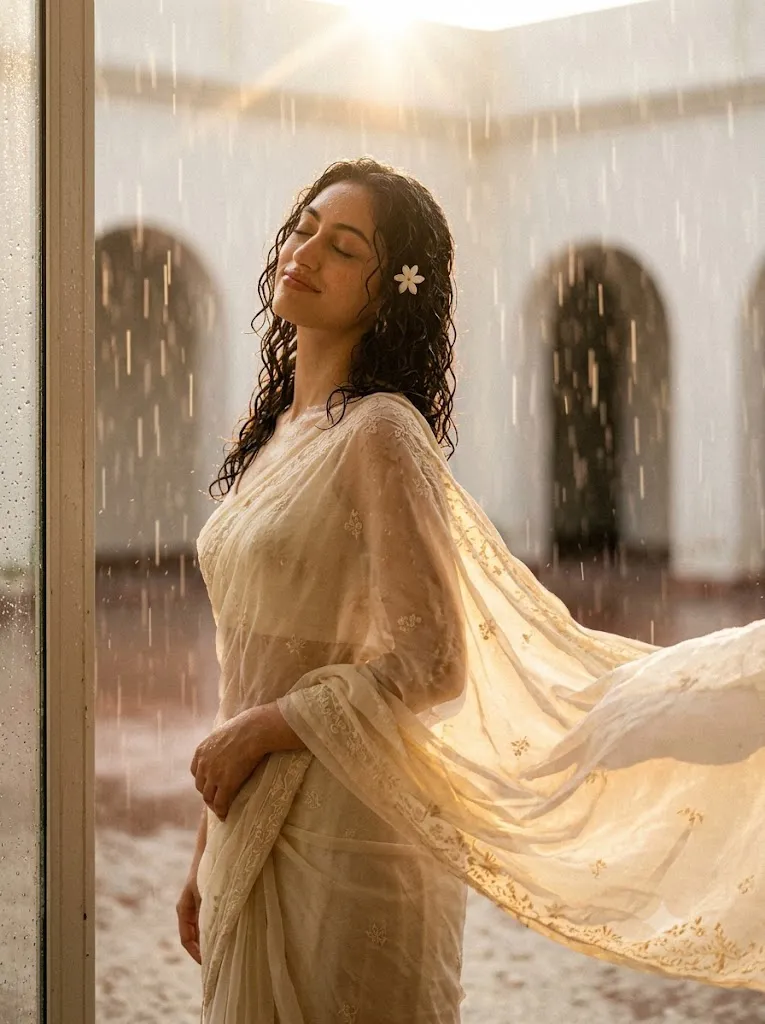
Create a retro vintage rainy portrait of the reference image while preserving the original facial features. The scene should feel like a nostalgic 1990s cinematic photograph with visible film grain and a soft white-toned vintage color palette. The subject has naturally curly wet hair with a small white flower tucked into the curls. She is wearing an elegant flowing chiffon saree, standing gracefully in a windy and rainy environment. Her eyes are gently closed with a calm yet confident expression, creating a mysterious and artistic atmosphere. Warm golden sunset lighting softly illuminates her face, producing beautiful highlights and gentle shadows. The background is minimalist with subtle textures and soft blur. Capture realistic skin details, cinematic depth of field, soft rain droplets, vintage film aesthetics, ultra-realistic photography, 8K HDR, highly detailed, masterpiece quality.
The look typically features a young woman wearing a flowing chiffon saree while standing gracefully in a windy, rainy environment. Her curly wet hair adds a natural touch, with a small flower tucked into the curls to enhance the vintage beauty. Her eyes remain gently closed, creating a peaceful and mysterious expression, while the warm golden sunset light softly illuminates her face. The background is kept minimal with subtle textures so that all attention stays on the subject.
Whether you are using ChatGPT, Midjourney, Flux, Stable Diffusion, Ideogram, or another AI image generator, this portrait style produces breathtaking results. By using a well-written prompt, you can recreate the timeless beauty of retro photography with modern AI technology.
How To Use Photo Editing?
Creating a beautiful AI portrait starts with selecting a high-quality reference image. Choose a photo with clear facial details, natural lighting, and good resolution. The better the input image, the more realistic the AI-generated portrait will appear.
Copy the prompt above and paste it into your preferred AI image generator. If the platform supports image references, upload your original photograph so the AI can preserve the facial structure while changing the artistic style.
Adjust the aspect ratio according to your needs. Portrait creators often prefer a 3:4 or 4:5 ratio for social media platforms like Instagram, Pinterest, and Facebook.
Experiment with different prompt strengths. Increasing the style strength enhances the retro effect, while lowering it preserves more of the original image. You can also modify lighting, rain intensity, flower color, saree color, or background elements until you achieve your desired artistic look.
Finally, upscale the generated image to 4K or 8K resolution for maximum quality before sharing or printing.
Tools You Can Use For Prompt Copy and Create Photo
Many AI tools are capable of generating stunning retro portraits. Here are some of the best options:
1. ChatGPT + Image Generation
Ideal for creating professional prompts and generating realistic artistic portraits with detailed instructions.
2. Flux AI
Excellent for producing realistic human faces with beautiful cinematic lighting and natural textures.
3. Midjourney
Known for its artistic quality, vibrant colors, and highly cinematic compositions.
4. Stable Diffusion
Perfect for users who want complete customization through advanced prompt controls and models.
5. Ideogram AI
Produces detailed portraits while maintaining excellent typography and creative compositions.
6. Leonardo AI
Offers fast image generation with realistic rendering and advanced editing features.
7. Playground AI
A beginner-friendly platform that provides quick results with many artistic presets.
8. Bing Image Creator
A free and simple option for generating AI artwork with impressive visual quality.
Each platform has its own strengths, so experimenting with multiple tools can help you achieve the perfect retro vintage portrait.
How To Edit Photo?
After generating your AI portrait, editing can further improve the final result.
Begin by adjusting brightness and contrast to create a balanced exposure. Slightly reduce saturation to maintain the authentic vintage aesthetic. Add warm highlights to recreate the soft golden sunset glow.
Next, apply a subtle film grain effect. Vintage photographs often contain natural grain that adds realism and nostalgic charm. Avoid making the grain too strong, as it may reduce image quality.
Enhance the rain by increasing clarity on water droplets while keeping the background softly blurred. A gentle vignette around the edges helps focus attention on the subject.
Use color grading to introduce warm cream, beige, and golden tones while reducing modern digital sharpness. Soft highlights and slightly faded blacks recreate the look of old analog film cameras.
If needed, lightly retouch the skin without removing natural textures. Realistic skin details contribute to the authenticity of the portrait. Enhance the chiffon saree by increasing fabric texture and improving its flowing appearance in the wind.
Finally, sharpen only the eyes, lips, and facial details while keeping the overall image soft and dreamy. Export the finished portrait in the highest possible resolution, preferably PNG or high-quality JPEG, for social media sharing or professional printing.
Conclusion
The Retro Vintage Rainy Saree Portrait Prompt is a perfect combination of nostalgia, elegance, and cinematic storytelling. The blend of soft rain, flowing chiffon sarees, curly wet hair, warm sunset lighting, and vintage film grain creates portraits that feel timeless and emotionally captivating.
By using a detailed prompt, selecting the right AI image generator, and applying thoughtful post-editing techniques, anyone can create stunning retro-inspired portraits that look like professional editorial photography. Whether you are building a portfolio, creating social media content, or exploring AI-generated art, this vintage rainy aesthetic offers endless creative possibilities.
Experiment with different saree colors, lighting conditions, flower styles, and weather effects to make every portrait unique. With a little creativity and the right prompt, you can transform an ordinary photo into a breathtaking masterpiece that captures the magic of classic vintage cinema.