Introduction
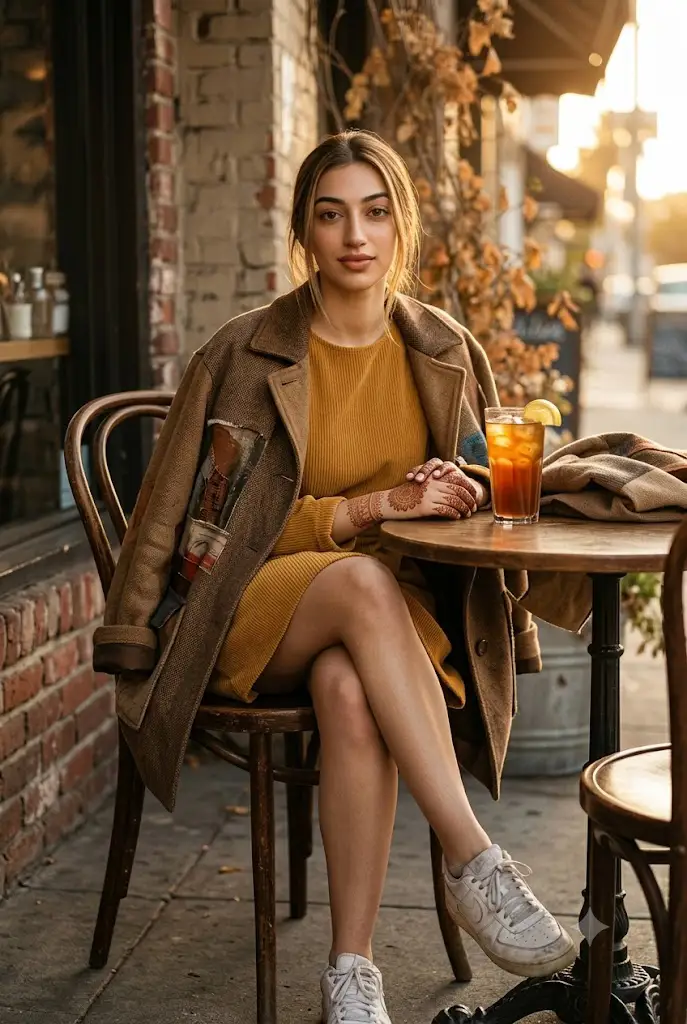
There's a particular kind of image that keeps showing up on moodboards, Pinterest boards, and AI art feeds lately — a warm, golden-toned portrait of someone sitting at a small café table, oversized sunglasses pushed up, iced coffee in hand, palm trees blurred softly in the background. This is the "Los Angeles Café Muse" aesthetic, and it captures a very specific feeling: effortless glamour, laid-back confidence, and that unmistakable California light that photographers chase for hours to catch naturally.
The style draws from a mix of influences — 90s film photography, editorial fashion shoots, and the everyday glamour of LA street style. Think linen shirts, gold jewelry, a woven tote bag on the table, and the kind of soft, hazy sunlight that makes everything look a little more cinematic than real life. It's the visual language of a lazy Sunday brunch that somehow still looks like it belongs in a fashion magazine.
For content creators, fashion brands, and AI art enthusiasts, the Los Angeles Café Muse prompt has become a favorite because it's instantly recognizable yet endlessly customizable. You can dial up the vintage film grain for a nostalgic feel, or lean into crisp, bright tones for a more modern editorial look. This article breaks down what the aesthetic is, how photo editing brings it to life, which tools you can use to build and refine it, and the exact editing steps to get that sun-drenched café glow.
"Los Angeles Café Muse Prompt"
Create a female model with dark blond hair in front of her, and a rounded table with iced tea. sitting on a wooden chair, she is wearing a yellow outfit and slightly worn white shoes. And a stylized brown coat. Her pose is sitting on a weden chair with her legs crossed. She looks in the camera with a natural, realistic look, skin, and textures. Golden hour vibe, fall time, ratio 2:3, random cafe in Los Angeles. Eye level-low angle.
How To Use Photo Editing?
Photo editing is central to nailing the Los Angeles Café Muse look, whether you're starting with an AI-generated image or a real photograph taken on your phone.
If you're working from an AI-generated base image, editing is mostly about refinement. AI-generated café scenes can sometimes have oddly rendered hands, inconsistent shadow direction, or lighting that feels artificial instead of sun-warmed. Editing helps smooth out these details — correcting skin tones so they look naturally sun-kissed, adjusting shadows to feel like they're falling from a real midday sun, and softening any harsh, unnatural edges around the subject.
If you're working from a real photograph, editing is how you transform an ordinary café shot into something with that signature LA glow. This usually involves:
- Warming up the overall color temperature so the image feels golden rather than neutral or cool.
- Lifting the shadows slightly to create that soft, hazy, sun-faded look typical of film photography.
- Adding a gentle warm haze or light leak effect to mimic the way sunlight scatters through café windows or outdoor patio umbrellas.
- Slightly desaturating certain tones while boosting warmth in skin and wood textures, which keeps the image looking natural rather than oversaturated.
In both cases, the goal is consistency — every element in the frame, from the ceramic coffee cup to the sunglasses to the background blur, should feel like it's bathed in the same warm, golden light.
Tools You Can Use For Prompt Copy and Create Photo
Building this aesthetic well usually means combining a few different tools across the creative process.
1. Prompt-writing and reference tools
Keeping a running list of descriptive phrases makes prompt-building faster and more consistent. Useful terms include "golden hour café portrait," "soft film grain," "LA street style," "warm sunlit tones," and "editorial candid shot." Saving these in a notes app lets you mix and match depending on the mood you're going for.
2. AI image generation platforms
Midjourney tends to excel at capturing the cinematic, film-like quality this aesthetic relies on. Stable Diffusion offers more granular control if you want to fine-tune specific elements like clothing texture or background blur. DALL·E works well for quick, conversational prompt iterations, and Adobe Firefly is a solid choice if you plan to move straight into Adobe's editing suite afterward.
3. Editing and finishing tools
For deep color grading and retouching, Adobe Lightroom and Photoshop remain the go-to choices, especially for building custom warm-toned presets you can reuse. On mobile, apps like VSCO and Lightroom Mobile are popular specifically because their filters were designed with this kind of warm, film-inspired look in mind. For quick AI-assisted touch-ups, chat-based image editing tools let you describe adjustments in plain language and get an updated version almost instantly, which is useful for fast iteration.
How To Edit Photo?
Once you have your base image, here's a step-by-step approach to achieving the Los Angeles Café Muse look:
1. Warm up the white balance
Shift the color temperature toward yellow and slightly away from blue to give the whole image a golden, sun-warmed base.
2. Lift the shadows gently
Instead of deep, dark shadows, raise the shadow levels slightly so the image has that soft, hazy film quality rather than harsh contrast.
3. Boost warm tones in skin and wood
Selectively increase warmth in skin tones and any wooden café furniture, since these areas benefit most from that golden glow.
4. Add a soft haze or light leak
A subtle warm overlay near the edges of the frame mimics natural sunlight scattering, adding to the dreamy, cinematic feel.
5. Blur the background gently
A soft, out-of-focus background — whether palm trees, café signage, or passing traffic — keeps the focus on the subject while reinforcing the relaxed, candid mood.
6. Fine-tune contrast and saturation
Keep contrast moderate and saturation slightly muted, avoiding an oversaturated or artificial look that clashes with the natural film aesthetic.
7. Finish with grain
A light film grain overlay ties everything together, giving the final image that nostalgic, slightly imperfect texture that defines the whole style.
Conclusion
The Los Angeles Café Muse aesthetic works because it captures something universally appealing — effortless style bathed in warm, golden light. Whether you start with an AI-generated concept or a real photo from your phone, photo editing is what transforms a simple café scene into something that feels cinematic and intentional. By understanding the role editing plays, choosing the right combination of AI and editing tools, and following a clear step-by-step process, you can consistently recreate this warm, sun-soaked look. Whether it's for a personal aesthetic, a brand campaign, or just creative experimentation, mastering this workflow gives you a reliable formula for capturing that unmistakable LA glow every time.