Introduction
Streetwear photography has always thrived on attitude, texture, and mood, but the rise of AI image generation has opened up a completely new creative lane: the "Neon Halo Streetwear" aesthetic. This style blends gritty urban fashion with a soft, glowing ring of light — a halo — that frames the subject in electric color. Think oversized hoodies, cargo pants, and chunky sneakers photographed under a neon-lit underpass, with a luminous circular glow hovering behind the model's head like a futuristic crown.
This look has become popular across Instagram, Pinterest moodboards, and AI art communities because it merges two visual languages that rarely meet: the raw, documentary feel of street fashion photography and the dreamy, otherworldly quality of neon sci-fi lighting. A well-crafted "Neon Halo Streetwear" prompt can turn a simple portrait concept into something that feels like a album cover, a fashion campaign, or a cyberpunk poster.
Whether you're a fashion designer wanting quick concept visuals, a content creator building a distinct visual identity, or simply someone experimenting with AI image tools for fun, understanding how to build, use, and edit this kind of prompt will help you get consistent, striking results. This article walks through what the style is, how to use photo editing to enhance it, which tools work best, and a step-by-step approach to editing your final image.
"Neon Halo Streetwear Prompt"
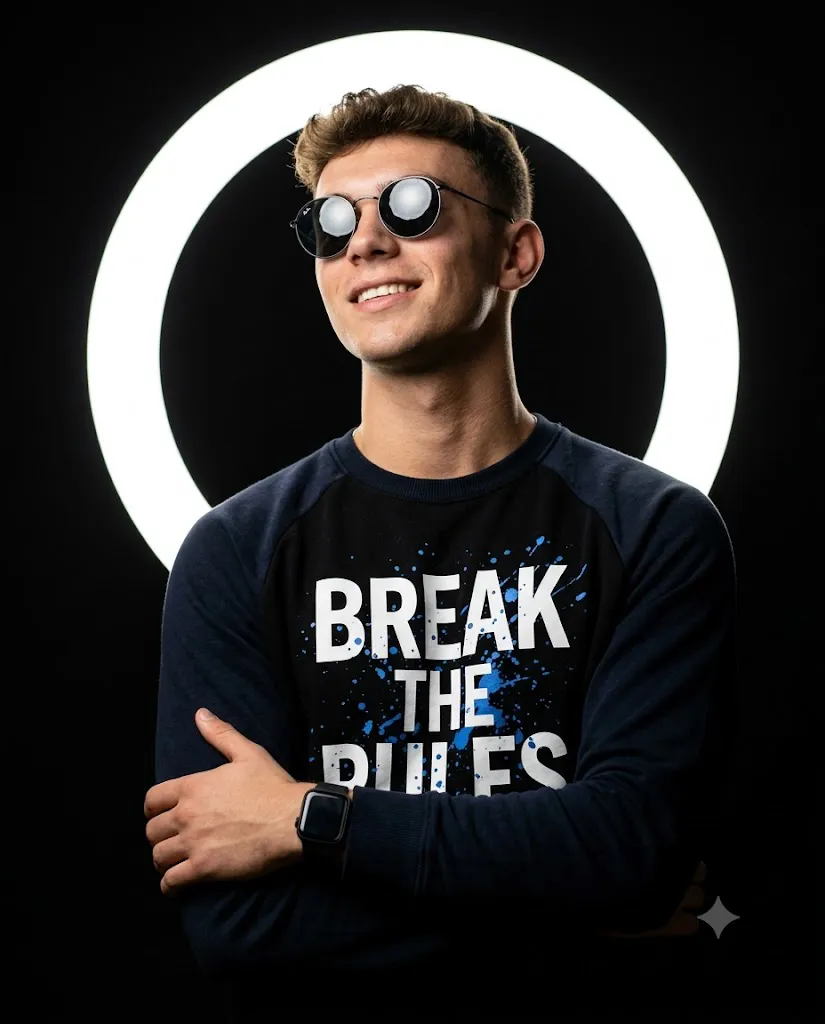
Studio portrait of a young man, wearing [round reflective sunglasses] and a [navy-and-black raglan graphic sweatshirt with bold 'BREAK THE RULES' streetwear print and blue paint-splatter design], plus a [black smartwatch]. Subject posed at a slight angle, arms crossed casually, head tilted upward with a confident smile, looking off-camera. Lighting & background: pitch-black studio backdrop with a large glowing white circular LED ring light positioned directly behind the subject's head like a halo, creating soft rim lighting on hair and shoulders. Clean, moody, high-contrast look. Camera & style: shot on [85mm lens, f/2.8], sharp focus on face, professional fashion/streetwear editorial style, vertical 4:5 crop, rich blacks, subtle warm skin tones, crisp fabric detail, Instagram-ready aesthetic.
How To Use Photo Editing?
Photo editing plays two roles in the Neon Halo Streetwear workflow: refining AI-generated images and enhancing real photographs to match the aesthetic.
Step 1: Correct the AI-Generated Image
AI tools sometimes produce slightly warped proportions, inconsistent lighting, or halo effects that look flat rather than luminous. Editing fixes these issues — smoothing skin tones, sharpening fabric textures on jackets and hoodies, and boosting the glow intensity around the halo so it reads as a genuine light source rather than a pasted-on circle.
Step 2: Darken the Background for Contrast
When starting from a real photograph, the first step is darkening the background. Neon glows need darkness to pop, so creating this contrast is the foundation for the entire look.
Step 3: Add the Halo and Apply Color Grading
Using gradient or radial glow tools, add a circular light element positioned behind or around the subject's head. Then apply color grading in pink, cyan, purple, or electric blue tones to mimic the look of neon signage.
Step 4: Finish with Contrast and Texture
Increase contrast and add a subtle grain or film texture to give the image an urban, slightly gritty feel. The final goal is to balance the softness of the glow with the sharpness of the streetwear details, so the clothing still feels tangible while the light still feels magical.
Tools You Can Use For Prompt Copy and Create Photo
There's a growing ecosystem of tools suited to building and executing a Neon Halo Streetwear concept, and it helps to think of them in three categories.
1. Prompt-writing and reference tools
Before generating anything, it helps to draft your prompt text somewhere flexible, like a notes app or a simple text editor, so you can reuse and tweak it. Many creators keep a personal "prompt library" of phrases like "neon halo lighting," "urban streetwear portrait," "cinematic rim light," and "cyberpunk fashion editorial" that they mix and match.
2. AI image generation platforms
This is where the prompt actually becomes an image. Popular options include Midjourney, known for its painterly and cinematic output; Stable Diffusion, which offers deep customization through models and settings; DALL·E, which is accessible and easy to prompt conversationally; and Adobe Firefly, which integrates directly with editing software. Each interprets "neon halo" lighting slightly differently, so testing the same prompt across a couple of platforms can help you find the style that fits your vision.
3. Editing and finishing tools
Once you have a base image, tools like Adobe Photoshop or Lightroom give you full manual control over color grading, glow effects, and retouching. For quicker edits, mobile apps such as Snapseed, Lightroom Mobile, or PicsArt offer built-in glow and neon filters that can fast-track the look. If you want AI-assisted editing without leaving a chat interface, tools that support image generation and editing together let you describe changes in plain language and get updated versions of your image almost instantly.
How To Edit Photo?
Once you have your base image, here's a practical editing sequence to bring the Neon Halo Streetwear look to life:
1. Set the mood with exposure and contrast
Darken shadows and slightly lower overall brightness so the neon elements stand out against a moody backdrop.
2. Isolate the subject
Use a selection or masking tool to separate the model from the background. This lets you edit lighting on the person and the environment independently.
3. Build the halo
Create a soft circular gradient — usually pink, cyan, or violet — positioned behind the subject's head or shoulders. Blur its edges so it looks like glowing light rather than a flat sticker.
4. Add rim lighting
Apply a thin glow along the edges of the subject's hair and clothing to simulate the neon light wrapping around them. This is what sells the "lit from behind" illusion.
5. Color grade the whole scene
Push shadows toward blue or purple and highlights toward pink or teal for a cohesive cyberpunk palette.
6. Enhance texture last
Sharpen fabric details on the streetwear pieces — stitching, zippers, fabric folds — so the clothing still feels grounded and real against the dreamy lighting.
7. Finish with grain and vignette
A light film grain and a subtle dark vignette around the frame edges add cinematic polish and draw the eye toward the glowing subject.
Conclusion
The Neon Halo Streetwear aesthetic is a great example of how AI prompting and traditional photo editing now work hand in hand. The prompt gets you the raw concept — a stylish figure wrapped in glowing, colorful light — while editing tools shape that concept into something polished and shareable. By understanding the role photo editing plays, knowing which tools suit each stage of the process, and following a clear editing sequence, you can consistently produce striking, professional-looking images in this style. Whether your goal is social media content, a fashion mood board, or personal creative experimentation, mastering this workflow gives you a repeatable formula for turning a simple idea into a visually unforgettable image.