Introduction
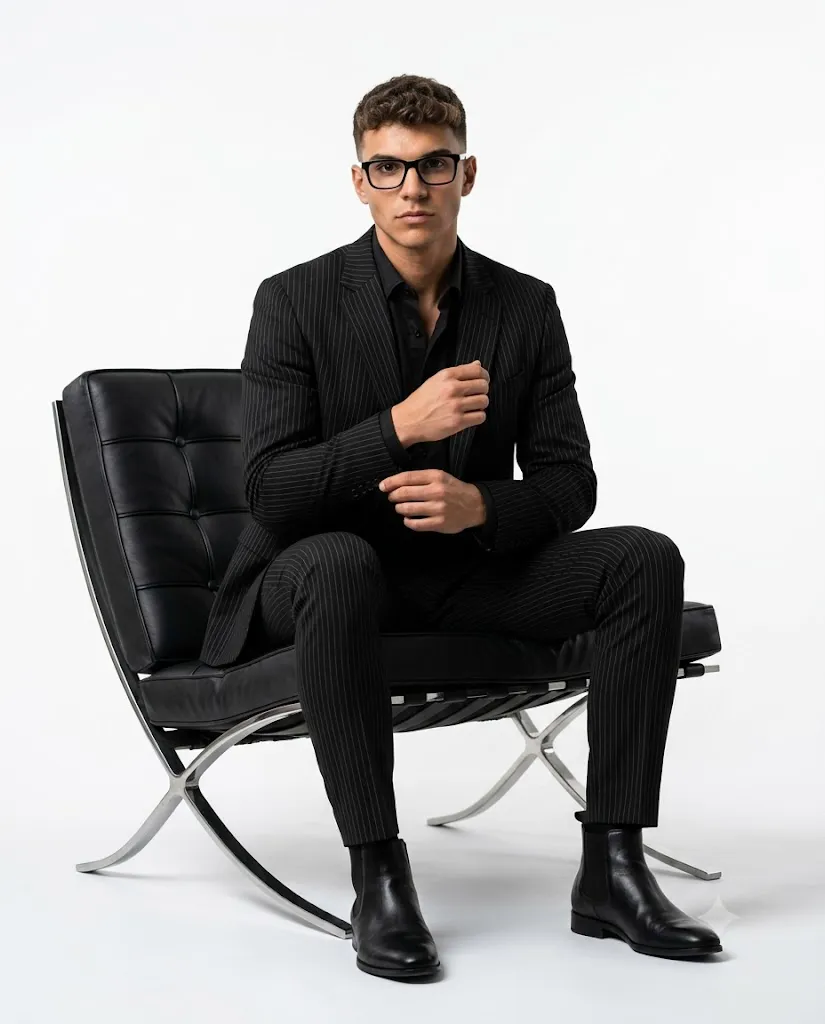
The Black Pinstripe Studio Portrait Prompt is a premium AI photography prompt designed to create elegant, magazine-quality fashion portraits with a clean and minimalist aesthetic. Inspired by luxury editorial campaigns and high-end fashion magazines, this prompt combines sophisticated styling, professional studio lighting, and ultra-realistic image quality to produce portraits that look like they were captured in an expensive commercial photography studio.
One of the defining characteristics of this prompt is its minimalist composition. A seamless white studio background eliminates distractions and allows the subject to become the center of attention. The tailored black pinstripe suit, black dress shirt, Chelsea boots, modern eyeglasses, and designer lounge chair work together to create a refined and confident appearance suitable for fashion editorials, business branding, and luxury lifestyle photography.
Modern AI image generation technology can accurately preserve the facial identity of the uploaded person while transforming the overall style into a professional editorial portrait. Facial structure, hairstyle, skin tone, and natural proportions remain realistic, while cinematic lighting, premium fabric textures, and shallow depth of field enhance the overall quality. The result is a polished portrait that closely resembles a cover image from a luxury fashion magazine. Whether you are creating a personal branding image, portfolio photograph, LinkedIn profile picture, or premium social media content, the Black Pinstripe Studio Portrait Prompt offers a timeless and sophisticated look that never goes out of style.
"Black Pinstripe Studio Portrait Prompt"
Use the uploaded reference image strictly as the ONLY face reference. Preserve exact facial structure, proportions, skin tone, hair texture, and identity — no alteration. Create an ultra-realistic studio fashion portrait of a person seated on a modern black leather lounge chair with a chrome frame in a minimalist white seamless studio. Composition & Framing: Full-body shot, vertical 4:5 aspect ratio. Subject centered with slight forward lean, occupying ~65–70% of frame height. Clean negative space around, no cropping of head or feet. Pose & Expression: Seated with legs apart in a relaxed power pose. One hand adjusting the cuff while the other rests naturally. Upper body slightly leaning forward. Expression confident, intense, and composed with direct eye contact. Outfit & Styling: Tailored black pinstripe suit with a fitted black dress shirt underneath (no tie). Slim trousers, clean silhouette. Black leather Chelsea boots. Modern black rectangular eyeglasses. Groomed short curly hair and light stubble. Environment & Background: Minimalist white seamless backdrop (infinity wall, no edges visible). Black leather designer chair as the only prop. Clean, editorial aesthetic with no distractions. Lighting: Soft diffused studio lighting from front-left with subtle shadow falloff on the right side. Gentle contrast, natural skin tones, no harsh highlights. Slight rim light to separate subject from background. Camera & Technical Details: Shot on 85mm lens, f/2.8, shallow depth of field. Ultra-sharp focus on face and upper body. High dynamic range, 8K resolution, crisp fabric texture and skin detail. Style: Luxury fashion editorial, minimal, modern, high-end magazine quality.
How To Use Photo Editing?
Creating a luxury studio portrait with AI is straightforward. Follow these steps to achieve the best possible results.
Step 1: Select a High-Quality Reference Photo
Choose a sharp, high-resolution image with your face clearly visible. A well-lit portrait allows the AI to preserve your facial identity more accurately.
Step 2: Copy the Prompt
Copy the complete Black Pinstripe Studio Portrait Prompt without removing any important details. A detailed prompt should include:
- White seamless studio background
- Black leather lounge chair
- Tailored black pinstripe suit
- Black dress shirt
- Chelsea boots
- Modern rectangular eyeglasses
- Editorial lighting
- Soft studio shadows
- 85mm lens simulation
- Ultra-realistic skin texture
- 4:5 vertical aspect ratio
Detailed prompts help AI generate realistic and professional images.
Step 3: Upload Your Reference Image
Upload your original portrait into an AI image generator that supports image references. This ensures your facial structure, hairstyle, and natural skin tone remain unchanged.
Step 4: Paste the Prompt
Paste the copied prompt into the AI editor and confirm that facial identity preservation is included. Instructions should clearly state that the uploaded image is the only facial reference.
Step 5: Generate the Portrait
Click the Generate button and review the result. If necessary, regenerate the image or make small prompt adjustments to improve the pose, lighting, or composition.
Step 6: Export the Final Image
Download the completed portrait in 4K or 8K resolution for social media, professional branding, websites, portfolios, or high-quality printing.
Tools You Can Use for Prompt Copy and Create Photo
Several AI tools can generate stunning editorial fashion portraits from detailed prompts. Here are some of the best options.
1. ChatGPT
ChatGPT is an excellent assistant for writing professional AI prompts. It helps describe poses, clothing, lighting, camera settings, and composition in detail, making your prompt more effective.
2. Midjourney
Midjourney is widely known for producing cinematic, artistic, and editorial-quality fashion images with premium realism and impressive lighting.
3. Flux AI
Flux AI specializes in preserving facial identity while generating ultra-realistic portraits. It is an excellent choice for luxury studio photography.
4. Leonardo AI
Leonardo AI offers advanced controls for realism, textures, lighting, and composition, making it ideal for fashion editorials.
5. Google Gemini
Gemini can help refine prompts, improve descriptions, and generate creative styling ideas before creating the final image.
6. Adobe Firefly
Adobe Firefly integrates AI image generation with professional editing tools, allowing you to enhance colors, contrast, lighting, and overall image quality.
7. Ideogram AI
Ideogram AI performs well when your portrait requires magazine headlines, elegant typography, or poster-style layouts.
8. Canva AI
Canva AI enables users to combine AI-generated portraits with social media templates, branding elements, frames, and professional graphic layouts.
How To Edit Photo?
To create a realistic Black Pinstripe Studio Portrait, follow these professional editing recommendations.
Step 1: Preserve Facial Identity
Always include instructions such as:
- Use the uploaded image as the only face reference.
- Keep facial structure unchanged.
- Preserve hairstyle.
- Maintain natural skin tone.
- Keep realistic proportions.
- Avoid distortion or cartoon effects.
These instructions ensure the portrait remains authentic.
Step 2: Style the Outfit
Dress the subject in premium formal clothing including:
- Tailored black pinstripe suit
- Black fitted dress shirt
- Black leather Chelsea boots
- Modern black rectangular eyeglasses
The monochrome wardrobe creates a timeless editorial appearance.
Step 3: Create the Studio Environment
Place the subject on a modern black leather lounge chair with a chrome frame inside a seamless white photography studio. The clean background creates a luxury magazine aesthetic without distractions.
Step 4: Apply Professional Lighting
Use soft diffused lighting from the front-left with subtle shadow falloff on the right side. Add a gentle rim light to separate the subject from the background while preserving natural skin tones.
Step 5: Improve Image Quality
Apply the following professional settings:
- HDR rendering
- 85mm portrait lens
- f/2.8 aperture
- Shallow depth of field
- Ultra-sharp facial focus
- Realistic skin pores
- Premium fabric textures
- High dynamic range
- Natural color grading
These settings produce a polished editorial finish suitable for magazine publication.
Step 6: Export
Save the completed portrait in 4K or 8K resolution to ensure exceptional quality across digital platforms and print media.
Conclusion
The Black Pinstripe Studio Portrait Prompt is an outstanding choice for anyone looking to create elegant, luxury fashion portraits using AI. By combining a tailored pinstripe suit, minimalist white studio, designer furniture, professional lighting, and ultra-realistic rendering, this prompt produces sophisticated editorial images that rival professional fashion photography.
One of the greatest advantages of AI-powered photo editing is its ability to create studio-quality portraits without requiring expensive equipment or years of editing experience. By uploading a high-quality reference image and using a detailed prompt, you can preserve your facial identity while transforming your portrait into a premium magazine-style photograph.
Whether you are creating personal branding photos, business profiles, fashion portfolios, LinkedIn headshots, or stylish social media content, this prompt delivers consistently impressive results. AI tools such as ChatGPT, Midjourney, Flux AI, Leonardo AI, Adobe Firefly, Ideogram AI, and Canva AI provide the flexibility to customize every detail, from wardrobe and lighting to composition and textures. As AI technology continues to evolve, luxury studio portrait prompts like this will remain a favorite among photographers, designers, influencers, and content creators who want to produce modern, professional, and visually striking portraits with minimal effort.