Introduction
There is something magical about watercolor art. The soft edges, the gentle bleeding of colors, and the dreamy, romantic feel make it perfect for love-themed portraits. In recent years, "Watercolor Love Prompts" have become extremely popular among photo editors and AI art enthusiasts who want to transform ordinary couple photos or portraits into soft, painterly masterpieces. Whether it's for a wedding album, an anniversary gift, or simply a creative social media post, a watercolor love prompt helps turn a simple photograph into an emotional piece of art. This article explains what a watercolor love prompt is, how to use photo editing tools to create this effect, which tools work best, and a step-by-step guide to editing your own photo.
“Watercolor Love Prompt”
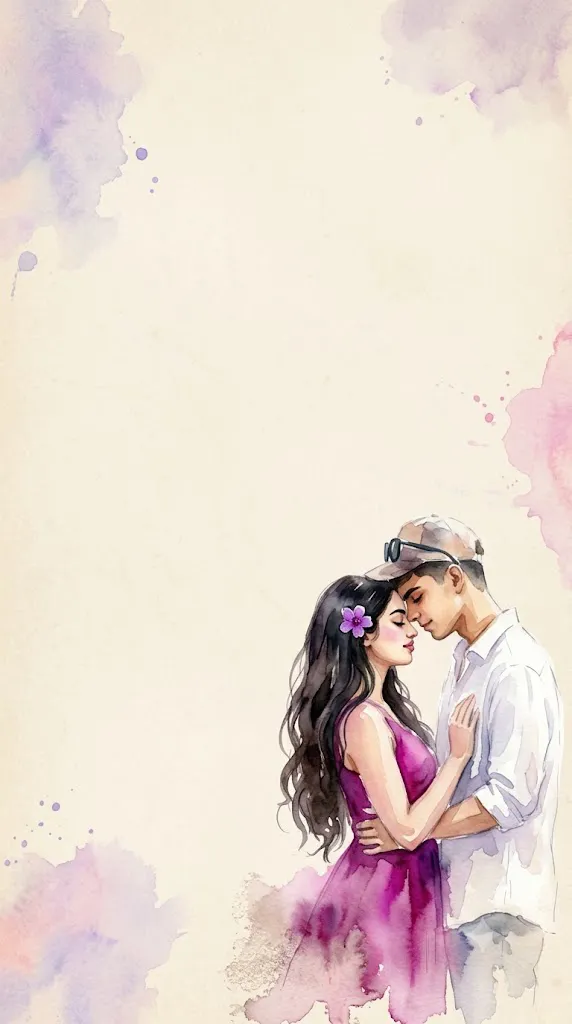
A romantic impressionist watercolor painting of a young couple standing close together in an intimate pose. The girl has long dark flowing hair with a small purple flower tucked near her ear, wearing a bright magenta dress that softly blends into the watercolor texture. The boy is dressed in a simple white shirt. The painting style is loose, blurry, and emotional, with soft brush strokes, smudged edges, and a dreamy unfinished look. The watercolor effect should feel expressive and fluid, with gentle color bleeding and natural paper texture visible. Background is minimal - plain textured beige paper like vintage parchment, with large empty negative space above the couple. The couple is positioned at the bottom-right corner of the frame, leaving wide space for text. Soft pastel watercolor splashes in purple and pink appear subtly around the edges.
How To Use Photo Editing?
The Watercolor Love trend is different from conventional photo editing because the goal is not simply to change brightness, contrast, or saturation. Instead, AI is used to transform a visual concept into an artistic watercolor painting.
The AI interprets descriptive words such as “loose brush strokes,” “soft color bleeding,” “vintage parchment,” and “impressionist watercolor” to create the desired artistic appearance.
Here’s the typical workflow:
1. Choose a reference image or concept
You can start with a couple photograph if your AI tool supports reference images, or simply describe the couple and scene directly in the prompt.
2. Copy the detailed prompt
Paste the Watercolor Love Prompt into your selected AI image-generation tool. Make sure the artistic style and composition are clearly described.
3. Generate the artwork
The AI converts the described scene into a watercolor-inspired illustration.
4. Review different versions
Generate multiple variations and compare the painting texture, couple positioning, color balance, background, and overall emotional feeling.
5. Refine the artwork
You can ask the AI to make the brush strokes softer, increase paper texture, reduce color saturation, or create more negative space.
The more specific the prompt, the more control you have over the final artwork.
Tools You Can Use For Prompt Copy and Create Photo
1. Midjourney
Midjourney can be useful for creating artistic compositions, impressionist paintings, watercolor textures, and dreamy romantic scenes. It provides plenty of creative possibilities for experimenting with colors and artistic styles.
2. Leonardo AI
Leonardo AI can help generate and edit creative artwork using detailed text instructions. It can be useful for experimenting with different watercolor techniques, compositions, and color palettes.
3. Google Gemini
Gemini-based image tools can provide a simple natural-language workflow for generating creative images, depending on the features available to the user.
4. Canva AI
Canva is useful when you want to combine AI-generated artwork with graphic design. After creating the watercolor image, you can add romantic quotes, names, wedding details, invitations, or other typography.
5. ChatGPT With Image Generation
ChatGPT can help create, customize, and refine detailed watercolor prompts. Where image-generation features are available, you can also generate artwork and request changes through natural-language instructions.
How To Edit Photo?
Creating a Watercolor Love artwork is easy when you follow a few basic steps.
Step 1: Choose your reference
Select a clear couple photograph if you want the AI to use specific people as references. A good-quality image can help produce a more recognizable result.
Step 2: Copy the Watercolor Love Prompt
Paste the detailed prompt into your selected AI tool. You can customize the clothing, flower color, background, and artistic style.
Step 3: Choose the watercolor style
Words such as “impressionist watercolor,” “loose brush strokes,” “fluid pigments,” “soft color bleeding,” and “unfinished artistic edges” can help establish the desired appearance.
Step 4: Create negative space
Negative space is an important part of this design. Keep the couple toward the bottom-right and leave sufficient empty space above them for future text.
Step 5: Add pastel colors
Use soft pink, purple, lavender, beige, and magenta tones to create a romantic color palette. Avoid excessive saturation if you want a traditional watercolor appearance.
Step 6: Generate multiple variations
Create several versions and select the one with the most natural composition and attractive watercolor texture.
Step 7: Refine the details
If the artwork looks too digital, request “more natural paper texture and translucent watercolor pigments.” If the couple is too large, ask for “a smaller couple positioned in the bottom-right corner with increased negative space.”
Step 8: Add final text
Once the artwork is complete, you can use Canva or another design tool to add a romantic quote, names, wedding date, greeting, or invitation details in the empty space.
Conclusion
A watercolor love prompt is a beautiful way to transform everyday photos into timeless, romantic artwork. With the right combination of a well-written prompt and powerful editing tools like Canva, Photoshop, or Midjourney, anyone can create stunning watercolor-style portraits without needing traditional painting skills. Whether you're preparing a gift, a wedding keepsake, or simply exploring your creative side, this trend offers an easy and joyful way to turn memories into art.