Introduction
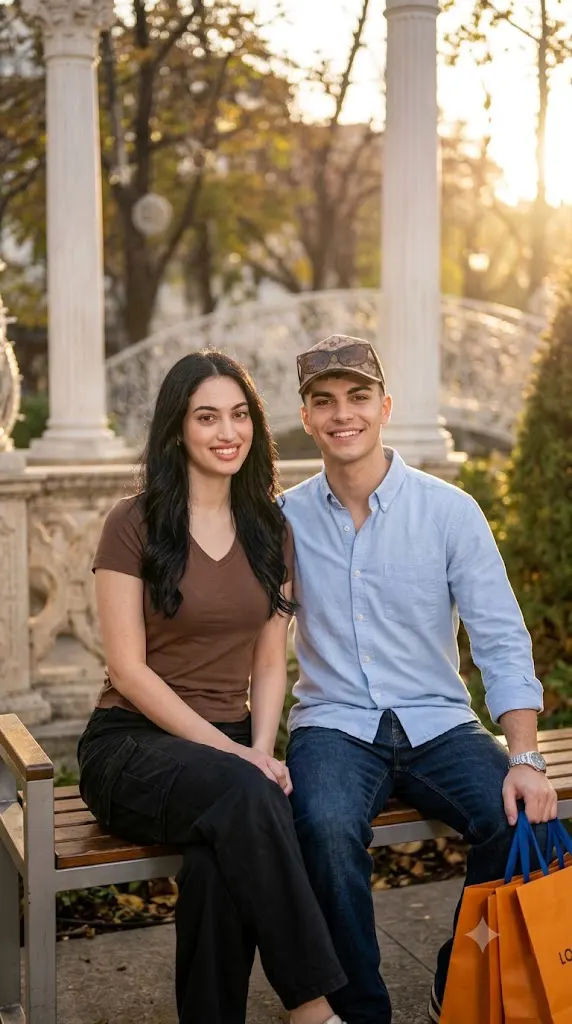
In the world of AI image generation, few trends have captured hearts quite like the "cinematic couple" aesthetic. These images look like frames pulled straight from a romantic movie — dramatic lighting, moody color grading, soft bokeh backgrounds, and couples posed with an effortless, film-like elegance. Whether you're a content creator, a couple wanting a unique digital portrait, or someone experimenting with AI art tools like Midjourney, Leonardo AI, or Stable Diffusion, cinematic couple prompts have become one of the most searched and shared photo styles online. This article walks you through what these prompts are, how to use them effectively, the best tools available, and how to edit your final image to perfection.
“Cinematic Couple Prompt”
Recreate the uploaded reference as a highly realistic cinematic smartphone photo. Preserve the exact composition, framing, camera angle, pose, subject positions, clothing, environment, lighting, colors and atmosphere. Use the separate male face reference as a strict identity lock, preserving his exact facial features, proportions, skin texture and natural appearance. Male foreground left, seated close to camera, wearing a powder-blue rolled-sleeve shirt, dark jeans and silver watch, with the reference hair and hairstyle. He looks toward the girl, with only half his face visible. Female behind on the right, long straight dark-brown center-parted hair, mustard patterned top and dark trousers, arms resting on raised knees, with half her face visible beneath her arm. Warm sunlight, ornate architecture, white column, soft lens flare, hazy cinematic depth, natural skin texture, realistic fabric. No CGI, text or watermark.
How To Use Photo Editing?
Unlike traditional photo-editing applications that mainly adjust brightness, contrast, and color, the Cinematic Couple trend uses AI image-generation and editing technology to create or transform an entire visual scene. The AI analyzes your reference photo and follows the instructions provided in the prompt.
Here’s the typical workflow:
1. Upload a clear reference photo
Choose a high-quality photograph where the faces and important details of both people are visible. Clear reference images generally provide better information for maintaining facial identity.
2. Add a detailed couple prompt
Describe the pose, clothing, background, lighting, accessories, camera angle, and overall mood you want.
3. Generate the image
The AI combines the reference images with your instructions and creates a cinematic couple portrait.
4. Review multiple results
Generate several versions and compare facial likeness, body positioning, clothing, lighting, background, and overall realism.
5. Refine the result
Use follow-up instructions to make specific changes. For example, you can request softer sunlight, more natural flowers, stronger background bokeh, or more realistic film grain.
The more specific the prompt is, the easier it becomes to control the final appearance. Instead of simply writing “make a romantic couple photo,” describe the exact environment and visual characteristics you want.
Tools You Can Use For Prompt Copy and Create Photo
Several AI platforms can help you create cinematic couple portraits.
1. Midjourney
Midjourney is widely used for cinematic compositions, atmospheric backgrounds, creative lighting, and editorial photography. It can be useful when you want a highly stylized movie-like environment.
2. Leonardo AI
Leonardo AI provides image-generation and editing features that can help users experiment with different couple poses, backgrounds, clothing, lighting, and photography styles.
3. Google Gemini
Gemini-based image tools can provide a convenient natural-language workflow for image creation and editing, depending on the features available to the user.
4. Canva AI
Canva can be useful for combining AI image generation with traditional editing. After generating the portrait, you can adjust cropping, brightness, contrast, filters, and other elements.
5. ChatGPT With Image Generation
ChatGPT can help create detailed couple-photo prompts and refine them based on your desired composition. Where image-generation features are available, users can also work with reference images and make adjustments through follow-up instructions.
Many creators start with a ready-made Cinematic Couple Prompt and customize elements such as outfits, flowers, location, lighting, camera style, and color grading.
How To Edit Photo?
Creating a cinematic couple portrait becomes easy when you follow a structured editing process.
Step 1: Choose strong reference images
Select clear photographs of both subjects. Make sure facial features, hairstyles, and important details are visible.
Step 2: Copy the Cinematic Couple Prompt
Paste the detailed prompt into your selected AI image-generation or editing tool. Customize the scene according to your preferred style.
Step 3: Describe the couple’s pose
Clearly explain where each person should be positioned. You can specify whether they are sitting together, walking, looking at each other, holding hands, or simply sharing a natural candid moment.
Step 4: Add cinematic lighting
Use phrases such as “warm sunset light,” “soft diffused illumination,” “subtle lens flare,” “golden-hour glow,” and “natural atmospheric haze” to create the desired visual mood.
Step 5: Create background depth
A shallow depth of field can separate the couple from the surroundings. Mention “soft bokeh,” “dreamy background blur,” and “cinematic depth” for a more professional photography appearance.
Step 6: Generate multiple variations
Don’t stop at the first result. Generate several versions and compare facial identity, pose accuracy, clothing details, lighting, flowers, and background.
Step 7: Make targeted refinements
If something looks unnatural, request a specific adjustment. For example, ask the AI to “make the flowers more realistic,” “preserve both facial identities,” “soften the sunset highlights,” or “keep the original pose and framing.”
Step 8: Apply final editing
After selecting the best result, make subtle adjustments using an editing application. Fine-tune exposure, contrast, highlights, shadows, sharpness, cropping, and film grain. Avoid excessive filters so that the photograph maintains its natural cinematic quality.
Conclusion
Cinematic couple prompts blend the art of storytelling with the power of AI, allowing anyone to create emotionally rich, movie-quality portraits without a professional camera crew. By understanding how to craft detailed prompts, choosing the right generation tools, and applying thoughtful post-processing edits, you can consistently produce images that feel timeless and cinematic. As AI tools continue to evolve, this creative process will only become more accessible — turning everyday photo requests into stunning visual stories.