Introduction
European street fashion is known for timeless elegance, effortless styling, and cinematic photography — cobblestone streets, historic architecture, vintage cafés, and muted tones. The "European Fashion Collage Prompt" brings this aesthetic into AI photo editing, blending multiple photographs, vintage fashion, analog film textures, and editorial composition into one sophisticated image.
Inspired by 1990s and early-2000s fashion magazines, where photographers relied on film cameras, natural light, and creative layouts, this trend lets AI show the same person across several photographs while keeping facial identity, hairstyle, clothing, and overall appearance consistent.
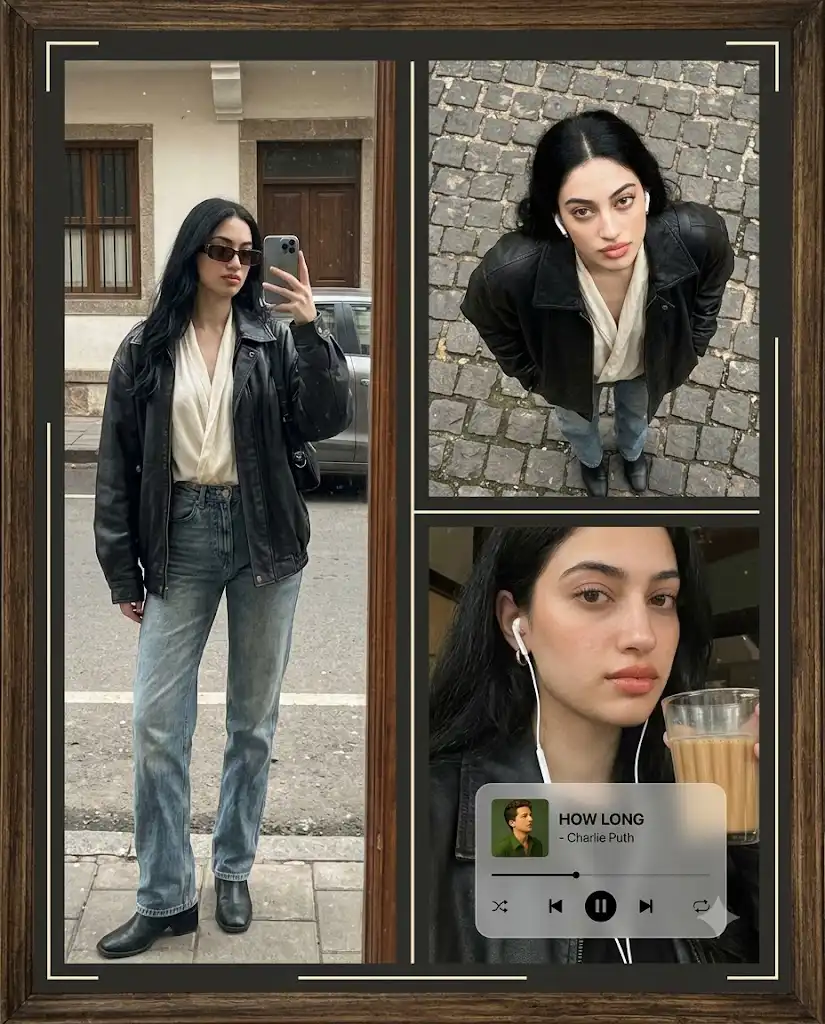
A typical collage features three perspectives of the same person: a full-body street selfie, an overhead shot on European cobblestones, and an intimate close-up with coffee or chai. Framed with minimalist borders and analog textures, it mimics a professional fashion magazine spread.
Styling relies on oversized leather jackets, ivory blouses, relaxed faded jeans, black ankle boots, and rectangular sunglasses. Muted browns, charcoals, creams, olives, and faded blues create a nostalgic, analog feel — all achievable through AI without a trip to Europe, expensive clothing, or a studio.
“European Fashion Collage Prompt”
Ultra-realistic cinematic editorial fashion collage, vertical 4:5, featuring the same young woman from the reference image across three consistent photographs, preserving her facial identity, features, hairstyle, skin tone, and proportions. Create a sophisticated vintage European street-style aesthetic inside a dark aged frame, inspired by 1990s/early-2000s analog fashion photography, with muted brown, charcoal, cream and olive tones, 35mm grain, faded blacks, dust, scratches, soft contrast and nostalgic editorial texture. Show her in a black oversized leather jacket, loose ivory blouse, high-waisted relaxed faded-blue jeans, black ankle boots and black rectangular sunglasses. Left panel: full-body mirror/window street selfie. Upper-right: dramatic overhead view on European cobblestones, looking upward. Lower-right: cinematic close-up with white wired earphones, holding a transparent glass of chai. Add narrow charcoal borders, cream inner lines and minimalist corner brackets. Overlay a translucent retro frosted-glass music player reading "How Long - Charlie Puth", with album art, progress bar and controls. Soft overcast European daylight, realistic anatomy, hands, clothing textures, reflections and shallow depth of field.
How To Use Photo Editing?
Unlike traditional photo-editing applications that mainly enhance an existing image, the European Fashion Collage trend uses AI image generation to create multiple connected photographs within one composition. The AI follows your instructions to maintain the same person, outfit, visual style, and color palette across the entire collage.
Here’s the typical workflow:
1. Upload a clear reference photo
Choose a high-quality image where the face, hairstyle, and important features are clearly visible. A clean reference helps the AI maintain consistency.
2. Copy or create a detailed prompt
Describe the fashion style, three-panel layout, backgrounds, poses, lighting, borders, and analog photography effects.
3. Generate the collage
The AI creates multiple scenes featuring the same subject and combines them into a single editorial composition.
4. Check consistency
Make sure the face, hairstyle, clothing, and body proportions remain consistent across all panels.
5. Refine the result
If one panel looks different, use a follow-up instruction asking the AI to preserve the same identity, outfit, and styling.
Detailed prompts are especially important for collage images. Instead of simply saying “create a European fashion collage,” specify the individual panels, camera perspectives, outfit, color palette, film texture, and graphic layout.
Tools You Can Use For Prompt Copy and Create Photo
Several AI platforms can help you create European-style fashion collages.
1. Midjourney
Midjourney can be useful for creating cinematic fashion scenes, European environments, vintage textures, and editorial compositions. It is particularly suitable for experimenting with different visual styles.
2. Leonardo AI
Leonardo AI provides image-generation and editing capabilities that can help create fashion portraits, street environments, clothing details, and cinematic backgrounds.
3. Google Gemini
Gemini-based image tools can offer a straightforward natural-language workflow for image creation and editing, depending on the features available to the user.
4. Canva AI
Canva is especially useful for creating the final collage layout. After generating the individual visual, you can arrange panels, add borders, create frames, and adjust the overall composition.
5. ChatGPT With Image Generation
ChatGPT can help write, customize, and refine detailed fashion prompts. Where image-generation features are available, you can also use reference images and follow-up instructions to refine the visual.
Many creators start with a ready-made European Fashion Collage Prompt and customize details such as the outfit, European location, color palette, accessories, photography style, and collage layout.
How To Edit Photo?
Creating your own European Fashion Collage is simple when you follow a structured process.
Step 1: Choose a strong reference image
Select a clear photograph with visible facial features. Avoid excessive filters or very low-resolution images.
Step 2: Copy the collage prompt
Paste the detailed prompt into your selected AI image-generation tool. Customize the clothing, environment, and panel descriptions if required.
Step 3: Maintain identity consistency
Clearly instruct the AI to preserve the same facial identity, hairstyle, skin tone, outfit, and proportions across every panel.
Step 4: Define each photograph
Explain exactly what should appear in the left, upper-right, and lower-right sections. Specific camera angles and poses make the collage more controlled.
Step 5: Add vintage photography effects
Use phrases such as “35mm film grain,” “faded blacks,” “analog dust,” “subtle scratches,” “soft contrast,” and “nostalgic editorial texture.”
Step 6: Add the graphic layout
Specify charcoal borders, cream inner lines, corner brackets, and the frosted-glass music player. These details give the image its magazine-editorial appearance.
Step 7: Generate multiple versions
Create several variations and compare facial consistency, panel composition, clothing details, background quality, and film texture.
Step 8: Apply final adjustments
Once you select the best result, use an editing application to adjust cropping, contrast, exposure, sharpness, and grain. Keep the effects subtle so the image retains a realistic analog appearance.
Conclusion
The European Fashion Collage Prompt merges modern AI image generation with the timeless language of European street fashion and analog editorial photography. Combining oversized leather jackets, relaxed denim, cobblestone streets, muted tones, film grain, and vintage borders creates a sophisticated, nostalgic look — enhanced further by the retro music-player overlay.
Success depends on a strong reference photo and a detailed, specific prompt covering each panel, the outfit, environment, and desired film texture. Whether for Instagram, Pinterest, a profile picture, or creative artwork, this prompt offers a simple way to turn an ordinary photo into a cinematic European fashion story.