Introduction
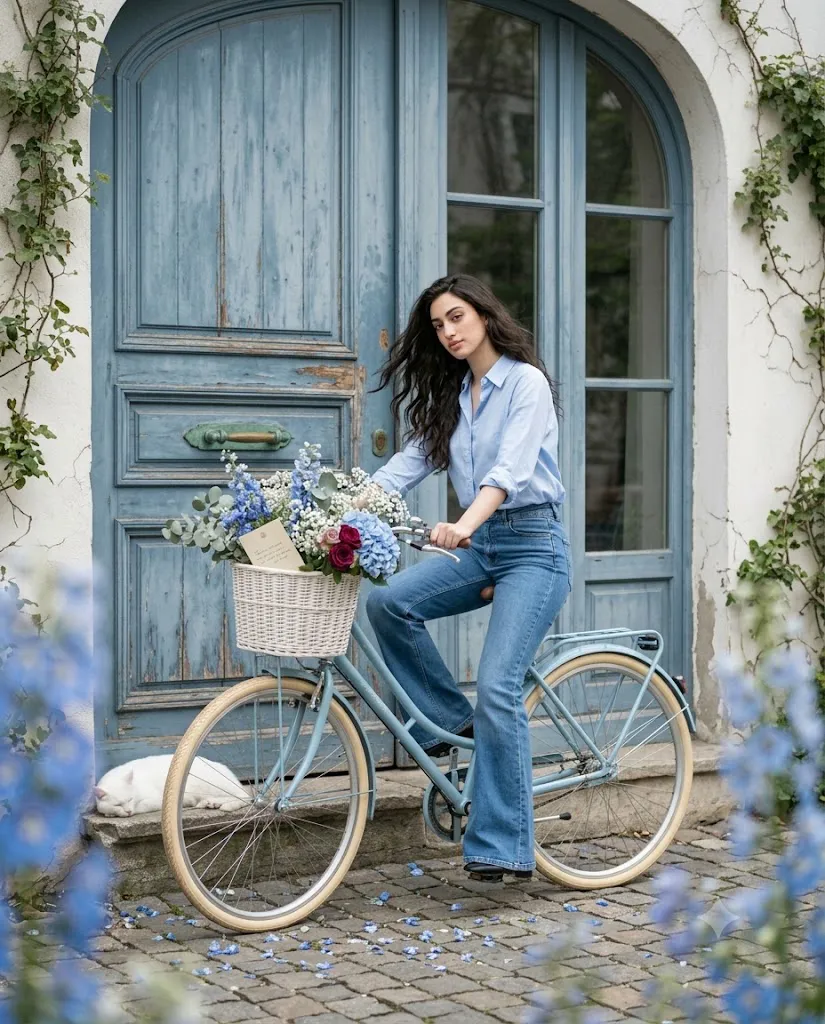
The Blue Bicycle Cinematic Prompt is designed to create elegant, ultra-realistic editorial portraits with a dreamy Pinterest aesthetic. It combines a vintage blue bicycle, an aged blue wooden door, soft overcast lighting, fresh flowers, cobblestone streets, and a peaceful atmosphere to produce timeless photographs. This prompt is ideal for content creators, bloggers, photographers, influencers, and AI art enthusiasts who want magazine-quality images without an actual photoshoot. With the right AI image generator and a few editing techniques, you can create stunning cinematic portraits in just a few minutes.
"Blue Bicycle Cinematic Prompt"
Ultra-realistic cinematic editorial photo, soft Pinterest aesthetic, shallow depth of field, subtle film grain. A young woman sits gracefully on a vintage pastel-blue Dutch bicycle before a weathered blue wooden arched door with brass handles (green patina) and a matching arched glass window, set in an aged white plaster wall with ivy vines. She wears a light blue button-up shirt (sleeves rolled) and high-waisted flared jeans, one foot on cobblestone, gaze softly downward, hair in a gentle breeze. The bike has cream tires and a white wicker basket overflowing with blue hydrangeas, delphiniums, baby's breath, eucalyptus, and dark red roses, with a small handwritten letter tucked in. A white cat sleeps on the stone step nearby; blue petals scatter across the cobblestones; dreamy blue floral bokeh frames the foreground. Soft overcast light, gentle shadows, smooth natural skin tones. Palette: dusty blue, ivory, sage green, brass, cream, stone gray, burgundy accents. Mood: quiet, nostalgic, romantic, timeless. Shot on full-frame mirrorless, 85mm lens, f/1.8, ultra-photorealistic, detailed skin texture, natural fabric folds, 8K UHD, editorial magazine quality, no yellow color cast. Aspect ratio 4:5. Negative prompt: cartoon, CGI, illustration, anime, low resolution, oversaturated colors, yellow tint, plastic skin, unrealistic anatomy, extra limbs, duplicate objects, blurry face, watermark, text, oversharpening, excessive HDR.
How To Use Photo Editing?
Step 1: Generate Your AI Image
Copy the complete Blue Bicycle Cinematic Prompt and paste it into your preferred AI image generator.
Step 2: Download the Best Result
Choose the most realistic image and download it in the highest available resolution.
Step 3: Open Your Editing Software
Import the image into Lightroom, Photoshop, Canva, Snapseed, or any professional editing application.
Step 4: Adjust Brightness
Increase brightness slightly to create a clean and natural editorial appearance.
Step 5: Improve Contrast
Add a small amount of contrast to give depth while maintaining soft lighting.
Step 6: Enhance Colors
Boost the dusty blue tones, flowers, greenery, and skin tones without making the image oversaturated.
Step 7: Apply Soft Color Grading
Use cool blue and neutral tones to achieve a cinematic Pinterest-inspired look.
Step 8: Save the Final Image
Export the edited photo in high resolution for Instagram, Pinterest, blogs, or your portfolio.
Tools You Can Use For Prompt Copy and Create Photo
Step 1: Copy the Prompt
Copy the entire Blue Bicycle Cinematic Prompt.
Step 2: Choose an AI Generator
Popular tools include:
- ChatGPT Image Generator
- Midjourney
- Flux AI
- Google Imagen
- Leonardo AI
- Stable Diffusion
- Adobe Firefly
- Canva AI
Step 3: Paste the Prompt
Open your chosen AI tool and paste the prompt into the prompt box.
Step 4: Upload a Reference Photo (Optional)
If you want to preserve your facial identity, upload your reference image before generating.
Step 5: Select the Best Settings
Choose:
- Ultra Realistic
- Cinematic Style
- Editorial Photography
- 8K Resolution
- 4:5 Aspect Ratio
- High Detail
- Shallow Depth of Field
Step 6: Generate the Image
Click the Generate button and allow the AI to create your portrait.
Step 7: Download the Image
Save the highest-quality version for editing.
How To Edit Photo?
Step 1: Import the Photo
Open your editing software and load the AI-generated image.
Step 2: Crop the Composition
Keep the vintage blue bicycle, large blue door, flowers, and cobblestone path properly framed.
Step 3: Correct White Balance
Maintain neutral colors and avoid yellow color casts.
Step 4: Adjust Exposure
Increase exposure slightly for a bright and elegant editorial appearance.
Step 5: Refine Skin Tones
Apply light skin retouching while preserving realistic texture.
Step 6: Enhance Clothing Details
Increase clarity slightly on the blue shirt and denim jeans to reveal realistic fabric folds.
Step 7: Improve Flower Colors
Enhance the blue hydrangeas, white flowers, eucalyptus, and burgundy roses to make the basket stand out naturally.
Step 8: Add Soft Background Blur
Use a gentle depth-of-field effect to emphasize the subject while maintaining the dreamy atmosphere.
Step 9: Sharpen Important Areas
Sharpen only the eyes, hair, bicycle details, and flower basket for a professional finish.
Step 10: Export the Final Photo
Save the image as a high-quality JPEG or PNG in 4:5 ratio, ready for Instagram, Pinterest, websites, or print.
Conclusion
The Blue Bicycle Cinematic Prompt is perfect for creating timeless editorial portraits with a vintage European aesthetic. Its combination of a pastel-blue bicycle, rustic architecture, fresh flowers, soft natural lighting, and cinematic composition results in elegant, high-end images suitable for social media, blogs, magazines, and creative portfolios. By following the steps above, you can easily generate, edit, and enhance AI portraits that look professionally photographed. With the right prompt, editing tools, and creative vision, you can produce stunning cinematic images that capture a quiet, nostalgic, and romantic atmosphere.