Introduction
The Blue Hour Scandinavian Prompt is designed to create a premium cinematic lifestyle portrait that combines modern fashion, Scandinavian minimalism, luxury editorial photography, and contemporary social-media aesthetics. The concept focuses on simplicity, clean composition, elegant styling, soft atmospheric lighting, and carefully controlled negative space.
Blue hour is one of the most visually attractive periods for cinematic photography. It occurs around the transition between daylight and night, when the sky develops deep blue and cool tones while the remaining ambient light gently illuminates the environment. This creates a sophisticated atmosphere without requiring extremely dramatic lighting.
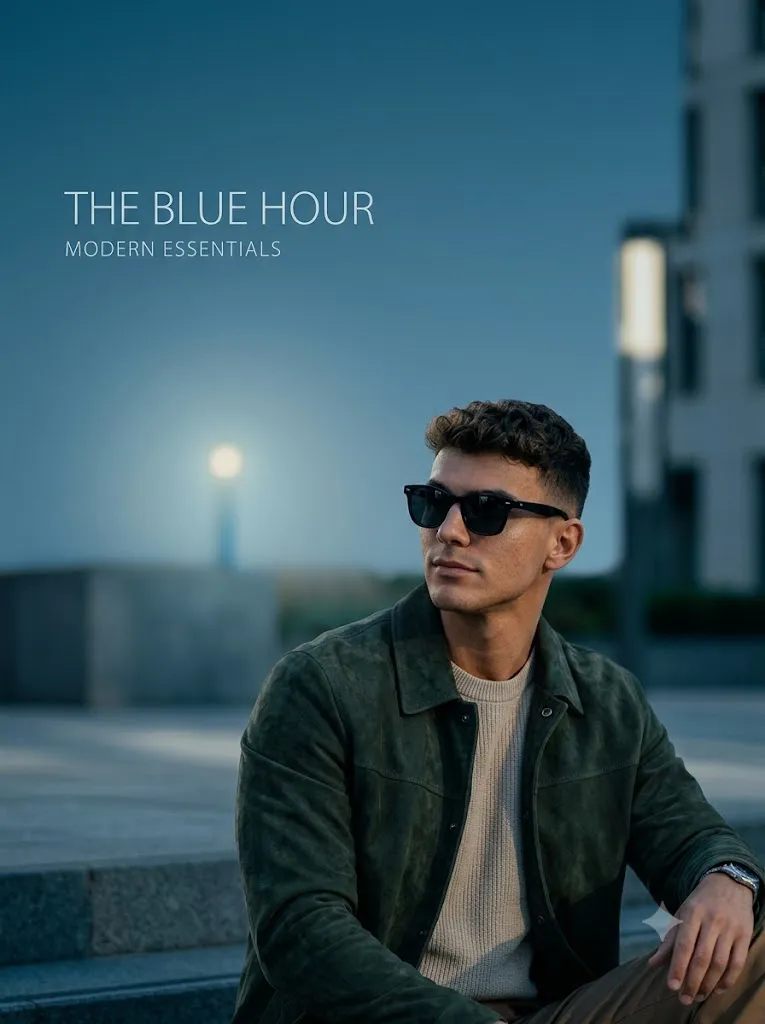
The prompt places a stylish young Indian man outdoors and frames him from the chest upward. Instead of placing the subject directly in the center, the composition positions him toward the lower-right area of the frame. This creates significant negative space around him, giving the image a premium editorial appearance.
The slightly low camera angle adds confidence and presence, while the clean surroundings prevent the photograph from becoming visually crowded. The overall aesthetic can work especially well for fashion campaigns, Instagram portraits, Pinterest-inspired photography, profile pictures, digital magazines, and lifestyle branding.
The combination of Indian identity and Scandinavian-inspired minimalism creates a distinctive visual style. Rather than relying on excessive decoration, the prompt focuses on refined clothing, natural posture, subtle expressions, atmospheric color, and high-quality cinematic composition.
"Blue Hour Scandinavian Prompt"
A premium cinematic lifestyle editorial portrait of a stylish young indian man captured outdoors during blue hour, inspired by luxury fashion campaigns, Pinterest aesthetics, Scandinavian minimalism, and modern Instagram editorials. The composition is clean, airy, and dominated by negative space. The subject is positioned in the lower-right portion of the frame from the chest upward, photographed from a slightly low angle.
How To Use Photo Editing?
Using the Blue Hour Scandinavian Prompt is straightforward when the editing process is completed in stages.
Step 1: Select Your Reference Image
Begin with a high-resolution photograph of the person you want to transform. Choose an image where the face is clearly visible and the facial features are not hidden by heavy shadows, sunglasses, or other objects. A sharp reference image gives the AI more useful information about facial structure, hairstyle, skin tone, and overall appearance.
Step 2: Upload the Reference Photo
Use an AI photo editor or image-generation platform that supports reference-image editing. Upload the selected photograph and use it as the main identity reference.
If maintaining the subject's appearance is important, add a clear instruction such as:
“Preserve the subject's natural facial identity and recognizable facial characteristics. Keep the facial structure, skin tone, hairstyle, eyes, nose, and lips consistent with the reference image.”
This helps reduce unnecessary changes to the person's appearance.
Step 3: Add the Blue Hour Prompt
Paste the complete Blue Hour Scandinavian Prompt into the prompt field. Describe the outdoor environment, fashion styling, camera angle, framing, lighting, negative space, color palette, and overall editorial atmosphere. Avoid making the prompt unnecessarily complicated. The goal is to give the AI enough information to understand the composition while maintaining a clean visual direction.
Step 4: Generate Several Variations
Create multiple versions of the image rather than relying on a single generation. Compare the results and select the version with the best facial consistency, natural clothing, realistic lighting, attractive composition, and balanced negative space.
Tools You Can Use For Prompt Copy and Create Photo
Different types of creative tools can be used to create this style of portrait.
1. AI Image Generators
AI image-generation platforms can create a complete cinematic fashion scene from a text description. They are useful when you want the AI to build the background, lighting, clothing, pose, and atmosphere automatically. For a reference-based portrait, choose a platform that supports image references or identity-consistency features.
2. AI Photo Editors
AI photo editors are useful when you already have an existing portrait and want to transform it into the Blue Hour Scandinavian aesthetic. These tools can help modify the background, clothing, lighting, atmosphere, and composition while using your original photograph as a reference.
3. Graphic Design Tools
Graphic-design software can be used after AI generation to make final adjustments. You can crop the image, position the subject precisely, adjust the amount of negative space, and prepare different versions for social media.
4. Image Enhancement Tools
Image-enhancement tools can improve resolution and clarity after the image has been generated. They can be useful for refining facial details, clothing textures, hair strands, and background elements. However, enhancement should be subtle so the portrait does not develop an overly artificial appearance.
How To Edit Photo?
Once the first AI-generated image is ready, carefully refine each visual component.
Step 1: Check Facial Accuracy
Start by examining the face. Make sure the subject remains recognizable and natural. Check the eyes, eyebrows, nose, lips, jawline, skin texture, and hairstyle. If the facial appearance changes too much, regenerate the image using a stronger reference-image instruction.
Step 2: Refine the Fashion Styling
The clothing should support the Scandinavian luxury aesthetic. Choose clean silhouettes, neutral or muted colors, premium-looking fabrics, and minimal accessories. Avoid overly complicated patterns because Scandinavian-inspired fashion generally benefits from simplicity. The clothing should also look physically realistic, with natural folds and shadows.
Step 3: Create the Blue Hour Atmosphere
The background should contain cool blue-hour tones while retaining enough ambient light to reveal the subject. The sky can have subtle blue gradients, while surrounding surfaces may reflect soft cool light. Avoid making the entire image extremely dark. A small amount of warm ambient light in the environment can create a pleasing contrast against the cooler blue atmosphere.
Step 4: Maintain Negative Space
Negative space is one of the defining features of this concept. Keep the subject in the lower-right portion of the frame and leave sufficient open space around him. This gives the photograph a sophisticated editorial quality. The empty space should still have visual interest through subtle architectural details, sky gradients, distant lights, or softly blurred environmental elements.
Step 5: Adjust the Camera Perspective
A slightly low camera angle can make the subject appear confident and sophisticated. The framing should remain from approximately the chest upward. Avoid extreme wide-angle distortion because it can make facial proportions and body shapes look unnatural. A portrait-oriented composition can work particularly well for social media.
Step 6: Improve Depth of Field
Use a subtle background blur to separate the subject from the environment. The face and clothing should remain sharp, while distant background elements can become softly blurred. This creates the polished appearance associated with professional editorial photography.
Step 7: Apply Final Color Grading
Finally, adjust contrast, exposure, highlights, shadows, and color balance. Maintain cool blue tones while preserving realistic skin color. Excessive blue grading can make the skin appear unnatural, so the subject's complexion should remain believable. A small amount of cinematic grain can also add texture, but it should remain subtle.
Step 8: Choose the Final Format
For Instagram posts, a vertical 4:5 format can provide strong screen presence. For Stories and Reels covers, 9:16 is more suitable. For Pinterest or editorial layouts, a taller portrait composition can also work effectively.
Conclusion
The Blue Hour Scandinavian Prompt is an excellent concept for creating a sophisticated lifestyle portrait that combines cinematic photography with minimalist fashion aesthetics. Its defining characteristics are blue-hour lighting, premium styling, clean composition, negative space, subtle environmental details, and a slightly low camera perspective.
The subject's placement in the lower-right portion of the frame is particularly important because it creates the spacious editorial appearance associated with luxury campaigns and modern Pinterest-inspired photography.
For the best results, begin with a high-quality reference photograph and provide clear instructions about identity preservation, clothing, camera angle, lighting, background, and composition. After generating the image, carefully refine facial details, clothing realism, blue-hour color, background depth, and negative space.
With a well-structured prompt and thoughtful editing process, an ordinary portrait can be transformed into a polished Blue Hour Scandinavian luxury editorial that feels modern, cinematic, minimal, and highly suitable for Instagram, Pinterest, fashion portfolios, and creative lifestyle content.