Introduction
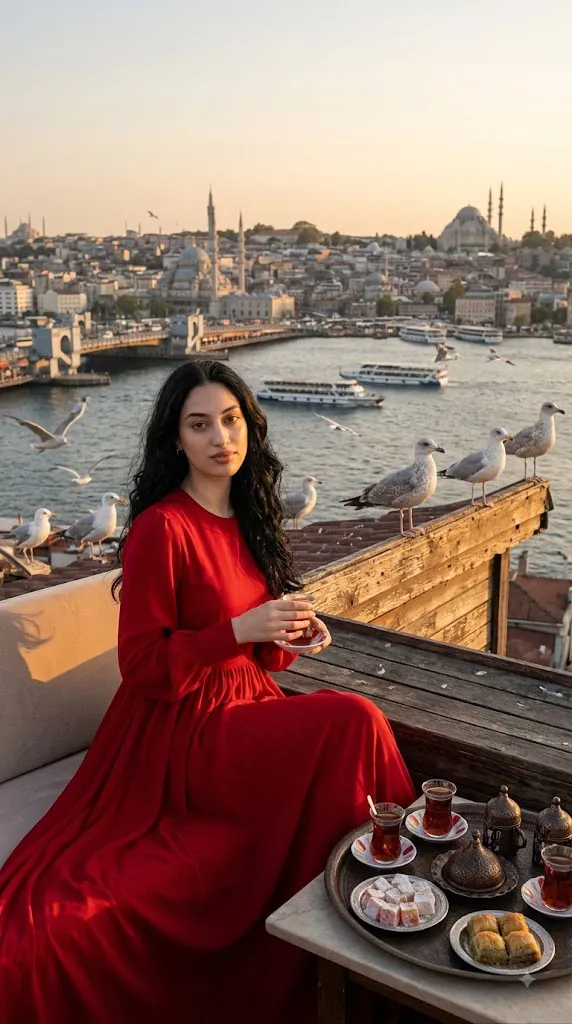
The Bosphorus Rooftop Tea Prompt is an AI photo-editing concept inspired by the romance, culture, and scenery of Istanbul. It turns an ordinary portrait into a photorealistic lifestyle photograph set on an elegant rooftop café overlooking the Bosphorus — combining a stylish subject, traditional Turkish tea, sweets, seagulls, and warm golden-hour light into a scene meant to look like an authentic travel photo rather than an AI creation.
The main subject is a woman with long, naturally wavy hair and realistic, untouched skin texture — no artificial shine or heavy smoothing. She wears an elegant, modest, long-sleeved red dress that moves gently in the evening breeze, its rich color standing out beautifully against the blue water, warm architecture, and golden light.
A traditional Turkish tea setup adds cultural authenticity: tulip-shaped tea glasses, Turkish delight, and baklava arranged beside her, evoking Istanbul's café culture. Seagulls add life and movement — some perched along the rooftop edge, others gliding past — instantly signaling the setting.
Golden-hour lighting ties everything together, softly illuminating her face, hair, dress, and the tea tray while keeping the Bosphorus and distant skyline gently softened for cinematic depth. When a reference photo is used, her facial features, hairstyle, skin tone, and proportions stay consistent, while the AI reimagines the setting, outfit, lighting, and overall travel mood.
“Bosphorus Rooftop Tea Prompt”
A hyper-realistic lifestyle photograph set at a rooftop café overlooking the Bosphorus in Istanbul, featuring an iconic shot of a seagull on the roof. The main female subject has long, wavy hair and realistic facial features; her skin has a soft, natural texture—no filters or artificial sheen. She sits comfortably on the rooftop terrace, wearing an elegant, modest, long-sleeved red dress that flows and sways gently in the breeze. Beside her sits a traditional Turkish tea tray with tulip-shaped glasses, Turkish delight, and baklava. Seagulls are nearby, with some perched on the roof edge. Warm golden-hour lighting, natural shadows, cinematic Istanbul atmosphere, ultra-detailed facial features, realistic textures.
How To Use Photo Editing?
Using the Bosphorus Rooftop Tea Prompt is simple when the editing process is divided into several stages. The quality of the reference photograph plays an important role in achieving a convincing result.
Step 1: Select a Good Reference Photo
Choose a clear, high-resolution photograph of the person you want to feature. The face should be visible, preferably with natural lighting and minimal filters. Avoid extremely blurry images, photographs with heavy shadows, or images where important facial details are hidden.
Step 2: Upload the Reference Image
Upload the selected image to an AI photo-editing or image-generation platform that supports reference photographs.
Add an instruction such as:
“Use the uploaded photograph as the primary identity reference. Preserve the subject's recognizable facial characteristics, hairstyle, natural skin texture, skin tone, and proportions while transforming the clothing, environment, lighting, and atmosphere.”
This helps maintain consistency while allowing the AI to create the new Istanbul setting.
Step 3: Add the Full Prompt
Paste the complete Bosphorus Rooftop Tea Prompt into the prompt field. Include the red dress, Turkish tea tray, baklava, Turkish delight, seagulls, Bosphorus, rooftop café, golden-hour lighting, and cinematic photography details.
Step 4: Generate Multiple Variations
Create several versions and compare them carefully. Look for natural facial details, realistic hands, accurate tea glasses, believable food textures, properly formed seagulls, and a convincing Bosphorus background. Choose the variation that looks the most natural and visually balanced.
Tools You Can Use For Prompt Copy and Create Photo
Different categories of AI and editing tools can be used to create this type of cinematic Istanbul portrait.
1. AI Image Generators
AI image-generation platforms can create complete environments from detailed prompts. They can generate the rooftop café, Bosphorus scenery, clothing, food, birds, lighting, and overall composition. For portraits based on an existing photograph, choose a platform that supports image references or identity consistency.
2. AI Photo Editors
AI photo editors are useful when you already have a portrait and want to place the subject into a completely different environment. They can help modify clothing, replace backgrounds, adjust lighting, and introduce new objects such as tea trays, food, and birds.
3. Professional Editing Software
Traditional photo-editing software can be used for final refinements. Exposure, contrast, highlights, shadows, saturation, cropping, sharpness, and color balance can be adjusted manually. This is particularly useful for matching the subject with the warm lighting of the Istanbul environment.
4. Image Enhancement Tools
Image enhancement and upscaling tools can improve fine details after generation. They can help refine hair strands, facial texture, dress fabric, tea glasses, food details, and distant architectural elements. Use enhancement carefully to avoid making the skin appear overly sharp or artificial.
How To Edit Photo?
Once the first version has been generated, inspect each part of the image carefully.
Step 1: Check Facial Identity
Compare the generated face with the reference photograph. Examine the eyes, eyebrows, nose, lips, jawline, hairstyle, and overall facial proportions. The subject should remain recognizable while retaining realistic skin texture. Avoid excessive beautification or artificial skin smoothing.
Step 2: Refine the Red Dress
The long-sleeved red dress should have realistic fabric texture and natural folds. The dress should flow gently with the breeze rather than appearing rigid. Maintain the elegant, modest styling while ensuring that the rich red color remains realistic and does not become excessively saturated.
Step 3: Improve the Turkish Tea Tray
The tea tray should look authentic and naturally positioned beside the subject. Tulip-shaped Turkish tea glasses should have realistic transparent glass, tea color, reflections, and shadows. Turkish delight and baklava should have believable shapes and textures rather than looking like generic AI-generated food.
Step 4: Enhance the Seagulls
Seagulls should appear anatomically realistic. Birds perched on the rooftop should have natural poses, while flying birds should have believable wing positions. Avoid adding too many birds because an overcrowded sky can distract from the main subject.
Step 5: Improve the Bosphorus Background
The Bosphorus should provide a recognizable Istanbul atmosphere. Include blue water, distant buildings, rooftops, historic architecture, and a broad waterfront perspective. The background can remain slightly blurred to maintain focus on the woman while still communicating the location.
Step 6: Adjust Golden-Hour Lighting
Warm sunlight should illuminate the subject naturally from a believable direction. Add subtle highlights to the hair and red dress while preserving soft shadows across the face. Avoid excessive orange or yellow tones. The goal is warm natural sunlight rather than an artificial filter.
Step 7: Add Natural Wind Movement
The breeze should gently affect the woman's hair and dress. Small movements can make the photograph feel candid and realistic. Avoid exaggerated hair movement because subtle motion generally looks more authentic.
Step 8: Apply Cinematic Color Grading
Use warm, refined color grading while maintaining realistic skin tones. The red dress should remain a strong visual focal point, while the blue Bosphorus and neutral architecture provide complementary contrast. Moderate contrast and subtle film grain can add an editorial travel-photography appearance.
Step 9: Check Shadows and Reflections
Inspect the tea glasses, table, dress, railing, and rooftop surfaces for realistic shadows and reflections. Objects should appear properly connected to the environment. Correct lighting relationships can make a major difference in photographic realism.
Step 10: Choose the Final Composition
Vertical 4:5 works well for Instagram-style portraits and fashion photography, while 9:16 is suitable for stories, reels, and mobile wallpapers. Keep the woman as the primary focal point while allowing enough of the Bosphorus to remain visible around her.
Conclusion
The Bosphorus Rooftop Tea Prompt blends Istanbul's iconic scenery, Turkish café culture, elegant fashion, and cinematic travel photography into one cohesive concept. The flowing red dress anchors the composition, while the tea tray, baklava, Turkish delight, and tulip glasses add authentic cultural detail. The Bosphorus provides a stunning natural backdrop, seagulls bring movement, and golden-hour light warms the whole scene.
For the best results, start with a high-quality reference photo and clear instructions for preserving identity, then pay close attention to facial details, hands, clothing, food, birds, and background depth. After generating the image, refine lighting, shadows, reflections, and color grading, avoiding heavy filters or unnatural saturation. Done well, this concept turns a simple portrait into a luxurious, authentic-feeling Istanbul travel photograph — well suited for social media, travel inspiration, fashion portfolios, and creative digital projects.