Introduction
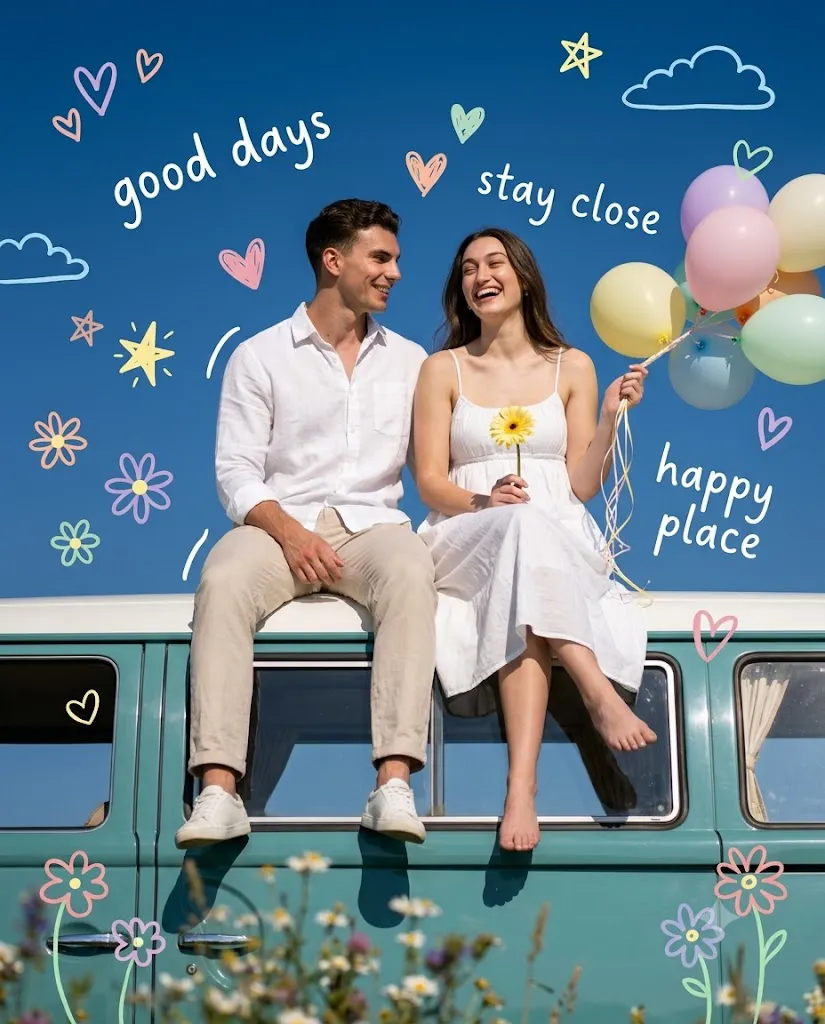
The Camper Van Couple Prompt is a premium AI photography prompt designed to create ultra-realistic, cinematic lifestyle portraits with a romantic travel aesthetic. Featuring a vintage teal camper van, a happy couple, pastel balloons, wildflowers, and a deep blue sky, this prompt produces Pinterest-worthy and editorial-quality images. Whether you're creating content for Instagram, blogs, digital portfolios, or AI art collections, this prompt helps generate beautiful travel-inspired portraits with natural lighting, authentic emotions, and professional DSLR quality.
"Camper Van Couple Prompt"
8K ultra-realistic lifestyle portrait, a couple sitting side-by-side on the roof of a vintage teal camper van against a clear deep blue sky. Match faces precisely to reference image. Man (left): white linen shirt (sleeves rolled), beige trousers, grey sneakers, turned toward woman with an affectionate smile. Woman (right): white spaghetti-strap sundress, white sneakers, laughing joyfully, holding a yellow daisy and pastel balloons (blue, yellow, white). Legs dangle over the van windows, carefree vibe. Background: vivid blue sky, blurred wildflowers in foreground for depth, vintage teal van with subtle window reflections. Overlay: playful pastel hand-drawn doodles (flowers, smiley faces, stars, hearts, clouds, sparkles, motion lines) around the couple and balloons. Add handwritten-style white text in the sky: "good days," "stay close," "happy place" — casual, whimsical chalk/marker font. Lighting: bright soft natural daylight, minimal shadows, warm romantic cheerful mood, dreamy spring/summer feel. Composition: vertical 4:5, eye-level with van roof, subjects slightly below center with negative space above for text/doodles. Camera: DSLR, 85mm lens, f/2.8, shallow depth of field, ultra-detailed textures, crisp focus, soft blur, 8K resolution, no warm tone.
How To Use Photo Editing?
Step 1: Generate the AI Image
Copy the Camper Van Couple Prompt and paste it into your favorite AI image generator.
Step 2: Download the Best Image
Select the most realistic version and download it in the highest available resolution.
Step 3: Open a Photo Editor
Import the image into Lightroom, Photoshop, Canva, Snapseed, or any professional editing software.
Step 4: Adjust Brightness
Increase brightness slightly to create a fresh daylight appearance.
Step 5: Improve Contrast
Add a small amount of contrast for better depth while keeping the lighting soft.
Step 6: Enhance Colors
Boost the blue sky, teal camper van, balloons, flowers, and clothing colors while maintaining a natural look.
Step 7: Apply Soft Color Grading
Use cool blue and neutral tones to achieve a cinematic editorial style without adding a warm color cast.
Step 8: Export the Final Photo
Save the image in high resolution for Instagram, Pinterest, websites, or print.
Tools You Can Use For Prompt Copy and Create Photo
Step 1: Copy the Prompt
Copy the complete Camper Van Couple Prompt.
Step 2: Select an AI Image Generator
You can create stunning images using:
- ChatGPT Image Generator
- Midjourney
- Flux AI
- Google Imagen
- Leonardo AI
- Stable Diffusion
- Adobe Firefly
- Canva AI
Step 3: Paste the Prompt
Open your preferred AI platform and paste the prompt into the prompt field.
Step 4: Upload Reference Images (Optional)
If you want the AI to preserve both faces accurately, upload clear reference photos before generating.
Step 5: Choose Generation Settings
Select:
- Ultra Realistic
- Cinematic Editorial
- Lifestyle Photography
- 8K Resolution
- DSLR Quality
- 4:5 Aspect Ratio
- High Detail
- Shallow Depth of Field
Step 6: Generate the Image
Click the Generate button and wait for the AI to create your portrait.
Step 7: Download the Result
Download the highest-quality image for editing.
How To Edit Photo?
Step 1: Import the Image
Open Lightroom, Photoshop, Canva, or Snapseed and import your AI-generated portrait.
Step 2: Crop the Composition
Maintain the vertical 4:5 framing with enough negative space above the couple.
Step 3: Correct White Balance
Keep neutral tones and remove any unwanted yellow tint to match the original prompt.
Step 4: Adjust Exposure
Increase exposure slightly to create a bright and airy daytime atmosphere.
Step 5: Enhance Skin Tones
Apply light skin corrections while preserving natural texture and realistic facial details.
Step 6: Improve Clothing Details
Increase clarity slightly on the linen shirt, sundress, and camper van textures for a premium editorial look.
Step 7: Enhance the Sky and Flowers
Boost the deep blue sky and wildflower colors while keeping them soft and natural.
Step 8: Sharpen Key Details
Sharpen the eyes, hair, balloons, camper van, and flowers without oversharpening the entire image.
Step 9: Preserve Background Blur
Maintain a soft depth-of-field effect to keep the couple as the main focus.
Step 10: Export the Final Image
Save the edited portrait as a high-quality JPEG or PNG, optimized for Instagram, Pinterest, blogs, or professional printing.
Conclusion
The Camper Van Couple Prompt is an excellent choice for creating romantic, cinematic, and ultra-realistic travel portraits with AI. The combination of a vintage camper van, vibrant blue sky, pastel balloons, natural expressions, and editorial composition creates timeless images that stand out on social media and creative platforms. By following the steps above, you can easily generate, edit, and enhance high-quality AI portraits that look professionally photographed. Whether you're building a portfolio, creating travel-themed content, or sharing memorable couple photos online, this prompt delivers beautiful results with minimal effort.