Introduction
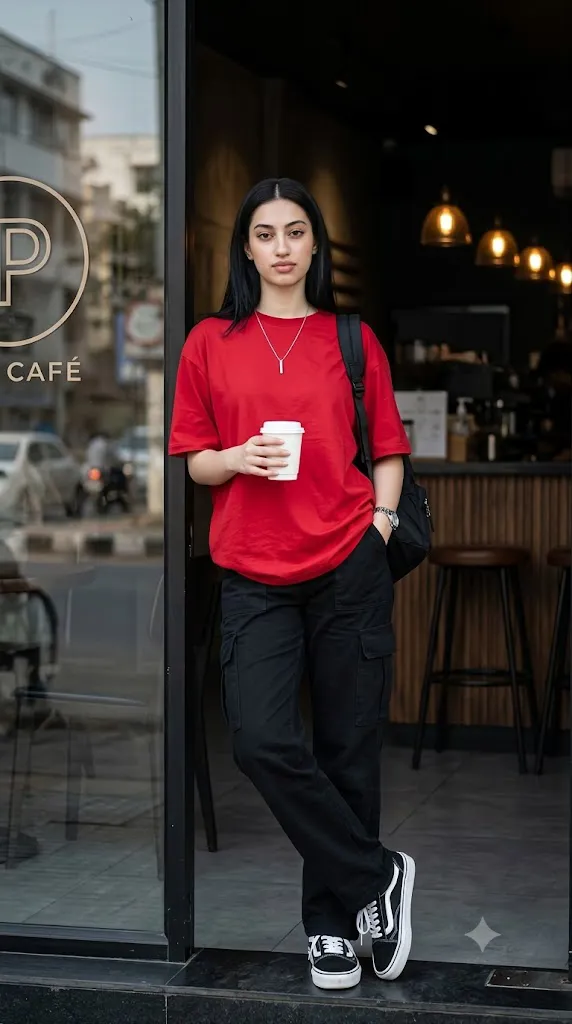
The Cherry Red Café Street Style Prompt is a stylish AI photo-editing concept designed to create a realistic urban fashion portrait with a modern café atmosphere. This prompt combines contemporary streetwear, cinematic photography, moody café lighting, and professional fashion-editorial composition to create an image that looks like it was captured during a real street-style photoshoot.
The main visual attraction is the oversized cherry-red crew-neck T-shirt. Its vibrant color becomes the visual anchor of the entire photograph and contrasts beautifully with black high-waisted cargo pants and black-and-white low-top sneakers. The combination creates a simple but fashionable streetwear look that feels modern, relaxed, and effortlessly confident.
The subject stands near the entrance of a contemporary café, holding a white disposable coffee cup in one hand while keeping the other hand inside a cargo-pants pocket. One leg is crossed slightly in front of the other, creating a natural editorial pose. A thin silver necklace, silver wristwatch, and black backpack complete the urban lifestyle appearance.
The environment is equally important. A glass café window reflects a softly blurred street scene, while the darker café interior provides wood textures, bar stools, and warm pendant lights. This contrast between natural daylight outside and the darker interior makes the red shirt immediately stand out. The final visual style is intended to resemble high-end DSLR street photography, with realistic skin texture, shallow depth of field, cinematic contrast, professional color grading, and a vertical 4:5 composition.
"Cherry Red Café Street Style Prompt"
Full-length high-res portrait, young woman at modern café entrance, candid urban street photography, high contrast fashion-editorial realism. Subject: Fair-medium complexion, straight middle-parted hair, neutral confident expression, sharp winged eyeliner, soft natural lips. Outfit: Oversized cherry-red crew-neck tee (slightly tucked), black high-waisted cargo pants, black-white low-top sneakers (Vans Old Skool style, white laces/soles). Accessories: thin silver necklace, silver wristwatch (left wrist), black backpack (right shoulder). Holding white disposable coffee cup in right hand, left hand in pocket. Pose: Relaxed confident stance, one leg crossed in front, leaning near café entrance, editorial street-style body language. Setting: Café entrance — left side glass window reflecting blurred street scene; dark moody café interior behind (wood textures, bar stools, warm pendant lights) making red shirt pop. Glass door shows partial logo: stylized "P" in circle + "CAFE" text. Composition: Centered full-body vertical shot, strong vertical door-frame lines, eye-level angle. Lighting: Soft natural daylight on face, high contrast vs dark café interior, shallow DOF (f/1.8–f/2.8), subject sharp/background blurred. Color: Dominant red (shirt as visual anchor), deep blacks, neutral greys. Style: Ultra-realistic, cinematic street photography, DSLR quality, moody café lighting, urban lifestyle aesthetic, 4K, professional color grading, 4:5 aspect ratio.
How To Use Photo Editing?
Creating this style of image becomes easier when you follow a clear editing workflow.
Step 1: Select a Reference Photo
Begin with a high-quality full-body photograph of the person you want to edit. A photo with good lighting and a clearly visible face will usually produce better results. Make sure the body is not heavily cropped because the prompt requires a complete full-length portrait. A natural standing photograph can work particularly well.
Step 2: Upload Your Photo
Open an AI image editor or image-generation platform that supports reference images. Upload your photograph and use it as the primary reference. If preserving the person's identity is important, clearly instruct the AI to maintain the original facial characteristics, natural skin tone, hairstyle, and recognizable features.
Step 3: Paste the Prompt
Copy the complete Cherry Red Café Street Style Prompt and paste it into the prompt field. The prompt should describe the clothing, accessories, pose, café environment, lighting, camera perspective, depth of field, colors, and image quality. Detailed instructions help the AI understand how all the visual elements should work together.
Step 4: Generate the Image
Generate the first version and inspect it carefully. Pay attention to the face, hands, clothing, shoes, coffee cup, backpack, café background, and overall body proportions. If certain details look unnatural, modify those specific parts instead of changing the entire prompt.
Tools You Can Use For Prompt Copy and Create Photo
Different categories of AI and editing tools can be useful for creating the Cherry Red Café Street Style image.
1. AI Image Generators
AI image-generation platforms can create complete fashion scenes from text prompts. They are useful for generating the café environment, clothing, lighting, composition, and cinematic atmosphere. If you want to use your own photograph, look for a platform that supports reference images or image-to-image generation.
2. AI Photo Editors
AI photo-editing tools are particularly useful when you already have a portrait and want to transform the clothing or environment. You can use them to place the subject outside a café, change the outfit, add accessories, modify the lighting, or create a realistic street-photography atmosphere.
3. Graphic Design Tools
After generating the image, graphic-design software can be useful for final adjustments. You can crop the photograph to a 4:5 format, adjust composition, add subtle design elements, and prepare the image for social media.
4. Image Enhancement Tools
An image enhancer or upscaling tool can help improve fine details after generation. It can be particularly useful for improving facial texture, clothing details, hair strands, and background clarity. Always inspect the enhanced image afterward because excessive sharpening can make skin and clothing appear unnatural.
How To Edit Photo?
Once the initial AI image has been generated, several editing steps can improve the final result.
Step 1: Check Facial Details
Start by examining the face. The subject should maintain natural facial proportions and recognizable characteristics. Check the eyes, eyebrows, nose, lips, jawline, hairstyle, and skin texture. Avoid excessive artificial skin smoothing because realistic texture is important for a professional street-photography appearance.
Step 2: Refine the Outfit
The cherry-red oversized crew-neck T-shirt should remain the strongest color element in the photograph. Make sure the shirt has realistic fabric folds and a natural fit. The black high-waisted cargo pants should provide contrast without distracting from the red shirt. The black-and-white low-top sneakers should have realistic soles, laces, proportions, and shadows.
Step 3: Check Accessories
The silver necklace should remain subtle around the neckline. The silver wristwatch should appear naturally positioned on the left wrist. The black backpack should rest naturally over the right shoulder, with realistic straps and shadows. The white coffee cup should be correctly positioned in the right hand. Pay special attention to the fingers because AI-generated hands can sometimes contain unnatural shapes.
Step 4: Improve the Pose
The relaxed stance should look natural rather than overly staged. The subject should lean slightly near the café entrance while keeping one leg crossed in front. The left hand should remain comfortably inside the pocket, while the right hand holds the coffee cup. This body language creates the effortless confidence associated with modern street-style photography.
Step 5: Refine the Café Background
The café should contain a dark, moody interior with subtle wood textures, bar stools, and warm pendant lights. On the left side, the glass window can reflect a blurred urban street scene. This reflection adds realism and makes the photograph feel like an authentic city photograph. If the café includes signage, keep the visible logo subtle so it does not compete with the subject.
Step 6: Adjust Lighting
Use soft natural daylight on the subject's face while keeping the café interior noticeably darker. This creates a strong contrast between the bright exterior and moody interior. The red shirt becomes the visual focal point while the face remains naturally illuminated. A shallow depth-of-field effect can further separate the subject from the background.
Step 7: Apply Cinematic Color Grading
The final color palette should emphasize cherry red, deep black, neutral grey, and warm café tones. Use moderate contrast and controlled highlights. Avoid excessive saturation because the shirt should look vibrant but still realistic.
Step 8: Prepare the Final Image
Crop the final photograph into a 4:5 vertical format for a strong social-media composition. Keep the subject centered and ensure the vertical café door-frame lines remain visible. These architectural lines can make the composition look cleaner and more professional.
Conclusion
The Cherry Red Café Street Style Prompt is a powerful concept for creating a fashionable urban portrait with a cinematic lifestyle aesthetic. Its combination of cherry-red streetwear, black cargo pants, casual sneakers, coffee-shop accessories, and moody café surroundings creates a visually strong and modern composition.
The contrast between natural daylight and the darker café interior is one of the most important elements of the concept. It gives the image depth while allowing the red T-shirt to become the primary visual anchor.
For the best results, begin with a high-quality reference photograph, use detailed instructions, maintain natural facial and body proportions, and carefully inspect small details such as hands, fingers, coffee cups, shoes, accessories, and clothing folds.
After generation, refine the lighting, background blur, color grading, and composition. A final 4:5 crop can make the portrait especially suitable for Instagram and other social-media platforms.
With a detailed prompt and thoughtful editing workflow, an ordinary portrait can be transformed into a professional-looking Cherry Red Café Street Style fashion photograph that combines urban lifestyle, cinematic realism, and modern editorial fashion.