Introduction
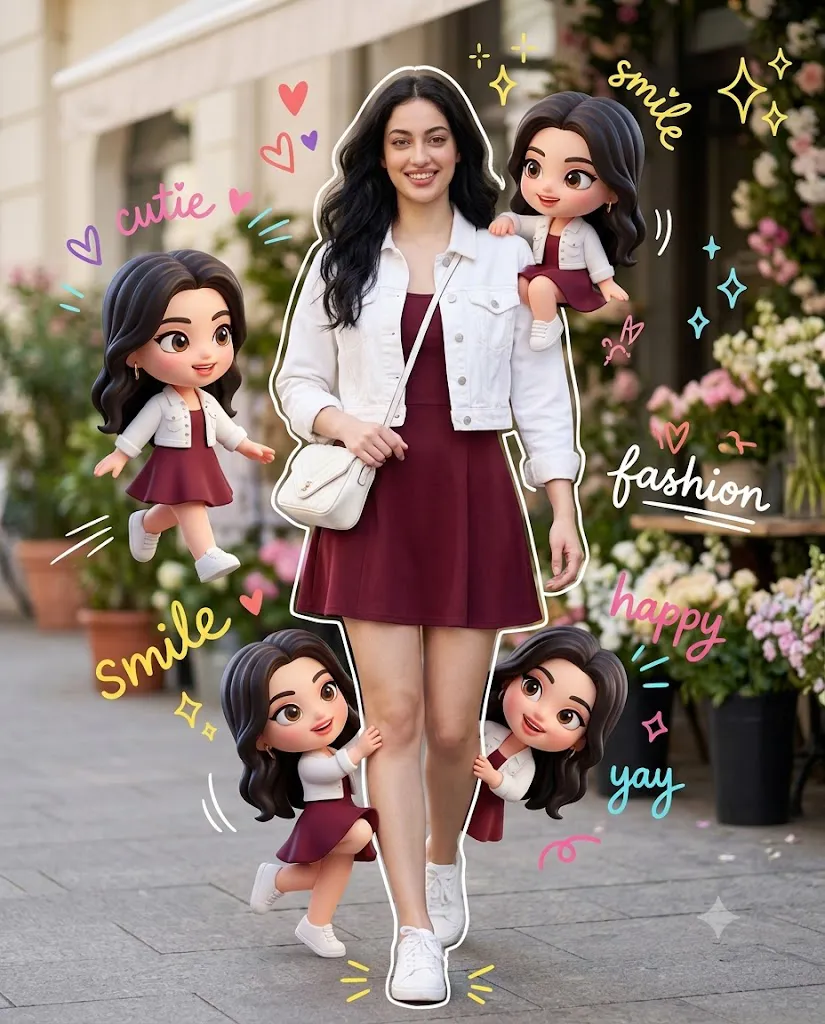
The Chibi Cutie Fashion Prompt is a creative AI photo-editing concept that combines realistic photography with adorable 3D chibi characters and colorful hand-drawn doodles. Instead of creating a completely cartoon-style image, this prompt keeps the main subject realistic while surrounding her with miniature chibi versions of herself. The result is a playful mixed-media composition that looks modern, fashionable, cheerful, and perfect for social media.
The main subject remains the visual focus of the composition. She wears a stylish maroon skater-style mini dress with a cropped white denim jacket, clean white sneakers, and a small white quilted crossbody bag. Her hair flows naturally, and she has a warm, cheerful smile. The subject is shown in a full-body walking pose toward the camera, creating the feeling of a candid lifestyle fashion photograph.
The most important requirement is identity preservation. When a reference photograph is provided, the AI should maintain the subject's recognizable facial identity, including her facial proportions, jawline, cheekbones, forehead, and overall facial structure. The clothing, environment, and creative elements can be transformed, but the person's identity should remain consistent.
Around the realistic subject are four stylized 3D chibi versions of the same woman. Each chibi follows the same outfit and general appearance but has a cute miniature body, glossy 3D finish, lively expression, and soft white outline. Handwritten doodles such as hearts, stars, sparkles, lightning strokes, and motion lines complete the playful composition.
"Chibi Cutie Fashion Prompt"
Vibrant mixed-media composition — realistic photo + 3D chibi + doodle style. Uploaded image as face reference (100% identity match — exact facial structure, jawline, cheekbones). Warm natural smile, flowing hair. Outfit: maroon skater mini dress, cropped white denim jacket, white sneakers, white quilted crossbody bag. Full-body walking pose toward camera, one hand on bag strap. Vertical 4:5/1:1, subject-centered, clean white handwritten outline around body. 4 chibi versions (same face/outfit, Pixar-style glossy, white handwritten outline): 1 medium chibi walking beside her (left), 1 tiny chibi sitting on her right shoulder, 1 hugging her leg, 1 peeking from behind other leg — all playful, dynamic poses. Background: outdoor café street, plants/flowers, no people, soft bokeh blur. Lighting: bright natural daylight, high-end lifestyle look. Add doodle overlays: hearts, stars, sparkles, lightning, motion lines + handwritten text ("cutie", "smile", "fashion", "happy", "yay") in white/blue/black/color mix. Keep main subject photorealistic; chibis + doodles stylized but balanced, not overpowering realism
How To Use Photo Editing?
Creating this style becomes easier when you follow a structured editing process.
Step 1: Select a Suitable Reference Image
Start with a clear, high-quality image of the person. A full-body or three-quarter photograph is ideal because the final concept requires the subject to appear from head to toe. Choose an image with good lighting and a clearly visible face. Avoid photographs where the face is heavily covered by sunglasses, hands, hair, or other objects.
Step 2: Upload the Reference Image
Upload the photograph into an AI image editor that supports reference-image editing. Make the uploaded image the primary identity reference. The prompt should clearly state that the subject's facial identity must be preserved. Instead of allowing the AI to redesign the face, instruct it to retain the original facial characteristics and natural appearance.
Step 3: Add the Fashion Details
Describe the outfit precisely. The subject should wear a maroon skater-style mini dress, cropped white denim jacket, clean white sneakers, and a small white quilted crossbody bag. The clothing should look realistic, with natural folds, stitching, shadows, and accurate proportions.
Step 4: Describe the Chibi Characters
The four chibi characters are an important part of this concept. Describe each position separately so the AI understands the composition. One medium-sized chibi should walk beside the subject on the left. A smaller chibi should sit playfully on her right shoulder. Another should hug or climb her leg, while the fourth should peek from behind the opposite leg. Each character should have a glossy 3D appearance, lively body movement, and a soft white outline.
Step 5: Add the Doodle Elements
Finally, include colorful hand-drawn elements around the subject. Hearts, stars, sparkles, lightning strokes, and motion lines can make the composition feel energetic. Add playful handwritten words such as “cutie,” “smile,” “fashion,” “happy,” and “yay.”
Tools You Can Use For Prompt Copy and Create Photo
Different AI tools can be used depending on whether you want to generate the entire composition or edit an existing photograph.
1. AI Image Generation Tools
Text-to-image and image-reference platforms can create the complete concept from a detailed prompt. These tools are useful for experimenting with different poses, environments, chibi designs, and compositions. For identity-focused work, look for tools that provide reference-image or character-consistency features.
2. AI Photo Editing Tools
AI photo editors are useful when you already have a photograph and want to transform the environment, clothing, or visual style. These tools can help create the café-street background, add miniature characters, adjust lighting, and integrate graphic elements.
3. Graphic Design Tools
Traditional graphic-design applications can be useful for adding the final doodles and typography. You can manually place hearts, stars, handwritten text, motion lines, and other decorative elements after generating the main image. This can give you more control over the final composition.
4. Image Enhancement Tools
An image-enhancement tool can be used after generation to improve resolution, sharpness, texture, and overall clarity. However, avoid excessive enhancement because over-processing can make the realistic subject look artificial.
How To Edit Photo?
Once the AI creates the initial image, carefully review every part of the composition.
Step 1: Check the Face
The face should remain consistent with the reference image. Check the eyes, nose, lips, jawline, cheeks, forehead, and overall proportions. If the AI has changed the facial identity too much, regenerate the image with stronger identity-preservation instructions.
Step 2: Check the Main Outfit
Make sure the maroon dress, white cropped denim jacket, white sneakers, and quilted crossbody bag are clearly visible. The bag should naturally cross the body rather than appearing disconnected or floating.
Step 3: Check the Chibi Characters
The chibis should look like miniature versions of the main subject while remaining clearly stylized. Check their positions carefully. The left-side chibi should be the largest, while the shoulder, leg-hugging, and peeking characters should be smaller.Avoid stiff poses. Their arms, legs, facial expressions, and body positions should appear playful and dynamic.
Step 4: Improve the Background
The outdoor café street should contain plants and flowers while remaining uncluttered. Avoid visible people in the background. A shallow depth of field and soft bokeh can help separate the main subject from the environment.
Step 5: Balance Realism and Cartoon Style
This is one of the most important editing steps. The main woman should remain photorealistic, while the chibi characters should retain their stylized glossy 3D appearance. The two visual styles should coexist naturally without making the entire image look like a cartoon.
Step 6: Add Doodles and Typography
Place the doodles around the subject rather than covering important facial or clothing details. Use colorful handwritten words such as “cutie,” “smile,” “fashion,” “happy,” and “yay.” White, blue, black, and vibrant colors can be mixed to create a youthful social-media aesthetic.
Step 7: Choose the Final Composition
A vertical 4:5 composition works well for social media posts, while a square 1:1 composition can work well for profile-style content. Keep the main subject centered and leave enough space around her for the chibi characters and doodle graphics.
Conclusion
The Chibi Cutie Fashion Prompt is a fun way to transform an ordinary fashion photograph into a creative mixed-media artwork. By combining realistic photography, glossy 3D chibi characters, colorful doodles, and playful typography, you can create a unique visual that feels both fashionable and imaginative.
The key to achieving a high-quality result is maintaining a clear separation between the realistic main subject and the stylized chibi characters. The original identity should remain recognizable, while the miniature characters should provide the playful fantasy element.
For the best result, use a high-quality reference photograph, describe every character's position clearly, specify the outfit and environment, and carefully review the generated image afterward. Final adjustments to lighting, composition, sharpness, doodles, and typography can make the image look much more polished.
With the right prompt and editing workflow, the Chibi Cutie Fashion concept can be used for Instagram posts, fashion inspiration, creative portfolios, profile graphics, digital artwork, and other social-media content.