Introduction
AI image generation has completely changed the way photographers, designers, and digital artists create stunning portraits. Instead of traveling to expensive international destinations or hiring a professional production team, creators can now produce breathtaking cinematic images with the help of advanced AI image generators and a well-crafted prompt. One of the most visually striking concepts is the Cinematic Andorra Stone Archway Portrait AI Prompt, which combines the timeless beauty of European architecture with realistic fashion photography.
"Cinematic Andorra Stone Archway Portrait AI Prompt"
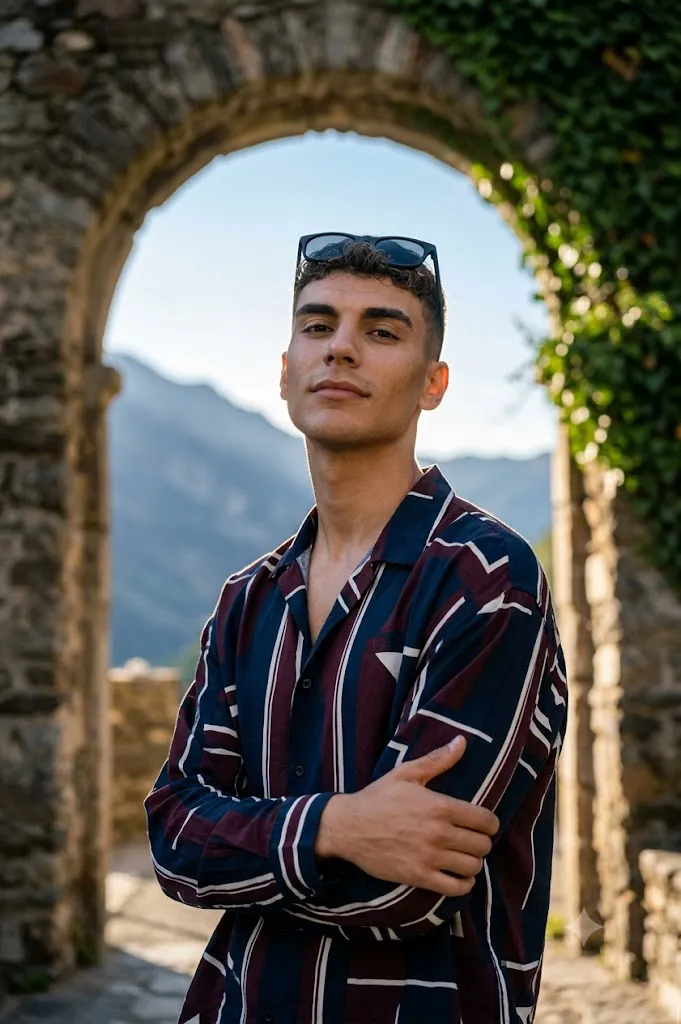
Create a 8K hyper-realistic, cinematic half-body portrait photo of a slim, confident young man in Andorra, Europe, standing near an old stone archway with a mountain view and soft morning light. Pose: New stylish modeling position – arms crossed loosely, shoulders slightly turned toward camera, head tilted slightly up, eyes looking directly at the lens with calm confidence and presence. Subtle smile or neutral hero expression. Face: Keep the exact same face from the uploaded photo – no edits or alterations. Maintain crystal-clear facial details, lifelike skin texture, clean natural tone, and realistic lighting. Accessory: Add matte black sunglasses – sleek, professional look, faint sunlight reflection only. Outfit: Oversized navy, maroon, and white patterned shirt, slightly open collar, fabric catching soft light; realistic folds and texture. Background: Ancient stone arch with ivy vines and mountain horizon visible through the arch. Slight breeze moving the shirt fabric.
This prompt creates an ultra-realistic half-body portrait of a confident young man standing beside an ancient stone archway in Andorra, Europe. The peaceful mountain landscape visible through the arch, soft morning sunlight, gentle breeze, and luxurious fashion styling create an elegant editorial look inspired by premium travel and fashion magazines.
The subject wears an oversized navy, maroon, and white patterned shirt paired with sleek matte black sunglasses for a modern European street-style appearance. The carefully designed pose, featuring crossed arms, slightly turned shoulders, and calm eye contact with the camera, adds confidence and sophistication to the portrait. Every detail—from the realistic skin texture to the natural fabric folds—is designed to achieve a professional-quality image suitable for portfolios, social media, magazine covers, and commercial advertising.
Whether you are an AI artist, photographer, influencer, or content creator, this prompt allows you to produce high-quality cinematic portraits that look as if they were captured by an experienced fashion photographer in the heart of Europe.
How To Use Photo Editing?
Using this AI portrait prompt is simple if you follow the correct process. A detailed prompt combined with a high-quality reference image can produce stunning results in just a few minutes.
Step 1: Copy the Prompt
Copy the complete Cinematic Andorra Stone Archway Portrait AI Prompt exactly as written. Every line contains important instructions for lighting, composition, clothing, facial preservation, background, and camera perspective.
Step 2: Choose a High-Quality Reference Image
Upload a clear, front-facing photo with good lighting. A high-resolution image helps the AI preserve your facial features accurately while generating a realistic portrait.
For the best results:
- Use natural lighting.
- Keep the face fully visible.
- Avoid blurry or low-quality images.
- Remove heavy beauty filters.
- Use a neutral facial expression.
Step 3: Paste the Prompt
Open your preferred AI image generation platform, paste the prompt into the prompt field, and upload your reference photo if the platform supports face reference or image guidance.
Step 4: Generate the Portrait
Click the Generate button and wait while the AI processes the image. Most AI tools provide multiple variations, allowing you to choose the best version.
Step 5: Refine the Final Image
If necessary, regenerate the portrait with slight adjustments to improve facial accuracy, lighting, clothing details, or background composition until you achieve the desired cinematic quality.
Tools You Can Use For Prompt Copy and Create Photo
Several AI image generators are capable of producing professional cinematic portraits. Here are some of the best options.
1. ChatGPT Image Generation
ChatGPT can generate realistic portraits from detailed prompts while maintaining accurate facial identity, clothing textures, natural lighting, and scenic backgrounds.
Best For:
- Cinematic portraits
- Travel photography concepts
- Fashion editorials
- Lifestyle campaigns
- Social media content
2. Midjourney
Midjourney is known for producing artistic and visually stunning images with dramatic lighting and exceptional composition.
Features:
- Premium realism
- Beautiful landscapes
- Detailed clothing
- Professional color grading
- Editorial-style photography
3. Flux AI
Flux AI creates highly realistic portraits with excellent facial detail and sharp clothing textures.
Best For:
- Hyper-realistic portraits
- Commercial fashion
- Travel-themed photography
- Lifestyle editorials
4. Google ImageFX
Google ImageFX provides clean, realistic image generation with balanced lighting and natural color reproduction.
5. Leonardo AI
Leonardo AI offers advanced customization options that allow creators to fine-tune lighting, textures, composition, and artistic style.
6. Ideogram AI
Ideogram AI is especially useful for combining realistic portraits with stylish typography, making it an excellent choice for magazine covers and promotional posters.
7. Adobe Firefly
Adobe Firefly integrates smoothly with Photoshop and is ideal for professionals who want to enhance AI-generated images with additional editing.
How To Edit Photo?
Follow these steps to create a professional cinematic portrait using this prompt.
Step 1: Select a High-Resolution Reference Photo
Choose a clear image with:
- Sharp facial details
- Natural lighting
- Neutral expression
- High resolution
- Minimal background distractions
A high-quality reference image helps the AI preserve facial identity more accurately.
Step 2: Copy the Complete Prompt
Paste the full Cinematic Andorra Stone Archway Portrait AI Prompt into your AI image generator. Avoid removing important instructions, as each detail contributes to the final cinematic result.
Step 3: Upload Your Reference Image
Upload your portrait as the facial reference. This allows the AI to maintain your exact facial features while generating the new scene.
Step 4: Configure Image Settings
For the best output, use:
- Resolution: 8K or Highest Available
- Aspect Ratio: Portrait (4:5 or 3:4)
- Style: Hyper-Realistic
- Camera Angle: Eye-Level
- Lighting: Soft Morning Light
- Detail Level: Maximum
Step 5: Generate Multiple Versions
Create several image variations and compare them carefully. Select the version with the best facial accuracy, clothing realism, mountain background, and lighting.
Step 6: Upscale the Selected Image
Use the AI upscaling feature to increase the resolution while preserving skin texture, fabric details, and overall sharpness.
Step 7: Fine-Tune the Portrait
Open the image in Photoshop or another editing application to make final adjustments such as:
- Enhance sharpness
- Improve lighting balance
- Increase contrast
- Remove unwanted artifacts
- Refine clothing textures
- Enhance mountain scenery
- Adjust color grading
Keep the edits subtle to maintain a natural, professional appearance.
Step 8: Export the Final Image
Save your finished portrait in a high-quality format suitable for both digital and print use.
Recommended formats include:
- PNG
- JPG
- TIFF (for professional printing)
Step 9: Share Your Cinematic Portrait
Your completed image is ideal for:
- Instagram Posts
- Facebook Covers
- Pinterest Pins
- Behance Projects
- Portfolio Websites
- Fashion Blogs
- Travel Content
- YouTube Thumbnails
- Digital Magazine Covers
- AI Art Galleries
Conclusion
The Cinematic Andorra Stone Archway Portrait AI Prompt is an excellent choice for anyone looking to create realistic, travel-inspired fashion portraits with AI. By combining elegant European architecture, breathtaking mountain scenery, soft natural lighting, and premium fashion styling, this prompt produces images that resemble high-end editorial photography.
Using a clear reference image, a detailed prompt, and a reliable AI image generator allows you to create portraits with lifelike facial details, realistic clothing textures, cinematic lighting, and professional composition. Whether you are building a creative portfolio, producing social media content, designing promotional materials, or experimenting with AI-generated fashion photography, this prompt offers a simple yet powerful way to achieve premium-quality results.
Feel free to experiment with different clothing colors, accessories, poses, and seasonal lighting while preserving the core cinematic style. With practice and thoughtful prompt refinement, you can consistently create visually striking portraits that capture the elegance of European landscapes and the sophistication of modern fashion photography.