Introduction
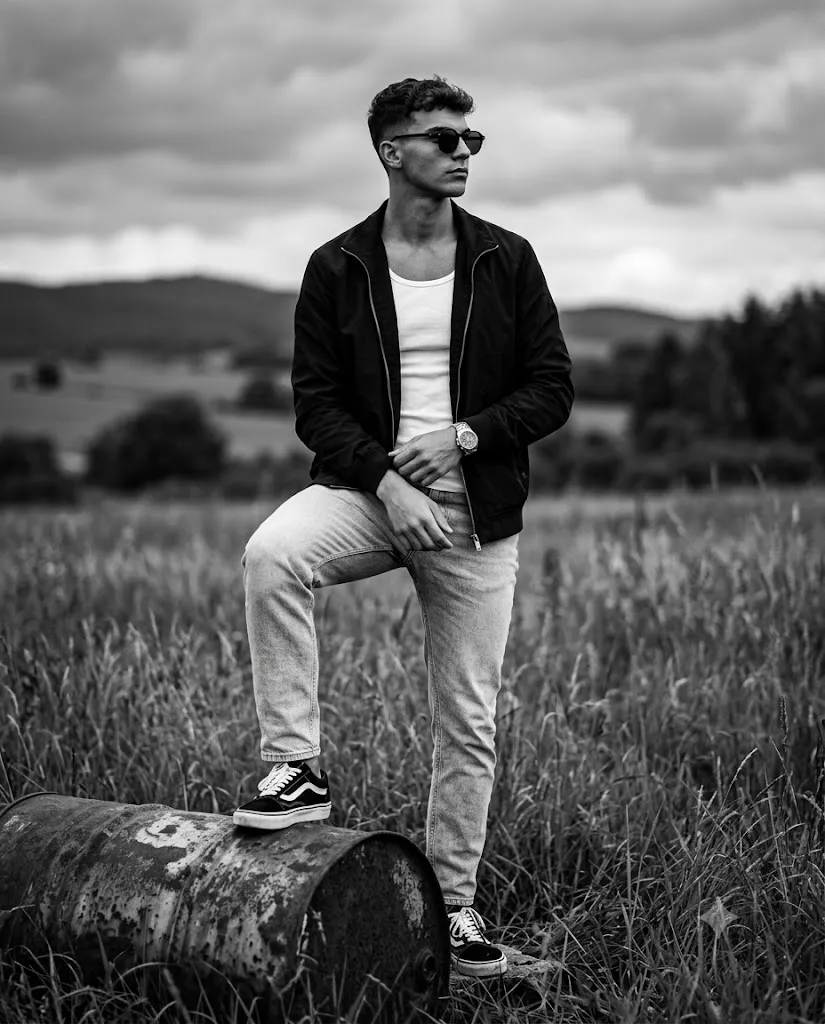
The Cinematic Black & White Rural Prompt is a premium AI photo editing style that recreates the timeless beauty of classic monochrome photography. Inspired by vintage analog film, editorial fashion magazines, and cinematic portraiture, it transforms an ordinary photo into a dramatic black-and-white masterpiece featuring a rugged countryside setting, textured wild grass, rustic metal elements, and a moody overcast sky.
Unlike standard filters, this prompt combines realistic lighting, shallow depth of field, premium film grain, and high-detail textures to produce an image resembling a professionally captured analog photograph. The subject stays sharp and central while the blurred rural landscape adds depth and emotion. Every detail — from the weathered metal barrel and denim fabric to natural hair texture and skin tones converted into rich grayscale — is rendered with exceptional realism, while the AI accurately preserves the uploaded person's facial identity, hairstyle, and expressions.
This style works well for social media content, artistic portraits, portfolio images, wallpapers, and personal branding.
"Cinematic Black & White Rural Prompt"
Create a cinematic, ultra-high-resolution black and white photograph of a stylish man(face match) in a confident pose. The composition is a full-body portrait with the man standing in a rural field of tall, wild grass under a dramatically cloudy, overcast sky. He is looking in profile to the right, with a serious and contemplative expression, wearing a pair of black, round-framed sunglasses. The man is positioned to the centred of the frame, with his left foot resting firmly on a heavily weathered and rusty, dented metal barrel which sits in the foreground. His right leg is straight, planted on the grass. His hands are loosely clasped in front of him at waist level. He is wearing a black, unzipped lightweight jacket over a white ribbed tank top, light-wash, slightly loose-fit denim jeans, and a pair of black and white skate shoes (classic Vans Old Skool style). A black luxury watch is on his left wrist. The background is a vast, open landscape of rolling hills and distant trees, all rendered in soft, muted tones of grey and black, creating a deep atmospheric blur that emphasizes the subject and foreground. The lighting is soft, diffuse natural daylight from the heavy cloud cover, producing a balanced, high-fidelity image with a rich, full range of black, white, and grey tones, mimicking the texture and grain of a premium black and white film stock (like Kodak Tri-X 400). The camera angle is at eye-level, making the man look grounded and imposing. The photograph has a very fine, detailed film grain throughout, enhancing the tactile qualities of the rusty metal, the denim fabric, the grass, and the man’s hair. The focus is sharp on the man’s face and the rusty barrel, with a shallow depth of field (f/2), making the far landscape a soft, detailed backdrop. Shot on a prime 50mm lens with a classic analog photography feel, capturing texture and grit. Aspect ratio 4:5.
How To Use Photo Editing?
Creating a cinematic rural portrait with AI is simple if you follow a structured workflow.
Step 1: Select a High-Quality Portrait
Choose a sharp, high-resolution photo with good lighting. A clear image helps the AI preserve facial identity while generating realistic textures and details.
Step 2: Copy the Prompt
Copy the complete Cinematic Black & White Rural Prompt. Make sure it includes important information such as:
- Black-and-white film photography
- Rural field background
- Rusty metal barrel
- Dramatic cloudy sky
- Editorial fashion styling
- Vintage analog film grain
- Soft natural daylight
- Shallow depth of field
- 50mm prime lens
- 4:5 aspect ratio
Detailed prompts produce significantly better AI-generated images.
Step 3: Upload Your Reference Image
Upload your portrait into an AI image generator that supports image references. This allows the AI to accurately preserve your facial features, hairstyle, and natural proportions.
Step 4: Paste the Prompt
Paste the copied prompt into the AI editor. Verify that it includes instructions for preserving facial identity, realistic clothing textures, cinematic lighting, and monochrome styling.
Step 5: Generate the Image
Generate the portrait. If needed, refine the prompt or regenerate the image until you achieve the desired composition and artistic quality.
Step 6: Export the Final Photo
Download the finished image in 4K or 8K resolution. High-resolution exports are ideal for Instagram, portfolios, digital art, wallpapers, or large-format printing.
Tools You Can Use for Prompt Copy and Create Photo
Many AI image generation platforms can create stunning cinematic portraits from detailed prompts. Here are some of the best tools available.
1. ChatGPT
ChatGPT helps create detailed AI prompts with accurate descriptions of lighting, camera angles, clothing, composition, and artistic direction. It is an excellent starting point for building professional prompts.
2. Midjourney
Midjourney is well known for producing artistic, cinematic, and editorial-quality images. Its realistic monochrome rendering and dramatic atmosphere make it an excellent choice for vintage-style portraits.
3. Flux AI
Flux AI specializes in realistic human portraits while preserving facial identity. It performs exceptionally well for fashion photography, editorial portraits, and analog-inspired compositions.
4. Leonardo AI
Leonardo AI provides advanced controls for lighting, realism, textures, and image quality, making it suitable for creating premium rural fashion portraits.
5. Google Gemini
Gemini helps refine prompts, improve descriptions, and generate creative visual ideas before using them in an AI image generator.
6. Adobe Firefly
Adobe Firefly integrates AI image creation with professional editing features, allowing you to fine-tune contrast, exposure, monochrome tones, and texture.
7. Ideogram AI
Ideogram AI is useful if you want to include stylish typography, magazine headlines, or poster-style graphic elements in your portrait.
8. Canva AI
Canva AI makes it easy to combine AI-generated portraits with layouts, branding elements, frames, and social media templates for a polished final design.
How To Edit Photo?
Follow these editing tips to create a realistic Cinematic Black & White Rural Portrait.
Step 1: Preserve Facial Identity
Always include instructions such as:
- Keep the original face exactly the same.
- Preserve hairstyle.
- Maintain natural facial proportions.
- Keep realistic skin texture.
- Avoid cartoon effects or distortion.
These instructions help the AI maintain the subject's recognizable appearance.
Step 2: Style the Outfit
Dress the subject in timeless fashion pieces such as:
- Black lightweight jacket
- White ribbed tank top
- Light-wash denim jeans
- Black-and-white skate shoes
- Black luxury wristwatch
- Round black sunglasses
This wardrobe creates a clean editorial look while complementing the monochrome color palette.
Step 3: Create the Rural Environment
Place the subject in a field of tall wild grass with rolling hills and distant trees in the background. Position a weathered rusty metal barrel in the foreground to add character, texture, and storytelling.
Step 4: Apply Cinematic Lighting
Use soft, diffused daylight under an overcast sky. Gentle highlights and realistic shadows create balanced contrast while preserving details across the full grayscale range.
Step 5: Enhance the Film Look
Add:
- Fine analog film grain
- Kodak Tri-X style monochrome tones
- HDR detail
- 50mm prime lens simulation
- f/2 shallow depth of field
- Sharp facial focus
- Realistic fabric textures
- Crisp metallic details
These effects recreate the authentic feel of classic black-and-white photography.
Step 6: Export
Save the final portrait in 4K or 8K resolution to maintain maximum sharpness and quality for digital or print use.
Conclusion
The Cinematic Black & White Rural Prompt suits anyone who appreciates timeless photography powered by a modern AI workflow. It lets users achieve professional-quality results without expensive cameras or studio equipment — just upload a reference photo, paste a detailed prompt, and let the AI create an elegant monochrome portrait while preserving facial identity.
Ideal for personal branding, fashion editorials, portfolios, social content, or wall art, this style benefits from tools like ChatGPT, Midjourney, Flux AI, Leonardo AI, Adobe Firefly, Ideogram AI, and Canva AI for customizing lighting, texture, and composition. As AI technology advances, this cinematic monochrome aesthetic will remain a favorite for creators seeking powerful, emotionally engaging, classic analog-style imagery.