Introduction
Double exposure photography has made a striking comeback in the age of AI-powered editing tools. What was once a rare, film-camera technique reserved for experimental photographers is now something anyone can create in minutes using a well-written prompt and the right software. A cinematic double-exposure image blends two visuals — usually a portrait and a landscape, cityscape, or texture — into one seamless frame that feels moody, dramatic, and emotionally layered, much like a movie poster or an album cover.
The appeal lies in storytelling. A single portrait can look beautiful, but a double exposure lets you say something deeper: a person's silhouette filled with a forest suggests connection to nature, a face merged with city lights suggests ambition or nostalgia, and a figure blended with stars suggests dreaming or freedom. This is why "cinematic double-exposure prompt" has become one of the most searched terms among AI art creators, photographers, and content designers who want to produce gallery-worthy visuals without years of Photoshop training.
In this article, we'll break down how to use photo editing tools to achieve this effect, which apps and AI platforms work best for generating and editing these prompts, and a step-by-step process for creating your own cinematic double-exposure image from scratch.
"Cinematic Double-Exposure Prompt"
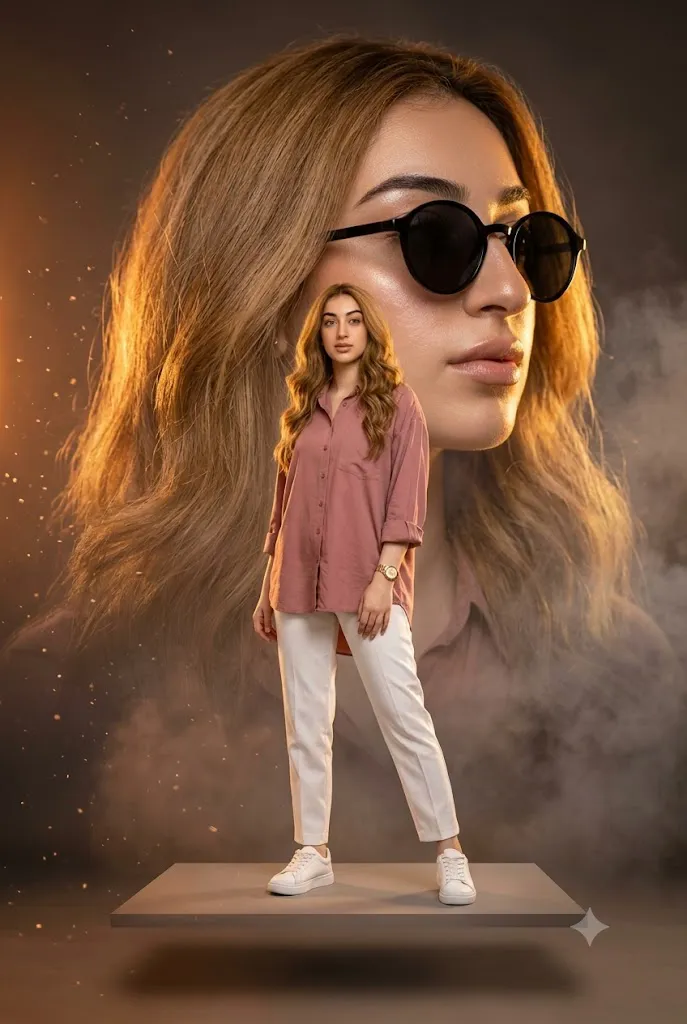
A high-fashion cinematic double-exposure portrait of a beautiful young woman with naturally wavy hair, glowing natural skin, and soft confident expression. The composition features a massive semi-transparent close-up portrait in the background wearing stylish black round sunglasses, softly looking sideways with dramatic golden rim lighting. In the foreground, a full-body pose of the same woman standing confidently on a subtle floating platform, wearing a dusty rose oversized button-down shirt with rolled sleeves, elegant white high-waisted trousers, and clean white sneakers. Moody dark background with warm cinematic orange highlights, floating dust particles, soft smoke atmosphere, ultra-realistic lighting, luxury editorial fashion photography, shallow depth of field, studio-quality sharp details, rich shadows, glowing highlights, Instagram aesthetic, 85mm lens, ultra-detailed 8K, vertical, photorealistic, premium color grading, cinematic composition, high contrast, soft hair movement, elegant and modern fashion magazine style.
How To Use Photo Editing?
Using the Cinematic Double-Exposure Prompt is straightforward when the editing process is divided into several stages. The most important step is choosing a high-quality reference image that clearly shows the subject's face and overall appearance.
Step 1: Select a Good Reference Photo
Choose a clear, high-resolution photograph of the woman. A photograph with visible facial features, natural lighting, and minimal filters is ideal. If possible, select a photograph where the hairstyle and face are clearly visible. Avoid images with excessive blur, extreme shadows, or objects covering the face.
Step 2: Upload the Reference Image
Upload the photograph into an AI photo-editing or image-generation platform that supports image references.
Use the image as the primary identity reference and add an instruction such as:
“Use the uploaded image as the primary reference for accurate identity preservation. Keep the woman's recognizable facial structure, hairstyle, skin tone, and natural proportions consistent throughout both the close-up and full-body representations.”
This helps prevent the two versions from appearing like different people.
Step 3: Add the Complete Prompt
Paste the complete Cinematic Double-Exposure Prompt into the prompt field. Make sure the description clearly identifies the background close-up, foreground full-body pose, clothing, sunglasses, lighting, smoke, dust particles, and overall cinematic atmosphere.
Step 4: Generate Multiple Variations
Generate multiple versions and compare them carefully. Look for consistent facial identity, realistic anatomy, natural clothing, proper double-exposure blending, and balanced composition. Select the variation with the most convincing combination of foreground and background elements.
Tools You Can Use For Prompt Copy and Create Photo
Several types of tools can help you create a cinematic double-exposure fashion portrait.
1. AI Image Generators
AI image-generation platforms are useful for creating complete cinematic compositions from text prompts. They can generate fashion styling, atmospheric backgrounds, dramatic lighting, and double-exposure effects. For identity-focused projects, use platforms that support reference images or character consistency.
2. AI Photo Editors
AI photo editors are useful when you already have a photograph and want to transform it into a cinematic editorial design. They can help with background replacement, clothing changes, lighting adjustments, and atmospheric effects.
3. Graphic Design Applications
Graphic-design software can provide greater control over the double-exposure effect. You can manually layer a close-up portrait over a full-body photograph, adjust opacity, apply masks, and refine the blending. This is particularly useful when the AI-generated result needs additional composition adjustments.
4. Image Enhancement Tools
Image enhancement and upscaling tools can improve the final resolution and recover subtle details in hair, skin, clothing, and facial features. Enhancement should be applied carefully so that natural skin texture remains intact.
How To Edit Photo?
Once you've generated or manually blended your double-exposure image, editing is what elevates it from "interesting" to "cinematic."
1. Crop for composition
Use the rule of thirds to position the subject off-center, leaving space for the secondary image's detail to breathe.
2. Balance exposure
Ensure neither layer overpowers the other — the portrait should remain recognizable while the second image adds texture and emotion.
3. Sharpen selectively
Sharpen the eyes or facial features slightly more than the blended background to keep the subject as the emotional anchor.
4. Apply film grain
A subtle grain overlay instantly adds a cinematic, analog feel that separates the image from a flat digital composite.
5. Vignette the edges
A soft dark vignette draws the viewer's eye toward the center, mimicking classic film photography.
6. Export in high resolution
Cinematic images are meant to be viewed large, so always export at the highest quality your tool allows, especially if the final use is a poster, portfolio piece, or print.
Conclusion
Cinematic double-exposure photography sits at the intersection of technical skill and emotional storytelling. Whether you're using AI prompt generators like Midjourney and Leonardo AI, or manually crafting the effect in Photoshop and Lightroom, the underlying goal remains the same: merge two images into one meaningful visual narrative. With the right base photo, thoughtful blend choices, and a final cinematic color grade, anyone can create striking double-exposure art that feels professionally produced. As AI editing tools continue to improve, this technique will only become more accessible — making it one of the most rewarding styles for photographers, designers, and content creators to master today.