Introduction
Artificial Intelligence has transformed digital photography and creative design by making professional-quality portraits accessible to everyone. Today, creators can produce magazine-worthy fashion images with only a detailed AI prompt and a high-quality reference photo. One of the most impressive examples of modern AI photography is the Cinematic Dual-Light White Puffer Jacket Portrait AI Prompt, which combines dramatic studio lighting, luxury fashion styling, and hyper-realistic facial details into one visually stunning composition.
"Cinematic Dual-Light White Puffer Jacket Portrait AI Prompt"
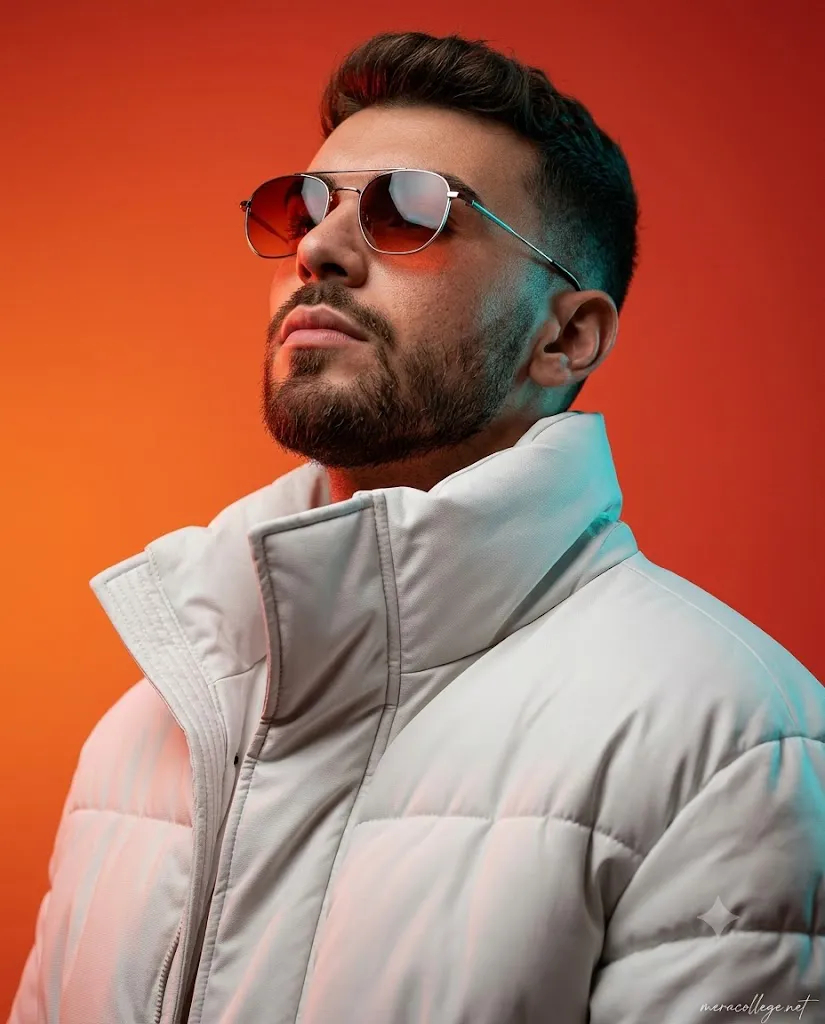
Create an ultra-photorealistic cinematic portrait of a man viewed from a slightly low angle looking upward with a confident, powerful expression. Generate his face using the uploaded portrait photo. The composition is a tight upper-body portrait with the head tilted slightly upward, emphasizing the jawline and beard structure. The background is a smooth vibrant studio gradient transitioning between deep orange and warm red tones, creating a dramatic modern aesthetic. Use strong cinematic dual-color lighting: warm red/orange light from one side and cool teal/blue rim lighting from the opposite side to create striking contrast across the face and beard. The man is wearing a futuristic white oversized puffer jacket with large quilted sections and a high protective collar. The jacket should look premium and modern with realistic fabric folds, padded insulation volume, and subtle material sheen similar to high-end technical winter fashion. Add extremely detailed textures: visible skin pores, beard hair strands, subtle facial imperfections, realistic lip texture, micro skin reflections, and detailed hair follicles. The sunglasses should have thin metal frames with realistic reflections and slightly tinted lenses reflecting the colored lighting. The white puffer jacket must show detailed stitching, fabric grain, padded segments, and realistic light interaction across the material. Lighting should create soft shadows, strong color contrast, and dramatic highlights across the face, beard, glasses, and jacket. Maintain sharp focus on the subject with studio-quality depth and clarity. Ultra photorealistic portrait photography, cinematic studio lighting, hyper-detailed textures, 8K detail, premium editorial fashion portrait, extremely realistic skin and fabric materials. Add a subtle handwritten text in the bottom-right corner that reads "meracollege.net", elegant fashion-editorial signature style, thin white ink, slightly transparent, like a photographer's signature on a luxury magazine shoot. hotography style, shallow depth of field, soft rim light, high dynamic range, 85 mm lens look, f/1.8 aperture, photorealistic studio quality, high-resolution detail, modern cinematic aesthetic. Vertical 4:5 aspect ratio.
This prompt is designed to generate an ultra-photorealistic upper-body portrait of a confident young man viewed from a slightly low camera angle. The pose emphasizes confidence and strength, while the head is slightly tilted upward to enhance the jawline and beard. The dramatic studio background blends vibrant orange and deep red tones, creating a modern cinematic atmosphere. Strong dual-color lighting—warm orange from one side and cool teal-blue rim lighting from the opposite side—adds depth and contrast, making the portrait resemble a luxury fashion campaign.
The futuristic oversized white puffer jacket gives the image a premium winter-fashion appearance. Detailed stitching, realistic fabric folds, and subtle material reflections make the clothing appear authentic. Combined with realistic skin pores, beard strands, sunglasses reflections, and high dynamic range lighting, the final portrait looks like it was captured in a professional photography studio using an 85 mm lens at f/1.8.
Whether you are an AI artist, fashion enthusiast, photographer, or social media creator, this prompt provides everything needed to create a cinematic portrait suitable for magazine covers, YouTube thumbnails, Instagram posts, digital portfolios, and commercial branding.
How To Use Photo Editing?
Creating this premium cinematic portrait is easy when you follow the correct workflow.
Step 1: Copy the Complete Prompt
Begin by copying the entire Cinematic Dual-Light White Puffer Jacket Portrait AI Prompt exactly as written. Every instruction contributes to the final appearance, including lighting, clothing, camera angle, textures, and background.
Step 2: Upload a High-Quality Reference Image
Choose a sharp portrait with your face clearly visible. A high-resolution image helps the AI preserve facial identity and generate realistic skin details.
For the best results:
- Use natural lighting.
- Keep the face unobstructed.
- Avoid heavy filters.
- Select a front-facing portrait.
- Ensure the image is high resolution.
Step 3: Paste the Prompt
Open your preferred AI image generator and paste the copied prompt into the prompt field. If the platform supports image references, upload your portrait before generating.
Step 4: Generate the Portrait
Click the Generate button and wait for the AI to create the image. Most platforms provide several variations, allowing you to choose the strongest composition.
Step 5: Improve the Result
If necessary, regenerate the portrait with small adjustments until you achieve the ideal lighting, facial accuracy, and clothing realism.
Tools You Can Use For Prompt Copy and Create Photo
Several AI image generators can create realistic cinematic portraits. Here are some of the most popular options.
1. ChatGPT Image Generation
ChatGPT is capable of producing highly realistic portraits with accurate facial preservation, premium lighting, and excellent clothing textures.
Best For:
- Editorial portraits
- Fashion photography
- Commercial advertising
- Social media content
- Professional studio portraits
2. Midjourney
Midjourney is known for producing cinematic visuals with exceptional artistic quality and dramatic lighting effects.
Features:
- Hyper-realistic portraits
- Beautiful color grading
- Premium fashion styling
- Detailed textures
- Editorial-quality results
3. Flux AI
Flux AI excels at generating realistic human portraits with lifelike skin, sharp facial details, and natural clothing textures.
Best For:
- Luxury fashion
- Commercial portraits
- Magazine covers
- Lifestyle photography
4. Google ImageFX
Google ImageFX creates clean, balanced, and realistic images with excellent lighting and natural colors.
5. Leonardo AI
Leonardo AI offers advanced customization controls for adjusting lighting, textures, camera angles, and artistic styles.
6. Ideogram AI
Ideogram AI is especially useful for projects that require realistic typography integration, making it ideal for fashion posters and magazine covers.
7. Adobe Firefly
Adobe Firefly integrates seamlessly with Photoshop, making it an excellent choice for creators who want to refine AI-generated images with professional editing tools.
How To Edit Photo?
Follow these steps to create a high-quality cinematic portrait.
Step 1: Select a High-Resolution Reference Photo
Choose a portrait with:
- Sharp facial features
- Natural lighting
- Neutral expression
- High image quality
- Minimal distractions
A clean reference image improves facial accuracy during generation.
Step 2: Copy the Prompt
Paste the complete Cinematic Dual-Light White Puffer Jacket Portrait AI Prompt into your preferred AI image generator. Avoid removing important details because each instruction helps produce a more realistic image.
Step 3: Upload Your Portrait
Upload your reference image so the AI can preserve your facial features while creating the cinematic portrait.
Step 4: Configure Image Settings
For the best output, use:
- Resolution: 8K or Highest Available
- Aspect Ratio: 4:5
- Style: Ultra Photorealistic
- Camera Lens: 85 mm Look
- Aperture: f/1.8
- Lighting: Cinematic Dual-Light
- Quality: Maximum
Step 5: Generate Multiple Variations
Generate several versions of the portrait and compare them carefully. Select the image with the best lighting balance, facial realism, jacket details, and sunglasses reflections.
Step 6: Upscale the Best Image
Use the built-in upscaling feature to increase resolution while preserving skin texture, beard details, and fabric quality.
Step 7: Make Final Adjustments
Open the selected portrait in Photoshop or another editing application to:
- Enhance contrast
- Improve skin texture
- Sharpen the beard
- Refine jacket details
- Increase overall clarity
- Remove unwanted artifacts
- Balance highlights and shadows
Keep edits natural to maintain the realistic studio appearance.
Step 8: Export the Final Portrait
Save the finished image in a high-quality format.
Recommended formats:
- PNG
- JPG
- TIFF (for professional printing)
Step 9: Share Your Portrait
Your finished cinematic portrait is ideal for:
- Instagram Reels Covers
- YouTube Thumbnails
- Fashion Blogs
- Portfolio Websites
- Behance Projects
- Pinterest Pins
- LinkedIn Profile Banners
- AI Art Showcases
- Magazine Covers
- Digital Advertisements
Conclusion
The Cinematic Dual-Light White Puffer Jacket Portrait AI Prompt is an outstanding choice for anyone looking to create professional-quality fashion portraits with AI. By combining dramatic dual-color studio lighting, a futuristic oversized white puffer jacket, realistic skin textures, premium editorial styling, and cinematic composition, this prompt produces images that rival those captured in luxury commercial photo studios.
With a clear reference image, a carefully written prompt, and a reliable AI image generation tool, you can create stunning portraits featuring lifelike facial details, realistic fabric textures, cinematic lighting, and professional depth of field. Whether you are creating content for social media, building a creative portfolio, designing promotional artwork, or exploring AI-powered fashion photography, this prompt provides an excellent starting point for achieving premium-quality results.
Experiment with different lighting colors, accessories, facial expressions, and clothing variations while maintaining the cinematic aesthetic. As AI technology continues to evolve, prompts like this will enable creators to produce increasingly realistic and visually captivating portraits that stand out across digital platforms and creative industries.