Introduction
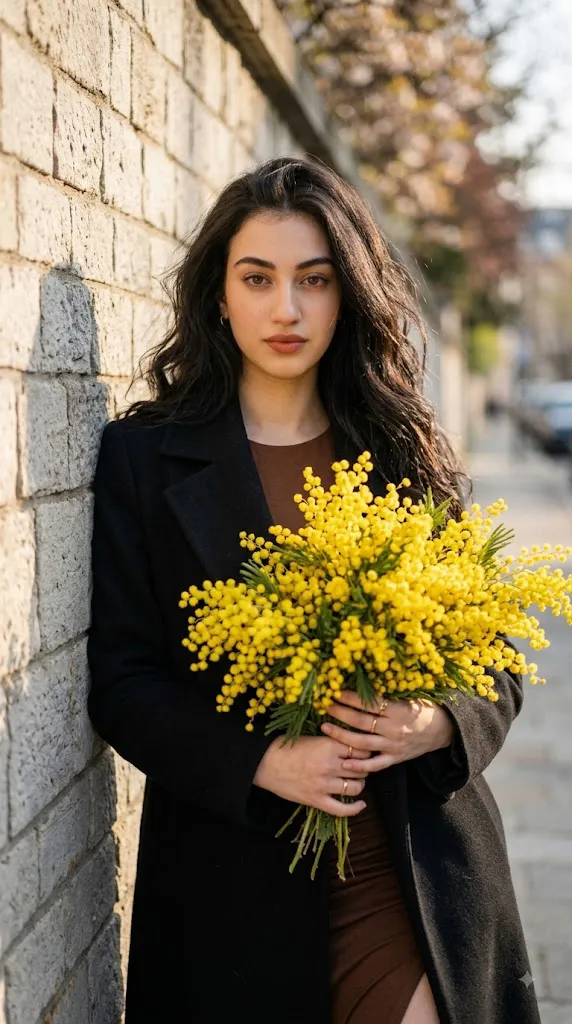
The Cinematic French Editorial Prompt is an AI photo-editing concept inspired by timeless French fashion photography, romantic spring styling, and minimalist editorial aesthetics. It transforms an ordinary portrait into a sophisticated fashion image: a young woman holding a large bouquet of bright yellow mimosa flowers against an old textured stone wall.
The core visual contrast comes from pairing a deep matte black wool or velvet overcoat with vibrant yellow mimosa blooms. The dark coat gives the portrait a refined feel, while the flowers add freshness and a distinct spring mood.
The subject has long, naturally wavy dark-brown hair and a serene, slightly melancholic expression, with a soft, confident gaze directed straight at the camera. Natural makeup — terracotta-nude lips, subtle smoky eyes, defined brows — keeps the look polished but unretouched. Minimal gold rings add understated feminine detail, in keeping with effortless French styling.
The setting stays simple: an old light-gray textured stone wall as a neutral backdrop, with golden-hour side lighting casting gentle highlights on the hair and face and soft shadows across the wall. The final look blends candid editorial photography, French-girl style, warm spring tones, shallow depth of field, and film-inspired color grading (Fujifilm/Kodak Portra tones) for a timeless, not over-filtered, feel.
When using a reference photo, the subject's identity should stay consistent — the AI should transform clothing, flowers, environment, lighting, and mood while preserving facial features, skin tone, hairstyle, and proportions.
"Cinematic French Editorial Prompt"
Spring editorial portrait of a young woman, romantic minimalist aesthetic, holding a large bouquet of bright yellow mimosa flowers. Deep matte black wool/velvet overcoat contrasting with the vibrant yellow blooms. Long dark brown wavy natural hair, serene melancholic expression, soft confident gaze looking directly at camera. Natural makeup with terracotta-nude lips, subtle smoky eyes, well-defined brows, realistic skin texture, no-retouch look. Minimal gold rings on fingers for refined feminine detail. Leaning slightly against an old light-gray textured stone brick wall, golden hour side sunlight, soft shadows. Calm, warm spring mood, candid editorial fashion photography, French-girl aesthetic, Fujifilm/Kodak Portra film tones, balanced contrast, shallow depth of field, sharp focus on eyes, soft background blur, natural color grading, timeless cinematic look, high resolution, professional photography.
How To Use Photo Editing?
Using the Cinematic French Editorial Prompt is straightforward when the process is divided into a few simple stages. The quality of the final result depends heavily on the reference photograph and how clearly the prompt describes the desired transformation.
Step 1: Select a Good Reference Photo
Start with a high-resolution portrait where the person's face is clearly visible. Natural lighting is preferable because it gives the AI more accurate information about facial structure, skin tone, hairstyle, and proportions. Avoid photographs with extreme filters, heavy blur, excessive shadows, or objects covering the face.
Step 2: Upload the Reference Image
Open an AI image-generation or photo-editing platform that supports reference images. Upload the selected photograph and use it as the primary visual reference.
You can add an instruction such as:
“Use the uploaded photograph as the primary identity reference. Preserve the subject's recognizable facial features, natural skin tone, hairstyle, facial proportions, and distinctive characteristics while transforming the wardrobe, flowers, environment, lighting, and editorial style.”
This helps maintain consistency while allowing the AI to create the requested fashion scene.
Step 3: Add the Full Prompt
Paste the complete Cinematic French Editorial Prompt into the prompt field. Make sure the description includes the mimosa bouquet, black overcoat, hairstyle, facial expression, stone wall, golden-hour lighting, camera style, and film-inspired color grading.
Step 4: Generate Multiple Variations
Create several variations and compare them carefully. Look for the version with the most natural facial appearance, realistic hands, accurate flower structure, convincing clothing texture, and balanced lighting.
Tools You Can Use For Prompt Copy and Create Photo
Different categories of creative tools can be used to create this type of cinematic portrait.
1. AI Image Generators
AI image-generation platforms can create complete editorial scenes from detailed prompts. They can generate clothing, flowers, backgrounds, lighting, poses, and photographic compositions. For reference-based portraits, choose a platform that supports image references or character consistency.
2. AI Photo Editors
AI photo editors are useful when you already have a portrait and want to transform it into a French editorial scene. They can help change clothing, replace backgrounds, introduce flowers, modify lighting, and create cinematic effects.
3. Professional Photo-Editing Software
Applications such as Photoshop or Lightroom can be used for final adjustments after generating the image. Exposure, highlights, shadows, contrast, crop, color temperature, and sharpness can all be refined manually.
4. Image Enhancement Tools
AI enhancement and upscaling tools can improve resolution and restore subtle details after generation. They can be useful for refining hair strands, skin texture, flower details, fabric texture, and overall sharpness. Enhancement should remain subtle because excessive sharpening can create unnatural skin or artificial-looking details.
How To Edit Photo?
Once the initial image is generated, inspect each major component before finalizing the portrait.
Step 1: Check Facial Identity
Compare the generated face with the reference photograph. Examine the eyes, eyebrows, nose, lips, jawline, cheek structure, hairstyle, and skin tone. Avoid excessive beautification or artificial skin smoothing. The goal is a realistic editorial portrait with natural facial texture.
Step 2: Refine the Black Overcoat
The deep black wool or velvet overcoat should look luxurious and tactile. Make sure the fabric contains realistic texture, natural folds, and subtle highlights. The black material should retain visible detail rather than becoming a completely flat dark shape.
Step 3: Enhance the Mimosa Bouquet
The bright-yellow mimosa flowers are one of the most important visual elements. They should look naturally arranged, with realistic small blossoms, stems, and varying levels of focus. Avoid repetitive flower patterns or unnaturally perfect shapes. The bouquet should feel like a real spring arrangement held naturally by the subject.
Step 4: Improve the Hair and Makeup
The dark-brown wavy hair should contain individual strands and natural movement. Avoid excessive smoothing or unrealistic shine. The makeup should remain understated. Terracotta-nude lips, subtle smoky eyes, and defined eyebrows should enhance the face without overpowering the natural appearance.
Step 5: Refine the Hands and Jewelry
Hands can sometimes become distorted in AI-generated images, so inspect the fingers carefully. The minimal gold rings should appear naturally positioned and correctly proportioned.Keep the jewelry understated to preserve the minimalist French aesthetic.
Step 6: Enhance the Stone Wall
The old light-gray stone brick wall should provide realistic texture and depth. Natural imperfections, subtle cracks, stone variations, and soft shadows can make the background feel authentic. Avoid making the wall too sharp because it should remain secondary to the subject.
Step 7: Adjust Golden-Hour Lighting
Warm side sunlight should illuminate one side of the face and hair while creating soft shadows on the opposite side. The lighting should remain natural rather than excessively dramatic. A subtle warm glow can enhance the spring mood while maintaining realistic skin tones.
Step 8: Apply Cinematic Depth of Field
Keep the eyes and primary facial features sharply focused while allowing the background to gradually become softer. A shallow depth of field helps separate the woman from the stone wall and creates the polished appearance of professional portrait photography.
Step 9: Apply Film-Inspired Color Grading
Use balanced contrast with warm highlights and natural skin tones. Fujifilm- or Kodak Portra-inspired colors can provide a gentle analog character. Avoid excessive saturation. The yellow mimosa should remain vibrant while the black coat, gray wall, and skin tones stay balanced.
Step 10: Choose the Final Composition
A vertical 4:5 composition works particularly well for fashion portraits and social-media posts. Keep the subject prominent while allowing enough space around the bouquet and stone wall to establish the environment. The final image should feel intimate, elegant, effortless, and naturally photographed.
Conclusion
The Cinematic French Editorial Prompt combines minimalist fashion, spring flowers, natural beauty, and timeless European-style photography into one elegant concept. The black overcoat forms a luxurious base, the mimosa bouquet adds seasonal freshness, and the textured stone wall keeps the background simple and secondary. Golden-hour side lighting and shallow depth of field complete the polished, editorial feel.
For best results, start with a clear reference photo and detailed instructions covering identity, clothing, flowers, expression, hairstyle, lighting, and composition. Generate several variations, inspect faces, hands, jewelry, flowers, and shadows closely, and finish with restrained color grading rather than heavy filters. Done well, this workflow turns a simple photo into a sophisticated fashion image — suited to social media, portfolios, magazine-style editorials, wallpapers, and personal branding — with a timeless appeal across seasons.