Introduction
Friendship Day celebrates the bond, trust, and unforgettable memories shared between friends. In today's digital world, people love capturing these moments through creative photographs. With AI, you can now create premium cinematic Friendship Day portraits without visiting a professional studio. A well-crafted Cinematic Friendship Day AI Prompt transforms an ordinary photo into a high-end editorial masterpiece with dramatic lighting, realistic textures, and movie-like quality.
The biggest advantage of a detailed AI prompt is its ability to preserve each person's facial identity while enhancing the environment, lighting, clothing, and cinematic atmosphere. Modern AI generators can replicate professional techniques like shallow depth of field, HDR lighting, and cinematic color grading. Mentioning camera settings like an 85mm lens, f/1.8 aperture, golden-hour lighting, and 4:5 portrait ratio helps generate images resembling magazine covers or movie posters — perfect for Instagram, blogs, or personal memories.
"Cinematic Friendship Day Prompt"
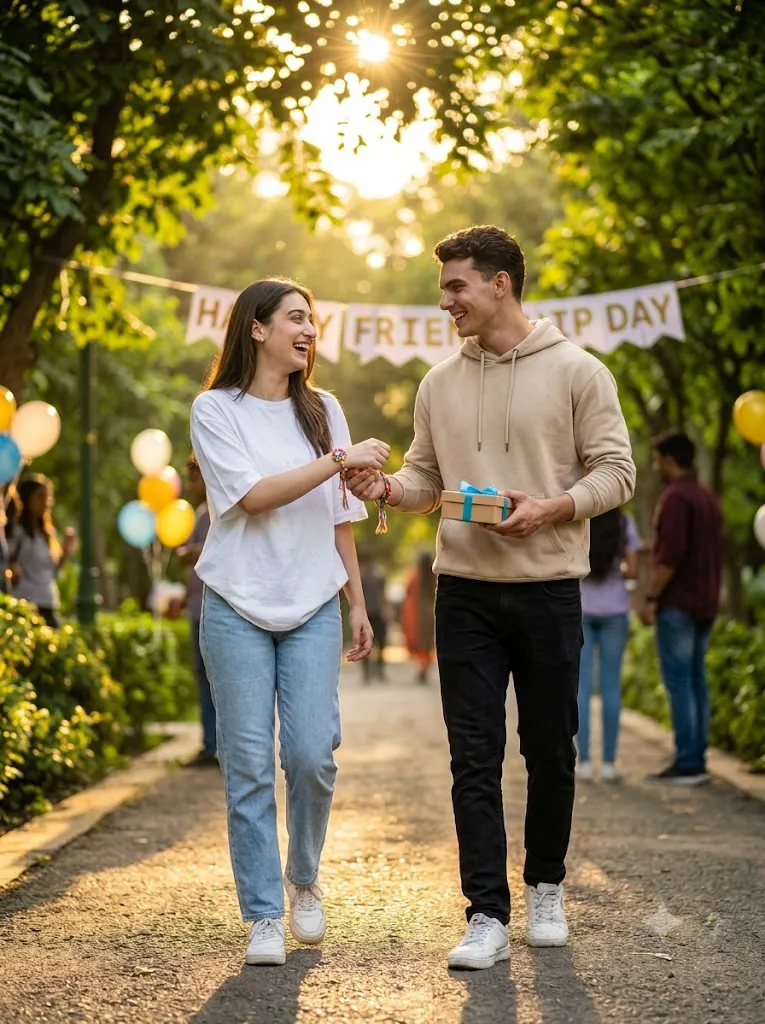
Create an ultra-realistic, cinematic Friendship Day portrait of two best friends walking together through a tree-lined park at golden hour, preserving their exact facial identity, skin tone, and features from the reference photos. They laugh naturally, exchanging colorful friendship bands, with one holding a small gift box tied with a blue ribbon. One wears a white oversized T-shirt, light blue jeans, and white sneakers; the other a beige hoodie, black jeans, and white sneakers. Warm sunlight filters through green trees with floating leaves and soft bokeh; background shows a festive park with balloons and a "Happy Friendship Day" banner. Shot on 85mm f/1.8, sharp subjects, blurred background, natural skin texture, cinematic HDR lighting, 8K editorial quality, no distortion or extra fingers.Negative Prompt: blurry, cartoon, CGI, unrealistic skin, bad anatomy, extra fingers, deformed hands, watermark, text errors, distorted face.
How To Use Photo Editing?
Creating a cinematic Friendship Day portrait using AI is simple when you follow the correct steps.
Step 1: Select a High-Quality Photo
Choose a clear photo of you and your friends with good lighting and visible facial details. High-resolution images always produce better AI results.
Step 2: Copy the AI Prompt
Copy the complete Cinematic Friendship Day Prompt exactly as written. Every detail, including clothing, lighting, background, expressions, and camera settings, helps improve the final image.
Step 3: Upload Your Reference Image
Open your preferred AI image generation platform and upload the original group or friendship photo.
Step 4: Paste the Prompt
Paste the copied prompt into the text input area. Keep instructions like identity preservation and realistic facial matching unchanged for the most natural results.
Step 5: Generate Multiple Variations
Generate several versions using the same prompt. AI often creates slight variations in lighting, composition, and expressions, giving you more options.
Step 6: Download the Best Image
Select the version with the best lighting, facial accuracy, realistic textures, and natural poses. Save it in the highest available resolution.
Tools You Can Use for Prompt Copy and Create Photo
Many AI tools can generate premium Friendship Day portraits. Here are some of the most popular options.
1. ChatGPT Image Generation
Perfect for generating detailed AI prompts and realistic friendship portraits with accurate face preservation and cinematic quality.
2. Midjourney
Known for producing artistic, editorial-style images with stunning lighting, realistic textures, and premium visual quality.
3. Flux AI
Excellent for creating photorealistic portraits with natural skin tones, accurate facial features, and realistic clothing details.
4. Leonardo AI
Offers advanced portrait models capable of generating cinematic friendship images with professional lighting and stylish compositions.
5. Adobe Firefly
Ideal for designers and photographers who require commercial-quality AI editing with high-resolution outputs.
6. Google Gemini Image Tools
Provides clean, balanced, and realistic portrait generation with modern AI capabilities.
7. Ideogram AI
Suitable for stylish social media portraits and creative editorial photography with impressive visual detail.
8. Bing Image Creator
A beginner-friendly AI image generator that quickly produces attractive Friendship Day portraits using simple prompts.
How To Edit Photo?
Professional Friendship Day portraits depend on both a detailed AI prompt and careful editing techniques.
Preserve Facial Identity
Always include instructions asking the AI to preserve each person's face, hairstyle, skin tone, age, and recognizable features. This keeps everyone looking like themselves.
Choose Stylish Outfits
Modern casual clothing in coordinated colors creates a fashionable and timeless look. Denim jackets, neutral shirts, sneakers, hoodies, or smart-casual outfits work particularly well.
Use Cinematic Lighting
Golden-hour sunlight, dramatic sunset lighting, or soft studio illumination adds warmth and emotional depth to the portrait. Cinematic lighting makes the image feel more premium and professional.
Add a Beautiful Background
Choose locations such as city streets, rooftop viewpoints, parks, beaches, mountains, cafés, or urban landscapes. A clean and uncluttered background keeps the focus on the friendship.
Create Natural Poses
Avoid stiff poses. Instead, ask the AI to generate genuine interactions such as laughing together, walking side by side, high-fives, shoulder hugs, or casual conversations. Natural expressions make the image more believable.
Enhance the Final Image
After generating the portrait, use AI upscaling tools to improve sharpness, remove small imperfections, and increase image resolution. The final result will be suitable for printing, social media, or digital portfolios.
Conclusion
The Cinematic Friendship Day AI Prompt is a powerful way to create memorable, visually stunning friendship portraits using artificial intelligence. By combining accurate facial identity preservation, stylish clothing, realistic body language, premium lighting, and professional camera settings, it produces images that resemble high-end editorial photography.
Whether celebrating Friendship Day, creating social media content, or preserving memories with close friends, this prompt delivers exceptional results without expensive cameras or professional editing skills. Simply upload a high-quality reference photo, copy the detailed prompt, and generate multiple variations to find the perfect cinematic image — a timeless celebration of friendship and happiness.