Introduction
The Cinematic Kawasaki Ninja H2R Prompt is an exciting AI photo-editing concept designed for motorcycle enthusiasts, cinematic photography lovers, and social media creators. This type of prompt can transform an ordinary portrait into a dramatic, premium-looking motorcycle scene featuring the legendary Kawasaki Ninja H2R.
The concept focuses on creating a realistic cinematic composition in which the subject becomes the central character of a high-end motorcycle photoshoot. The motorcycle, outfit, environment, lighting, camera angle, and background are carefully described so that an AI image-generation or photo-editing tool can produce a visually powerful result.
The Kawasaki Ninja H2R is particularly suitable for this concept because its aggressive aerodynamic bodywork, sharp design, dark finish, and futuristic appearance naturally create a cinematic atmosphere. When combined with dramatic lighting, realistic shadows, atmospheric depth, and a professional camera perspective, the final image can look similar to a premium motorcycle advertisement or movie poster.
One of the most important elements of a reference-based portrait is facial identity preservation. If you are using your own photograph as the reference, the prompt should clearly instruct the AI to preserve the original facial characteristics. The face should remain recognizable while the clothing, pose, motorcycle, environment, and lighting are transformed. The goal is not simply to place a person beside a motorcycle. Instead, the objective is to create a believable scene where the person and motorcycle appear to have been photographed together in the same location.
"Cinematic Kawasaki Ninja H2R Prompt"
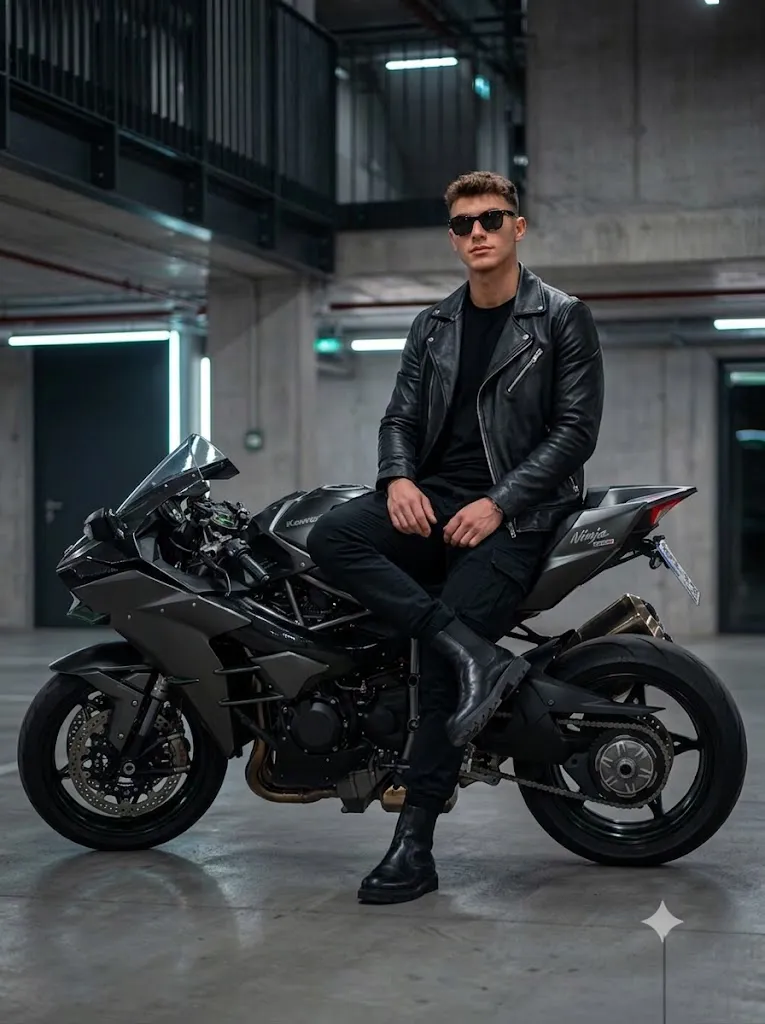
Style: Ultra-realistic, cinematic quality. Subject: A stylish young man (Note: Ensure a 100% facial match to the uploaded image). Action/Pose: Full-body shot. The man is sitting on the back of a matte-black Kawasaki Ninja H2R. One leg is crossed casually over the other. Expression/Angle: Looking slightly right and confidently towards the camera. Attire: Top: Slim, off-black T-shirt. Outerwear: Premium black leather jacket. Bottoms: Slim black cargo pants. Footwear: Black leather chunky boots. Setting/Background: A slightly dark and modern environment.
How To Use Photo Editing?
Using the Cinematic Kawasaki Ninja H2R Prompt becomes easier when you follow a structured workflow.
Step 1: Select the Reference Photo
Choose a clear, high-resolution photograph of the person you want to place into the motorcycle scene. A photograph with a clearly visible face works best. Avoid extremely blurry images or photographs where the face is hidden by hands, helmets, heavy shadows, or other objects. If identity preservation is important, select an image with natural lighting and a clear view of the facial features.
Step 2: Upload the Image
Open an AI photo editor or image-generation platform that supports reference images. Upload the photograph and use it as the primary identity reference.
Add an instruction such as:
“Preserve the subject's original facial identity and natural facial characteristics. Keep the face recognizable and do not unnecessarily modify the facial structure, eyes, nose, lips, skin tone, or hairstyle.”
This helps communicate that the person's identity should remain consistent.
Step 3: Add the Motorcycle Prompt
Paste the complete Cinematic Kawasaki Ninja H2R Prompt into the prompt field. Describe the motorcycle, subject's pose, clothing, location, lighting, camera perspective, atmosphere, and realism requirements. The prompt should also explain how the person interacts with the motorcycle so the AI can create a more believable composition.
Step 4: Generate the Image
Generate the image and inspect the result carefully. Look at the face, hands, body proportions, motorcycle structure, clothing, shadows, and background. If something appears unnatural, modify that specific part of the prompt and generate another version.
Tools You Can Use For Prompt Copy and Create Photo
Different types of AI tools can be useful for creating a cinematic Kawasaki Ninja H2R portrait.
1. AI Image Generation Platforms
Text-to-image platforms are useful when you want to create the entire motorcycle scene from a detailed description.
They can generate cinematic environments, motorcycle compositions, dramatic lighting, clothing, camera angles, and atmospheric effects. For personal portraits, select a platform that supports reference-image or character-consistency features.
2. AI Photo Editing Tools
AI photo editors are better when you already have a photograph and want to transform it into a motorcycle scene. These tools can help replace the background, modify clothing, add motorcycles, change lighting, and create a cinematic environment while using the original image as a reference.
3. Traditional Photo Editing Software
After generating the AI image, traditional editing software can be used for final corrections. You can adjust exposure, contrast, highlights, shadows, sharpness, cropping, and color balance. These adjustments can help the final image look more polished and suitable for publishing.
4. Image Upscaling Tools
If the generated image lacks fine detail, an image-enhancement or upscaling tool can help improve resolution and clarity. Pay particular attention to the motorcycle's mechanical details, facial texture, clothing, and background because these areas can reveal AI artifacts.
How To Edit Photo?
After generating the initial image, carefully refine the composition.
Step 1: Check Facial Details
Start with the subject's face. Confirm that the facial structure and recognizable characteristics remain consistent with the reference photograph. Look at the eyes, eyebrows, nose, lips, jawline, skin texture, and hairstyle. If the face looks noticeably different, regenerate the image with stronger identity-preservation instructions.
Step 2: Check the Motorcycle
The Kawasaki Ninja H2R should look like a realistic high-performance motorcycle rather than a generic sportbike.
Inspect the fairings, wheels, handlebars, exhaust area, suspension, body proportions, and aerodynamic design.
Make sure the motorcycle is correctly integrated into the environment and does not appear distorted.
Step 3: Improve the Pose
The subject's pose should look natural and physically believable. If the person is sitting on the motorcycle, ensure that the legs, hands, feet, and body position interact realistically with the motorcycle. Avoid unnatural limb positions or hands that appear disconnected from the handlebars.
Step 4: Refine Lighting
Cinematic lighting is one of the most important parts of the concept. Use dramatic highlights and controlled shadows to emphasize the motorcycle's bodywork and the subject's facial features. Rim lighting can help separate the subject and motorcycle from a darker background. A subtle atmospheric haze can add depth without making the image look artificial.
Step 5: Adjust the Background
Choose an environment that complements the aggressive motorcycle aesthetic. A dark urban road, modern industrial location, tunnel, garage, or dramatic open-road setting can work well. Keep unnecessary objects away from the main subject so the viewer's attention remains on the rider and motorcycle.
Step 6: Add Cinematic Color Grading
A darker cinematic color grade can enhance the premium appearance. Adjust contrast, highlights, shadows, and saturation carefully. Avoid excessive sharpening or artificial skin smoothing. Natural skin texture and realistic materials will make the final image more convincing.
Step 7: Select the Best Aspect Ratio
For Instagram posts, a vertical format such as 4:5 can work well. For Instagram Stories, Reels, and mobile wallpapers, 9:16 is a practical choice. For cinematic banners or desktop wallpapers, a wider landscape composition may be more suitable.
Conclusion
The Cinematic Kawasaki Ninja H2R Prompt is an excellent way to create a powerful motorcycle-themed portrait using AI photo-editing technology. By combining a realistic reference photograph with a detailed motorcycle scene, cinematic lighting, dramatic composition, and professional camera aesthetics, you can create an image that feels like a premium motorcycle campaign.
The most important factors are facial identity preservation, realistic body proportions, accurate motorcycle details, natural interaction between the rider and bike, and consistent lighting.
For the strongest results, begin with a high-quality reference image and provide clear instructions about the subject, motorcycle, environment, camera angle, lighting, and desired realism. After generation, carefully inspect the face, hands, motorcycle geometry, clothing, shadows, and background.
Finally, use subtle color grading and image enhancement to give the result a polished cinematic finish. With a well-written prompt and careful editing workflow, the Cinematic Kawasaki Ninja H2R concept can turn an ordinary photograph into a dramatic, high-end motorcycle portrait suitable for social media, wallpapers, creative portfolios, and cinematic visual projects.