Introduction
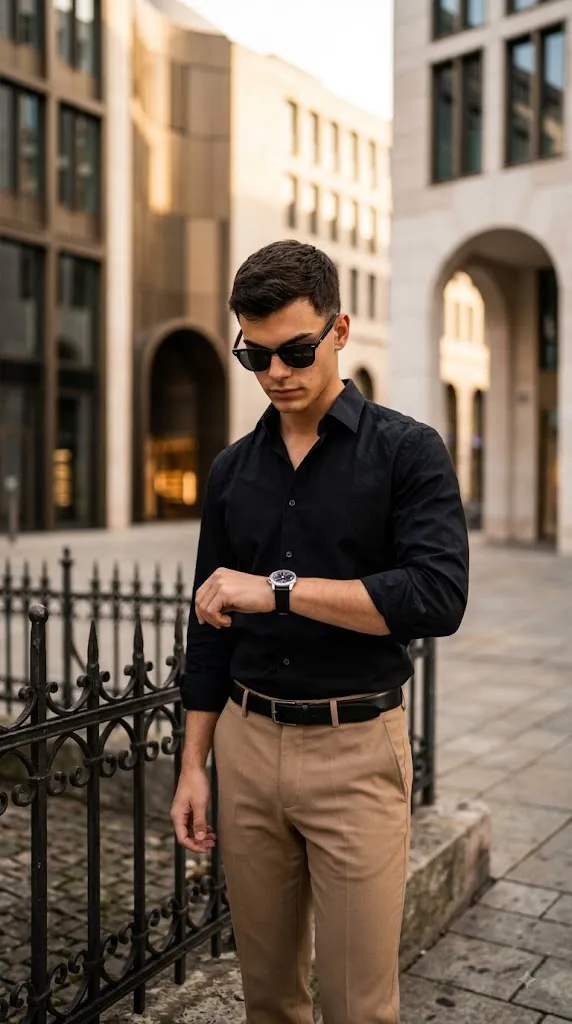
This AI photo-editing style turns an ordinary portrait into a high-fashion, editorial-style urban scene. It features a man standing near a low wrought-iron fence, glancing at his wristwatch, dressed in a black button-down shirt, tailored tan trousers, a black leather belt, and dark sunglasses. His downcast gaze and relaxed posture create a candid, thoughtful mood rather than a posed studio look.
The setting is a sophisticated modern cityscape — a plaza, luxury district, or high-rise exterior — with neutral architecture, arches, and stone surfaces softly blurred behind him. A shallow depth of field keeps the subject sharp while the background fades into cinematic bokeh, and soft natural daylight with a refined, slightly warm color grade completes the editorial atmosphere.
"Cinematic Luxury Portrait Prompt"
A high-fashion, cinematic medium shot of a handsome man standing near a low wrought-iron fence outdoors, checking the time on a wrist watch. He wears dark sunglasses, a crisply ironed black button-down shirt, and tailored tan trousers secured with a black leather belt. He stands with slightly downcast eyes, lost in his own thoughts as he glances at the watch. The setting is a modern urban environment, possibly a plaza or the area outside a high-rise building. Behind him, blurred shapes of neutral-toned architecture, arches and windows create a sense of sophisticated anonymity.
How To Use Photo Editing?
Using the Cinematic Luxury Portrait Prompt is simple when the editing process is divided into a few important stages. The most important factor is starting with a clear reference image that gives the AI enough information about the subject.
Step 1: Select a Good Reference Photo
Begin with a high-resolution photograph of the person you want to feature. Choose an image where the face is clearly visible and the subject has reasonably natural lighting. A front-facing or slightly angled portrait can work well. Avoid extremely blurry photographs, heavy filters, extreme shadows, or images where the face is partially hidden. A clean reference image gives the AI a better understanding of facial structure, hairstyle, skin tone, and proportions.
Step 2: Upload the Reference Image
Open an AI image-generation or photo-editing platform that supports reference images. Upload your selected photograph and use it as the primary visual reference.
You can add an instruction such as:
“Use the uploaded photograph as the primary identity reference. Preserve the subject's recognizable facial characteristics, natural skin texture, hairstyle, skin tone, facial proportions, and distinctive features while transforming the clothing, environment, lighting, and overall cinematic styling.”
This helps communicate that the main creative transformation should focus on the scene rather than unnecessarily changing the person's appearance.
Step 3: Add the Full Prompt
Paste the complete Cinematic Luxury Portrait Prompt into the prompt field. Make sure the description includes the black shirt, tan trousers, sunglasses, wristwatch, wrought-iron fence, urban architecture, pose, camera perspective, lighting, and depth of field. Detailed descriptions can provide better control over the final composition.
Step 4: Generate Multiple Variations
Generate several variations instead of immediately selecting the first result. Compare the images for facial consistency, clothing accuracy, hand and wristwatch details, body proportions, background quality, and lighting. Choose the version that looks the most realistic and naturally composed.
Tools You Can Use For Prompt Copy and Create Photo
There are several categories of tools that can help you create a cinematic luxury portrait.
1. AI Image Generators
AI image-generation platforms are useful when you want to create an entirely new luxury fashion scene from a text prompt. These tools can generate the subject, clothing, architecture, lighting, composition, and overall atmosphere. For reference-based work, choose a platform that supports image references or identity/character consistency.
2. AI Photo Editors
AI photo editors are especially useful when you already have an existing photograph. They can help modify clothing, replace backgrounds, adjust lighting, enhance details, and create an urban luxury environment while using the original image as a reference. This approach is ideal when maintaining the person's recognizable appearance is important.
3. Graphic Design Applications
Traditional graphic-design applications can be used after the AI generation process for final refinements. You can crop the portrait, adjust framing, add text, prepare social-media versions, or create a fashion-poster layout. These tools are also useful for making final exposure, contrast, and composition adjustments.
4. Image Enhancement Tools
Image-enhancement and upscaling tools can improve the final resolution and recover subtle details. They may be useful for refining hair, clothing texture, watch details, sunglasses, and architectural elements. However, enhancement should be applied carefully because excessive sharpening can make skin and fabric appear artificial.
How To Edit Photo?
Once the initial cinematic portrait has been generated, carefully inspect the image and refine the most important elements.
Step 1: Check Facial Identity
Begin with the face. Compare the generated image with the reference photograph and check the overall facial structure, eyes, eyebrows, nose, lips, jawline, hairstyle, and natural skin tone. Avoid excessive AI beautification or artificial skin smoothing. A realistic portrait should retain natural facial texture. If the face has changed significantly, regenerate the image with stronger reference-image instructions.
Step 2: Refine the Black Shirt
The black button-down shirt should look crisp, clean, and professionally tailored. Pay attention to the collar, buttons, sleeves, fabric texture, and natural folds. The shirt should have realistic highlights rather than appearing completely flat or artificially black.
Step 3: Improve the Tan Trousers
The tailored tan trousers should fit naturally and maintain realistic fabric folds. The color should complement the black shirt while creating the sophisticated contrast that defines the outfit. Make sure the trousers do not appear overly smooth or plastic-like.
Step 4: Refine the Accessories
The dark sunglasses should have realistic reflections and sit naturally on the subject's face. The black leather belt should appear proportional and naturally integrated with the trousers. The wristwatch is particularly important because it is part of the main action. Make sure the watch is positioned correctly on the wrist and does not contain distorted shapes or unnecessary details.
Step 5: Improve the Pose
The subject should appear relaxed while checking his watch. His arms and hands should have anatomically realistic proportions. The slightly downcast gaze should communicate a thoughtful, sophisticated mood rather than sadness. The pose should feel like a candid moment captured by a professional fashion photographer.
Step 6: Enhance the Urban Background
The background should include sophisticated architectural elements such as arches, windows, stone walls, modern buildings, or a luxury plaza. Keep the background slightly blurred so it provides context without distracting from the subject. Avoid overly detailed or crowded backgrounds because the purpose of the scene is to create an elegant feeling of sophisticated anonymity.
Step 7: Adjust Natural Lighting
Soft natural daylight works particularly well for this concept. The light should illuminate the face and clothing without creating harsh highlights. Subtle highlights can appear on the sunglasses, watch, shirt, and hair, while gentle shadows provide depth. A slight cinematic rim light around the shoulders or hair can help separate the subject from the background.
Step 8: Add Cinematic Depth of Field
Use a shallow depth of field to keep the subject sharp while allowing the architecture behind him to become softly blurred. An 85mm lens with a wide aperture such as f/1.8 is a useful visual reference for creating this type of portrait aesthetic. The background should still retain recognizable architectural shapes without becoming distracting.
Step 9: Apply Luxury Color Grading
Use a refined neutral color palette with subtle warmth. Maintain natural skin tones while allowing the black shirt and tan trousers to remain visually rich. Avoid excessive saturation. A restrained cinematic grade with moderate contrast and subtle film grain can create a more professional editorial appearance.
Step 10: Choose the Final Composition
A vertical 4:5 composition is excellent for fashion and social-media portraits, while 9:16 works well for stories, reels, and mobile-screen content. Keep the subject prominently positioned while leaving enough background space to communicate the sophisticated urban setting. The final image should feel balanced, premium, and naturally photographed.
Conclusion
This prompt blends modern menswear, urban architecture, and cinematic photography into one polished concept. The watch-checking gesture adds narrative depth, making the image feel candid rather than staged. Success depends on starting with a strong reference photo, giving clear instructions on identity preservation and styling, generating several variations, and applying only light enhancement to keep skin, fabric, and lighting looking natural. Done well, it produces a portrait suitable for social media, personal branding, or luxury lifestyle content.