Introduction
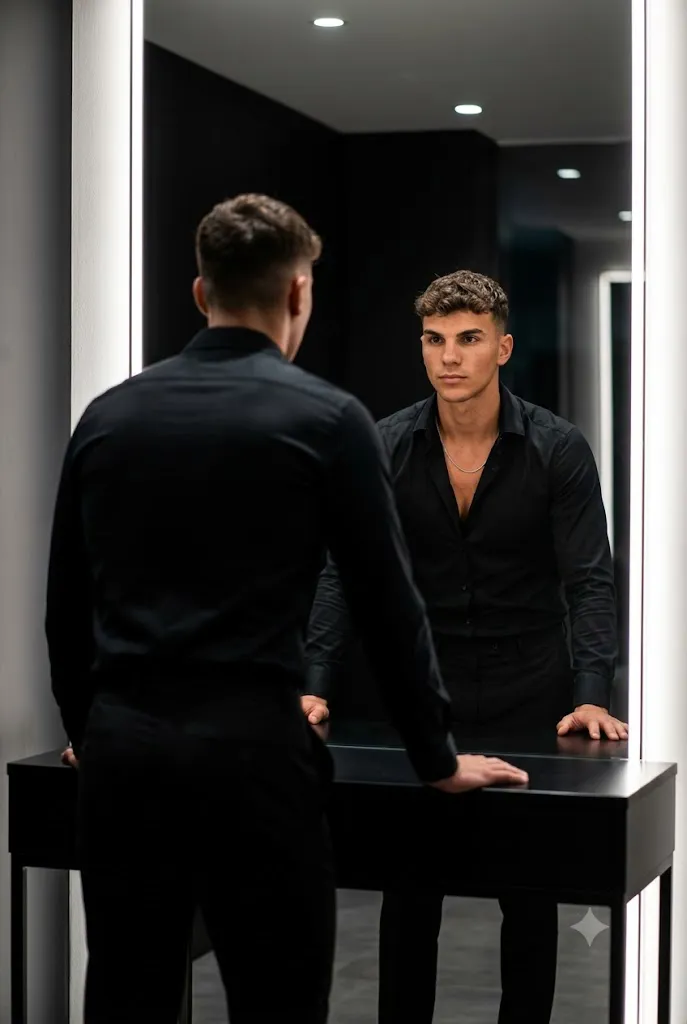
The Cinematic Mirror Reflection Prompt is a premium AI portrait prompt designed to create dramatic, ultra-realistic editorial photographs with a luxury fashion aesthetic. This prompt captures a confident man standing in front of a modern LED-lit mirror, creating a powerful reflection with deep cinematic shadows and high contrast. Combined with a tailored black outfit, minimalist dark background, soft LED lighting, and shallow depth of field, the result is a professional magazine-quality portrait that looks like it was captured in a high-end fashion studio.
Whether you're creating content for Instagram, Pinterest, fashion blogs, or your personal portfolio, this prompt delivers stylish and realistic images with incredible facial detail, natural skin texture, and a premium editorial atmosphere. Simply use a powerful AI image generator, apply a few professional editing techniques, and you'll have a luxury portrait ready to share.
"Cinematic Mirror Reflection Prompt"
Use my exact reference image face, ultra-realistic cinematic mirror portrait, vertical. Confident man in a black tailored outfit, slightly unbuttoned black shirt with thin chain, standing before a modern LED-lit mirror Shot from behind with clear reflection, leaning forward in a powerful, introspective pose. Soft cinematic LED lighting, deep shadows, high contrast, minimal dark bakground. Photorealistic skin texture, sharp focus, shallow DOF, luxury editorial look. No text, no logos, no watermark, no CGI. Comma Haircut.
How To Use Photo Editing?
Step 1: Generate the AI Portrait
Copy the complete Cinematic Mirror Reflection Prompt and paste it into your preferred AI image generator.
Step 2: Download the Best Result
Select the image with the most realistic face, lighting, and reflection, then download it in the highest available resolution.
Step 3: Open Your Editing Software
Import the portrait into Adobe Lightroom, Photoshop, Canva, Snapseed, or any professional editing application.
Step 4: Adjust Brightness
Increase brightness slightly while preserving the cinematic mood and deep shadows.
Step 5: Improve Contrast
Boost contrast carefully to make the reflection, facial features, and black outfit stand out.
Step 6: Enhance Colors
Keep the black clothing rich and deep while maintaining natural skin tones. Avoid oversaturation.
Step 7: Refine the Mirror Reflection
Enhance clarity around the mirror without making reflections appear artificial.
Step 8: Export the Final Portrait
Save the edited image in high resolution for Instagram, Pinterest, websites, or professional printing.
Tools You Can Use For Prompt Copy and Create Photo
Step 1: Copy the Prompt
Copy the complete Cinematic Mirror Reflection Prompt.
Step 2: Choose an AI Image Generator
You can create realistic portraits using:
- ChatGPT Image Generator
- Midjourney
- Flux AI
- Google Imagen
- Leonardo AI
- Stable Diffusion
- Adobe Firefly
- Canva AI
Step 3: Paste the Prompt
Open your selected AI platform and paste the prompt into the image generation box.
Step 4: Upload Your Reference Image (Optional)
If you want the AI to preserve your exact facial identity, upload a clear reference image before generating.
Step 5: Select the Best Settings
Choose:
- Ultra Realistic
- Editorial Photography
- Cinematic Lighting
- 8K Resolution
- Portrait Mode
- High Detail
- Shallow Depth of Field
- Vertical Composition
Step 6: Generate the Image
Click the Generate button and let the AI create your cinematic portrait.
Step 7: Download the Image
Download the highest-quality version for final editing.
How To Edit Photo?
Step 1: Import the Portrait
Open Lightroom, Photoshop, Canva, or Snapseed and import your AI-generated portrait.
Step 2: Crop the Composition
Keep the vertical composition balanced, ensuring both the subject and mirror reflection remain clearly visible.
Step 3: Correct White Balance
Maintain neutral colors while preserving the cool LED lighting. Avoid unwanted warm or yellow tones.
Step 4: Adjust Exposure
Increase exposure slightly to brighten facial details while keeping the dramatic atmosphere.
Step 5: Enhance Skin Texture
Apply light skin retouching while preserving realistic pores and natural facial texture.
Step 6: Improve Clothing Details
Increase clarity slightly on the black tailored outfit, shirt folds, chain, and hairstyle to create a luxury editorial appearance.
Step 7: Enhance the Mirror
Use selective sharpening to improve the reflection while keeping it natural and realistic.
Step 8: Add Depth
Apply a subtle background blur if necessary to make the subject stand out even more.
Step 9: Sharpen Important Details
Sharpen the eyes, hair, beard (if present), accessories, and mirror edges while avoiding oversharpening.
Step 10: Export the Final Portrait
Save the finished portrait as a high-quality JPEG or PNG, optimized for Instagram, Pinterest, websites, portfolios, or print.
Conclusion
The Cinematic Mirror Reflection Prompt is an excellent choice for creating luxury editorial portraits with a modern cinematic style. The combination of LED mirror lighting, minimalist dark backgrounds, premium black fashion, and realistic reflections creates striking images that capture confidence and sophistication. By following the steps above, you can generate, edit, and enhance professional-quality portraits that look like they were photographed in a luxury fashion studio. Whether you're building a personal brand, creating social media content, or expanding your creative portfolio, this prompt helps you produce timeless, high-end results with minimal effort.