Introduction
The Cinematic Rolls-Royce Luxury Prompt is an AI photo-editing concept designed to turn an ordinary portrait into a dramatic, billionaire-style luxury lifestyle image. It blends high-end fashion, an exotic car, Dubai's skyline, cinematic night lighting, and wet reflective surfaces into one polished editorial look.
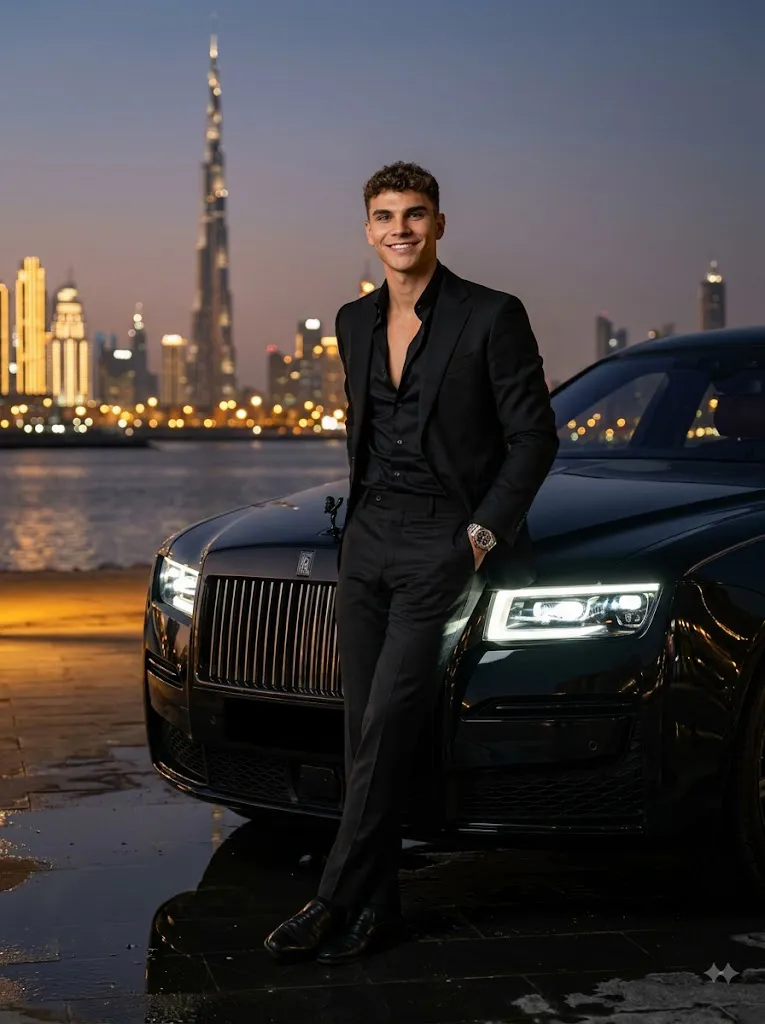
The subject: a stylish young man in an all-black tailored suit with an unbuttoned black silk shirt and a luxury wristwatch. The monochrome wardrobe creates a strong, masculine silhouette while letting the city lights and car glow provide contrast. He leans casually against the hood of a glossy black Rolls-Royce, its LED headlights adding dramatic foreground light. The setting is a Dubai waterfront at twilight, with the Burj Khalifa and skyline glowing in the background, and wet pavement reflecting the lights below for extra depth.
An 85mm lens at f/1.8 gives the shot cinematic subject separation and background blur. The goal is realistic skin texture, accurate fabric and reflections, and a result that reads as a genuine luxury campaign photo rather than an obvious AI render. When using a reference photo, the subject's real facial identity, hairstyle, and proportions stay intact while everything else — clothing, car, setting, lighting — is transformed.
“Cinematic Rolls-Royce Luxury Prompt”
A cinematic, ultra-realistic portrait of a handsome stylish young man in an all-black tailored suit and unbuttoned black silk shirt, wearing a luxury watch. He is leaning effortlessly against the front hood of a glossy jet-black luxury Rolls-Royce car with glowing LED headlights. Setting is a luxury Dubai waterfront at twilight/night, with the illuminated Burj Khalifa and glowing city skyline in the background. Wet reflective ground, dramatic moody lighting, golden bokeh, rich black tones, billionaire luxury lifestyle aesthetic, shot on 85mm lens, f/1.8, 8k resolution, hyper-detailed, photorealistic. --ar 3:4 --style raw --v 6.0.
How To Use Photo Editing?
Using the Cinematic Rolls-Royce Luxury Prompt is straightforward when the process is divided into several stages. The most important step is selecting a suitable reference photograph.
Step 1: Select a Good Reference Photo
Choose a high-resolution image where the subject's face is clearly visible. A photograph with natural lighting and minimal filters usually provides better results. Avoid extremely blurry photographs, strong shadows covering the face, or images where important facial features are hidden.
Step 2: Upload the Reference Image
Open an AI image-generation or photo-editing tool that supports reference images. Upload the selected photograph and use it as the primary reference.
You can add an instruction such as:
“Use the uploaded photograph as the primary identity reference. Preserve the subject's recognizable facial characteristics, hairstyle, natural skin tone, facial proportions, and distinctive features while transforming the clothing, environment, vehicle, lighting, and cinematic atmosphere.”
This makes the intended transformation clearer.
Step 3: Add the Complete Prompt
Paste the full Cinematic Rolls-Royce Luxury Prompt into the prompt field. Include the car, black suit, waterfront setting, Burj Khalifa, wet ground, headlights, lighting, camera perspective, and cinematic atmosphere. Detailed prompts provide greater control over the final composition.
Step 4: Generate Multiple Variations
Create several variations and compare them carefully. Look for accurate facial identity, realistic hands, correct vehicle proportions, believable reflections, natural clothing, and convincing lighting. Choose the version that provides the best combination of realism and composition.
Tools You Can Use For Prompt Copy and Create Photo
Several categories of tools can help you create this type of luxury portrait.
1. AI Image Generators
AI image generators are useful for creating complete luxury scenes from text prompts. They can generate fashion, vehicles, architecture, lighting, reflections, and cinematic environments. For reference-based portraits, choose a platform that supports image references or character consistency.
2. AI Photo Editors
AI photo-editing applications are useful when you already have a photograph and want to transform the environment around the subject. They can help replace backgrounds, modify clothing, introduce vehicles, change lighting, and create cinematic atmospheres.
3. Professional Editing Software
Traditional editing software can be used for final color correction, exposure adjustments, cropping, contrast, masking, and composition refinement. This is particularly useful when preparing the final portrait for social media, advertising, or a luxury fashion portfolio.
4. Image Enhancement Tools
Image-enhancement and upscaling tools can improve resolution and refine small details after the AI generation process. They can help enhance facial texture, suit fabric, watch details, car surfaces, reflections, and architectural elements. Use enhancement carefully to avoid excessive sharpening or artificial-looking skin.
How To Edit Photo?
Once the initial image has been generated, inspect each important element carefully.
Step 1: Check Facial Identity
Compare the generated face with the reference image. Examine the eyes, eyebrows, nose, lips, jawline, hairstyle, and overall facial proportions. Avoid excessive beautification or artificial skin smoothing. Natural texture helps the portrait look authentic.
Step 2: Refine the Black Suit
The all-black tailored suit should look premium and properly fitted. Ensure the jacket has realistic folds, seams, lapels, and fabric texture. The black silk shirt should have a subtle natural sheen rather than appearing completely flat. The slightly open collar creates a relaxed luxury aesthetic.
Step 3: Improve the Luxury Watch
The watch should remain proportional to the wrist and contain realistic metallic reflections. Avoid distorted watch faces or unnatural straps. A subtle watch detail is enough to communicate luxury without distracting from the main composition.
Step 4: Enhance the Rolls-Royce
The vehicle should have realistic proportions, smooth glossy black paint, accurate bodywork, and believable reflections. The LED headlights should glow naturally without completely washing out the surrounding scene. Reflections from the headlights can extend naturally across the wet ground.
Step 5: Refine the Pose
The subject should lean casually against the hood rather than appearing stiff. Maintain realistic body proportions and natural hand placement. A confident but relaxed expression works particularly well for the billionaire lifestyle aesthetic.
Step 6: Improve the Dubai Background
The Burj Khalifa should appear recognizable but remain slightly softened by the shallow depth of field. The surrounding skyline can contain glowing windows, modern towers, waterfront architecture, and distant city lights. Avoid making the background too sharp because it can compete with the subject.
Step 7: Enhance Wet Reflections
Wet pavement is an important visual element. Add realistic reflections of headlights, skyline lights, and surrounding architecture. The reflections should follow the perspective of the ground rather than appearing like artificial mirrored objects.
Step 8: Adjust Cinematic Lighting
Use dramatic nighttime lighting with controlled highlights and deep shadows. The headlights can provide foreground illumination while city lights create subtle background highlights. A slight warm glow can be added to the distant lights while preserving rich black tones in the suit and vehicle.
Step 9: Apply Cinematic Color Grading
Use deep blacks, controlled highlights, subtle golden tones, and realistic skin colors. Avoid excessive saturation. A professional cinematic grade should make the image feel expensive and atmospheric rather than overly colorful.
Step 10: Final Composition and Export
Maintain the 3:4 vertical composition so the subject, Rolls-Royce, skyline, and Burj Khalifa can all be included naturally. Before exporting, inspect the image for distorted hands, unrealistic car details, strange reflections, duplicated objects, or artificial facial features. Export the final image at the highest available quality.
Conclusion
The Cinematic Rolls-Royce Luxury Prompt merges high fashion, automotive photography, and Dubai's skyline into a single cinematic concept. The black suit and silk shirt build a sophisticated, masculine look, the watch adds a quiet luxury detail, and the glossy Rolls-Royce serves as a strong secondary subject linking fashion and automotive culture. The illuminated Burj Khalifa anchors the location, and wet reflective pavement adds cinematic depth.
For the best results, start with a clear reference photo, give detailed instructions on identity, clothing, vehicle, pose, lighting, and color grading, then generate multiple variations and inspect faces, hands, reflections, and architecture closely. Done well, the result should read as a professionally shot luxury campaign — realistic texture, believable reflections, and controlled cinematic lighting — perfect for social media, fashion inspiration, automotive content, portfolios, or premium lifestyle wallpapers.