Introduction
There’s something timeless about a beautifully designed vintage car. The polished chrome, classic curves, round headlights, and elegant bodywork instantly create a feeling of luxury, nostalgia, and old-school charm. That exact aesthetic has become a popular AI photo-editing trend on Instagram, Pinterest, TikTok, and other social media platforms: the “Cinematic Vintage Car Prompt.” With just a reference photo and a carefully written AI prompt, anyone can transform an ordinary photograph into a dramatic portrait that looks like it belongs in a classic movie or luxury fashion editorial.
The popularity of this trend comes from the combination of vintage automobiles and cinematic photography. Instead of using a normal background, AI can place the subject beside a beautiful classic car on an old city street, countryside road, luxury hotel entrance, or atmospheric garage. Warm sunlight, realistic shadows, reflections, and subtle film grain can make the final image look like it was captured by a professional photographer.
The subject can also be styled in different ways. A black suit, leather jacket, white shirt, vintage sunglasses, or elegant casual outfit can create completely different moods. The car can be customized with different colors and classic designs, while the background can be changed from a sunny street to a rainy nighttime scene.
What makes this trend especially interesting is that you don’t need an actual vintage car, expensive clothes, or professional photography equipment. A clear reference image and a detailed prompt are often enough to create the desired concept. This article explains how to use the Cinematic Vintage Car Prompt, which tools you can use, and how to edit your photo step by step.
“Cinematic Vintage Car Prompt”
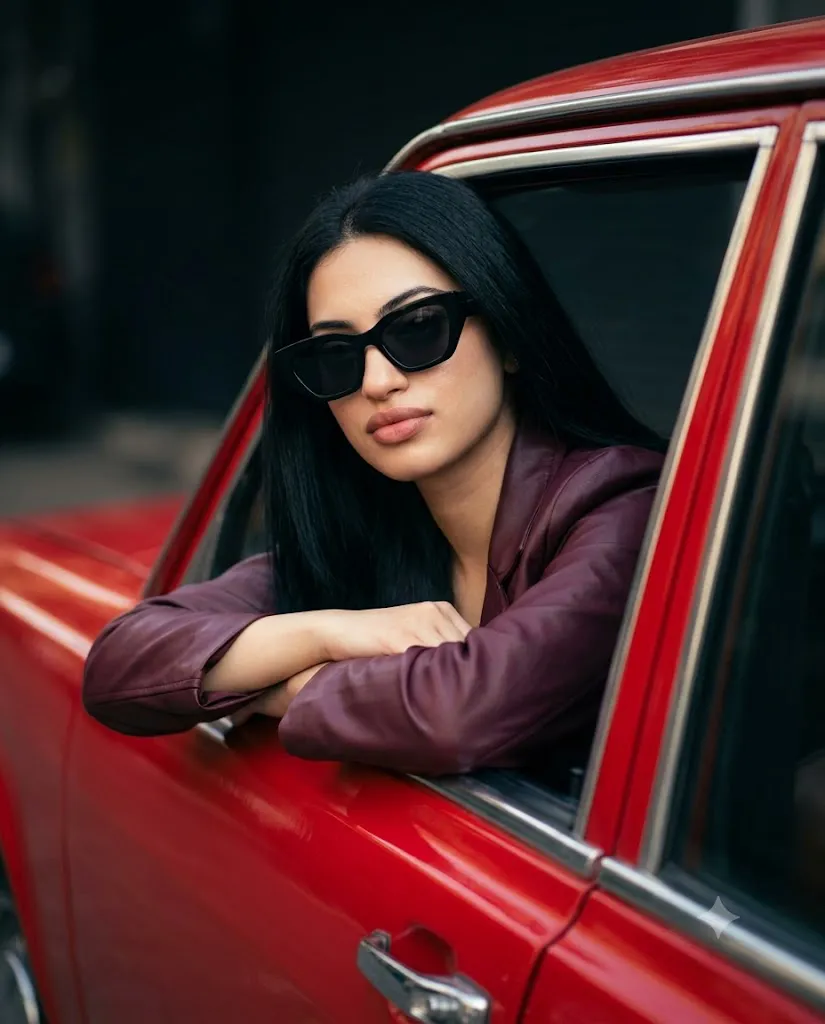
Use the uploaded image strictly as the ONLY face reference. Create an ultra-realistic cinematic portrait of a person leaning out of the open window of a bright red vintage car, resting both arms naturally on the door. The subject has long, straight dark hair, defined eyebrows, smooth warm skin, and a calm, confident neutral expression. Outfit includes a deep burgundy leather jacket and oversized black angular sunglasses. Composition is a medium close-up shot from a slightly low side angle using a 35–50mm lens, maintaining natural proportions and sharp facial detail. Lighting is soft directional sunlight with clean shadows and subtle highlights enhancing skin texture and jacket sheen. Background is a dark, minimal urban street with shallow depth of field and no distractions, ensuring full focus on the subject. Ultra-detailed, photorealistic, cinematic color grading, high dynamic range, 8K quality. Aspect ratio 4:5.
How To Use Photo Editing?
Unlike traditional photo-editing apps that mainly adjust brightness, colors, or contrast, the Cinematic Vintage Car trend uses AI image-generation and editing technology to create a new visual composition from your reference image and written instructions.
Here’s the typical workflow:
1. Upload a clear reference photo
Choose a high-quality photo where your face is clearly visible. A front-facing or slightly angled image generally provides useful facial information for the AI.
2. Write or copy a detailed prompt
Describe the vintage car, outfit, background, lighting, camera angle, and overall cinematic mood.
3. Generate the image
The AI combines the reference image with the instructions and creates a new cinematic composition.
4. Compare different versions
Generate multiple variations and choose the one with the most natural face, realistic car details, and convincing lighting.
5. Refine the result
You can request changes such as warmer lighting, darker shadows, a different car color, or a more realistic background.
The most important part of getting a good result is specificity. A detailed description gives the AI more information and allows you to control the final appearance more effectively.
Tools You Can Use For Prompt Copy and Create Photo
Several AI platforms can help you create cinematic vintage-car portraits.
1. Midjourney
Midjourney is popular for detailed cinematic scenes and creative compositions. It can be useful for creating dramatic environments, vintage automobiles, and editorial-style visuals.
2. Leonardo AI
Leonardo AI provides image-generation and editing features that can help users experiment with different cars, backgrounds, lighting styles, and compositions.
3. Google Gemini
Gemini-based image tools can provide a simple workflow for users who want to create or modify images using natural-language instructions, depending on the features available to them.
4. Canva AI
Canva is useful when you want to combine AI generation with traditional editing. After creating your image, you can adjust cropping, contrast, brightness, filters, and other elements.
5. ChatGPT With Image Generation
ChatGPT can help users create and refine detailed image prompts. You can upload a reference image, provide the vintage-car concept, and use follow-up instructions to improve the generated result.
Many creators start with a ready-made Cinematic Vintage Car Prompt and customize details such as the car color, outfit, location, lighting, and camera angle. This copy-and-customize approach is especially useful for beginners.
How To Edit Photo?
Creating your own cinematic vintage car portrait is straightforward when you follow a few simple steps.
Step 1: Choose a strong reference photo
Select a clear, high-resolution image with good lighting. Avoid heavily blurred images or photographs where the face is hidden.
Step 2: Copy a vintage car prompt
Paste the detailed prompt into your preferred AI image tool. Customize the car, clothing, location, and mood according to your preference.
Step 3: Add cinematic keywords
Use phrases such as “golden-hour lighting,” “classic vintage automobile,” “polished chrome,” “film photography aesthetic,” “shallow depth of field,” “cinematic movie still,” and “realistic reflections.”
Step 4: Choose your pose and camera angle
You can stand beside the car, lean against the door, sit inside the vehicle, or pose in front of the headlights. Low-angle and three-quarter shots can create a particularly powerful cinematic effect.
Step 5: Generate multiple variations
Don’t depend on the first result. Generate several versions and compare facial details, car proportions, lighting, background, and overall realism.
Step 6: Refine specific elements
If something looks incorrect, give targeted instructions such as “make the chrome more realistic,” “soften the background,” “preserve the original face,” or “make the golden-hour lighting warmer.”
Step 7: Add final touches
After generating the image, use an editing tool to make small adjustments to brightness, contrast, sharpness, cropping, and film grain. This can give the final photograph a more polished appearance.
Conclusion
The Cinematic Vintage Car Prompt is a creative way to transform an ordinary photograph into a stylish, nostalgic, and movie-inspired portrait. The combination of a classic automobile, sophisticated clothing, dramatic lighting, realistic reflections, and cinematic surroundings can produce a premium editorial appearance.
The biggest advantage of AI editing is flexibility. You don’t need access to a vintage car, professional studio, or expensive photography equipment. With a clear reference image and a detailed prompt, you can experiment with different cars, locations, outfits, poses, and lighting conditions.
Whether you want a luxury fashion portrait, a classic movie aesthetic, a romantic vintage scene, or a stylish road-trip photograph, this trend offers endless creative possibilities. By writing specific prompts and making small refinements, you can create a realistic cinematic vintage car portrait that looks professional, timeless, and visually striking.