Introduction
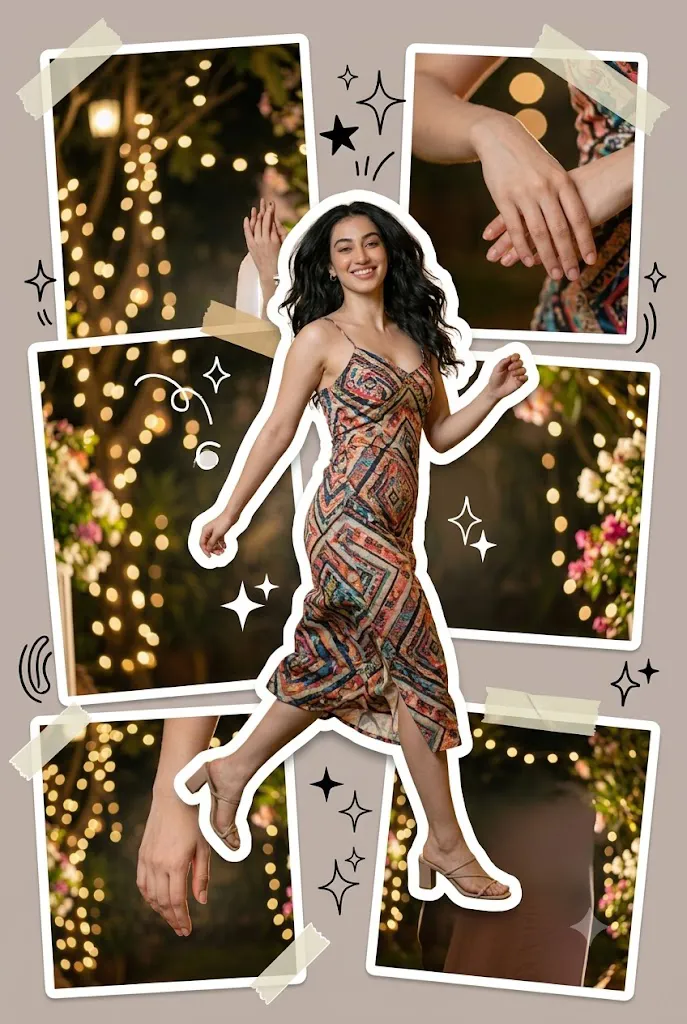
Artificial Intelligence has completely transformed digital art and photo editing, allowing creators to produce eye-catching artwork with only a detailed prompt and a reference image. One of the most exciting trends in AI-generated artwork is the Creative Sticker Sheet Poster Portrait style. This unique design transforms a single portrait into a vibrant collection of die-cut stickers arranged across a stylish poster. Each sticker features clean white borders, realistic shadows, layered depth, and playful decorative elements, creating a composition that looks modern, premium, and ready for social media.
"Creative Sticker Sheet Poster Portrait AI Prompt"
Generate a vertical-format poster in a Sticker Sheet Poster style, where the entire composition is transformed into a curated collection of stickers in various sizes, arranged in a seemingly random yet intentionally balanced layout. Each sticker should have clean die-cut edges with subtle white outlines, layered naturally to create depth, making the overall composition feel playful, energetic, visually rich, and highly engaging while maintaining a polished editorial aesthetic. The design should immediately capture attention during fast social media scrolling without appearing cluttered or chaotic.Use a cinematic contemporary aesthetic with dynamic lighting, premium color grading, and a strong sense of depth. Enhance the composition with decorative elements that naturally complement the sticker sheet concept, such as abstract shapes, stars, arrows, sparkles, doodles, tape accents, geometric graphics, brush strokes, paper textures, and other modern poster ornaments. These embellishments should enrich the visual storytelling while keeping the layout clean, balanced, and professionally curated. The subject should not replicate the reference photo's pose or facial expression. Instead, introduce a fresh composition with a more expressive, confident, and naturally dynamic pose that feels alive rather than stiff or flat. The body language should reflect the elegance and confidence commonly seen in international fashion editorials, featuring graceful posture, realistic movement, and authentic facial expression that adds personality to the poster. Replace the outfit from the reference image with a completely different wardrobe that better suits the Sticker Sheet Poster aesthetic. Select clothing with contemporary fashion appeal, incorporating varied colors, textures, patterns, and garment styles to avoid a monotonous appearance. The outfit should harmonize with the overall poster theme while looking stylish, modern, and visually interesting without overpowering the subject. Maintain an ultra-high-resolution 8K finish with crisp details, realistic textures, premium lighting, and excellent visual clarity. The final artwork must contain no text, typography, logos, or watermarks, relying entirely on strong visual composition. Ensure the overall poster feels modern, trendy, premium, and creatively distinctive, avoiding any generic, mediocre, repetitive, or outdated appearance. The final result should deliver a vibrant, eye-catching, editorial-quality Sticker Sheet Poster with a fresh contemporary aesthetic
Unlike traditional portraits, the Sticker Sheet Poster style combines fashion photography with graphic design. Multiple versions of the subject appear in different poses and sizes, surrounded by stars, arrows, sparkles, paper textures, doodles, brush strokes, geometric shapes, and tape accents. These elements create an energetic yet balanced layout that immediately grabs attention without feeling overcrowded.
The Creative Sticker Sheet Poster Portrait AI Prompt is designed to generate ultra-realistic 8K images with cinematic lighting, premium color grading, detailed clothing textures, and editorial-quality composition. Instead of copying the pose from the reference image, the AI creates fresh, natural body language that looks confident and fashionable. The wardrobe is also redesigned with stylish contemporary clothing, making every portrait feel unique and visually engaging.
Whether you are creating content for Instagram, Pinterest, YouTube, Behance, or your personal portfolio, this prompt helps produce premium-quality artwork that stands out from ordinary AI portraits.
How To Use Photo Editing?
Creating a professional Sticker Sheet Poster is simple when you follow the correct workflow.
Step 1: Copy the Prompt
Begin by copying the complete Creative Sticker Sheet Poster Portrait AI Prompt exactly as written. Every line contains instructions for the pose, lighting, clothing, sticker arrangement, decorative graphics, and overall composition.
Step 2: Select a High-Quality Reference Photo
Choose a sharp, high-resolution portrait with:
- Good natural lighting
- Clear facial details
- Neutral expression
- Minimal background distractions
- High image quality
A clean reference image helps the AI preserve facial identity while creating new poses and compositions.
Step 3: Upload the Reference Image
Open your preferred AI image generation platform and upload the reference image. Platforms that support image guidance or face reference usually provide the best results.
Step 4: Paste the Prompt
Paste the complete prompt into the prompt box without removing important details. The AI uses these instructions to understand the desired artistic style.
Step 5: Generate the Image
Click the Generate button and wait for the AI to create multiple Sticker Sheet Poster variations.
Step 6: Choose the Best Result
Compare the generated images and select the one with the best facial accuracy, clothing design, sticker arrangement, and lighting.
Tools You Can Use For Prompt Copy and Create Photo
Several AI image generators are excellent for creating cinematic Sticker Sheet Poster portraits.
1. ChatGPT Image Generation
ChatGPT can generate highly detailed poster-style portraits with realistic lighting, fashionable clothing, layered sticker effects, and balanced compositions.
Best For:
- Creative posters
- Fashion editorials
- Social media graphics
- Personal branding
- AI artwork
2. Midjourney
Midjourney is widely known for producing artistic, cinematic visuals with exceptional lighting and creative compositions.
Features:
- Premium color grading
- High-quality textures
- Dynamic lighting
- Fashion-inspired artwork
- Editorial-quality results
3. Flux AI
Flux AI delivers realistic portraits with excellent facial preservation and highly detailed clothing textures.
Best For:
- Hyper-realistic portraits
- Commercial artwork
- Fashion photography
- Creative posters
4. Leonardo AI
Leonardo AI provides advanced customization controls that help users fine-tune the style, lighting, composition, and artistic direction of their images.
5. Google ImageFX
Google ImageFX is beginner-friendly and produces realistic images with balanced lighting and accurate facial rendering.
6. Ideogram AI
Ideogram AI is ideal for poster-style compositions and creative layouts, making it suitable for visually rich Sticker Sheet designs.
7. Adobe Firefly
Adobe Firefly works seamlessly with Photoshop and is perfect for enhancing AI-generated artwork with professional editing tools.
How To Edit Photo?
Follow these simple steps to create a premium Sticker Sheet Poster Portrait.
Step 1: Choose a High-Resolution Reference Photo
Use a portrait that has:
- Clear facial features
- Natural lighting
- Sharp focus
- High resolution
- Minimal editing
Step 2: Copy the Complete Prompt
Paste the entire Creative Sticker Sheet Poster Portrait AI Prompt into your AI image generator. Do not remove important instructions because every detail contributes to the final design.
Step 3: Upload the Reference Image
Upload your portrait so the AI can preserve your facial features while generating fresh poses and modern styling.
Step 4: Configure Image Settings
For the best quality, use these settings:
- Resolution: 8K or Highest Available
- Aspect Ratio: Vertical (4:5 or 3:4)
- Style: Hyper-Realistic
- Lighting: Cinematic
- Detail Level: Maximum
- Quality: Ultra HD
Step 5: Generate Multiple Variations
Generate several versions of the image. Compare them carefully and choose the one with the best composition, lighting, facial accuracy, and sticker layout.
Step 6: Upscale the Image
Use the AI upscaling feature to increase the resolution while preserving every detail of the face, clothing, and decorative elements.
Step 7: Refine the Artwork
Open the selected image in Photoshop or another editing program and make final improvements such as:
- Increase sharpness
- Improve contrast
- Balance colors
- Remove unwanted artifacts
- Enhance sticker shadows
- Refine paper textures
- Improve lighting
- Clean the background
These small adjustments help achieve a polished editorial appearance.
Step 8: Export the Final Poster
Save the finished artwork in a high-quality format suitable for both online sharing and printing.
Recommended formats include:
- PNG
- JPG
- TIFF (for professional printing)
Step 9: Share Your Artwork
Your completed Sticker Sheet Poster is perfect for:
- Instagram Posts
- Pinterest Pins
- Behance Portfolio
- Dribbble Projects
- YouTube Thumbnails
- Personal Branding
- Fashion Blogs
- Digital Posters
- AI Art Galleries
- Social Media Campaigns
Conclusion
The Creative Sticker Sheet Poster Portrait AI Prompt is an excellent choice for creators who want to combine realistic portrait photography with modern graphic design. By transforming a single reference image into a collection of stylish die-cut stickers, this prompt creates artwork that feels energetic, premium, and highly engaging. The combination of dynamic poses, fashionable clothing, cinematic lighting, decorative elements, and layered sticker effects produces a unique visual style that stands out on social media and professional portfolios.
With a clear reference image, a detailed prompt, and the right AI image generator, anyone can create editorial-quality Sticker Sheet Posters without advanced design skills. Experiment with different outfits, color palettes, accessories, and decorative graphics while maintaining the core sticker-sheet concept to create fresh and distinctive artwork. As AI technology continues to evolve, this creative style offers endless opportunities for digital artists, content creators, influencers, and designers to produce visually striking posters that capture attention and showcase their creativity.