Introduction
The Crimson Meadow Dreamscape Prompt is a beautiful AI photo-editing concept designed to transform an ordinary portrait into a romantic, cinematic, and dreamy countryside scene. The visual style combines cottagecore fashion, a lush wildflower meadow, warm natural sunlight, soft atmospheric depth, and rich crimson tones to create an elegant editorial portrait.
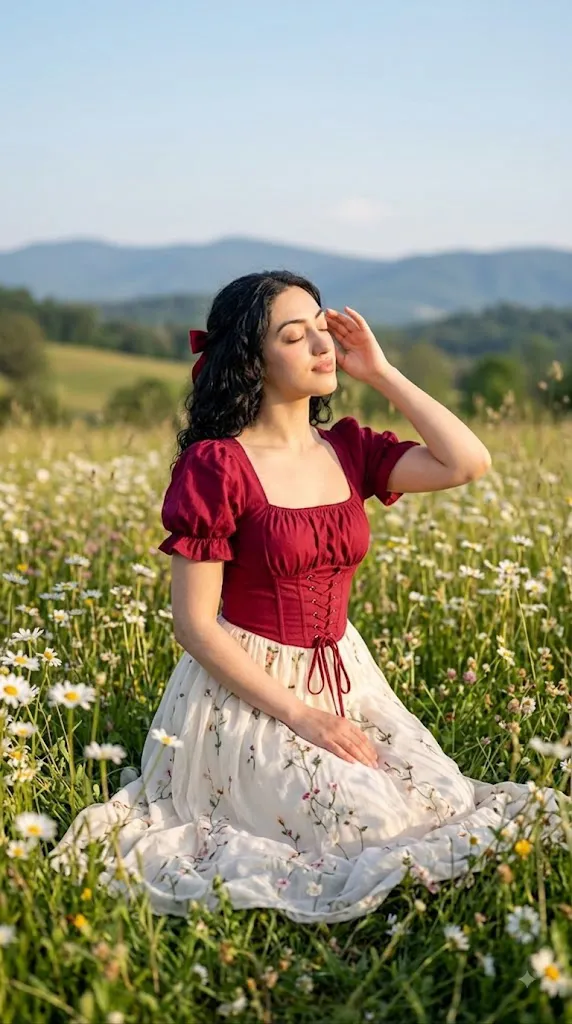
The central styling idea features a young woman wearing a deep crimson puff-sleeve blouse with a square neckline and corset-inspired lace-up detailing. The blouse is paired with a flowing cream or ivory maxi skirt featuring delicate floral embroidery. This combination creates a sophisticated contrast between the rich red upper garment and the soft neutral tones of the skirt.
The meadow is an important part of the composition. Wildflowers, tall grass, soft greenery, and distant foliage create a natural environment around the subject. Rather than making the background extremely sharp, a cinematic depth-of-field effect can be used to create soft layers of color and atmosphere.
Warm sunlight is another defining element of this concept. Gentle golden rays can illuminate the subject's face, hair, and clothing while creating subtle highlights throughout the meadow. Soft shadows help preserve natural facial texture and add dimensionality.
When a reference photograph is used, the subject's recognizable identity should remain consistent. The reference image can guide facial appearance, hairstyle, skin tone, and natural proportions while the AI transforms the clothing, environment, lighting, and overall cinematic atmosphere.
"Crimson Meadow Dreamscape Prompt"
A young woman with naturally wavy hair kneeling in a lush wildflower meadow, wearing a romantic cottagecore-style outfit — a deep crimson puff-sleeve blouse with a square neckline and a corset-style lace-up bodice, paired with a flowing cream/ivory maxi skirt with delicate floral embroidery. Small red ribbon bow tucked into her hair, soft natural makeup, one hand gently raised to her temple, eyes closed in a serene, dreamy expression. Golden hour sunlight casting warm light across the scene, pale blue sky with soft wispy clouds, blurred rolling green hills and mountains in the background, daisies and wildflowers scattered throughout the field. Candid lifestyle portrait photography, shallow depth of field, warm romantic color grading, soft bokeh, countryside aesthetic. Technical/style tags shot on 85mm lens, f/1.8, natural light, golden hour, film photography aesthetic, warm tones, soft focus background.
How To Use Photo Editing?
Using the Crimson Meadow Dreamscape Prompt is straightforward when the process is divided into a few important steps.
Step 1: Select a Good Reference Photo
Begin with a clear, high-resolution photograph of the person you want to feature. Choose an image where the face is clearly visible and the subject has natural lighting. Avoid photographs with excessive blur, heavy filters, extreme shadows, or objects covering important facial details.
Step 2: Upload the Reference Image
Open an AI image-generation or photo-editing tool that supports reference images. Upload the selected photograph and use it as the primary visual reference.
You can add an instruction such as:
“Use the uploaded photograph as the primary identity reference. Preserve the subject's recognizable facial characteristics, natural skin tone, hairstyle, and proportions while creating the requested cinematic environment and styling.”
This makes it clear that the creative transformation should not unnecessarily change the subject's identity.
Step 3: Add the Full Prompt
Paste the Crimson Meadow Dreamscape Prompt into the prompt field. Include details about the crimson blouse, cream skirt, floral embroidery, meadow, sunlight, pose, camera perspective, depth of field, and cinematic realism. Detailed prompts generally provide better control over the final composition.
Step 4: Generate Multiple Variations
Generate several versions and compare them. Pay attention to facial consistency, clothing details, body proportions, flowers, lighting, and overall composition. Choose the version that looks the most natural and visually balanced.
Tools You Can Use For Prompt Copy and Create Photo
There are several categories of tools that can help you create this type of cinematic portrait.
1. AI Image Generators
AI image-generation platforms are useful for creating complete scenes from detailed text prompts. They can generate landscapes, clothing, lighting, poses, and cinematic compositions. For reference-based portraits, select a platform that supports image references or character consistency.
2. AI Photo Editors
AI photo editors are particularly useful when you already have a photograph and want to transform the environment and styling. They can help replace backgrounds, modify clothing, improve lighting, and create a meadow environment while using the original photograph as a reference.
3. Graphic Design Applications
Graphic-design software can be useful for final adjustments after the AI generation process. You can crop the image, refine composition, add typography, or prepare versions for different social media platforms.
4. Image Enhancement Tools
Upscaling and enhancement tools can improve resolution and fine detail after the image has been generated. These tools can be especially helpful for improving hair strands, fabric textures, floral details, and overall image clarity.
How To Edit Photo?
Once the initial image has been generated, carefully inspect and refine the important elements.
Step 1: Check Facial Identity
Start by examining the face. Make sure the subject remains recognizable compared with the reference photograph. Inspect the eyes, eyebrows, nose, lips, jawline, skin tone, and hairstyle. Avoid excessive AI beautification or unrealistic skin smoothing. If the face has changed noticeably, regenerate the image using stronger reference-image instructions.
Step 2: Refine the Crimson Blouse
The deep crimson blouse should have realistic fabric texture and natural folds. The puff sleeves should retain their volume, while the square neckline and corset-inspired lace-up detailing should appear structurally believable. The rich crimson color should remain vibrant without becoming unnaturally oversaturated.
Step 3: Improve the Cream Maxi Skirt
The cream or ivory maxi skirt should flow naturally around the subject. Delicate floral embroidery can add subtle detail without overwhelming the outfit. Pay attention to the fabric folds, shadows, and interaction between the skirt and surrounding grass.
Step 4: Enhance the Meadow
The wildflower meadow should look lush and naturally varied. Include different types of flowers, grass, leaves, and distant greenery rather than repeating identical patterns. Some foreground flowers can be softly blurred to create depth. The meadow should complement the subject instead of competing with her.
Step 5: Adjust Natural Lighting
Warm golden-hour lighting works particularly well for this concept. Use soft sunlight to illuminate the face and clothing while maintaining gentle shadows. Subtle rim lighting around the hair can help separate the subject from the background. Avoid excessively bright highlights because they can remove facial and fabric detail.
Step 6: Add Cinematic Depth of Field
Keep the subject relatively sharp while allowing foreground flowers and distant meadow elements to become progressively softer.
This creates a professional portrait-photography effect and gives the scene a dreamy atmosphere.
Step 7: Apply Color Grading
A warm cinematic color grade can emphasize the crimson blouse and golden sunlight. Maintain natural skin tones while allowing the meadow's greens and floral colors to remain rich. Moderate contrast and subtle film grain can add an editorial quality.
Step 8: Choose the Final Composition
For social-media portraits, vertical 4:5 or 9:16 compositions work particularly well. Keep the subject positioned prominently within the frame while leaving enough surrounding meadow visible to establish the dreamscape setting.
Conclusion
The Crimson Meadow Dreamscape Prompt combines romantic fashion, natural scenery, cinematic photography, and cottagecore-inspired styling into a visually rich AI portrait concept. The deep crimson blouse provides a striking focal point, while the cream embroidered skirt creates an elegant contrast.
The wildflower meadow, warm sunlight, soft shadows, and cinematic depth of field give the image a peaceful and dreamy atmosphere. The result can resemble a professional outdoor fashion editorial captured during golden hour.
For the strongest results, begin with a high-quality reference image and provide detailed instructions about identity preservation, clothing, environment, lighting, pose, and camera composition. Generate multiple variations and carefully inspect facial details, hands, clothing, flowers, and background consistency.
Finally, use subtle color grading, realistic shadows, depth of field, and image enhancement to achieve a polished finish. Avoid excessive filters or artificial skin smoothing.
With the right prompt and editing workflow, the Crimson Meadow Dreamscape can transform a simple photograph into a romantic cinematic portrait that is ideal for social media posts, fashion inspiration, creative portfolios, wallpapers, and personal visual projects.