Introduction
Few fashion aesthetics capture attention quite like a richly detailed lehenga paired with a dramatic, romantic setting — and the "Crimson Rose Lehenga" prompt style has become a favorite among AI art enthusiasts, photographers, and content creators for exactly this reason. The look combines the deep, passionate red of a traditional crimson lehenga with soft floral elements, often set against a rose garden, palace courtyard, or softly lit indoor setting. It evokes the elegance of South Asian bridal and festive fashion photography, with intricate embroidery, flowing dupattas, and a warm, romantic color palette that feels both regal and dreamlike.
This style has grown popular for wedding-inspired content, festive photoshoots, digital fashion lookbooks, and creative portrait art. Because it centers on intricate clothing details, rich color grading, and atmospheric backgrounds, it's a great example of how thoughtful prompt-writing and photo editing can come together to produce editorial-quality fashion imagery. This article breaks down how to approach this aesthetic — from photo editing fundamentals to the tools and workflow needed to bring a Crimson Rose Lehenga-inspired image to life.
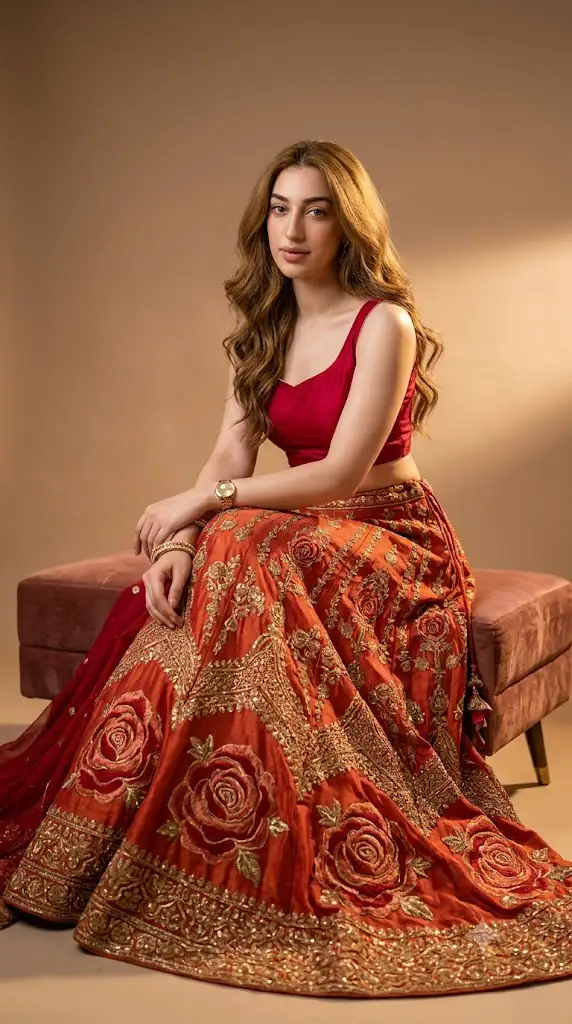
"Crimson Rose Lehenga Prompt"
Ultra-realistic 8K editorial portrait of an elegant Indian woman based on uploaded image seated on a low velvet ottoman in se warm studio light. She wears a sleeveless crimson blouse with a modest neckline and a red-orange lehenga with oversized rose motifs and gold embroidery, fabric pooling luxuriously around her. Cinematic, intimate, high-detail fashion focus.
How To Use Photo Editing?
Photo editing for a look like this generally falls into two paths: refining an existing photograph and generating new imagery through AI prompts.
When working with an existing photo — say, a real lehenga photoshoot — editing focuses on enhancing the richness of the red fabric, correcting skin tones under mixed lighting, and adding warmth to make gold embroidery and jewelry catch the light naturally. Background editing plays a big role too: softening a busy backdrop, adding a rose-garden blur, or replacing a plain studio background with a more atmospheric setting like a palace courtyard or candle-lit hall.
For AI-assisted generation, the approach shifts to prompt writing. A strong prompt for this style typically specifies the exact shade of red (crimson, not just "red"), the embroidery style (zardozi, gota patti, floral thread work), the silhouette (flared lehenga, fitted choli, flowing dupatta), and supporting details like floral jewelry, a rose backdrop, or subtle petals scattered in the air. Lighting descriptions matter just as much — warm golden-hour light, soft diffused indoor lighting, or candlelight all produce very different moods even with the same outfit description.
A well-structured prompt usually separates these elements clearly: subject and pose, outfit and embroidery details, background and setting, lighting style, and camera specifications (lens type, aperture, depth of field). This structure makes it much easier to tweak individual details — like swapping the background from a garden to a palace hallway — without having to rewrite the entire prompt from scratch.
Tools You Can Use For Prompt Copy and Create Photo
A range of tools can help bring this aesthetic to life, whether you're editing real photos or generating new ones:
- AI image generators like Midjourney, Adobe Firefly, and Stable Diffusion-based platforms are well-suited to fashion-focused prompts, especially when given detailed descriptions of fabric texture, embroidery, and lighting.
- Prompt-sharing communities on platforms like Pinterest, Reddit, and dedicated art forums often feature fashion and bridal-style prompts that can be adapted — useful as a starting template for your own crimson lehenga concept.
- Traditional editing software such as Adobe Photoshop and Lightroom remain essential for color grading, especially for getting the exact crimson tone right and enhancing embroidery detail without over-processing the image.
- Mobile editing apps like VSCO, Snapseed, and Lightroom Mobile are popular for quick color adjustments, warm filters, and soft-focus effects that suit festive fashion photography.
- Background and object tools, including Photoshop's Generative Fill or Canva's background remover, are helpful for placing a subject into a rose-garden or palace-style setting convincingly.
- Texture and fabric-focused plugins or AI upscalers can add fine detail to embroidery and fabric folds, which is often what separates an average result from a truly polished, editorial-quality image.
When copying a prompt template, it's helpful to keep a personal "style sheet" — a saved list of your preferred color tones, embroidery keywords, and lighting phrases — so you can quickly build variations for different shoots or projects.
How To Edit Photo?
Here's a practical step-by-step workflow for achieving the Crimson Rose Lehenga look, whether starting from a photograph or an AI-generated base image:
1. Establish the correct crimson tone
Adjust hue and saturation so the red reads as a deep, rich crimson rather than orange-red or pink — this is the anchor color for the whole image.
2. Enhance fabric and embroidery detail
Increase local contrast and clarity selectively on the outfit to make gold thread work and beading stand out without affecting skin texture.
3. Balance skin tones
Warm lighting and red fabric can shift skin tones; correct white balance so the complexion still looks natural and even.
4. Add or enhance the background
Whether it's a rose garden, palace courtyard, or soft studio backdrop, blur it slightly to keep focus on the subject and outfit.
5. Introduce floral accents
Scattered rose petals, floral jewelry, or a garland can reinforce the "rose" theme without overwhelming the composition.
6. Apply warm, romantic lighting
Golden-hour tones or soft diffused light work best; avoid harsh, cool lighting that clashes with the warm color palette.
7. Fine-tune the dupatta and drape
Ensure flowing fabric elements look natural, with realistic folds and gentle movement rather than a stiff, flat appearance.
8. Do a final detail pass
Zoom in on jewelry, hands, and facial features to check for consistency, then apply a light overall color grade to unify the image.
Conclusion
The Crimson Rose Lehenga aesthetic is a beautiful example of how color, texture, and setting come together to create striking fashion imagery. Whether you're refining a real photoshoot or crafting a new image from an AI prompt, success comes down to precision — getting the exact shade of red right, highlighting embroidery detail, and pairing it with warm, romantic lighting and a fitting background. With a well-organized prompt and the right combination of editing tools, you can create polished, editorial-quality portraits that capture the elegance and richness this style is known for.