Introduction
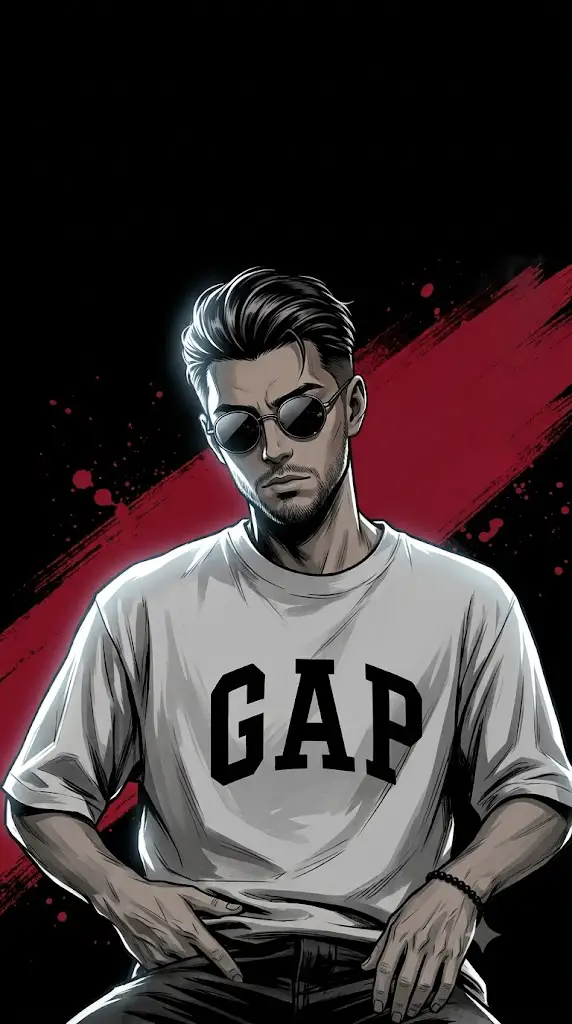
Dark cinematic anime art has become one of the most sought-after styles in the world of AI-generated imagery. Combining the bold linework of Japanese manga, the moody atmosphere of noir cinema, and the emotional intensity of seinen storytelling, this aesthetic transforms ordinary portraits into powerful, poster-worthy artwork. Think of characters wrapped in shadow, lit by a single dramatic rim light, surrounded by muted black-and-crimson palettes that feel straight out of an underworld crime saga.
What makes this style so popular isn't just its visual drama — it's how accessible it has become. With the rise of advanced AI image generators, anyone can turn a simple selfie or portrait into a striking dark cinematic anime illustration using nothing more than a well-crafted text prompt. The key lies in understanding how to structure that prompt, which tools to use, and how to refine the final image once it's generated. This article walks you through the entire process, from writing an effective prompt to editing your final artwork like a professional.
"Dark Cinematic Anime Prompt"
Using the uploaded portrait as reference, preserve the subject's exact face, identity, hairstyle, and proportions — transform into a dark seinen anime-noir portrait, 9:16 vertical, chest-up, positioned in lower two-thirds with space above for a title. Head tilted slightly down, chin tucked, facing camera with a calm, intimidating, mysterious expression — like an elite assassin or crime boss. Hair swept back. Small round dark sunglasses partially hiding the eyes. One hand raised across the lower face (back of hand to camera), second hand layered beneath it, holding a slim cigarette with a glowing crimson ember and thin curling smoke. Broad shoulders, angled symmetrical stance. High-contrast black-and-white manga ink style, cel-shaded, sharp linework, cinematic cool-white rim light from upper left, opposite side in deep shadow. Near-black background with a diagonal crimson brushstroke and red splatters. Palette: black, charcoal grey, silver white, deep crimson only.
How To Use Photo Editing?
Step 1: Choose a Clear Photo
Select a high-quality portrait where your face, hairstyle, and important details are clearly visible. A clear chest-up photo works best for this Dark Cinematic Anime style.
Step 2: Upload Your Photo
Open your preferred AI photo editing tool and upload the selected image as the main reference photo.
Step 3: Copy and Paste the Prompt
Copy the complete Dark Cinematic Anime Prompt and paste it into the prompt box. Make sure all important style and identity instructions are included.
Step 4: Set the Image Ratio
Choose a 9:16 vertical aspect ratio for a cinematic poster-style result. Keep the subject in the lower part of the frame with some empty space above.
Step 5: Generate the Image
Click the generate button and wait for the AI to create your Dark Cinematic Anime portrait. Review the result and regenerate if necessary.
Tools You Can Use for Prompt Copy and Create Photo
Step 1: Choose a Tool That Supports Image References
The most important feature to look for is the ability to upload an image and use it as a visual reference. This allows the AI to understand the original subject before applying the Dark Cinematic Anime style.
Step 2: Use ChatGPT for Prompt-Based Image Creation
ChatGPT can be used to work with detailed AI image prompts and create creative transformations from uploaded images. You can provide instructions about the composition, identity, lighting, colours, and artistic style.
Step 3: Try Gemini and Other AI Image Tools
Google Gemini and other AI image-generation platforms can also be used to create creative portrait transformations. Different AI models may produce different results from the same prompt, so trying more than one tool can help you discover the style you like best.
Step 4: Explore Leonardo AI and Midjourney
Leonardo AI and Midjourney are popular options for artistic experimentation. They can be useful for generating detailed illustrations, cinematic lighting, graphic-novel textures, and anime-inspired artwork. You can test different settings to achieve stronger shadows, sharper details, and a more dramatic composition.
Step 5: Use Photo Editing Software for Final Touches
After generating the main artwork, use a photo editing tool for final adjustments if needed. You can improve the crop, contrast, sharpness, background, and title placement. Keep the editing simple so that the dark cinematic style remains clean and professional.
How To Edit Photo?
Step 1: Upload Your Original Portrait
Start by uploading a clear portrait into your chosen AI editing tool. Make sure the uploaded image is selected as the primary reference for the generation.
Step 2: Apply the Dark Cinematic Anime Prompt
Paste the complete prompt and instruct the AI to preserve the original identity. Ask it to maintain facial features, hairstyle, beard, skin tone, clothing, and body proportions while changing the overall visual style.
Step 3: Create the Dark Anime Noir Style
Apply high-contrast black-and-white shading, sharp manga ink linework, cel shading, and painterly textures. Add dramatic shadows to create a serious and mysterious atmosphere.
Step 4: Add Cinematic Lighting and Character Details
Use a cool-white rim light from the upper-left side to highlight the hair, cheek, ear, shoulder, and hands. Keep the opposite side darker. Add subtle reflective sunglasses and maintain a calm, intimidating, and confident expression.
Step 5: Design the Black and Crimson Background
Use an almost pure black background with a large deep-crimson diagonal brushstroke. Add subtle red paint splatters, scratches, and soft smoke. Keep the background minimal so that the subject remains the main focus.
Step 6: Check and Finalize the Image
Review the generated image carefully. Check the face, hands, pose, colours, lighting, and overall composition. Regenerate or make small adjustments if necessary until you get a clean, high-quality Dark Cinematic Anime Noir portrait.
Conclusion
The Dark Cinematic Anime Prompt is an excellent choice for creating a bold and professional AI portrait. By combining identity preservation, manga-inspired artwork, dramatic rim lighting, deep black shadows, soft smoke, and crimson-red graphic elements, you can transform an ordinary image into a premium cinematic poster.
The key to success is using a clear reference photo and following the steps carefully. Choose a suitable AI tool, use the complete prompt, maintain the original identity, and review the result before finalizing it. With creativity, experimentation, and the right AI settings, you can create a stunning Dark Cinematic Anime portrait that looks mysterious, elegant, and unforgettable.