Introduction
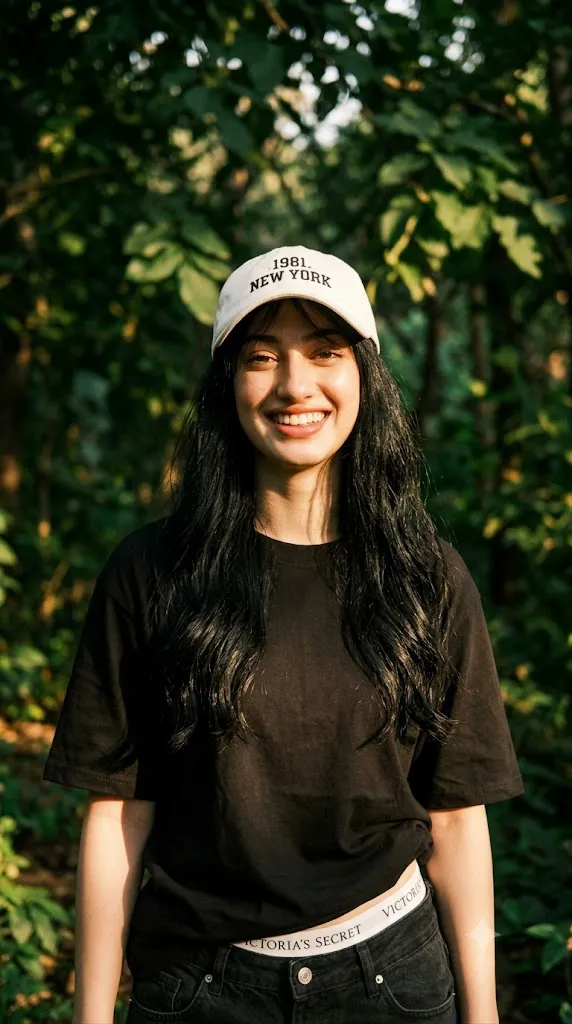
The Deep Emerald Cinematic Prompt is a sophisticated AI photo-editing concept created to produce a luxurious, dreamy, and cinematic portrait. The style combines a deep dark-green visual atmosphere with natural sunlight, soft shadows, flowing hair, realistic skin texture, and an expressive smile. The final image is designed to look like a professionally photographed cinematic portrait rather than an artificial AI-generated image.
One of the most important elements of this concept is facial identity preservation. When an uploaded reference photograph is used, the AI should maintain the person's recognizable facial characteristics as accurately as possible. Facial proportions, eyes, eyebrows, nose, lips, jawline, skin tone, and other defining characteristics should remain consistent while the overall lighting, mood, and photographic environment are enhanced.
The deep emerald color creates an elegant and dramatic visual mood. Instead of using a bright or highly saturated green, the prompt focuses on a rich, dark green atmosphere that adds depth and sophistication to the portrait.
Natural sunlight is another major feature. Gentle rays pass through the environment and create soft, dappled patterns across the face and hair. This produces a dreamy outdoor photography effect with subtle highlights and realistic shadows. The hairstyle also plays an important role. The subject has very long, naturally wavy hair with delicate wispy bangs. A few loose strands fall across the shoulders and lightly brush the face, creating movement and making the portrait feel more natural.
"Deep Emerald Cinematic Prompt"
Creat a 4k hyper-realistic dark deep green heavy portrait cinematic image with dramatic smile actions (uploaded photo 100% face match), soft and dreamy full portrait of a reference picture captured in natural sunlight. Gentle sun rays create soft, dappled shadows across her serene face. She has super long, wavy hair with delicate wispy bangs, a few strands falling naturally over her shoulders and brushing lightly across her face.
How To Use Photo Editing?
Using the Deep Emerald Cinematic Prompt is simple when you follow a proper image-editing workflow.
Step 1: Select the Reference Photo
Begin with a clear, high-quality photograph. The face should be visible and preferably captured from a natural angle. A sharp reference image gives the AI more information about facial proportions and helps maintain consistency during the editing process. Avoid using heavily filtered photographs because excessive filters can make natural facial details harder for the AI to understand.
Step 2: Upload the Photo
Upload the selected image into an AI photo-editing or image-generation platform that supports reference images.
The uploaded image should be treated as the identity reference. Include a clear instruction such as:
“Preserve the subject's original facial identity and natural facial characteristics. Do not unnecessarily change the face, facial proportions, skin tone, eyes, nose, lips, or hairstyle.”
This helps prioritize identity consistency.
Step 3: Add the Prompt
Paste the complete Deep Emerald Cinematic Prompt into the text field. Describe the desired lighting, hair, expression, colors, camera composition, realism, and background. Detailed descriptions allow the AI to understand the visual direction more accurately.
Step 4: Generate the Image
Generate the first version and carefully inspect the face, hair, lighting, shadows, and overall composition. If the result is not satisfactory, modify the prompt and generate another variation rather than heavily editing a poor base image.
Tools You Can Use For Prompt Copy and Create Photo
Different types of AI and photo-editing tools can be used to create this cinematic portrait.
1. AI Image Generators
AI image generators are useful for creating cinematic portraits from detailed text prompts. They can interpret descriptions involving lighting, hairstyles, facial expressions, color palettes, and photographic styles. For this particular concept, a platform with reference-image capabilities is preferable because maintaining the subject's identity is an important requirement.
2. AI Photo Editing Platforms
AI photo editors are useful when you already have a photograph and want to transform its visual appearance. You can use them to modify the environment, lighting, clothing, color palette, hairstyle, and overall atmosphere while using the original image as a reference.
3. Image Enhancement Tools
After generating the portrait, an image-enhancement tool can improve resolution, clarity, fine details, and overall sharpness. This is particularly useful if the final image will be used for printing, social media, wallpapers, or high-resolution digital content.
4. Traditional Photo Editing Software
Traditional editing software can be used for final corrections. Brightness, contrast, highlights, shadows, cropping, and color balance can be adjusted manually. This gives you greater control over the final cinematic appearance.
How To Edit Photo?
Once the image has been generated, follow these steps to refine it.
Step 1: Check Facial Accuracy
The face should be the first thing you inspect. Compare the generated portrait with the reference image. Look at the overall facial structure, eyes, eyebrows, nose, lips, jawline, and natural skin details. If the face looks significantly different, regenerate the image with stronger identity-preservation instructions.
Step 2: Refine the Deep Green Atmosphere
The image should feature a rich, deep emerald-green mood. The green should feel sophisticated rather than excessively bright. Use subtle tonal variations so the background does not become a flat block of color. Darker green shadows combined with slightly lighter areas can create depth.
Step 3: Enhance Natural Sunlight
Natural sunlight should appear soft and believable. Gentle rays can illuminate sections of the face and hair while creating delicate dappled shadows. Avoid excessively bright highlights because they can make the portrait look artificial. The goal is to recreate the appearance of sunlight passing naturally through leaves or a softly filtered outdoor environment.
Step 4: Refine the Hair
The long, wavy hairstyle should appear natural and detailed. Individual strands should be visible without making the hair look artificially sharp. The wispy bangs should frame the face gently, while a few loose strands can fall across the shoulders and lightly touch the cheek. Natural movement in the hair can make the portrait feel more photographic.
Step 5: Improve the Smile
The dramatic smile should remain natural rather than exaggerated. The expression should communicate confidence and warmth while preserving the subject's natural facial characteristic. Pay attention to the eyes as well. A genuine smile usually involves both the mouth and subtle changes around the eyes.
Step 6: Add Cinematic Depth
Use a soft depth-of-field effect to separate the subject from the background. The face and primary hair details should remain sharp, while the background gradually becomes softer. This creates the appearance of a professional portrait captured with a high-quality camera and portrait lens.
Step 7: Apply Final Color Correction
During the final editing stage, balance the green tones, skin tones, highlights, and shadows. The skin should remain natural while the environment carries the deep emerald color palette. Avoid applying excessive green color grading to the face because it can make the skin appear unnatural. A subtle cinematic contrast can add depth without destroying realistic details.
Step 8: Export in High Quality
After completing the edits, export the image at the highest practical resolution supported by your editing tool. For social media, choose the appropriate vertical format. For wallpapers or printing, use a larger resolution while maintaining image quality and detail.
Conclusion
The Deep Emerald Cinematic Prompt is an excellent concept for creating a luxurious and dreamy portrait with a strong cinematic identity. Its combination of deep emerald tones, natural sunlight, soft dappled shadows, long wavy hair, wispy bangs, and expressive smiling action creates a visually rich photography style.
The most important factor is maintaining the natural identity of the reference subject while enhancing the surrounding visual elements. Starting with a high-quality reference image and using clear identity-preservation instructions can help achieve a more consistent result.
Natural lighting should remain the heart of the composition. Soft sunlight, gentle shadows, realistic hair strands, subtle skin texture, and controlled depth of field can make the final image feel much more authentic.
After AI generation, careful editing of color, exposure, contrast, sharpness, and composition can further improve the result. Avoid excessive smoothing, artificial facial changes, or overly strong color effects.
With a detailed prompt and a thoughtful editing workflow, the Deep Emerald Cinematic concept can transform a simple reference photograph into a 4K-style hyper-realistic, elegant, dreamy, and cinematic portrait suitable for social media, creative portfolios, wallpapers, and professional visual projects.