Introduction
Among the many themes explored in AI-generated art, devotional and mythological portraits hold a special place — and few subjects inspire as much creative reverence as Radha Rani. Revered in Hindu tradition as the eternal consort of Lord Krishna and a symbol of pure, selfless love (prem bhakti), Radha Rani has been depicted for centuries in paintings, temple murals, and classical art with flowing silks, intricate jewelry, and a serene, luminous expression. The "Divine Radha Rani Prompt" style aims to recreate this timeless devotional beauty using modern AI image-generation tools — blending traditional iconography with soft, ethereal lighting and rich, symbolic detail.
This style is popular among devotees, digital artists, and content creators who want to produce respectful, high-quality devotional art for personal use, festivals like Radhashtami or Janmashtami, social media posts, or spiritual reflection spaces. Because the subject carries deep religious and cultural significance, creating this kind of art well requires more than just aesthetic prompt-writing skill — it calls for an understanding of traditional symbolism, appropriate ornamentation, and a tone of reverence rather than mere decoration. This article explains how to approach devotional photo editing and prompt-based art creation thoughtfully, along with the tools and workflow to bring such imagery to life.
"Divine Radha Rani Prompt"
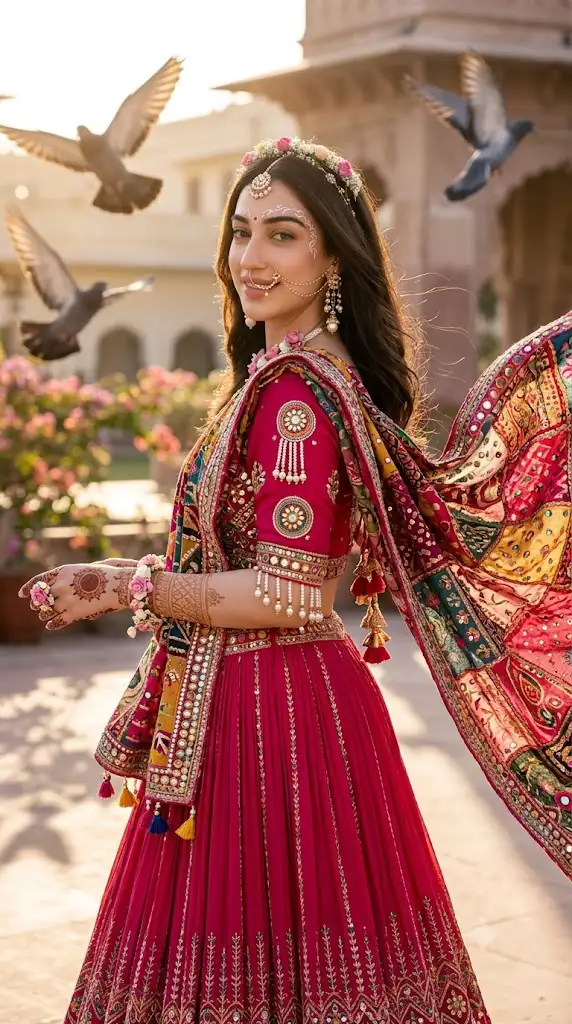
"Create a ultra realistic portrait of above giri in reference image, Close-up mesmerizing shot of a Radha Rani adorned in Traditional Indian lehenga in deep pink hues with intricate embroidery, The blouse is heavily embellished with zari, mirror work, kundan stones, beads, and multicolored thread detailing Sleeves are adorned with pearl tassel strings and decorative circular motifs. The dupatta features vibrant patchwork embroidery with rich patterns, mirror accents, and tassels, draped gracefully across one shoulder. The lehenga skirt is pleated with fine embroidered patterns near the hem. Traditional earrings with pearl drops, maang tikka resting delicately in the hair partition, and a small nose ring with multiple chains (nath), flowers crown in head and flowers jewelry, traditional white vine motifs painted around forehead and henna mehendi on hands. She is in a palace garden, looking over her shoulder with her flowing lehenga billowing dramatically in the breeze, Delicate embroidery and shimmering patterns catch the sunlight. Her dark brown hair flows naturally with a subtie jeweled accessory. Face exactly same, solt smile, glowing skin. Pigeons soar cinematically in the background, sunlight casts warm, realistic golden ligh and soft shadows across the palace garden.
How To Use Photo Editing?
When working on devotional art like a Radha Rani portrait, photo editing generally serves one of two purposes: enhancing an existing devotional image (such as a temple photo, a painting, or an idol photograph) or generating new artwork guided by a descriptive prompt.
For enhancing existing images — for example, a photograph of a Radha Rani idol or a traditional painting — editing typically focuses on restoring color vibrancy, correcting lighting so gold jewelry and silk fabrics shine naturally, removing dust or scratches from older prints, and adding a soft glow or halo effect around the figure to emphasize divinity. Background editing is also common, replacing a plain or cluttered backdrop with a temple courtyard, a lotus pond, or a soft golden-hour sky to elevate the devotional mood.
For AI-assisted generation, the process involves writing a detailed prompt describing traditional attire (such as a red or pink silk saree with gold zari border), ornaments (crown, nose ring, bangles, anklets), setting (a Vrindavan-style garden, temple hall, or riverside), lighting (soft golden divine light, diya glow, or moonlit ambience), and artistic style (traditional Indian miniature painting, Pichwai art, or realistic devotional illustration). Being specific about these elements helps the AI produce imagery that feels authentic and respectful rather than generic.
It's worth noting that responsible platforms generally avoid generating hyper-realistic photographic depictions of deities as if they were real, physical people, and instead lean toward traditional painterly, illustrative, or iconographic styles — which is both more culturally appropriate and more aligned with how Radha Rani has historically been portrayed in art.
Tools You Can Use For Prompt Copy and Create Photo
Several categories of tools support this kind of devotional art creation:
- AI image generators such as Midjourney, Adobe Firefly, and Stable Diffusion-based platforms can render devotional and mythological art styles, especially when prompted with references to traditional Indian art movements like Pichwai, Madhubani, or Rajput miniature painting.
- Prompt libraries and devotional art communities on platforms like Pinterest, Reddit, or dedicated art forums often share and refine prompts for deities, which can serve as a respectful starting point to adapt rather than copy wholesale.
- Traditional editing software like Adobe Photoshop and Lightroom are useful for retouching existing devotional photographs — adjusting warmth, removing blemishes on prints, and enhancing gold and jewel tones.
- Mobile apps such as Snapseed or PicsArt offer quick tools for adding light effects, glow, and color correction, popular among devotees editing personal temple or festival photos.
- Calligraphy and overlay tools can be used to add Sanskrit shlokas, mantras, or festival greetings (like "Radhashtami ki Shubhkamnaye") onto finished artwork for sharing during festivals.
When copying or adapting a prompt, it helps to organize it by category — attire, jewelry, setting, lighting, and artistic style — so each element can be adjusted individually while keeping the overall devotional tone consistent and respectful.
How To Edit Photo?
Here is a practical step-by-step workflow for creating or enhancing a Radha Rani-themed devotional image:
1. Choose a respectful base style
Decide whether you want a painterly, traditional illustration look or a soft-focus artistic rendering — both are more appropriate for devotional subjects than a hyper-realistic photographic treatment.
2. Focus on traditional attire and ornamentation
Ensure the saree, jewelry, and crown reflect authentic styles associated with Radha Rani in classical art, such as rich reds, pinks, and golds.
3. Add soft, warm lighting
Use a gentle golden or diya-like glow rather than harsh, flat lighting, to create a sense of serenity and divinity.
4. Incorporate symbolic background elements
Lotus flowers, peacock feathers, flutes (symbolizing Krishna), and Vrindavan-style gardens or temple architecture reinforce the devotional context.
5. Add a subtle halo or radiance effect
A soft glow around the figure is a common and respectful way to convey divine presence.
6. Adjust color grading gently
Keep tones warm and harmonious; avoid oversaturation, which can make the image feel artificial rather than sacred.
7. Refine facial and hand details
Pay close attention to gentle, serene expressions and traditional hand gestures (mudras), which carry symbolic meaning in devotional art.
8. Review the final image for cultural accuracy
Cross-check ornamentation and symbolism against traditional references to ensure the artwork feels authentic and respectful.
Conclusion
Creating a Divine Radha Rani-themed image blends technical prompt-writing skill with cultural and spiritual sensitivity. Whether you're restoring an old devotional photograph or generating new artwork with AI tools, the goal is the same: to portray Radha Rani with the grace, warmth, and reverence that centuries of traditional art have established. By choosing appropriate artistic styles, focusing on authentic attire and symbolism, and using soft, divine lighting, you can create devotional art that feels both beautiful and respectful — suitable for personal devotion, festival celebration, or sharing with a wider community of devotees.