Introduction
There's a certain nostalgic charm to doodles — the scribbled hearts in the margins of a notebook, the playful sketches on the back of a diary page, the little cartoon versions of ourselves we used to draw as kids. That same nostalgic, carefree energy is now being reimagined through AI, giving rise to one of the most fun and widely shared photo trends of the moment: the "Doodle Portrait Prompt". With just a reference photo and a well-written text prompt, anyone can transform their selfie into a charming, hand-drawn style portrait, complete with sketchy outlines, colorful scribbles, cartoonish shading, and playful doodle elements like stars, hearts, or handwritten notes surrounding the face.
This trend has quickly gained popularity among people looking for a lighthearted, creative alternative to typical photorealistic AI portraits. Instead of aiming for hyper-realistic beauty shots, the doodle portrait style embraces imperfection, whimsy, and personality. It's especially loved by content creators, journal enthusiasts, students, and anyone who wants a fun new profile picture that feels personal, artistic, and a little nostalgic. Some use it to celebrate birthdays, friendships, or simply to add a playful twist to their social media presence.
What makes this trend stand out is the sheer creative freedom it offers. Unlike more rigid photorealistic prompts, doodle portraits can be customized endlessly — from soft pastel color palettes to bold neon marker styles, from minimalist line art to busy, sticker-covered compositions. This article will walk you through how the doodle portrait editing process works, which AI tools are best suited for creating this look, and a simple step-by-step guide to generating your own doodle-style portrait.
"Doodle Portrait Prompt"
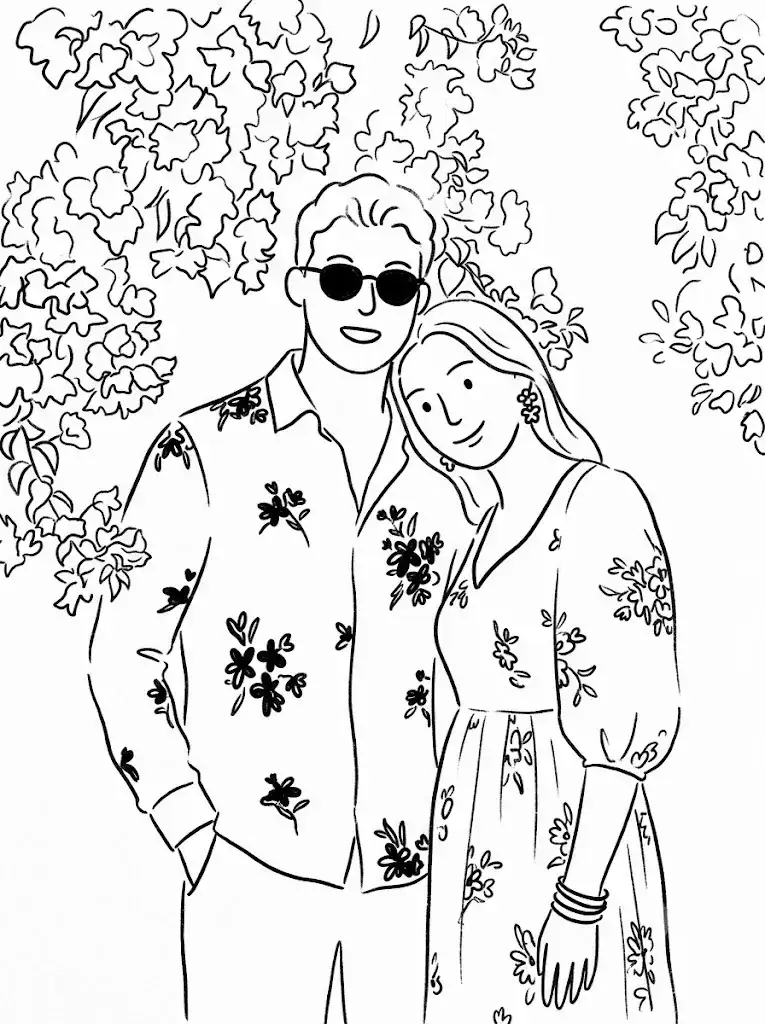
Transform the image into a minimalist hand-drawn doodle illustration. Use simple black brush-pen outlines with slightly wobbly, imperfect strokes. Reduce all details to cute, childlike shapes while preserving the main subject and composition. Naive sketchbook aesthetic, playful and whimsical character design, clean white background, minimal linework, expressive simplicity, handmade doodle style, black ink drawing, charming imperfections, simple cartoon illustration. Format 3:4.
How To Use Photo Editing?
Unlike traditional photo editing apps that simply enhance an existing image, the doodle portrait trend relies on AI models that generate a completely new, stylized illustration based on a written prompt and a reference photo of your face. Understanding how this process works helps you create more consistent and visually appealing results.
Here's the general workflow:
1. Upload a clear reference photo
A front-facing image with good lighting helps the AI accurately capture your facial features and expression.
2. Write or copy a doodle-style prompt
Describing the art style, line thickness, color palette, background elements, and any doodle decorations you want, such as stars, flowers, or handwritten text.
3. Generate the illustration
The AI transforms your facial likeness into a hand-drawn, sketch-inspired portrait based on the described style.
4. Compare multiple versions
Most platforms produce several variations, allowing you to choose the one with the best balance of likeness and artistic charm.
5. Refine with follow-up prompts
You can request changes like thicker outlines, brighter colors, or additional doodle elements around the portrait.
The key to getting a fun yet recognizable result is being specific about the style you want. A vague prompt like "make me into a doodle" often produces inconsistent or overly abstract results. Instead, successful prompts include details such as "thin black ink outlines," "soft watercolor shading," "pastel color palette," "cartoon-style eyes," or "surrounded by hand-drawn hearts and stars." The more descriptive the prompt, the more control you have over the final artistic outcome.
Tools You Can Use For Prompt Copy and Create Photo
Several AI platforms have become popular choices for creating doodle-style portraits, each offering different creative strengths:
1. Midjourney
Known for producing highly artistic, textured illustrations with rich color blending, making it ideal for detailed or painterly doodle styles.
2. Leonardo AI
Offers strong facial consistency across multiple generations, which is useful when experimenting with different doodle styles while keeping your likeness recognizable.
3. Google Gemini-based tools
Popular for quick, simple photo-to-illustration transformations, especially favored by beginners who want fast results without complex settings.
4. Canva AI Image Generator
A convenient all-in-one option, combining prompt-based generation with easy post-editing tools like adding stickers, text, or additional doodle decorations.
5. ChatGPT with image generation
Many users copy a ready-made doodle portrait prompt directly into ChatGPT, upload their photo, and generate the final illustration within the same conversation.
Rather than writing prompts from scratch, most people search for trending "Doodle Portrait Prompt" templates shared across Pinterest, Reddit, and prompt-sharing communities. They then copy these templates and personalize them — adjusting the color scheme, line style, or doodle decorations to match their own aesthetic. This copy-and-customize approach has made the trend accessible to anyone, regardless of prior experience with AI prompts.
How To Edit Photo?
Creating your own doodle portrait is a simple and enjoyable process. Follow these steps for the best results:
Step 1: Choose a clear reference photo
Select an image with even lighting and a front-facing angle so the AI can accurately capture your facial expression and features.
Step 2: Copy a trending doodle prompt template
Adjust the details to match your preferences — art style, color palette, or type of doodle decorations.
Step 3: Add specific styling keywords
Phrases like "thin ink line art," "pastel watercolor tones," "cartoon-style shading," "hand-drawn hearts and stars," and "notebook doodle background" help guide the AI toward a charming, cohesive output.
Step 4: Generate multiple variations
Don't settle for the first result — comparing a few outputs helps you find the version with the best balance of likeness and artistic style.
Step 5: Request targeted refinements
If the linework feels too messy or the colors look too muted, ask the AI to adjust just that element, such as "make the outlines cleaner" or "add brighter, more vibrant colors."
Step 6: Finalize with light post-editing
Once you're happy with the AI-generated doodle portrait, use a tool like Canva to add extra text, stickers, or a decorative frame before sharing it on social media.
Conclusion
The Doodle Portrait Prompt trend proves that not every AI-generated image needs to chase photorealism — sometimes, the most joyful and shareable content comes from embracing playful imperfection. With a clear reference photo, a creative prompt, and the right AI tool, anyone can turn a simple selfie into a charming, hand-drawn style portrait full of personality and whimsy. Whether you're looking for a fun new profile picture, a birthday post, or simply a lighthearted creative project, this trend offers an accessible and delightful way to reimagine yourself through art.