Introduction
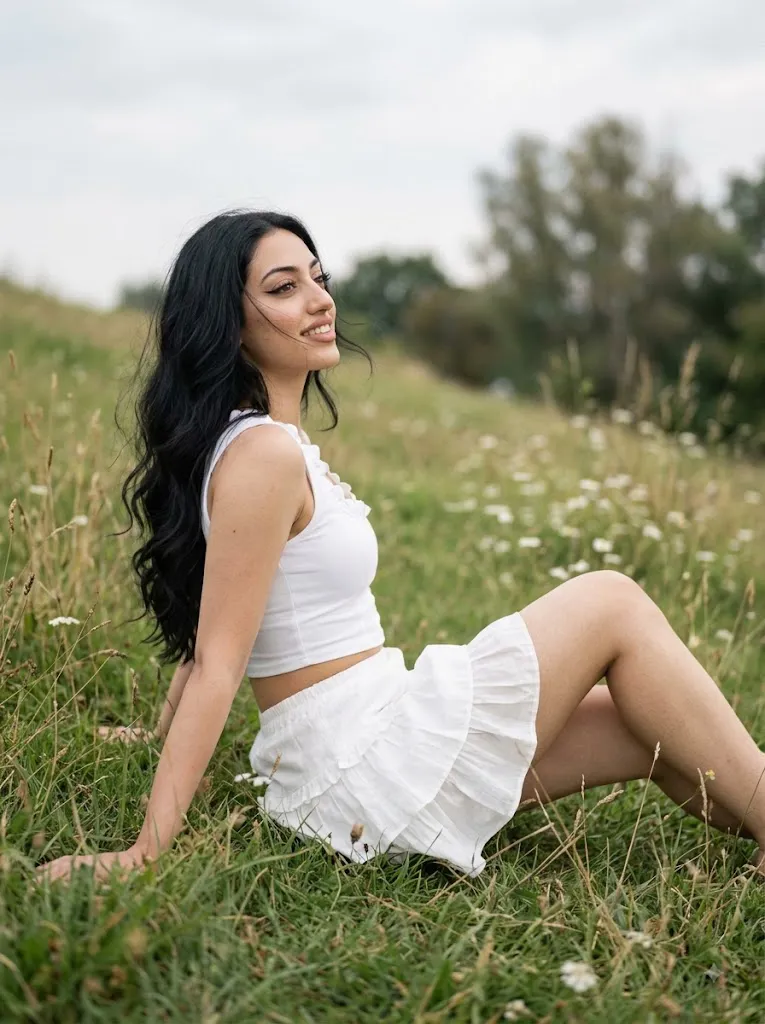
This AI photo-editing style transforms an ordinary portrait into a soft, romantic, high-fashion summer editorial set in a natural meadow. A woman sits sideways on a grassy slope in a white ruffled cropped top and matching mini-skirt — a clean, monochromatic look that lets the greenery and wildflowers provide natural contrast.
Her pose is elegant: one hand rests behind her on the ground, the other on a bent knee, one leg bent and one extended for an elongated silhouette. Back slightly arched, head tilted back, gaze drifting into the distance with a dreamy expression. Editorial makeup — winged eyeliner, voluminous lashes, nude-peach matte lips, dewy highlighter — pairs with long, loose, wind-tousled waves. Soft diffused daylight (overcast sky) avoids harsh shadows, giving the image a refined, cinematic quality rather than a bright sunny look.
"Dreamy Summer Meadow Prompt"
Use the uploaded photo as exact facial reference (preserve identity, same features). Natural realistic skin — no smoothing. Look: Winged eyeliner, voluminous lashes, nude-peach matte lips, dewy highlighter. Hair — long, loose waves, wind-tousled. Pose: Seated sideways on a grassy slope, one hand resting behind her on the ground, the other on a bent knee. One leg bent, one extended, back slightly arched, head tilted back, gaze in the distance, dreamy expression. Outfit: White ruffled cropped top + white ruffled mini-skirt. Camera: Low side angle, vertical 3:4 frame, cropped mid-thigh to head, legs elongated. Background: Grass, wildflowers, blurred trees, overcast sky. Lighting: Soft diffused daylight, no harsh shadows, editorial feel. Technical: 85mm lens, f/1.8, shallow depth of field, subject sharp/background bokeh, film grain, warm muted color grade. Mood: High-end summer campaign vibe (Zimmermann/Chloé style), hyper-realistic, no HDR look.
How To Use Photo Editing?
Using the Dreamy Summer Meadow Prompt is straightforward when the editing process is divided into a few simple stages. The most important part is selecting a suitable reference photograph before beginning the transformation.
Step 1: Select a Good Reference Photo
Start with a high-resolution photograph where the subject's face is clearly visible. A clean image with natural lighting and minimal filters is preferable. Avoid photographs where the face is heavily covered, extremely blurry, or distorted by aggressive beauty effects. A good reference image gives the AI enough information to preserve facial characteristics.
Step 2: Upload the Reference Image
Open an AI image-generation or photo-editing platform that supports reference images. Upload the photograph and select it as the primary reference.
You can add an instruction such as:
“Use the uploaded photograph as the exact facial reference. Preserve the recognizable facial structure, natural skin tone, hairstyle, facial proportions, and distinctive features. Do not unnecessarily modify the subject's identity.”
This makes identity preservation a priority while allowing the environment and styling to be transformed.
Step 3: Add the Full Prompt
Paste the complete Dreamy Summer Meadow Prompt into the prompt field. Include the outfit, pose, makeup, hairstyle, meadow, camera angle, lighting, depth of field, and color grading. Detailed instructions help establish the intended editorial composition.
Step 4: Generate Multiple Variations
Generate several versions and compare them carefully. Look at facial consistency, pose accuracy, clothing details, hands, legs, hair, lighting, background, and overall realism. Select the version with the most natural anatomy and strongest editorial composition.
Tools You Can Use For Prompt Copy and Create Photo
Several categories of tools can be useful for creating this type of cinematic summer portrait.
1. AI Image Generators
AI image generators can create complete editorial scenes from text prompts. They are useful for generating the meadow, clothing, pose, lighting, atmosphere, and photographic composition. For reference-based portraits, choose a platform that supports image references or consistent character features.
2. AI Photo Editors
AI photo editors are useful when you already have a photograph and want to transform its setting or styling. These tools can assist with background replacement, clothing changes, lighting adjustments, and creative environmental transformations. They are particularly useful when maintaining the original subject's appearance is important.
3. Graphic Design Applications
Graphic-design applications can be used after generation for final composition adjustments. You can crop the image, adjust framing, add typography, prepare social-media versions, or create a complete editorial layout.
4. Image Enhancement Tools
Image-enhancement tools can improve resolution and recover subtle details after the AI generation process. They can be useful for refining hair strands, fabric texture, flowers, and overall image clarity. Use enhancement carefully because excessive sharpening can make natural skin appear artificial.
How To Edit Photo?
After generating the initial image, carefully inspect the result and refine each important visual element.
Step 1: Check Facial Identity
Compare the generated face with the reference image. Inspect the eyes, eyebrows, nose, lips, jawline, cheek structure, hairstyle, and overall facial proportions. The skin should remain realistic and naturally textured. Avoid excessive smoothing, artificial beauty filters, or unrealistic facial changes.
Step 2: Refine the Makeup
The makeup should remain elegant and editorial rather than overly dramatic. Winged eyeliner should have a clean shape, while the lashes should appear voluminous but realistic. Nude-peach matte lips should complement the white outfit without becoming the dominant visual element. A subtle dewy highlighter can create gentle highlights on the face.
Step 3: Improve the Hair
The long loose waves should look naturally wind-tousled. Individual strands can move slightly with the breeze, creating a sense of motion. Avoid perfectly symmetrical curls or overly smooth AI-generated hair. Natural variation makes the portrait more convincing.
Step 4: Refine the White Outfit
The white ruffled cropped top and mini-skirt should have realistic fabric texture, folds, seams, and layered ruffles. The clothing should maintain its white tone without becoming overexposed. Soft shadows between the ruffles can help communicate depth and structure.
Step 5: Correct the Pose
The pose should look relaxed and anatomically natural. One hand should rest behind the body while the other rests on the bent knee. Check the hands and fingers carefully because AI-generated images can sometimes produce unnatural anatomy. The bent and extended legs should also connect naturally to the body.
Step 6: Enhance the Meadow
The grass should appear lush but natural, with scattered wildflowers adding subtle visual interest. Avoid repetitive flowers or unnatural patterns. Foreground grass and flowers can be slightly blurred to create depth, while distant trees should fade softly into the background.
Step 7: Adjust the Lighting
Soft diffused daylight is one of the most important characteristics of this concept. The overcast sky should create gentle illumination without strong directional shadows. The face, hair, and clothing should remain evenly exposed while subtle tonal differences provide dimensionality.
Step 8: Add Cinematic Depth of Field
An 85mm lens and f/1.8 aperture reference can help establish the desired shallow-depth-of-field aesthetic. Keep the subject sharp while allowing grass, trees, and distant scenery to gradually become softer. This separates the model from the environment and creates a professional editorial appearance.
Step 9: Apply Color Grading
Use warm muted tones with natural greens and soft neutral whites. Maintain realistic skin tones while avoiding excessive saturation. Subtle film grain and moderate contrast can give the photograph an authentic editorial character. Avoid an aggressive HDR appearance because the desired aesthetic is soft and photographic.
Step 10: Choose the Final Composition
A vertical 3:4 frame works particularly well for this portrait. Maintain the low side camera perspective and keep the crop approximately from mid-thigh to the head. The composition should emphasize the elongated silhouette while leaving enough meadow and background visible to communicate the summer setting.
Conclusion
The Dreamy Summer Meadow Prompt blends high-fashion styling, natural beauty, and soft countryside scenery into one refined editorial concept. The seated pose and distant gaze create a dreamy, storytelling quality, while wind-tousled hair, subtle makeup, and diffused daylight complete the premium summer-campaign aesthetic.
Best results come from a strong reference photo, detailed prompt instructions on identity and styling, multiple generated variations, and careful inspection of face, hands, and clothing — followed by restrained color grading and natural texture to avoid an overly artificial or HDR look.