Introduction
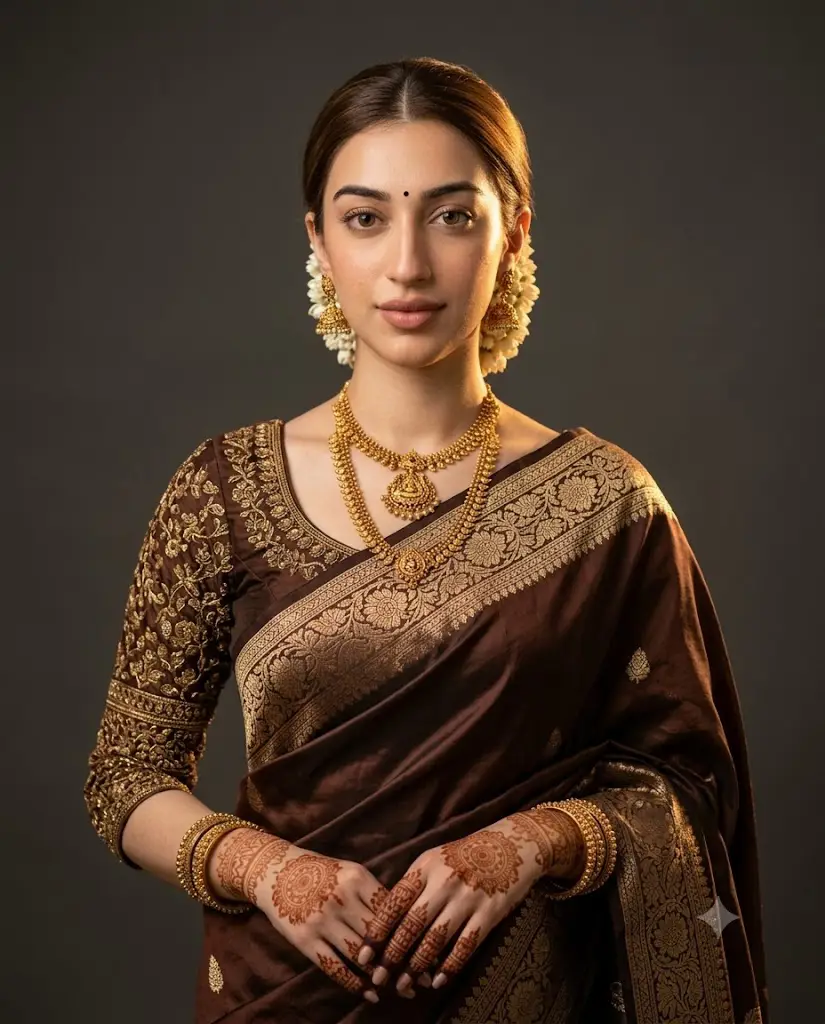
Traditional Indian bridal photography has always been admired for its richness — the silk sarees, the gold jewelry, the intricate henna, and the graceful poses that capture centuries of culture in a single frame. Now, thanks to AI image generation, this timeless aesthetic has found a brand-new digital life. The "Elegant Indian Bridal Prompt" trend is taking over social media, allowing anyone to transform a simple photo into a stunning, editorial-style bridal portrait complete with silk sarees, temple jewelry, jasmine-adorned hair, and cinematic studio lighting — all without ever stepping into a professional studio.
This trend has become especially popular among women who want a creative keepsake, content creators building aesthetic portfolios, and couples planning pre-wedding shoots on a budget. Instead of hiring a photographer, renting outfits, and booking a makeup artist, users are simply typing out a detailed prompt describing the saree color, jewelry style, hairstyle, and lighting mood they want, then letting AI tools bring that vision to life in minutes.
What makes this trend stand out from typical AI filters is the level of detail involved. These aren't generic glam filters — they're carefully written prompts that specify fabric texture, jewelry design, lighting direction, camera lens, and even skin texture realism. The result is a portrait that feels closer to a professional photoshoot than a quick social media edit. This article breaks down exactly how the trend works, which tools are best suited for it, and how you can create your own elegant Indian bridal portrait step by step.
"Elegant Indian Bridal Prompt"
Ultra-detailed photorealistic cinematic portrait of an elegant woman in a deep chocolate-brown silk saree with antique-gold floral brocade border, matching embroidered blouse. Layered temple-style gold necklace, jhumka earrings, low bun with fresh jasmine gajra, black bindi. Hennaed hands and wrists, stacked gold bangles. Facing camera, graceful confident expression, hands folded near waist. Medium close-up, centered, warm golden side-lighting from upper right, soft rim light on hair, dark neutral gray background, shallow depth of field. 85mm lens, f/1.6, ISO 100, natural skin texture, cinematic color grading, 8K, vertical 4:5. No text, watermark, or distorted anatomy.
How To Use Photo Editing?
Understanding the mechanics behind this trend makes it much easier to get consistently good results. Unlike traditional editing apps where you manually adjust brightness, contrast, or crop an existing photo, this style relies on AI models that generate a completely new, stylized image based on a written prompt and, in many cases, a reference photo of your face.
Here's how the general workflow operates:
1. Upload a clear reference photo
A front-facing image with good lighting helps the AI retain facial likeness accurately.
2. Write or copy a bridal-style prompt
Describing the saree color, embroidery, jewelry, hairstyle, bindi, henna, lighting, and camera settings.
3. Generate the image
The AI blends the facial features from your photo with the described bridal styling and studio lighting.
4. Compare multiple outputs
Most platforms generate several versions, letting you pick the one with the most natural expression and cleanest details.
5. Refine with follow-up instructions
You can request changes like brighter lighting, a different jewelry style, or softer background blur.
The most important factor in getting a photorealistic, high-quality result is prompt specificity. Mentioning exact details — such as "temple-style necklace," "jasmine gajra," "henna on wrists," or "85mm lens with shallow depth of field" — gives the AI clear creative direction, resulting in far more polished and believable imagery than vague requests like "make me look like a bride."
Tools You Can Use For Prompt Copy and Create Photo
A number of AI platforms have become go-to choices for creating elegant Indian bridal portraits, each offering different strengths:
1. Midjourney
Excellent for rich, painterly detail, especially when it comes to rendering silk textures, embroidery, and warm cinematic lighting.
2. Leonardo AI
Offers strong facial consistency across multiple generations, making it ideal for keeping the bride's likeness accurate throughout the editing process.
3. Google Gemini-based image tools
Popular for quick photo-to-portrait transformations, especially favored by beginners who want fast, simple results.
4. Canva AI Image Generator
A great all-in-one option, since it combines prompt-based generation with easy post-editing tools like cropping, filters, and text overlays.
5. ChatGPT with image generation
Many users simply paste a ready-made bridal prompt directly into ChatGPT along with their photo, generating the final portrait within the same conversation window.
Rather than writing prompts from scratch, most people search for trending "Elegant Indian Bridal Prompt" templates shared across Pinterest, Reddit, and prompt-sharing communities. They then copy these templates and personalize them — adjusting saree color, jewelry style, or background tone to match their own vision. This copy-and-customize approach has made the trend accessible even to users with zero prompt-writing experience.
How To Edit Photo?
Creating your own elegant Indian bridal portrait is simpler than it looks. Follow these steps for the best results:
Step 1: Select a high-quality reference photo
hoose an image with clear, even lighting and a front-facing angle so the AI can accurately capture facial features.
Step 2: Copy a trending bridal prompt template
Adjust the details to match your preferences — saree color, jewelry type, hairstyle, or background tone.
Step 3: Add specific styling keywords
Terms like "temple jewelry," "jasmine gajra," "henna patterns," "golden cinematic lighting," and "shallow depth of field" help guide the AI toward a realistic, editorial-style output.
Step 4: Generate several variations
Don't settle for the first result — comparing multiple outputs helps you choose the most natural-looking version.
Step 5: Request targeted refinements
If the jewelry looks off or the lighting feels too flat, ask the AI to adjust just that element, such as "add more warmth to the lighting" or "make the necklace more detailed."
Step 6: Finalize with light post-editing
Once you're happy with the AI-generated portrait, use a tool like Canva or Lightroom for minor touch-ups such as color balance, cropping, or adding a subtle vignette before sharing.
Conclusion
The Elegant Indian Bridal Prompt trend beautifully merges tradition with technology, allowing anyone to recreate the grandeur of a classic bridal portrait without a studio, stylist, or expensive photoshoot. With a clear reference photo, a well-written prompt, and the right AI tool, users can generate stunningly realistic bridal images that honor cultural aesthetics while embracing modern creativity. Whether it's for a pre-wedding shoot, a festive celebration, or simply a beautiful piece of digital art, this trend proves that AI can help preserve and reimagine tradition in ways that feel both authentic and effortlessly elegant.