Introduction
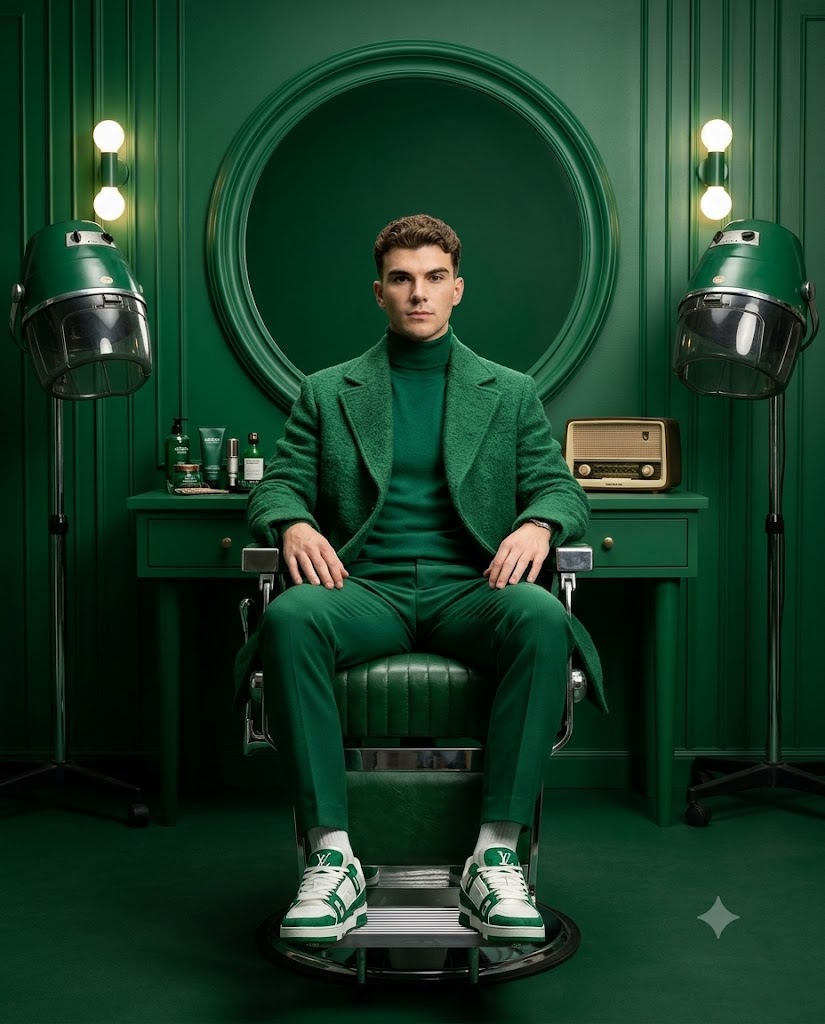
AI image generation has transformed the way people create stunning portraits without expensive cameras or professional studios. One of the latest trends is the Emerald Monochrome Vintage Barbershop Portrait, a luxury editorial style that combines classic vintage barbershop interiors with modern fashion photography. This style features elegant emerald green tones, symmetrical compositions, dramatic lighting, and premium fashion aesthetics.
"Emerald Monochrome Vintage Barbershop Portrait AI Prompt"
Create an ultra-luxury monochrome emerald vintage barbershop editorial portrait using the uploaded image as the ONLY facial reference, preserving 100% exact facial structure, hairstyle, skin tone, and all unique features without beautification or identity changes. A confident male model sits centered on a classic green leather vintage barber chair with a chrome base, hands resting on his thighs, wearing a textured emerald overcoat, green turtleneck, tailored green trousers, and green-white designer sneakers. The symmetrical barbershop features a centered circular green-framed mirror, green vanity cabinet, two vintage hooded hair dryers, neatly arranged green grooming products, a retro radio, vertical paneled walls, and a warm round wall light. Use soft cinematic studio lighting with clean shadows, chrome highlights, and no green spill on skin. Capture a full-body, eye-level, perfectly centered composition with a 50mm lens, the subject filling 65–70% of the frame. Maintain a deep emerald monochrome palette for the outfit and environment only (never the skin tone), delivering an ultra-detailed 8K hyper-realistic luxury fashion magazine portrait with sharp textures, premium studio quality, and a 4:5 aspect ratio.
The Emerald Monochrome Vintage Barbershop Portrait AI Prompt helps you generate highly realistic images using AI tools like ChatGPT, Midjourney, Flux AI, Ideogram, and other image generation platforms. Whether you are a content creator, social media influencer, photographer, or AI art enthusiast, this prompt allows you to create premium magazine-style portraits within minutes.
The prompt usually includes details such as monochrome emerald color grading, luxury barber chairs, vintage mirrors, classic wall designs, cinematic lighting, soft shadows, high-fashion clothing, realistic skin texture, and ultra-HD quality. When combined with a face reference image, it can preserve facial identity while placing the subject into a luxurious editorial environment.
Because of its elegant appearance, this portrait style is perfect for Instagram posts, profile pictures, YouTube thumbnails, AI photography portfolios, fashion advertisements, and digital artwork. The combination of vintage aesthetics and modern AI technology creates an eye-catching image that looks professionally photographed.
How To Use Photo Editing?
Using an AI photo editing prompt is simple if you follow the correct process. First, copy the complete Emerald Monochrome Vintage Barbershop Portrait AI Prompt. Then choose an AI image generator that supports long descriptive prompts.
Upload your reference image if the platform allows face reference or image conditioning. This helps the AI maintain your facial features, hairstyle, and skin tone while applying the luxurious emerald monochrome style.
Paste the copied prompt into the text box and review all the instructions. If necessary, adjust image dimensions such as 3:4, 4:5, or 9:16 depending on where you plan to use the image.
Click the Generate button and wait a few moments. Most AI generators produce multiple image variations. Select the best one that matches your expectations.
If the image needs improvements, edit the prompt by changing lighting intensity, background details, camera angle, clothing description, or color grading. Regenerate the image until you achieve the desired quality.
Finally, enhance the generated portrait using an AI upscaler or editing software to improve sharpness and resolution. Export the image in high quality for social media, printing, or professional use.
Tools You Can Use For Prompt Copy And Create Photo
Many AI platforms can generate realistic portraits from detailed prompts. Below are some of the best options.
1. ChatGPT Image Generator
ChatGPT can generate premium-quality AI portraits using detailed prompts and reference images. It is excellent for realistic lighting, facial preservation, and creative scene generation.
2. Midjourney
Midjourney is famous for creating cinematic, artistic, and luxury-style portraits. It produces highly detailed fashion photography with beautiful lighting effects.
3. Flux AI
Flux AI creates ultra-realistic portraits with natural skin textures, realistic shadows, and sharp image quality. It is suitable for professional AI photography.
4. Ideogram AI
Ideogram is known for generating high-quality images while accurately following detailed prompt instructions. It is beginner-friendly and produces consistent results.
5. Leonardo AI
Leonardo AI offers multiple image models with advanced customization options. Users can fine-tune styles, lighting, and realism.
6. Bing Image Creator
Powered by advanced AI technology, Bing Image Creator allows users to generate realistic portraits for free with simple prompts.
7. Adobe Firefly
Adobe Firefly combines AI image generation with professional editing tools, making it ideal for designers and photographers.
8. Canva AI
Canva's AI Image Generator is perfect for creating quick social media graphics and portrait designs without advanced editing skills.
How do I edit a photo?
Follow these steps to create the perfect "Emerald Green Vintage Barbershop Portrait".
Step 1: Choose a high-quality photo
Choose a clear portrait with good lighting. High-quality photos produce better AI results.
Step 2: Copy AI preset
Copy the "Emerald Green Vintage Barbershop Portrait" AI preset exactly to achieve the perfect style.
Step 3: Open the AI image generator
Open your favorite AI platform, such as ChatGPT, Midjourney, Flux AI, Leonardo AI, or Ideogram.
Step 4: Upload your reference image
If the platform supports image references, upload your original portrait. This will ensure accurate facial recognition.
Step 5: Paste preset
Paste the copied preset into the text field. Check the text for missing words and formatting errors.
Step 6: Choose an image size
Choose an aspect ratio as needed, such as 3:4, 4:5, or 9:16.
Step 7: Create the portrait
Click “Generate” and let the AI create multiple versions of the image.
Step 8: Compare the results
Carefully review each generated image. Choose the version with the best facial accuracy, lighting, and strongest emerald green monochrome effect.
Step 9: Optimize the image
Use an AI upscaler or image editing software to improve sharpness, reduce artifacts, and increase image resolution.
Step 10: Save and share
Download the finished portrait in high resolution and share it on Instagram, Facebook, Pinterest, Behance, or your personal portfolio.
Conclusion
The “Emerald Green Monochrome Vintage Barbershop Portrait” AI template is perfect for anyone looking to create stunning, editorial-style portraits using artificial intelligence. The unique blend of emerald green coloring, vintage barbershop interiors, cinematic lighting, and high-fashion styling creates images that look like professional magazine covers.
Whether you’re creating social media content, building an AI photography portfolio, designing advertising graphics, or simply experimenting with modern AI art, this template offers tremendous creative possibilities. With high-quality reference images, a reliable AI image generator, and the editing steps described above, you can effortlessly create realistic and striking portraits. As AI image generation technology continues to improve, mastering detailed templates like these will help you create high-quality artwork faster and more efficiently. Try the "Emerald Green Vintage Barbershop Portrait" AI template today and transform ordinary photos into stunning digital works of art.