Introduction
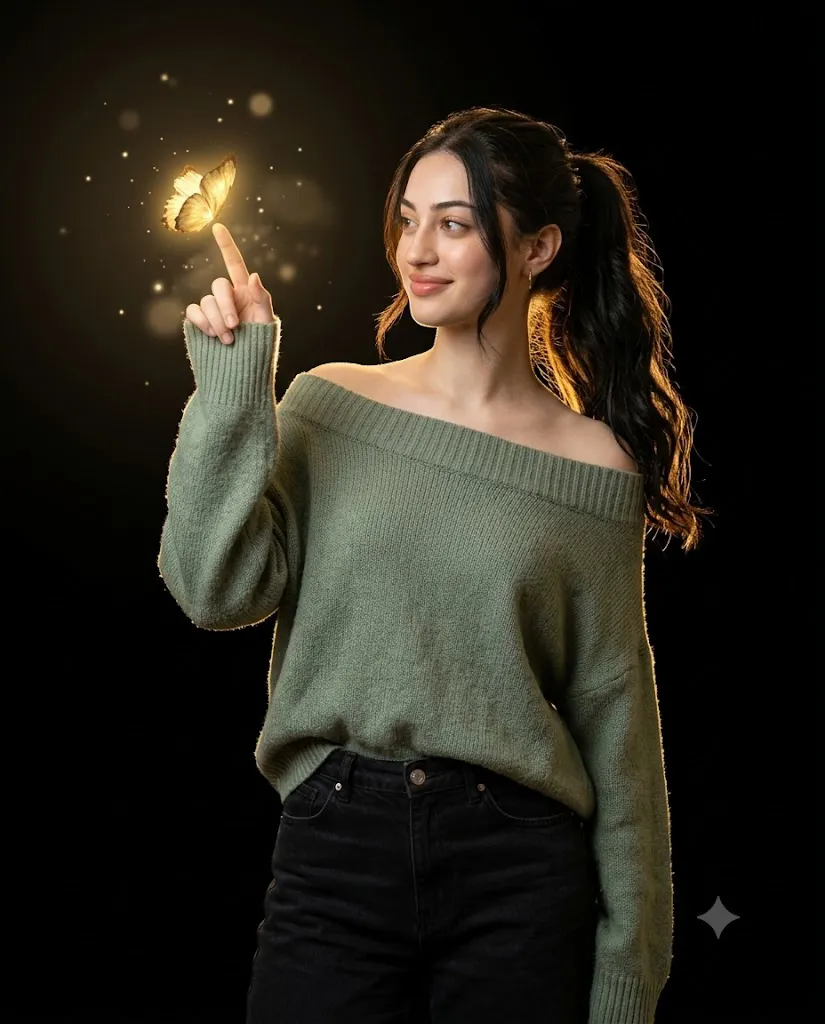
The Golden Butterfly Glow Prompt is a beautiful AI photography concept designed to transform an ordinary portrait into an elegant, magical, and cinematic fashion image. The central visual element is a glowing golden butterfly hovering above the subject's raised index finger. The woman looks toward the butterfly with a soft, fascinated smile, creating a natural sense of wonder and connection.
The outfit combines an oversized sage-green off-shoulder knit sweater with high-waisted black jeans. This combination creates a sophisticated contrast between the soft green sweater and the deep black lower outfit. Her loose high ponytail falls naturally over one shoulder, adding movement and elegance to the composition.
The background is intentionally kept seamless and black so that the golden butterfly becomes the main visual highlight. Warm golden rim lighting separates the subject from the dark background, while a soft frontal key light keeps the face naturally illuminated. Floating luminous particles and subtle volumetric glow add a dreamy atmosphere without making the image look artificial.
The prompt is designed for a 4:5 studio portrait, making it particularly suitable for Instagram posts, fashion editorials, profile images, creative portfolios, and other social-media content. The 85mm lens and f/2 aperture create a shallow depth-of-field effect, helping the subject stand out while producing a smooth cinematic background.
Another important part of the prompt is identity preservation. When using a reference photograph, the uploaded image should be treated as the only facial and identity reference. The AI should preserve the person's recognizable facial characteristics rather than replacing them with another generated face.
"Golden Butterfly Glow Prompt"
Create an ultra-realistic 4:5 studio portrait of the beautiful woman. Dress her in an oversized sage-green off-shoulder knit sweater with high-waisted black jeans. Pose her with one arm raised and the index finger pointing toward a glowing golden butterfly hovering above it, while she gazes at the butterfly with a soft, fascinated smile. Style her hair in a loose high ponytail cascading over one shoulder. Use a seamless black background, warm golden rim lighting, soft frontal key light, floating luminous particles, and subtle volumetric glow. Mid-thigh framing, 85mm lens, f/2, shallow depth of field, realistic skin and fabric texture, cinematic low-key lighting, high-end editorial quality. Use my uploaded face image as the ONLY facial and identity reference. No other faces, models, datasets, or references are allowed. 🔐Absolute Identity locked—non-negotiable.
How To Use Photo Editing?
Using the Golden Butterfly Glow Prompt is simple when your AI editor supports reference-image editing.
Step 1: Choose a Good Reference Image
Begin with a clear, high-resolution photograph of the person. A well-lit image with the face clearly visible generally provides better results. Avoid heavily blurred photographs or images where the face is covered by hands, hair, sunglasses, or other objects.
Step 2: Upload Your Face Reference
Upload the selected photograph into your AI photo-editing or image-generation tool. If the platform provides an identity-reference option, select the uploaded photograph as the primary reference. The prompt should clearly communicate that the person's identity must remain consistent.
For example, you can emphasize:
“Use the uploaded image as the only facial and identity reference. Preserve the original facial structure and recognizable appearance.”
Step 3: Add the Full Prompt
Paste the Golden Butterfly Glow Prompt into the text-prompt area. Make sure the important visual elements remain together: outfit, pose, butterfly, lighting, background, camera settings, and framing.
Step 4: Generate the Image
Generate the first version and carefully inspect the result. AI generation can sometimes interpret poses or clothing differently than expected, so creating a few variations can help you find the strongest composition. Look for a version where the face, hands, butterfly, clothing, and lighting appear natural.
Tools You Can Use For Prompt Copy and Create Photo
There are several categories of tools that can help you create this type of AI portrait.
1. AI Image Generators
Text-to-image generators are useful when creating a completely new cinematic portrait. They can interpret descriptions involving fashion, lighting, camera settings, atmosphere, and artistic composition. If you want to preserve the identity of a real person, choose a platform that supports reference-image or character-consistency features.
2. AI Photo Editing Tools
AI photo editors are useful when you already have a photograph and want to transform the clothing, pose, background, or lighting. For the Golden Butterfly Glow concept, an image-editing tool can help create the black studio background, sage-green sweater, golden butterfly, luminous particles, and cinematic lighting while using the original image as the identity reference.
3. Professional Photo Editing Software
Traditional editing software can be useful after AI generation. It allows you to make precise adjustments to brightness, contrast, exposure, highlights, shadows, sharpness, and cropping. You can also refine small imperfections that may appear during AI generation.
4. Prompt-Based Creative Platforms
Prompt-based platforms are ideal for experimenting with different versions of the concept. You can change the butterfly's size, glow intensity, camera composition, clothing, or background while keeping the overall concept consistent. Always check the current capabilities and licensing terms of the tool you choose before using generated images commercially.
How To Edit Photo?
After generating the image, a few editing steps can make the final portrait look significantly more realistic.
Step 1: Check the Face
First, inspect the facial identity carefully. The face should remain natural and consistent with the uploaded reference. Avoid unnecessary beautification, face reshaping, or artificial skin smoothing. Realistic skin texture is especially important for an editorial-style portrait.
Step 2: Refine the Outfit
The sage-green sweater should look oversized and naturally draped around the body. Because it is an off-shoulder design, the neckline should appear realistic rather than distorted. The high-waisted black jeans should have believable fabric texture, stitching, folds, and proportions.
Step 3: Perfect the Butterfly
The golden butterfly is the key creative element. It should appear to hover naturally above the raised index finger. The butterfly should have a warm golden glow without becoming excessively bright. A subtle halo around the wings can create a magical appearance while maintaining photorealism.
Step 4: Improve the Lighting
Use a combination of warm golden rim lighting and soft frontal illumination. The rim light should gently outline the woman's hair and shoulders, separating her from the black background. The frontal key light should illuminate the face evenly while preserving natural shadows.
Step 5: Add Atmospheric Effects
Floating luminous particles can add depth to the scene. Keep them subtle and scattered rather than covering the entire frame. A gentle volumetric glow around the butterfly can connect the light source with the subject and create a more cinematic appearance.
Step 6: Maintain Shallow Depth of Field
The 85mm lens and f/2 aperture look should produce a shallow depth-of-field effect. The subject and butterfly should remain visually important while the background stays smooth and unobtrusive. Avoid excessive blur around the hands or butterfly because these areas need to remain recognizable.
Step 7: Final Color Correction
Finally, adjust the overall exposure, contrast, highlights, shadows, and sharpness. The golden tones should complement the sage-green sweater without overpowering it. A slightly cinematic low-key finish can make the portrait look more like a professional fashion editorial.
Conclusion
The Golden Butterfly Glow Prompt combines fashion photography, cinematic lighting, and magical visual storytelling into one elegant portrait concept. The contrast between the black studio background, sage-green sweater, black jeans, and glowing golden butterfly creates a sophisticated and memorable composition.
The most important factors are identity preservation, realistic lighting, natural posing, accurate clothing details, and believable butterfly placement. A good reference photograph and a detailed prompt can help the AI understand these requirements more effectively.
For the best result, generate multiple versions and select the image with the most natural facial identity, hand position, clothing texture, and butterfly interaction. After generation, use photo-editing tools to refine lighting, color, sharpness, and atmospheric effects.
With careful prompting and editing, the Golden Butterfly Glow concept can turn a simple portrait into a high-end cinematic fashion photograph with a dreamy, elegant, and magical atmosphere.