Introduction
The Golden Hour Couple Prompt is a romantic AI photography concept designed to create a warm, emotional, and cinematic Valentine’s Day couple portrait. The combination of golden-hour sunlight, a blooming garden, pastel colors, soft hearts, elegant outfits, and intimate body language creates the appearance of a premium commercial love-story photograph.
The prompt is especially effective when reference images are used for both people. Maintaining facial identity is an important part of the process because the final image should preserve the recognizable facial characteristics of the original subjects while placing them into a completely new romantic environment.
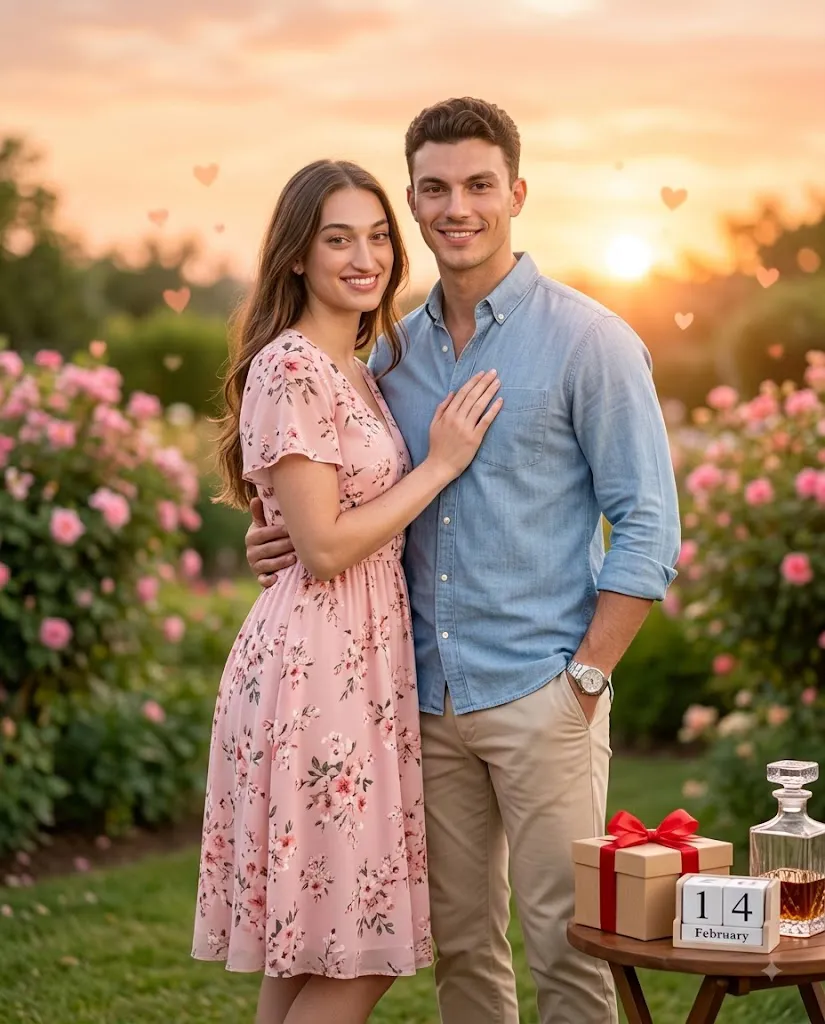
The composition features a full-body couple portrait in a beautiful garden during golden hour. The woman wears a pink floral dress and gently leans against the man's chest with her hand placed over his heart. The man wears a light-blue chambray shirt with beige chinos, keeps one arm around her waist, and places his other hand casually in his pocket. Both subjects smile naturally toward the camera.
The background includes pink flowers, a pastel sunrise or sunset sky, and subtle floating hearts. A softly blurred foreground table contains a ribboned gift box, a “14 February” flip calendar, and an elegant glass decanter. Shallow depth of field and smooth bokeh give the image a professional photography aesthetic.
"Golden Hour Couple Prompt"
Photorealistic romantic Valentine's portrait, strict face-match to reference images (image_0.png, image_1.png); vertical full-body couple shot, warm golden-hour garden setting with pink blooms, pastel sunrise sky, and soft floating hearts; woman in pink floral dress leans into man's chest with her hand over his heart, man in light blue chambray shirt and beige chinos has his arm around her waist, other hand in pocket, both smiling at camera with shallow depth of field; soft-focus foreground table with a ribboned gift box, "14 February" flip calendar, and glass decanter; golden-hour lighting, pastel color grade, 4:5 aspect ratio, premium commercial finish, smooth bokeh.
How To Use Photo Editing?
Creating this romantic couple portrait requires a good reference image and a detailed AI editing prompt. Follow these steps for a better result.
Step 1: Select Reference Images
Choose clear, high-resolution photographs of both people. Their faces should be visible and preferably captured from angles that allow the AI to understand their facial structure. Avoid heavily blurred images or photographs where the faces are covered.
Step 2: Upload the Reference Images
Upload the selected photographs into an AI image-editing platform that supports reference-image editing. Use the images as identity references rather than simply describing the subjects.
Include a clear instruction such as:
“Preserve the recognizable facial identity and natural facial characteristics of both reference subjects. Do not unnecessarily change their facial proportions or distinctive features.”
This helps maintain consistency.
Step 3: Add the Golden Hour Prompt
Paste the complete prompt into the AI editor. Include the couple's clothing, pose, environment, lighting, foreground objects, Valentine's Day details, aspect ratio, and photographic style. Detailed descriptions give the AI more information about the desired final composition.
Step 4: Generate the Image
Generate the first version and carefully inspect the result. Pay attention to the faces, hands, body proportions, clothing, romantic pose, and background. If something looks incorrect, modify the relevant part of the prompt instead of changing everything at once.
Tools You Can Use For Prompt Copy and Create Photo
Different categories of creative tools can be used for this type of AI portrait.
1. AI Image Generators
AI image-generation platforms are useful for creating a romantic garden environment from a detailed prompt. They can generate flowers, pastel skies, atmospheric lighting, hearts, bokeh, and cinematic backgrounds. If you're using real people as references, choose a platform with image-reference or identity-consistency capabilities.
2. AI Photo Editors
AI photo editors are useful for transforming an existing couple photograph. You can use them to replace the background, modify outfits, adjust lighting, and introduce Valentine's Day decorations. These tools are particularly useful when you want to preserve the original people while changing the entire setting.
3. Graphic Design Tools
Graphic-design software can be used for final adjustments after AI generation. You can refine the placement of the “14 February” calendar, gift box, decorative hearts, and other visual elements. It can also be used to crop the image into a precise 4:5 composition.
4. Image Enhancement Tools
Image-enhancement tools can improve resolution and fine details after the image has been generated. They can help improve clothing textures, hair details, skin texture, flowers, and small background elements. Always inspect enhanced images afterward because excessive processing can make details appear unnatural.
How To Edit Photo?
Once the AI creates the initial image, use a step-by-step editing process to achieve a polished result.
Step 1: Check Facial Accuracy
Start by checking both faces against the reference photographs. Look at the eyes, eyebrows, nose, lips, jawline, hairstyle, and overall facial proportions. The subjects should remain recognizable and natural. If the faces have changed significantly, regenerate the image with stronger reference and identity instructions.
Step 2: Check the Couple's Pose
The woman's pose should appear affectionate but natural, with her body leaning comfortably toward the man's chest and her hand positioned over his heart. The man's arm should rest naturally around her waist, while his other hand remains in his pocket. Avoid unnatural body positioning, distorted fingers, or awkward contact between the two subjects.
Step 3: Refine Clothing
The woman's pink floral dress should have realistic fabric texture and natural folds. Floral details should remain elegant rather than overly exaggerated. The man's light-blue chambray shirt and beige chinos should have realistic material textures and appropriate shadows. The clothing should also match the warm golden-hour lighting.
Step 4: Improve the Garden Background
The garden should contain soft pink blooms and a dreamy pastel sky. Keep the background slightly out of focus so the couple remains the main visual subject. Subtle floating hearts can add a Valentine's Day atmosphere without making the scene look overly artificial.
Step 5: Adjust Golden-Hour Lighting
Golden-hour lighting is one of the most important elements of this prompt. Use warm sunlight coming from a low angle to create gentle highlights around the couple. Soft rim lighting around the hair and shoulders can add depth. Keep the shadows soft and realistic rather than extremely dark.
Step 6: Add Foreground Elements
The blurred foreground table should contain a ribboned gift box, a “14 February” flip calendar, and a glass decanter. These objects should remain slightly out of focus. Their purpose is to reinforce the Valentine's Day story without competing with the couple.
Step 7: Create Smooth Bokeh
Use shallow depth of field to separate the couple from the garden. Soft circular bokeh from distant lights or sunlight can make the background feel more cinematic. Keep the bokeh subtle enough that the image remains photorealistic.
Step 8: Apply Final Color Grading
Use a soft pastel color grade with warm highlights and balanced skin tones. Avoid excessive saturation. The final image should feel like a professionally photographed Valentine's Day campaign rather than a heavily filtered AI image.
Step 9: Check the 4:5 Composition
A 4:5 vertical composition works especially well for social-media portrait photography. Keep the couple centered or slightly off-center while ensuring their full bodies remain visible. The foreground objects can occupy a small portion of the lower frame.
Conclusion
The Golden Hour Couple Prompt combines romance, cinematic photography, and Valentine's Day aesthetics into a single premium visual concept. Its warm garden setting, pink flowers, pastel sky, floating hearts, elegant outfits, and golden-hour lighting create a beautiful atmosphere for a couple portrait.
The most important aspects of the editing process are preserving recognizable facial identity, creating natural body interaction, maintaining realistic clothing textures, and matching the lighting across the subjects and background.
For the best results, begin with high-quality reference images, use detailed instructions, generate multiple variations when necessary, and carefully inspect the final image for facial consistency, hands, body proportions, and background quality.
With subtle color grading, smooth bokeh, realistic depth of field, and carefully positioned Valentine's Day elements, an ordinary couple photograph can be transformed into a romantic Golden Hour Valentine’s portrait with a polished commercial photography aesthetic.