Introduction
Artificial Intelligence has completely changed the way people create digital art and professional-quality portraits. Today, anyone can generate breathtaking cinematic images without expensive cameras, professional studios, or advanced editing skills. With a detailed AI prompt, modern AI image generators can produce realistic portraits that look as if they were captured by a professional photographer during golden hour.
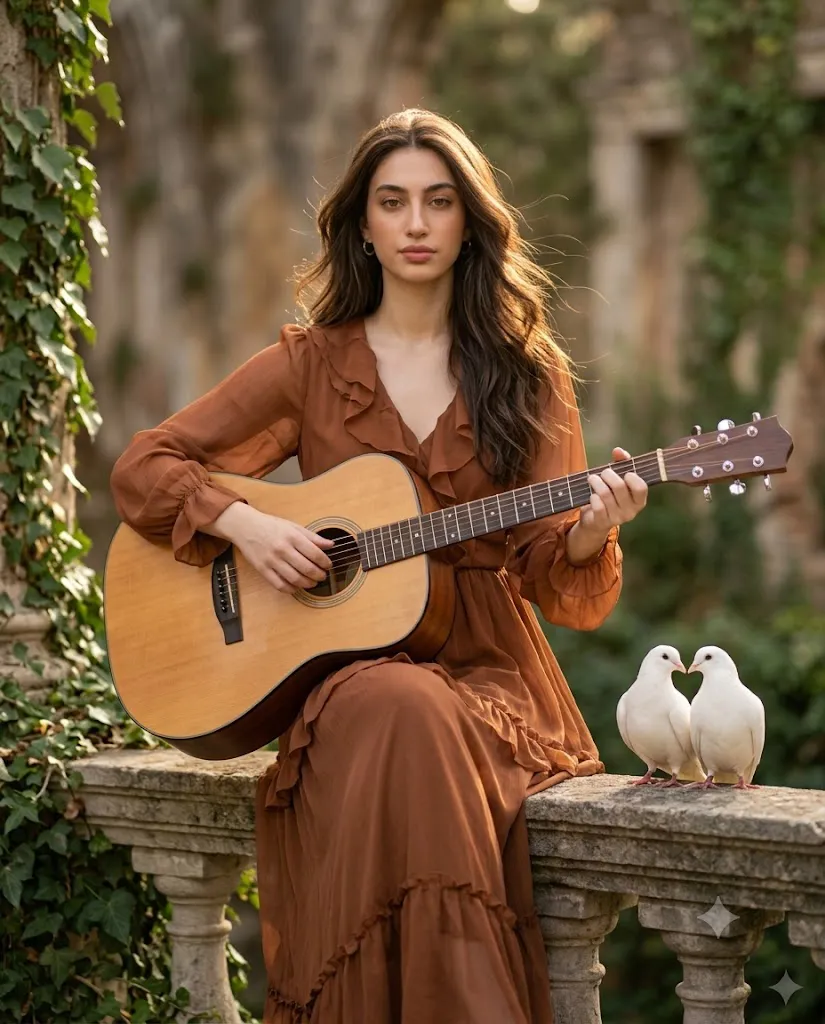
The Golden Hour Ruins Guitar Prompt is designed for creators who want a beautiful, storytelling portrait with a warm cinematic atmosphere. This prompt combines ancient stone ruins, lush green ivy, soft golden sunlight, and a peaceful acoustic guitar performance to create a timeless masterpiece. Every element—from the flowing chiffon dress to the heart-shaped white doves—adds emotion and elegance to the final image.
One of the biggest strengths of this prompt is its attention to detail. It preserves the person's facial identity while creating a natural environment with realistic lighting, accurate shadows, and professional depth of field. The result is an image suitable for Instagram, portfolio projects, wallpapers, posters, or social media branding. Whether you're an AI artist, content creator, photographer, or beginner exploring AI-generated artwork, this prompt helps you achieve premium-quality results with very little effort.
"Golden Hour Ruins Guitar Prompt"
Subject: A high-resolution, ultra-realistic cinematic portrait featuring the woman from the reference photo. Appearance & Pose: She is seated naturally on a weathered stone railing, body slightly angled. She has voluminous, layered chestnut-brown hair and wears a russet-toned ruffled chiffon dress. She is holding a polished acoustic guitar, softly playing a chord. Expression: Her expression is serene, calm, and gently directed toward the camera with a peaceful, introspective gaze. Setting & Composition: The scene is an ancient ruin with textured stone and overgrown ivy. She is positioned slightly to the left. On the right, two white doves are perched, their heads creating a subtle heart shape. Lighting: Golden hour sunlight fills the frame, providing warm rim lighting on her hair and dress. Format: 4:5 vertical portrait.
How To Use Photo Editing?
Using this AI photo editing prompt is simple. The key is selecting a high-quality reference image and combining it with a powerful AI image generation platform.
Step 1: Select a High-Quality Reference Image
Choose a clear portrait with good lighting. The face should be visible from the front or at a slight angle. Higher-quality reference photos produce better facial accuracy.
Step 2: Copy the Complete Prompt
Copy the entire Golden Hour Ruins Guitar Prompt exactly as written. Avoid deleting important details because every description influences the final output.
Step 3: Upload Your Reference Photo
Upload your original image to an AI image generator that supports image references or face preservation.
Step 4: Paste the Prompt
Paste the copied prompt into the prompt box. Make sure your AI platform supports image-to-image generation or face-lock technology.
Step 5: Generate the Image
Click the Generate button and wait for the AI to create your portrait. Most platforms produce multiple variations, allowing you to choose the best version.
Step 6: Refine If Necessary
If needed, regenerate the image with slight adjustments to lighting, pose, facial expression, or composition until you achieve your desired result.
Tools You Can Use For Prompt Copy and Create Photo
Many AI image generation tools can create cinematic portraits using detailed prompts. Here are some of the most popular options:
1. ChatGPT Image Generation
ChatGPT can generate detailed prompts and create high-quality AI images with excellent composition, realistic lighting, and accurate facial preservation.
2. Midjourney
Midjourney is known for producing artistic and cinematic visuals with incredible detail, making it ideal for editorial-style portraits and fantasy-inspired scenes.
3. Flux AI
Flux AI excels at photorealistic rendering, delivering natural skin textures, realistic lighting, and high-quality facial details.
4. Google Imagen
Google Imagen generates realistic images with sharp details, balanced colors, and highly accurate prompt interpretation.
5. Adobe Firefly
Adobe Firefly is perfect for designers who want commercial-safe AI-generated images with excellent quality and editing flexibility.
6. Leonardo AI
Leonardo AI offers customizable image generation with numerous artistic styles, making it a favorite among digital creators.
7. Ideogram AI
Ideogram AI is excellent for both realistic portraits and creative designs, especially when images include typography or artistic layouts.
8. Microsoft Designer
Microsoft Designer provides an easy-to-use interface for beginners while producing professional-quality AI artwork.
How To Edit Photo?
Creating a cinematic portrait using the Golden Hour Ruins Guitar Prompt is straightforward if you follow these steps carefully.
Step 1: Choose a Clear Portrait
Select a high-resolution reference photo with good lighting and minimal blur.
Step 2: Upload the Image
Open your preferred AI image generator and upload your reference image.
Step 3: Paste the Prompt
Copy the complete Golden Hour Ruins Guitar Prompt and paste it into the prompt field.
Step 4: Enable Face Preservation
If your AI platform offers Face Lock, Character Reference, or Identity Preservation features, enable them to maintain facial accuracy.
Step 5: Configure Settings
Use recommended settings such as:
- Aspect Ratio: 4:5 Portrait
- Quality: Ultra HD or 8K
- Style: Photorealistic
- Lighting: Golden Hour
- Lens: 85mm
- Aperture: f/2.0–f/2.8
- HDR: Enabled
- Depth of Field: Shallow
Step 6: Generate the Portrait
Allow the AI to render the image. Most tools generate multiple versions, giving you options to select the strongest composition.
Step 7: Fine-Tune the Result
If necessary, regenerate with slight adjustments to:
- Facial expression
- Hair movement
- Dress details
- Guitar position
- Sunlight intensity
- Background blur
- Color grading
Step 8: Export in High Resolution
Download the final image in the highest available quality for printing, social media, or professional use.
Conclusion
The Golden Hour Ruins Guitar Prompt is an outstanding choice for anyone looking to create cinematic, emotionally rich AI portraits. By blending warm golden-hour lighting, ancient stone architecture, lush greenery, a beautifully detailed acoustic guitar, and elegant styling, this prompt delivers images that appear professionally photographed rather than AI-generated.
Its carefully crafted instructions ensure realistic facial identity, natural skin texture, balanced composition, and premium-quality lighting. Whether you're creating content for Instagram, digital art portfolios, YouTube thumbnails, posters, or personal collections, this prompt provides consistently impressive results.
As AI technology continues to evolve, detailed prompts like this one demonstrate how creativity and precision can work together to produce stunning visual art. Experiment with different poses, lighting conditions, and compositions while keeping the core prompt intact to create unique cinematic masterpieces every time.