Introduction
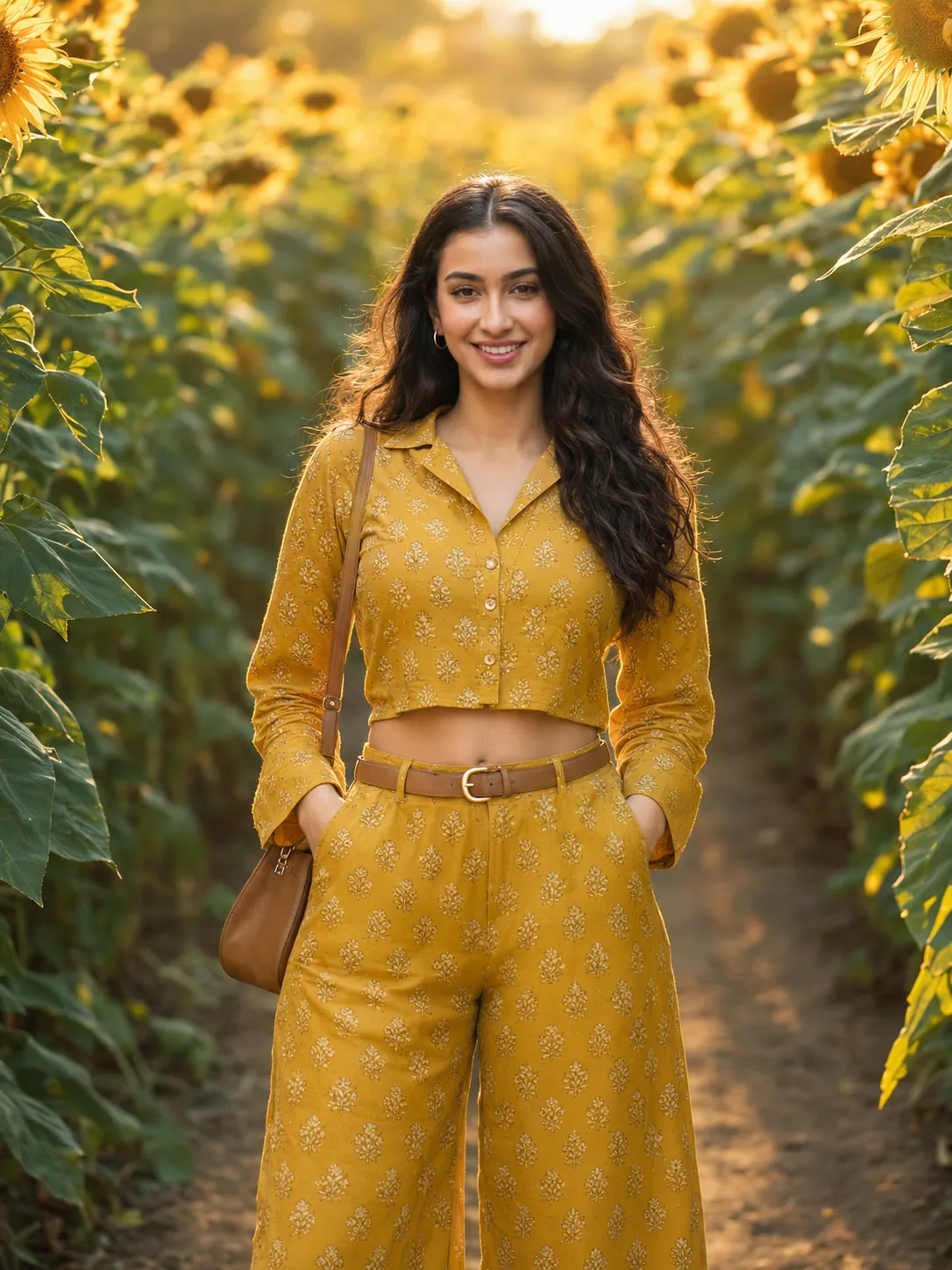
Ultra realistic luxury editorial portrait photography has become one of the biggest trends in modern AI-generated content creation. Today, creators can generate DSLR-quality fashion portraits using detailed prompts, cinematic lighting descriptions, and high-end editorial styling. One of the most visually stunning concepts currently trending is the “Golden Sunflower Muse” portrait aesthetic. This style combines warm golden-hour sunlight, blooming sunflower fields, luxury fashion outfits, natural beauty, and cinematic depth-of-field effects into one premium editorial composition.
A perfect cinematic prompt can completely transform the final AI image quality. Every detail inside the prompt helps the AI understand the exact lighting, outfit, expression, camera settings, and mood needed for realistic results. For example, this luxury editorial prompt creates a complete visual atmosphere:
“Ultra realistic luxury editorial portrait of a young Indian woman standing between tall blooming sunflower rows during warm golden afternoon light. Use the reference face exactly with identical facial features, natural skin texture, and expression. She wears a mustard yellow printed co-ord set with a fitted cropped shirt, wide-leg trousers, thin tan belt, gold hoop earrings, and a small tan sling bag. Sleek straight hair with center part, fresh dewy makeup, soft peach lips. She poses confidently with hands in pockets and chin slightly raised while sunlight creates a warm backlit halo through the sunflowers. Shot on Sony A7IV, 85mm f/1.8, razor-sharp face with dreamy bokeh background, warm cinematic color grading, luxury lifestyle editorial aesthetic, natural skin tones, 3:4 vertical composition.”
This type of prompt is powerful because it includes everything needed for professional cinematic realism. It describes the environment, facial accuracy, outfit styling, lighting direction, makeup, camera settings, and overall editorial mood. The result often looks similar to a fashion magazine photoshoot captured by a professional photographer.
Luxury sunflower portraits are especially popular on Instagram, Pinterest, photography pages, fashion blogs, and AI art communities because they combine nature, elegance, and cinematic beauty into one visually attractive image.
How To Use Photo Editing?
Photo editing is one of the most important steps after generating an AI portrait. Even the best AI-generated images become more professional after proper editing. Editing helps improve colors, lighting balance, skin texture, sharpness, cinematic atmosphere, and overall realism.
The first step is selecting the strongest image among multiple generated outputs. Choose the version with the best facial consistency, natural body posture, proper hand structure, and balanced lighting. Once selected, begin refining the portrait through editing software.
Start by adjusting exposure and brightness carefully. Luxury editorial portraits usually have soft balanced lighting rather than harsh contrast. Increasing warmth slightly creates a richer golden-hour effect and enhances the sunflower environment naturally.
Next, improve skin details while keeping texture realistic. Avoid over-smoothing the face because modern editorial photography focuses heavily on natural skin appearance. Small pores, realistic highlights, and subtle facial texture help maintain authenticity.
Background depth is another important part of cinematic editing. A softly blurred sunflower background creates professional DSLR depth-of-field effects that separate the subject from the environment beautifully. This dreamy bokeh style gives the portrait a premium fashion-photography look.
Sharpening facial details is equally important. Increase clarity around the eyes, lips, eyebrows, and hair strands carefully. Sharp facial focus combined with a blurred background creates a strong luxury editorial aesthetic.
Finally, apply cinematic color grading. Warm highlights, soft golden tones, slightly lifted shadows, and balanced skin colors create the final polished magazine-style result.
Tools You Can Use For Prompt Copy And Create Photo
Many AI tools and editing platforms are available today for creating ultra-realistic cinematic portraits. Each tool offers different advantages depending on your creative style and workflow.
1. ChatGPT
ChatGPT is one of the best tools for creating detailed AI prompts. It helps creators describe camera settings, lighting, outfits, cinematic moods, poses, and facial expressions professionally.
You can use ChatGPT for:
Writing luxury editorial prompts
Creating realistic descriptions
Improving cinematic quality
Shortening prompts
Writing captions and articles
Generating photography concepts
A well-written prompt dramatically improves the realism of the final image.
2. Midjourney
Midjourney is famous for artistic cinematic portraits and fashion-style image generation. It performs especially well with warm golden-hour lighting and luxury editorial compositions.
Advantages:
Beautiful cinematic colors
Fashion-style visuals
Artistic atmosphere
Premium composition quality
3. Leonardo AI
Leonardo AI is excellent for ultra-realistic portrait generation and facial consistency. It creates strong skin textures and DSLR-level realism.
Advantages:
Sharp facial details
Better texture realism
Strong lighting quality
Realistic editorial outputs
4. Adobe Photoshop
Photoshop remains one of the most powerful professional editing tools available today. Most creators use Photoshop for final image refinement.
Photoshop is useful for:
Skin retouching
Face cleanup
Background enhancement
Color correction
Cinematic effects
Professional sharpening
5. Lightroom
Lightroom is widely used for cinematic color grading and luxury tone adjustments. It is easier than Photoshop and extremely effective for portrait enhancement.
Best Lightroom features:
Warm golden-hour presets
Cinematic contrast
Highlight balancing
Exposure control
Natural skin-tone correction
6. Canva
Canva is a beginner-friendly platform for social media editing and presentation design. It helps creators prepare AI portraits for Instagram posts, thumbnails, portfolios, and banners.
How To Edit Photo?
Editing a cinematic AI portrait professionally requires careful adjustments and balanced enhancements.
Step 1: Upload The AI Portrait
Open your image inside Photoshop, Lightroom, or another editing software using the highest-resolution version possible.
Step 2: Adjust Warmth And Exposure
Increase warm tones slightly to create the glowing golden-hour atmosphere. Lower harsh shadows for softer luxury lighting.
Step 3: Preserve Realistic Skin
Retouch gently while keeping natural skin texture visible. Avoid plastic-looking skin effects.
Step 4: Sharpen Eyes And Hair
Increase sharpness around important facial areas like eyes, lips, and hair strands for DSLR-quality realism.
Step 5: Enhance Background Blur
If needed, add subtle blur to the sunflower background for creamy cinematic depth.
Step 6: Improve Color Balance
Boost yellow and orange tones carefully to make the sunflower environment feel more vibrant and rich.
Step 7: Apply Final Cinematic Grading
Use warm highlights, soft shadows, faded blacks, and natural golden skin tones for the final luxury editorial finish.
Conclusion
The “Golden Sunflower Muse” luxury editorial portrait style represents the perfect combination of nature, cinematic photography, fashion aesthetics, and AI creativity. Warm sunlight, blooming sunflower fields, realistic facial details, and editorial styling together create portraits that look elegant, premium, and magazine-worthy.
A strong cinematic prompt plays the most important role in achieving realistic results. Detailed descriptions of lighting, outfits, camera settings, poses, and facial features help AI tools generate highly professional images.
However, editing remains equally important. Proper color grading, realistic skin enhancement, sharp facial focus, and balanced lighting transform a normal AI image into a cinematic masterpiece.
With tools like ChatGPT, Midjourney, Leonardo AI, Photoshop, and Lightroom, creators can now produce fashion-quality editorial portraits directly from their imagination. By practicing detailed prompt writing and professional editing techniques, anyone can create stunning luxury portraits ready for social media, digital portfolios, or creative projects.