Introduction
Green is one of the most versatile colors in photography and visual design. It can represent nature, freshness, luxury, mystery, energy, and creativity depending on how it is used. The “Infinite Green Prompt” is a creative AI photo-editing concept that transforms an ordinary portrait into a visually immersive green-themed cinematic scene. By combining dramatic green lighting, rich backgrounds, atmospheric effects, stylish clothing, and professional photography details, this trend can create a photograph that looks like it belongs in a fashion campaign or futuristic movie.
The main attraction of the Infinite Green aesthetic is its ability to create an entire visual world around a single color. Instead of using green as a small accent, the concept incorporates different shades of emerald, forest, neon, and deep green throughout the composition. The result can be mysterious, luxurious, futuristic, or natural depending on the prompt.
AI photo-generation tools make this style accessible to almost anyone. You don’t need professional studio lights, expensive clothing, or a specially designed green location. With a clear reference photograph and a detailed prompt, AI can generate the desired environment, lighting, outfit, and cinematic atmosphere.
The subject can be standing in a green-lit studio, surrounded by tropical foliage, walking through a futuristic city, or posing against an abstract emerald background. Green rim lighting can outline the hair and shoulders, while soft shadows and atmospheric haze can add depth to the image. In this article, you will learn how to use the Infinite Green Prompt, which tools you can use to create the image, and how to edit your photograph step by step.
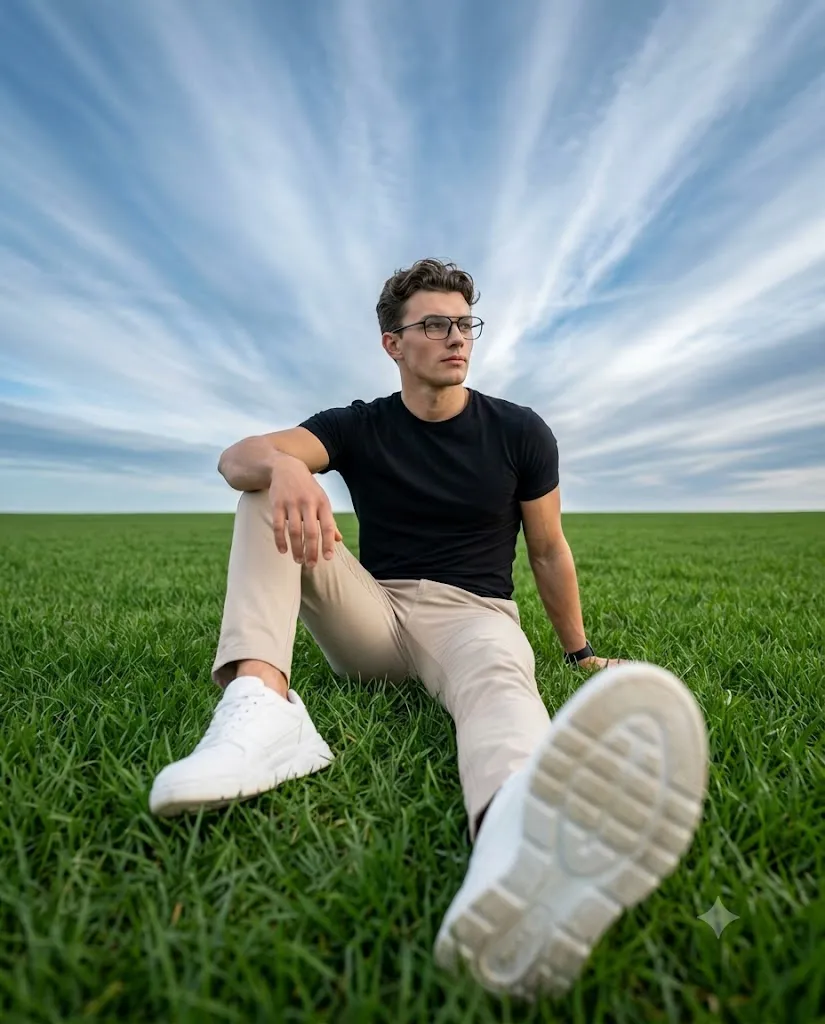
"Infinite Green Prompt"
Hyper-realistic 8K portrait, handsome man, styled hair, thin black wireframe glasses, black smartwatch. Fitted black crew-neck tee, beige slim chinos, chunky white sneakers. Seated on grass, right arm braced behind, left arm on bent knee, right leg extended toward camera. Calm, contemplative gaze off-camera right. Extreme low-angle, ultra-wide 13mm lens, right sneaker sole dominating blurred foreground, subject in lower third, vast sky with streaking cirrus clouds, straight clean horizon. Soft diffused daylight, f/4.0, ISO 100, 1/500s, cinematic HDR, crisp textures, 4:5 vertical, no warm tones.
How To Use Photo Editing?
Unlike traditional photo-editing applications that mainly modify an existing photograph, the Infinite Green trend uses AI image-generation and editing technology to create a new visual environment around your reference image. The AI interprets the instructions in your prompt and combines them with the appearance of your reference photograph.
Here’s the typical workflow:
1. Upload a clear reference photo
Choose an image with a clearly visible face and good-quality details. A clean portrait allows the AI to understand facial characteristics more effectively.
2. Copy or create a detailed prompt
Describe the green environment, clothing, lighting, background, camera angle, and mood. The more specific the description, the more control you have over the final image.
3. Generate the image
The AI processes the reference photo and prompt to create a new cinematic green-themed portrait.
4. Review multiple variations
Generate several versions and compare facial likeness, lighting, background quality, clothing details, and overall composition.
5. Refine the result
If the green effect is too strong or the background is too bright, use follow-up instructions to make specific adjustments.
A detailed prompt is important for this trend. Instead of saying “make my photo green,” describe elements such as “deep emerald background, soft green key light, subtle neon rim lighting, atmospheric haze, premium fashion photography, and cinematic color grading.”
Tools You Can Use For Prompt Copy and Create Photo
Several AI platforms can help you create an Infinite Green-style portrait.
1. Midjourney
Midjourney is widely used for creating cinematic and visually detailed images. It can be useful for experimenting with emerald environments, futuristic backgrounds, fashion compositions, and atmospheric lighting.
2. Leonardo AI
Leonardo AI offers image-generation and editing capabilities that can help users explore different green color palettes, clothing styles, backgrounds, and cinematic effects.
3. Google Gemini
Gemini-based image tools can provide a simple natural-language workflow for image creation and editing, depending on the features available to the user.
4. Canva AI
Canva can be useful for users who want to combine AI-generated imagery with traditional editing. After creating the portrait, you can adjust cropping, brightness, contrast, filters, and other elements.
5. ChatGPT With Image Generation
ChatGPT can be used to create and improve detailed AI prompts and, where image-generation capabilities are available, generate or edit images using reference photographs. You can also refine the result through follow-up instructions.
Many creators use a copy-and-customize method. They start with an Infinite Green Prompt and change the outfit, background, lighting intensity, green shade, camera angle, or overall mood according to their preference.
How To Edit Photo?
Creating an Infinite Green portrait is simple when you follow a structured workflow.
Step 1: Choose a strong reference photo
Start with a clear, high-resolution photograph. Make sure the face is visible and avoid images with excessive filters or blur.
Step 2: Copy the Infinite Green Prompt
Paste the detailed prompt into your chosen AI image-generation tool. Customize the clothing and background if you want a different visual direction.
Step 3: Choose your green aesthetic
You can choose from several green styles. Emerald green creates a luxurious appearance, forest green gives a natural and sophisticated feeling, while neon green can create a futuristic cyberpunk-inspired atmosphere.
Step 4: Describe the lighting
Lighting has a major impact on the final result. Try phrases such as “emerald rim light,” “soft green key light,” “dramatic low-key lighting,” and “subtle green atmospheric glow.”
Step 5: Generate multiple variations
Create several versions and compare the facial details, lighting, outfit, background, and overall balance. Select the version that looks the most realistic.
Step 6: Request targeted refinements
If the green color is too intense, ask the AI to make it more subtle. If the face is too dark, request softer facial illumination. You can also ask for more realistic fabric texture, sharper eyes, or a smoother background.
Step 7: Apply final editing
After selecting the best result, use an editing application to make small adjustments to exposure, contrast, highlights, shadows, sharpness, and cropping. A subtle amount of grain can help create a cinematic appearance without making the image look artificial.
Conclusion
The Infinite Green Prompt is a creative way to transform a normal portrait into an immersive, cinematic, and visually powerful green-themed photograph. By combining emerald lighting, atmospheric backgrounds, stylish clothing, realistic textures, and professional camera details, AI can create an image with a premium editorial appearance.
The concept is highly customizable. You can create a luxurious emerald portrait, a mysterious forest-inspired scene, a futuristic neon-green environment, or a minimalist studio composition. The key is to clearly describe the visual elements you want and refine the generated result through targeted instructions.
You don’t need professional equipment or a physical studio to experiment with this trend. A clear reference photo, a well-written prompt, and an AI image-generation tool can provide everything needed to begin. With a little experimentation, the Infinite Green Prompt can turn an ordinary photograph into a unique cinematic portrait that stands out on social media and creative platforms.