Introduction
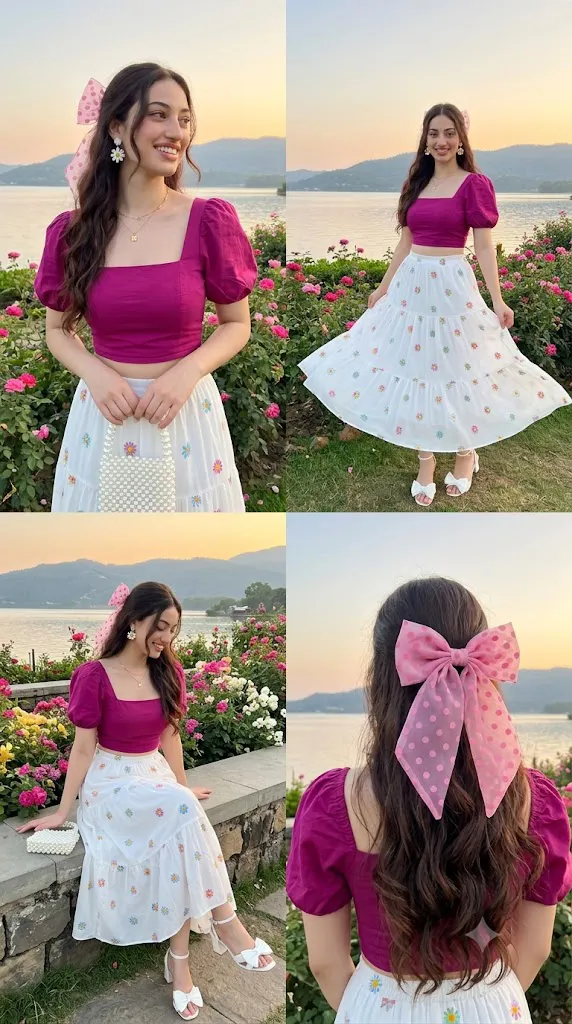
Artificial Intelligence has made it possible to create breathtaking portrait photography without traveling to expensive destinations or hiring a professional photography team. With a detailed AI prompt and a high-quality reference image, anyone can generate realistic outdoor portraits that look like they were captured by an experienced photographer. One of the most beautiful concepts is the Lakeside Garden AI Prompt, which combines peaceful nature, colorful flowers, crystal-clear water, soft natural lighting, and elegant fashion styling to create a premium cinematic portrait.
"Lakeside garden prompt"
«A 4-panel photo collage of the same young woman at a lakeside rose garden at golden hour sunset. Panel 1 - Top left: Half-body, smiling looking to the side, holding a white pearl beaded handbag. Panel 2- Top right: Full body, twirling her skirt, smiling at the camera, lake and hills in the background. Panel 3 - Bottom left: Sitting on a stone wall by the flowers, looking down and smiling. Panel 4- Bottom right: Back view close-up, showing the hair bow detail. Outfit for all panels: a magenta pink square-neck puff-sleeve crop top, p, paired with a white tiered maxi skirt with large colorful daisy prints in blue, pink, orange and yellow, and white bow-heeled sandals. Styling: long wavy dark brown hair with a large pink polka-dot organza bow, white daisy flower earrings, a delicate gold pendant necklace. Setting: a lakeside garden with pink roses, wooden fence, trees, soft golden sunset light. Photorealistic, natural skin texture, dreamy golden hour portrait photography, ultra detailed, 8K
The Lakeside Garden style places the subject in a lush garden beside a calm lake surrounded by blooming flowers, green trees, and scenic landscapes. Soft golden sunlight reflects across the water while gentle breezes create natural movement in clothing and hair. This combination produces a dreamy atmosphere that is ideal for fashion editorials, travel photography, engagement portraits, lifestyle content, and social media posts.
A well-designed AI prompt also ensures that facial features remain realistic while introducing fresh poses, premium clothing, cinematic lighting, and realistic environmental details. Whether you are an influencer, photographer, content creator, or AI art enthusiast, the Lakeside Garden AI Prompt allows you to create elegant outdoor portraits that stand out with exceptional realism and artistic quality.
The final result is an ultra-high-resolution image featuring crisp details, natural skin texture, vibrant greenery, realistic reflections, balanced colors, and professional composition that looks suitable for magazine covers, advertising campaigns, and digital portfolios.
How To Use Photo Editing?
Creating a beautiful Lakeside Garden portrait is easy when you follow the proper editing workflow.
Step 1: Copy the AI Prompt
Copy the complete Lakeside Garden AI Prompt exactly as written. Every instruction helps the AI understand the lighting, background, clothing, pose, camera angle, and environmental details.
Step 2: Choose a High-Quality Reference Image
Select a portrait with:
- Clear facial details
- High resolution
- Natural lighting
- Neutral facial expression
- Minimal background distractions
A clean reference image allows the AI to preserve facial identity while generating a new cinematic scene.
Step 3: Upload the Reference Photo
Open your favorite AI image generator and upload the reference image. Most modern AI platforms support image guidance for better facial accuracy.
Step 4: Paste the Prompt
Paste the complete prompt into the prompt box. Avoid removing important instructions because every detail contributes to the final result.
Step 5: Generate the Portrait
Click the Generate button and allow the AI to create several portrait variations.
Step 6: Choose the Best Version
Compare all generated images and select the portrait with the best facial accuracy, lighting, clothing, and garden scenery.
Tools You Can Use For Prompt Copy and Create Photo
Several AI tools are capable of producing realistic outdoor portraits with stunning quality.
1. ChatGPT Image Generation
ChatGPT is an excellent choice for creating cinematic portraits with realistic lighting, natural landscapes, and premium fashion styling.
Best For:
- Outdoor portraits
- Lifestyle photography
- Travel scenes
- Fashion editorials
- Nature-inspired artwork
2. Midjourney
Midjourney produces artistic images with outstanding lighting, vibrant colors, and cinematic landscapes.
Features:
- High-quality rendering
- Beautiful environmental details
- Excellent realism
- Premium lighting
- Professional composition
3. Flux AI
Flux AI specializes in realistic portraits with detailed facial textures and natural clothing folds.
Best For:
- Hyper-realistic portraits
- Fashion photography
- Commercial advertising
- Lifestyle images
4. Leonardo AI
Leonardo AI provides advanced controls for lighting, textures, camera angles, and artistic style, making it ideal for customized portrait generation.
5. Google ImageFX
Google ImageFX is beginner-friendly and generates clean, realistic portraits with balanced lighting and natural colors.
6. Ideogram AI
Ideogram AI can create artistic poster-style portraits and visually engaging compositions with realistic details.
7. Adobe Firefly
Adobe Firefly integrates with Photoshop, allowing professionals to refine AI-generated images using advanced editing tools.
How To Edit Photo?
Follow these steps to create a premium Lakeside Garden portrait.
Step 1: Select a High-Resolution Reference Image
Choose a portrait with:
- Sharp facial details
- Proper lighting
- Natural skin tone
- High image quality
- Minimal editing
Step 2: Copy the Complete Prompt
Paste the full Lakeside Garden AI Prompt into your AI image generator without removing any important instructions.
Step 3: Upload Your Reference Image
Upload your portrait so the AI can preserve your facial identity while creating a completely new lakeside environment.
Step 4: Configure Image Settings
For the highest quality, use:
- Resolution: 8K
- Aspect Ratio: 4:5 or 3:4
- Style: Hyper Realistic
- Lighting: Golden Hour
- Camera Angle: Eye-Level
- Detail Level: Maximum
Step 5: Generate Multiple Images
Create several variations and compare each carefully. Choose the portrait with the best lighting, facial accuracy, natural reflections, and realistic background.
Step 6: Upscale the Image
Use the AI upscaling feature to improve image resolution while maintaining realistic textures.
Step 7: Refine the Portrait
Open the image in Photoshop or another photo editing application to:
- Increase sharpness
- Improve color grading
- Enhance lighting
- Balance shadows
- Remove unwanted artifacts
- Improve reflections
- Refine clothing textures
- Enhance flower colors
These final adjustments help create a polished editorial appearance.
Step 8: Export the Final Image
Save the completed portrait in high quality.
Recommended formats include:
- PNG
- JPG
- TIFF (for professional printing)
Step 9: Share Your Artwork
Your finished Lakeside Garden portrait is perfect for:
- Instagram Posts
- Pinterest Pins
- Facebook Covers
- Behance Portfolio
- Travel Blogs
- Fashion Websites
- YouTube Thumbnails
- AI Art Galleries
- Digital Advertisements
- Personal Branding
Conclusion
The Lakeside Garden AI Prompt is a perfect choice for anyone who wants to create elegant outdoor portraits with the beauty of nature and the realism of professional photography. By combining peaceful lakes, colorful flowers, lush greenery, cinematic lighting, and fashionable styling, this prompt produces images that feel both artistic and lifelike.
Using a high-quality reference photo, a detailed AI prompt, and a reliable image generation tool allows you to create stunning portraits suitable for social media, fashion campaigns, travel blogs, and professional portfolios. The realistic lighting, natural skin textures, balanced composition, and scenic landscapes make every image visually appealing and memorable.
Feel free to experiment with different seasons, flower varieties, clothing styles, and lighting conditions while keeping the lakeside garden atmosphere intact. With creativity and the right workflow, you can consistently produce premium-quality AI portraits that capture the peaceful beauty of nature while showcasing modern fashion and professional photography techniques.