Introduction
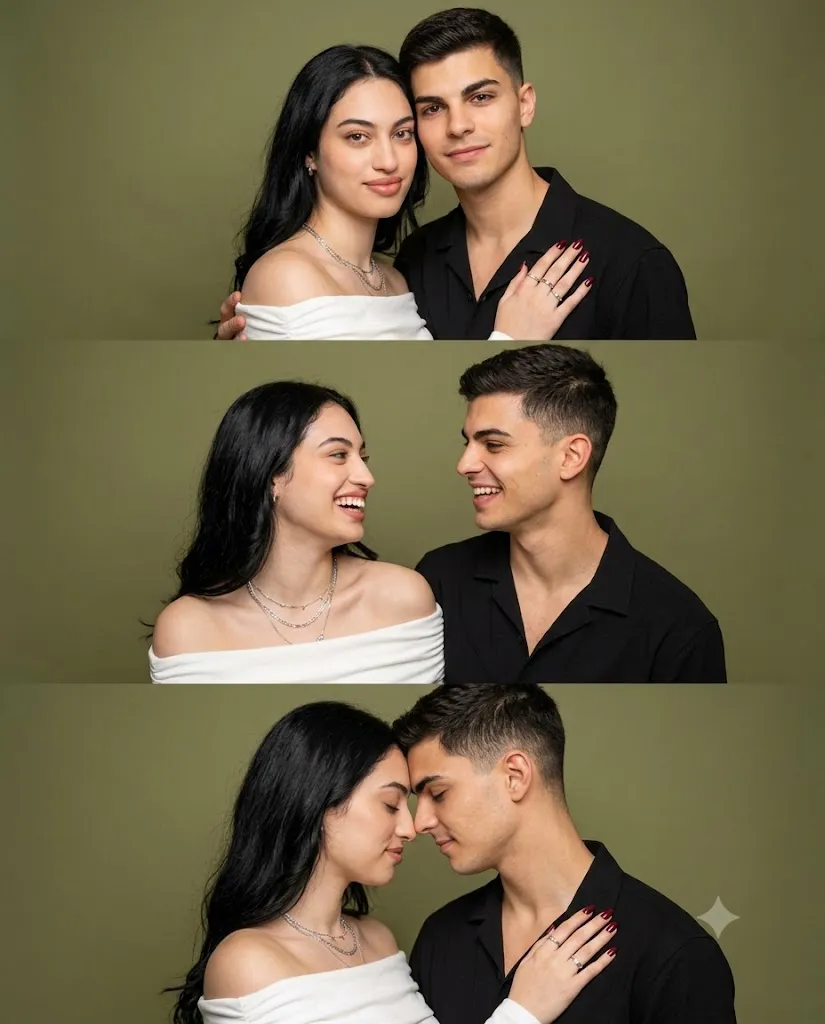
The Love in Three Frames Prompt is a beautiful AI photography concept created to capture the chemistry, emotions, and connection between two people in a single artistic composition. Instead of generating one ordinary couple portrait, this prompt creates a vertical three-panel photobooth-style triptych, where each panel presents a different emotional moment between the couple.
The entire composition uses a clean olive-green studio background, soft professional lighting, and consistent camera positioning. This creates a polished editorial appearance while allowing the couple's expressions and body language to become the main focus.
The three panels tell a small visual story. In the first frame, the couple stands closely together and looks directly at the camera with gentle smiles. The second frame captures a more natural interaction as they turn toward one another and share a playful moment. The third frame becomes more intimate, showing them gently touching foreheads and noses with their eyes closed.
One of the most important elements of this prompt is identity preservation. When an uploaded reference image is used, the AI should maintain the facial identity of both subjects as accurately as possible. Facial structure, hairstyle, skin tone, eyes, nose, lips, jawline, and other recognizable characteristics should remain consistent throughout all three panels.
The woman's white off-the-shoulder Bardot top creates an elegant contrast against the olive-green background, while layered necklaces, subtle rings, and dark red nails add sophisticated details. The man's minimalist black open-collar shirt provides a clean and timeless fashion aesthetic.
"Love in Three Frames Prompt"
Uploaded image = strict 100% face match/identity reference for both subjects, all panels. Photorealistic vertical photobooth-style triptych (3 stacked medium close-up panels), couple against clean olive-green backdrop, consistent styling/lighting/camera throughout. Woman: Natural styled hair, fitted white off-shoulder Bardot top, layered silver/beaded necklaces, subtle rings, dark red manicure, soft natural glowing makeup, peach-toned lips. Man: Neatly styled hair, minimalist black open-collar button-down, relaxed modern fit, clean refined look. Panel 1 (Close Portrait): Cheek-to-cheek, looking at camera, gentle confident smiles, arm around shoulder, warm/affectionate. Panel 2 (Shared Moment): Turned toward each other, candid smiles, playful eye contact, spontaneous body language. Panel 3 (Intimate Connection): Forehead-to-forehead, nose-to-nose, eyes closed, peaceful smiles, hand on shoulder (showing rings/nails), romantic mood. Background/Lighting: Smooth olive-green backdrop with subtle gradient vignette, bright soft even studio lighting, high-key flat illumination, minimal shadows, warm natural skin tones. Camera: Straight-on eye-level, medium close-up, sharp focus on faces/eyes, natural skin texture, ultra-realistic studio quality, 4:5 aspect ratio.
How To Use Photo Editing?
Using the Love in Three Frames Prompt becomes easier when you follow a structured photo-editing workflow.
Step 1: Choose a Suitable Reference Image
Begin with a clear photograph containing both subjects. The faces should be visible and reasonably well-lit. Avoid images where the subjects are heavily covered by accessories, extreme shadows, or objects. A high-resolution reference photograph generally provides better facial consistency.
Step 2: Upload the Reference Image
Upload the couple's photograph into an AI image-editing or image-generation platform that supports reference images. The reference image should be used specifically for identity matching. Add a clear instruction such as: “Use the uploaded image strictly as the identity reference for both subjects and preserve their facial features consistently across all three panels.” This helps communicate that the clothing, environment, and poses can change while the identities should remain recognizable.
Step 3: Add the Complete Prompt
Paste the Love in Three Frames Prompt into the tool. Include the styling, background, three individual panel descriptions, lighting, camera angle, and technical specifications. The three panels should be described separately so the AI understands that each frame represents a different interaction.
Step 4: Generate the Image
Generate the first version and carefully inspect all three panels. Look for consistency in faces, hairstyle, clothing, proportions, and lighting. If one panel looks different from the others, regenerate the image or strengthen the consistency instructions.
Tools You Can Use For Prompt Copy and Create Photo
There are several categories of tools that can help you create this type of AI portrait.
1. AI Image Generators
AI image generators are useful for creating the complete triptych composition from a detailed text prompt. They can interpret descriptions involving clothing, poses, lighting, background colors, and photography styles. For this particular concept, choose a generator that supports reference images and character consistency if maintaining the subjects' identities is important.
2. AI Photo Editing Tools
AI photo editors are useful when you already have a couple photograph and want to transform it into the three-panel studio concept. These tools can help change the background, wardrobe, poses, lighting, and overall visual style while using the original photograph as a reference.
3. Professional Image Editors
Traditional editing software can be used after AI generation for final corrections. You can adjust exposure, contrast, sharpness, cropping, skin texture, and color balance. It can also help prepare the final image for different social-media platforms.
4. Prompt-Based Creative Platforms
Prompt-based creative tools allow you to experiment with different variations. You can change the background from olive green to beige, cream, grey, or another studio color while maintaining the same three-frame storytelling concept. Always check the current capabilities and usage terms of the tool you choose because AI platforms frequently update their features.
How To Edit Photo?
After generating the triptych, careful editing can make the final result significantly more realistic.
Step 1: Check Facial Consistency
First, compare the faces across all three panels. Both subjects should remain recognizable from frame one through frame three. Look for changes in facial structure, eyes, nose, lips, jawline, skin tone, and hairstyle. Unwanted changes can reduce the realism of a multi-panel portrait.
Step 2: Check the Clothing
The woman's fitted white Bardot top should naturally expose the shoulders and collarbones. Her layered silver and beaded necklaces should remain delicate and realistic. Her rings and dark red manicure should be visible where the pose allows. The man's black open-collar button-down shirt should maintain a relaxed, modern appearance without unnatural folds or distortions.
Step 3: Improve the Background
The olive-green background should remain smooth and consistent across all three panels. A subtle gradient or vignette can add depth without distracting from the couple. Avoid unnecessary objects, patterns, furniture, or visual clutter.
Step 4: Adjust Lighting
Use bright, soft, even studio lighting. The faces should remain clearly illuminated, with realistic skin texture and minimal harsh shadows. Warm color grading can help create a romantic atmosphere while preserving natural skin tones.
Step 5: Refine Each Panel
The three frames should feel different but connected.
Panel 1: Focus on closeness, confidence, and warmth.
Panel 2: Emphasize natural conversation, eye contact, and playful chemistry.
Panel 3: Focus on tenderness and emotional intimacy with the forehead-to-forehead pose.
The expressions should look natural rather than exaggerated.
Step 6: Final Composition
Make sure the three panels are properly aligned vertically. Maintain similar framing, camera distance, lighting, and perspective throughout the triptych. A 4:5 aspect ratio works especially well for social-media posts because it provides enough vertical space for all three frames while keeping the couple prominent. Finally, apply subtle sharpening and exposure corrections. Avoid excessive skin smoothing because natural skin texture is an important part of photorealistic photography.
Conclusion
The Love in Three Frames Prompt offers a creative way to transform a simple couple photograph into a romantic visual story. Instead of relying on a single pose, the triptych format presents three different expressions of connection: looking together at the camera, sharing a playful moment, and expressing quiet intimacy.
The olive-green studio background provides a sophisticated visual foundation, while the woman's white Bardot top, silver accessories, and dark red manicure create elegant details. The man's black open-collar shirt adds a refined masculine contrast.
For the best results, begin with a high-quality reference photograph and clearly prioritize identity preservation. Then focus on consistent lighting, realistic clothing, natural expressions, accurate proportions, and a clean studio environment.
With careful prompting and final editing, this concept can produce a polished, cinematic, and emotionally expressive couple portrait that works beautifully for social media, anniversary memories, profile photography, creative portfolios, and romantic photo projects.