Introduction
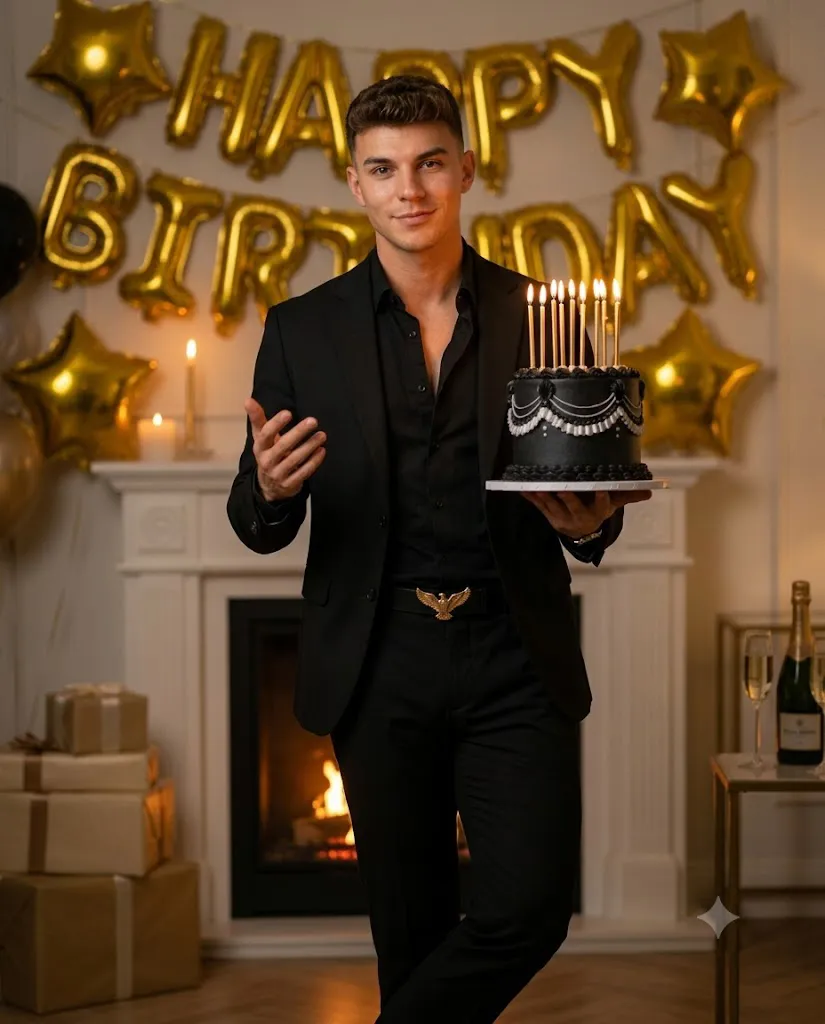
The Luxury Black Birthday Prompt is a stylish AI photo-editing concept designed to transform an ordinary portrait into a sophisticated, cinematic birthday photoshoot. The visual style combines a formal monochrome black outfit, a luxurious gold-and-black interior, a beautifully decorated birthday cake, warm candlelight, and an elegant editorial atmosphere.
The main attraction of this concept is its premium black-and-gold color palette. The subject wears a tailored black blazer, an open-collar black button-down shirt, fitted black trousers, and a statement belt with a metallic eagle-shaped buckle. This creates a powerful and sophisticated appearance while keeping the overall styling clean and masculine.
The birthday cake adds another important visual element. A two-tier matte black cake decorated with elegant white or silver royal icing is held naturally in one hand. Eight thin candles glow from the top of the cake, creating warm highlights that gently illuminate the subject's face.
The environment is designed like a luxury indoor celebration. Gold “HAPPY BIRTHDAY” balloons appear across the background, with additional star-shaped balloons adding depth. A classic white fireplace with a soft glowing fire creates a warm atmosphere, while gift boxes and a sophisticated table setup complete the scene.
One of the most important instructions in this type of AI portrait is identity preservation. When a reference photograph is supplied, it should be used as the primary facial and identity reference. The goal is to change the styling, environment, lighting, and composition while keeping the subject recognizable and natural.
"Luxury Black Birthday Prompt"
Uploaded image as ONLY facial/identity reference — exact same face, skin tone, hairstyle, natural texture, no beautification or alteration. Cinematic birthday portrait, confident adult man, luxurious indoor setting. Above-knee to head, 4:5 vertical, centered, relaxed leaning pose (one leg straight, other bent), right hand holding cake at mid-torso, left hand raised near chest, soft happy confident smile. Outfit: Black tailored blazer, black button-down (top open), fitted black trousers, belt with metallic eagle buckle, minimal luxury styling. Cake: Two-tier matte black cake, white/silver royal icing, 8 lit candles with warm flicker glow on face. Background: Gold foil "HAPPY BIRTHDAY" balloons + star balloons, white fireplace with soft fire glow, gift boxes (beige/gold, red ribbons) on left, wooden table with ice bucket, champagne bottle & flute on right. Lighting: Cinematic low-key — warm key light front-left, candle flicker as practical light, fireplace rim light, soft shadows, no harsh highlights. Mood/Color: Luxury gold + black palette, warm amber tones, rich contrast, realistic (no oversaturation). Quality: Shallow depth of field, ultra-detailed textures (metallic balloons, matte frosting, fabric realism), cinematic 85mm look, soft volumetric lighting, 8K detail.
How To Use Photo Editing?
Creating a Luxury Black Birthday portrait begins with selecting an appropriate reference photograph and then applying the detailed prompt through an AI photo-editing tool.
Step 1: Choose a High-Quality Reference Image
Select a clear photograph where the person's face is visible. A sharp image with natural lighting generally gives AI editors more information about facial structure and identity. Avoid photographs with heavy filters, extreme shadows, face coverings, or significant motion blur.
Step 2: Upload the Reference Image
Upload the selected photograph into an AI editor that supports image-to-image editing or reference-based generation. The reference image should be treated as the primary identity source. Include clear instructions such as: “Use the uploaded image as the only facial and identity reference. Preserve the exact facial structure, proportions, skin tone, hairstyle, grooming details, and natural appearance.” This helps reduce unnecessary changes to the subject's face.
Step 3: Add the Full Prompt
Paste the Luxury Black Birthday Prompt into the text instruction area. Make sure the prompt contains the important details about composition, clothing, cake, balloons, fireplace, lighting, color palette, and photographic style. Detailed prompts usually provide better control than short descriptions because they tell the AI exactly what visual elements should appear.
Step 4: Generate the Portrait
Generate the image and inspect the result carefully. AI tools may create several variations, so compare the outputs and select the version that provides the most natural face, realistic clothing, accurate cake design, and balanced composition.
Tools You Can Use For Prompt Copy and Create Photo
You can use several types of AI and photo-editing tools to create this style of portrait.
1. AI Image Generators
AI image generators can create cinematic birthday portraits from detailed text prompts. They are useful when you want complete control over the environment, lighting, outfit, cake, and composition. For reference-based work, choose a platform that supports image references or identity-consistency features.
2. AI Photo Editors
AI photo editors are particularly useful when you already have a photograph and want to transform the environment or clothing. These tools can help place the subject into a luxury birthday setting while maintaining important visual characteristics from the original photograph.
3. Professional Photo Editing Software
Traditional photo-editing applications can be used after AI generation for final corrections. You can adjust exposure, contrast, highlights, shadows, sharpness, cropping, and color balance. This is especially helpful when preparing the final image for Instagram, Facebook, websites, or digital invitations.
4. Prompt-Based Creative Platforms
Prompt-based creative platforms allow you to experiment with different versions of the same birthday concept. You can modify the background, cake style, lighting intensity, clothing details, or camera perspective without changing the overall theme. Before choosing a tool, check its current image-generation and reference-image capabilities because features can vary between platforms.
How To Edit Photo?
After generating the initial image, careful editing can make the portrait look much more realistic and professional.
Step 1: Check the Face
Begin by checking facial identity. The face should remain natural and consistent with the reference photograph. Look for changes in facial proportions, eyes, nose, lips, jawline, hairstyle, skin tone, and grooming details. Avoid excessive beauty filters or artificial skin smoothing. Natural pores and subtle facial asymmetry can make the final portrait look more authentic.
Step 2: Check the Outfit
The black blazer should appear tailored and structured. The open black button-down shirt should create a relaxed but luxurious appearance. The trousers should have realistic fabric folds and natural proportions. The metallic eagle-shaped belt buckle should appear sharp and believable rather than distorted.
Step 3: Improve the Cake
The two-tier matte black cake should remain clearly visible. Check the royal icing patterns and make sure the eight candles appear properly positioned. The candle flames should produce a realistic warm glow without becoming excessively bright.
Step 4: Enhance the Background
The gold “HAPPY BIRTHDAY” balloons should remain readable and naturally positioned. Star-shaped balloons can add depth without distracting from the subject. The white fireplace should appear behind the subject with a subtle warm fire. Gift boxes on the left and the dark wooden table on the right should support the luxury birthday theme.
Step 5: Adjust Lighting
Lighting is one of the most important parts of the final image. Use a warm key light from the front-left to shape the face. Candlelight should provide small flickering highlights, while the fireplace can create a subtle warm rim light around the subject. The shadows should remain soft, with smooth transitions rather than harsh edges.
Step 6: Add Cinematic Depth
A shallow depth of field can help separate the subject from the background. An 85mm lens-style look is ideal for creating a premium portrait appearance. The subject should remain sharply detailed while the balloons, fireplace, and other background elements gradually become softer.
Step 7: Final Color Correction
Maintain a luxury black-and-gold color palette with warm amber tones and rich contrast. Avoid excessive saturation. Slightly muted colors generally look more realistic and cinematic. Finally, sharpen important details such as the face, clothing texture, cake decoration, and metallic accessories while keeping the background softer.
Conclusion
The Luxury Black Birthday Prompt provides a powerful way to create a sophisticated and cinematic birthday portrait using AI photo-editing technology. Its combination of a monochrome black outfit, matte black birthday cake, golden balloons, glowing fireplace, elegant gifts, and warm cinematic lighting creates a premium editorial atmosphere.
The most important factor is maintaining the subject's natural identity while transforming the surrounding visual elements. A clear reference photograph and a detailed prompt can help achieve a more consistent result.
For the best final image, pay close attention to facial identity, realistic clothing textures, cake details, candlelight, background depth, and color grading. Small adjustments after AI generation can make a significant difference.
Whether you are creating a personal birthday portrait, social-media post, digital invitation, profile image, or luxury fashion-style photoshoot, the Luxury Black Birthday Prompt offers a stylish and memorable visual concept that combines celebration with cinematic elegance.