Introduction
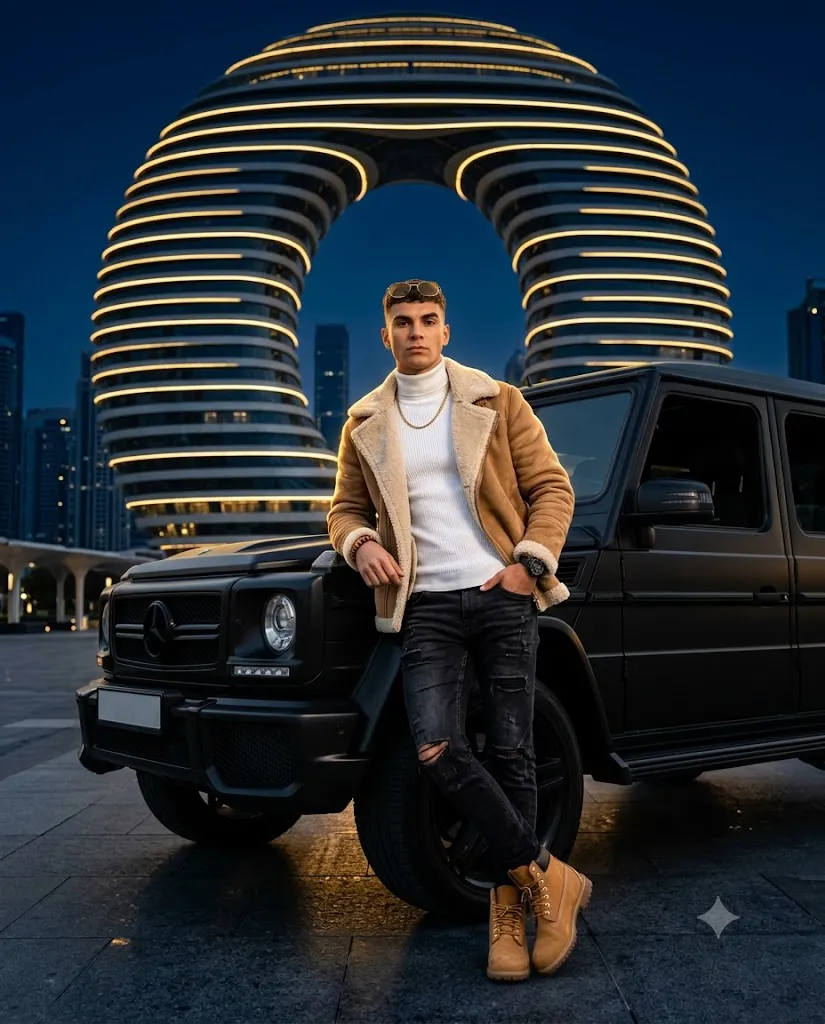
The Luxury G-Wagon Night AI Prompt is designed for creators who want to generate premium cinematic portraits featuring a luxury SUV, high-end fashion styling, and dramatic nighttime lighting. This type of AI prompt combines editorial photography, realistic textures, and luxury urban architecture to create images that look like they belong in a fashion magazine or automotive advertisement.
A well-crafted G-Wagon prompt includes every important detail, such as subject pose, clothing, accessories, luxury vehicle design, lighting setup, camera settings, and environmental elements. These details help AI image generators produce highly realistic images with accurate facial features, premium materials, and cinematic depth. Whether you are creating social media content, portfolio artwork, wallpapers, or AI fashion photography, this prompt delivers a professional luxury look with minimal effort.
"Luxury G-Wagon Night Prompt"
Full-body cinematic fashion portrait of a man leaning against a matte-black luxury G-Wagon SUV. Attire: tan suede shearling jacket, white ribbed turtleneck, distressed black jeans, wheat boots, gold aviators, matte black watch. Location: modern luxury plaza at night with a colossal futuristic ring-shaped skyscraper glowing with golden bands in the background. 85mm lens, dramatic teal and orange lighting, golden rim light, photorealistic, highly detailed skin texture, 8k resolution --ar 4:5
How To Use Photo Editing?
Creating a cinematic G-Wagon portrait with AI is simple when you follow the correct process.
Step 1: Select a High-Quality Photo
Choose a sharp, high-resolution portrait with good lighting. If your AI platform supports image references, upload your original image to preserve facial identity and natural proportions.
Step 2: Copy the AI Prompt
Use a detailed Luxury G-Wagon Night AI Prompt that includes information about the pose, clothing, accessories, vehicle, background, lighting, camera angle, and rendering quality. The more detailed the prompt, the more realistic the result.
Step 3: Paste the Prompt
Open your preferred AI image generator and paste the prompt into the text input field. Upload your reference image if required.
Step 4: Generate the Image
Click the Generate button and wait for the AI to create multiple variations. Review the results and choose the version that best matches your vision.
Step 5: Make Small Adjustments
If needed, regenerate the image after adjusting details such as lighting intensity, background color, camera angle, or clothing textures to improve realism.
Tools You Can Use For Prompt Copy and Create Photo
Many AI platforms can create professional luxury portraits from detailed prompts.
1. ChatGPT
ChatGPT is ideal for writing detailed AI prompts with realistic descriptions, lighting instructions, and fashion styling. It helps create prompts optimized for high-quality image generation.
2. Gemini
Gemini assists with improving prompt structure and generating creative ideas for cinematic luxury photography.
3. Midjourney
Midjourney is known for producing artistic, premium-quality fashion portraits with dramatic lighting and cinematic color grading.
4. Flux AI
Flux AI excels at creating highly realistic faces, luxury clothing textures, accurate lighting, and premium automotive details.
5. Leonardo AI
Leonardo AI provides advanced controls for image quality, composition, realism, and prompt customization.
6. Ideogram
Ideogram is useful when creating promotional posters or luxury advertisements that include stylish typography.
7. Adobe Firefly
Adobe Firefly combines AI image generation with editing tools, allowing creators to refine lighting, colors, and visual effects.
These platforms make it easy to transform detailed prompts into stunning editorial-quality artwork.
How To Edit Photo?
Follow these steps to achieve the most realistic luxury G-Wagon portrait.
Step 1: Upload Your Reference Image
Select a clear portrait with good lighting. Higher image quality produces better AI results.
Step 2: Insert the Prompt
Paste the complete Luxury G-Wagon Night Prompt into the AI image generator. Make sure the prompt includes details about the SUV, luxury fashion, pose, architectural background, camera settings, and cinematic lighting.
Step 3: Choose the Best Settings
Use these recommended settings:
- Aspect Ratio: 4:5 Vertical
- Image Quality: Ultra HD or 8K
- Stylization: Low for maximum realism
- HDR Rendering: Enabled if available
Step 4: Generate Multiple Versions
Most AI platforms generate several images. Compare each version and choose the one with the most accurate face, lighting, and composition.
Step 5: Refine the Final Image
Use editing software like Lightroom, Photoshop, or Snapseed to improve brightness, contrast, sharpness, and color balance. Small adjustments can significantly enhance the cinematic look while preserving realistic textures.
Conclusion
The Luxury G-Wagon Night AI Prompt is an excellent choice for anyone looking to create ultra-realistic fashion portraits with a premium automotive theme. By combining detailed prompt writing with modern AI image generators, you can achieve magazine-quality visuals featuring luxury SUVs, cinematic night lighting, realistic facial details, and stylish fashion. Whether you are creating content for Instagram, YouTube, blogs, or a professional portfolio, this prompt delivers impressive results without requiring advanced photography or editing skills. Simply choose a high-quality reference image, use a detailed prompt, generate your artwork, and apply a few finishing touches for a polished, high-end cinematic portrait.