Introduction
The Luxury Olive Green Fashion Prompt is a premium AI photo editing style designed to create sophisticated editorial portraits with a timeless luxury aesthetic. Inspired by high-end fashion magazines and professional advertising campaigns, this prompt combines elegant clothing, cinematic lighting, warm earthy color tones, and realistic photography techniques to produce stunning results. Whether you are creating content for Instagram, a personal portfolio, or a fashion-inspired social media profile, this prompt delivers a polished and magazine-quality appearance.
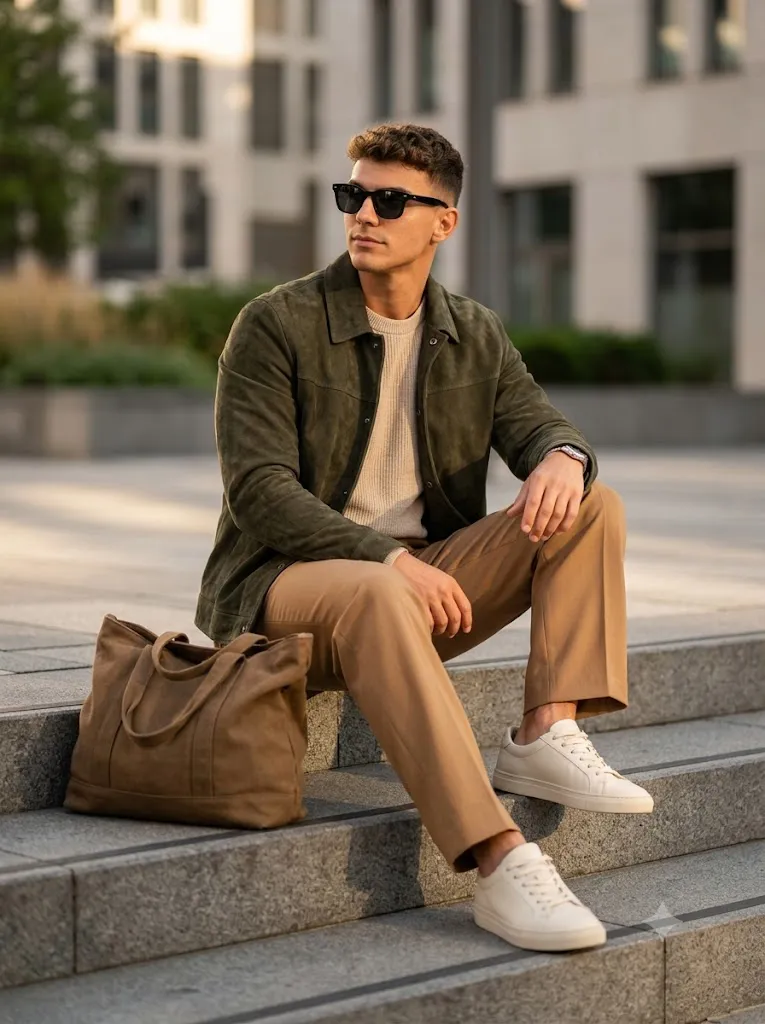
One of the standout features of this prompt is its carefully coordinated wardrobe. The deep olive-green suede jacket, light beige knitted sweater, camel tailored trousers, premium sneakers, and luxury accessories create a balanced color palette that feels modern, stylish, and refined. Combined with golden-hour sunlight and an urban architectural background, the overall composition resembles a luxury fashion editorial rather than a standard portrait.
Modern AI image generators can accurately preserve the subject's facial identity while transforming the image into a professional-quality fashion photograph. This means your hairstyle, facial structure, skin tone, and natural proportions remain authentic while the AI enhances the overall styling, lighting, and environment. If you want to create realistic editorial portraits without expensive cameras or professional studios, the Luxury Olive Green Fashion Prompt is an excellent choice for achieving premium results.
"Luxury Olive Greenl Fashion Prompt"
A highly realistic editorial fashion portrait of a stylish man sitting casually on modern concrete steps in an elegant outdoor urban setting, looking away from the camera with a confident and relaxed expression. He has naturally textured black hair, wearing premium black sunglasses, a luxury deep olive-green suede jacket, a light beige premium knitted crew-neck sweater, warm camel wide-leg tailored trousers, and clean off-white leather sneakers. A premium dark tan canvas tote bag is placed beside him. The overall color palette is warm, earthy, and luxurious. Soft golden-hour natural sunlight, cinematic shadows, neutral background, ultra-detailed fabric texture, realistic skin pores, sharp facial details, premium fashion photography, shallow depth of field, HDR, 85mm lens, professional editorial lighting, luxury aesthetic, ultra photorealistic, magazine-quality composition, 8K, extremely high detail, crisp focus, realistic colors, global illumination, masterpiece, award-winning fashion photography. Keep the face identity of the uploaded person accurately matched, preserving facial structure, hairstyle, skin tone, and natural proportions. No distortion, no cartoon effect, no extra limbs, no text artifacts. Ultra-realistic human features with premium cinematic quality. Aspect ratio 3:4.
How To Use Photo Editing?
Creating a luxury editorial portrait with AI is easy when you follow the correct workflow. Even beginners can achieve professional-quality images by using a detailed prompt and a clear reference photo.
Step 1: Choose a High-Quality Portrait
Select a sharp, high-resolution image with natural lighting. A portrait that clearly shows your face will help the AI preserve your identity while applying the fashion styling.
Step 2: Copy the Prompt
Copy the complete Luxury Olive Green Fashion Prompt exactly as written. The prompt should include clothing details, background, lighting, camera settings, composition, and instructions for preserving facial identity.
Step 3: Upload Your Reference Image
Upload your original portrait into an AI image generator that supports image references. This allows the AI to match your facial features, hairstyle, and skin tone while creating the new fashion scene.
Step 4: Paste the Prompt
Paste the prompt into the text box and verify that it includes key instructions such as:
- Luxury olive-green suede jacket
- Beige knitted sweater
- Camel tailored trousers
- Urban concrete steps
- Golden-hour lighting
- Cinematic shadows
- 85mm lens effect
- Shallow depth of field
- Ultra-realistic facial details
- HDR quality
- 3:4 aspect ratio
These details guide the AI toward generating a realistic editorial portrait.
Step 5: Generate and Refine
Generate the image. If necessary, make small adjustments to the prompt or regenerate the result until you achieve the desired fashion aesthetic.
Step 6: Export the Final Image
Download the image in high resolution (4K or 8K) for use on Instagram, LinkedIn, personal websites, portfolios, or promotional materials.
Tools You Can Use for Prompt Copy and Create Photo
Several AI tools can generate luxury editorial fashion portraits. Here are some of the most popular options:
1. ChatGPT
ChatGPT helps you create detailed prompts by describing clothing, lighting, poses, camera settings, and artistic direction. It is an excellent starting point for building high-quality AI prompts.
2. Midjourney
Midjourney is widely known for producing artistic and cinematic fashion images with rich textures, premium lighting, and stylish compositions.
3. Flux AI
Flux AI excels at generating realistic human portraits while accurately preserving facial identity. It is particularly effective for editorial and luxury fashion photography.
4. Leonardo AI
Leonardo AI provides advanced control over realism, composition, and lighting, making it ideal for premium fashion portrait generation.
5. Google Gemini
Gemini can help improve prompt wording, generate creative fashion ideas, and refine scene descriptions before using them in an AI image generator.
6. Adobe Firefly
Adobe Firefly integrates AI image generation with Adobe Creative Cloud tools, allowing users to enhance colors, textures, and overall image quality after generation.
7. Ideogram AI
Ideogram AI is useful when your fashion portrait includes elegant typography, magazine-style headlines, or graphic design elements.
8. Canva AI
Canva AI allows you to combine AI-generated portraits with additional layouts, branding elements, social media templates, and stylish graphic overlays.
How To Edit Photo?
To create a realistic Luxury Olive Green Fashion Portrait, follow these editing recommendations.
Step 1: Preserve Identity
Include instructions such as:
- Keep the original face exactly the same.
- Preserve hairstyle and facial structure.
- Maintain natural skin tone.
- Avoid distortion or cartoon effects.
- Keep realistic proportions.
These instructions help the AI produce authentic results.
Step 2: Style the Outfit
Dress the subject in premium clothing, including:
- Deep olive-green suede jacket
- Light beige knitted crew-neck sweater
- Camel wide-leg tailored trousers
- Off-white leather sneakers
- Premium sunglasses
- Dark tan canvas tote bag
The combination creates a warm, luxurious appearance suitable for editorial photography.
Step 3: Choose the Background
Use a clean urban setting with modern concrete steps and neutral architectural elements. A minimal background ensures that the subject remains the main focus.
Step 4: Apply Cinematic Lighting
Golden-hour natural sunlight provides soft highlights and warm shadows that enhance depth and realism. Combine this with subtle cinematic lighting to achieve a professional editorial look.
Step 5: Improve Image Quality
Use settings such as:
- HDR rendering
- 85mm portrait lens simulation
- Shallow depth of field
- Ultra-sharp facial details
- Realistic skin texture
- High dynamic range
- Premium color grading
These effects give the portrait a polished magazine-quality finish.
Step 6: Export the Image
Save the final portrait in 4K or 8K resolution for the highest quality when sharing on social media, websites, or printed materials.
Conclusion
The Luxury Olive Green Fashion Prompt is an ideal solution for creating elegant, magazine-quality portraits with AI. Its carefully selected wardrobe, warm earthy color palette, cinematic lighting, and realistic urban environment combine to produce sophisticated images that look like professional editorial photography.
One of the greatest advantages of AI photo editing is that it enables anyone to create premium visuals without needing expensive cameras, studio equipment, or advanced editing skills. By using a detailed prompt and a clear reference photo, you can generate stunning portraits that preserve your identity while adding luxury fashion styling.
Whether you're creating Instagram content, personal branding images, portfolio photographs, lifestyle posts, or promotional visuals, this prompt delivers consistent, high-quality results. AI tools such as ChatGPT, Midjourney, Flux AI, Leonardo AI, Adobe Firefly, Ideogram AI, and Canva AI make it easier than ever to customize every aspect of your fashion portrait, from clothing and lighting to composition and background. As AI technology continues to evolve, luxury editorial prompts like this will remain a popular choice for creators who want to produce visually striking and professional images with minimal effort.