Introduction
The Mediterranean Golden Hour Prompt is a beautiful AI photo-editing concept designed to transform an ordinary portrait into a warm, elegant, and cinematic outdoor photograph. The visual style combines Mediterranean architecture, golden-hour sunlight, natural fashion, subtle accessories, soft greenery, and realistic portrait photography to create a sophisticated editorial atmosphere.
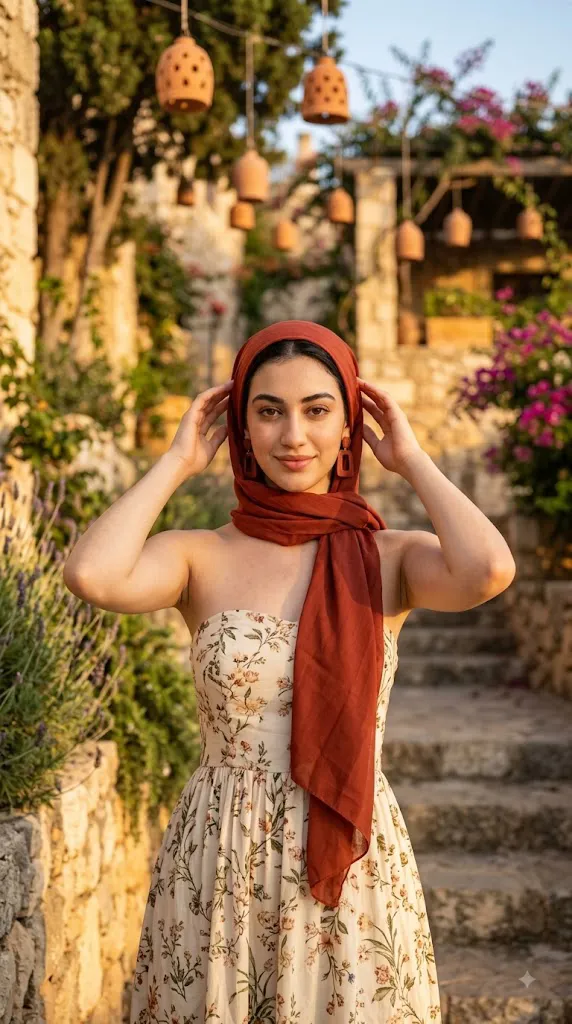
The central styling concept features a young woman wearing a rust-red headscarf with matching earrings and a beautiful beige floral strapless dress. The warm rust-red accessories provide a rich visual contrast against the soft neutral tones of the dress and the natural Mediterranean environment.
The location is an important part of the concept. A textured stone wall, elegant stone stairs, greenery, and warm architectural details create the feeling of a peaceful Mediterranean destination. The background should not appear overly sharp. Instead, a shallow depth of field can soften distant elements and create a beautiful cinematic separation between the subject and her surroundings. Golden-hour lighting is the defining feature of this portrait. Warm sunlight gently illuminates the woman's face and skin while producing subtle highlights around her hair, clothing, and accessories. Soft shadows add dimension without making the image appear harsh.
The overall photograph should feel natural rather than excessively posed. Natural makeup, realistic skin texture, gentle facial expression, and authentic sunlight help create the appearance of a professional lifestyle or fashion photograph captured outdoors. The original reference photograph can be used to preserve the subject's recognizable appearance while transforming the environment, outfit, lighting, and photographic style.
"Mediterranean Golden Hour Prompt"
Warm golden hour portrait of a young woman outdoors in a Mediterranean setting. She wears a rust red headscarf and matching earrings, and a beige floral strapless dress. Natural makeup, soft sunlit skin, gentle shadows. Stone wall and stairs with greenery in the background. Cinematic photography, shallow depth of field, highly detailed, realistic skin texture, photorealistic, 50mm lens, f/1.8.
How To Use Photo Editing?
Using the Mediterranean Golden Hour Prompt is simple when the process is divided into a few clear steps. The most important part is selecting a good reference photograph before beginning the editing process.
Step 1: Select a Good Reference Photo
Choose a high-resolution photograph where the subject's face is clearly visible. Natural lighting is preferable because it provides useful information about the person's facial features, skin tone, and proportions. Avoid extremely blurry photographs, excessive filters, very dark images, or photographs where the face is hidden by objects.
Step 2: Upload the Reference Image
Open an AI image-generation or photo-editing platform that supports reference images. Upload the selected photograph and use it as the primary visual reference.
You can include an instruction such as:
“Use the uploaded photograph as the primary identity reference. Preserve the subject's recognizable facial features, natural skin tone, hairstyle, facial proportions, and overall appearance while transforming the clothing, environment, lighting, and cinematic style.”
This helps keep the subject visually consistent while allowing the AI to create the Mediterranean setting.
Step 3: Add the Full Prompt
Paste the complete Mediterranean Golden Hour Prompt into the prompt field. Include details about the headscarf, earrings, floral dress, stone architecture, greenery, golden-hour lighting, camera lens, depth of field, and realistic photography. Detailed instructions give the AI more information about the desired final composition.
Step 4: Generate Multiple Variations
Generate several versions rather than relying on one result. Compare facial consistency, clothing quality, lighting, background, accessories, and overall realism. Select the version with the most natural face, realistic hands, accurate clothing, and balanced composition.
Tools You Can Use For Prompt Copy and Create Photo
Different types of creative tools can be used to create this Mediterranean portrait.
1. AI Image Generators
AI image generators are useful when creating an entirely new photograph from a text prompt. They can generate the subject, clothing, architecture, landscape, lighting, and photographic composition. For reference-based portraits, choose a platform that supports image references or character consistency.
2. AI Photo Editors
AI photo-editing applications are useful when you already have a photograph and want to transform its environment or styling. They can assist with background replacement, clothing changes, lighting modifications, and cinematic effects. These tools are particularly useful when maintaining the original person's recognizable appearance is important.
3. Professional Editing Software
Traditional photo-editing applications can be used for final adjustments after AI generation. Exposure, contrast, shadows, highlights, saturation, cropping, and sharpness can all be refined manually. This is especially helpful when the AI-generated image looks good but needs subtle professional finishing.
4. Image Enhancement Tools
Image enhancement and upscaling tools can improve the resolution and fine details of the final image. They may help refine skin texture, hair strands, fabric patterns, earrings, stone surfaces, and greenery. Enhancement should remain subtle because excessive sharpening can create unnatural skin or artificial-looking details.
How To Edit Photo?
After generating the first version, carefully inspect the important visual elements and make refinements where necessary.
Step 1: Check Facial Identity
Compare the generated face with the original reference photograph. Check the eyes, eyebrows, nose, lips, jawline, cheek structure, skin tone, and hairstyle. The face should remain natural and recognizable. Avoid excessive beautification or unrealistic skin smoothing.
Step 2: Refine the Headscarf
The rust-red headscarf should appear naturally wrapped around the head. Check the fabric folds and edges carefully. The color should be rich and warm without becoming excessively saturated. The headscarf should complement the earrings and overall golden-hour color palette.
Step 3: Improve the Earrings
The matching earrings should have realistic proportions and natural reflections. Avoid overly large or distorted accessories. Small details such as metallic highlights can help make the earrings appear more photographic.
Step 4: Enhance the Floral Dress
The beige floral strapless dress should have realistic fabric texture, natural folds, and delicate floral patterns. The neutral beige color should balance the stronger rust-red accessories. Make sure the dress fits naturally and maintains realistic body proportions.
Step 5: Improve the Mediterranean Background
The stone wall and stairs should look authentic and naturally textured. Add subtle greenery around the architecture to create a peaceful Mediterranean environment. The background should remain slightly blurred so that it supports the portrait without distracting from the subject.
Step 6: Adjust Golden-Hour Lighting
Golden-hour light should be warm but natural. Soft sunlight can illuminate the face while creating gentle shadows underneath facial features and clothing. Subtle highlights around the subject can produce a beautiful sunlit effect. Avoid extremely bright highlights that remove skin or fabric detail.
Step 7: Add Cinematic Depth of Field
A 50mm lens with an f/1.8 aperture is a useful visual reference for achieving shallow depth of field. Keep the subject relatively sharp while allowing the stone staircase, wall, and greenery in the background to gradually become softer. This creates depth and gives the image a professional portrait-photography appearance.
Step 8: Apply Color Grading
Use warm earthy tones inspired by Mediterranean landscapes. Rust red, beige, stone, green, and golden sunlight should work together naturally. Maintain realistic skin tones and avoid excessive saturation. A subtle cinematic grade with gentle contrast can create a polished editorial appearance.
Step 9: Refine Small Details
Inspect the image for distorted hands, unnatural fingers, strange fabric patterns, incorrect jewelry, unrealistic shadows, or background artifacts. Correct or regenerate problematic areas before finalizing the image.
Step 10: Choose the Final Composition
For social-media portraits, vertical 4:5 or 9:16 compositions work particularly well. Keep the woman's face and upper body clearly visible while leaving enough environmental space to communicate the Mediterranean atmosphere.
Conclusion
The Mediterranean Golden Hour Prompt brings together elegant fashion, sun-drenched architecture, and cinematic portraiture in one cohesive concept. The rust-red headscarf and earrings anchor the look, while the beige floral dress adds softness and balance. The stone wall, stairs, greenery, and golden light create an atmosphere that feels both editorial and effortless.
Start with a strong reference photo and clear instructions on identity, styling, location, lighting, and composition. Generate several versions, inspect faces, hands, jewelry, and background carefully, and finish with subtle color grading rather than heavy filters. Done well, this workflow turns an everyday photo into a polished Mediterranean Golden Hour portrait — ideal for social media, fashion inspiration, portfolios, travel content, wallpapers, and personal projects.