Introduction
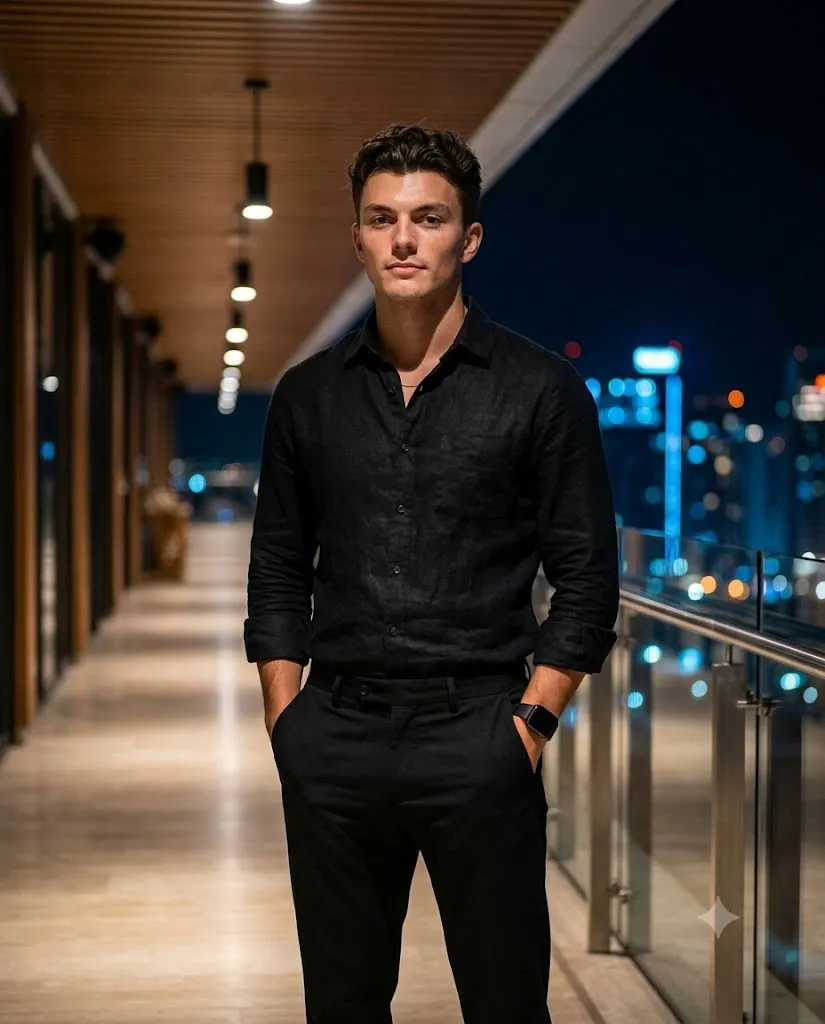
The "Midnight Luxury Rooftop" aesthetic has become one of the most sought-after styles in AI photo editing and portrait photography communities. It combines the elegance of high-end fashion editorials with the moody atmosphere of nighttime cityscapes — think warm architectural lighting, sleek all-black outfits, glass railings, and a blurred skyline glowing softly in the background. This look is popular because it turns an ordinary photo into something that feels like it belongs in a luxury magazine spread, complete with cinematic depth, rich color grading, and a confident, editorial pose.
Whether you're a content creator building a personal brand, a photographer experimenting with AI-assisted editing, or simply someone who wants a striking profile picture, understanding how this prompt style works — and how to use it responsibly — can help you get consistent, professional-looking results. This article walks through what the Midnight Luxury Rooftop prompt actually does, the tools available for building and using such prompts, and a practical workflow for editing your photos to achieve this cinematic night-portrait effect.
"Midnight Luxury Rooftop Prompt"
Ultra-realistic cinematic full-body portrait, 4:5 vertical, same person and pose as reference: slightly angled toward camera, shoulders relaxed, head turned naturally, calm confident expression, both hands in trouser pockets. Premium all-black outfit — fitted black full-sleeve button-up shirt, slightly open collar, tailored black trousers, black luxury wristwatch on left wrist. Setting: luxury rooftop corridor at night, warm wooden slatted ceiling, recessed hanging lights, polished floor, glass-and-metal railing, blurred night skyline with blue, orange, and golden bokeh beyond. Lighting: cinematic warm ambient front/side light, subtle rim light, realistic skin highlights, controlled shadows, soft filmic glow, glass reflections. Shot on full-frame camera, 50mm, f/1.8–2.0, shallow depth of field, sharp focus on face/torso, natural bokeh falloff. Photorealistic skin texture, detailed hair and beard, accurate fabric folds, natural anatomy, sophisticated color grading, 8K, highly detailed editorial fashion photography.
How To Use Photo Editing?
Photo editing for a look like this generally falls into two categories: traditional editing (adjusting an existing photo) and AI-assisted generation (creating a new image guided by a text prompt and, in some cases, a reference photo).
For traditional editing, the goal is to manually recreate the mood using color grading and lighting adjustments. This means darkening the background to simulate nighttime, boosting warm tones in the highlights (oranges and golds), adding a subtle blue tint to the shadows for contrast, and softening the background with a blur to mimic a shallow depth of field. Cropping and framing matter too — a vertical, slightly off-center composition tends to feel more editorial than a straight-on, centered shot.
For AI-assisted editing, the process is different. Instead of manually adjusting sliders, you write a detailed text prompt describing the scene, lighting, outfit, pose, and camera settings, and an AI image tool generates or modifies the image based on that description. This is where prompts like the "Midnight Luxury Rooftop" one come in — they act as a blueprint, telling the tool exactly what mood, setting, and technical photography style you're going for (camera lens, aperture, lighting direction, etc.).
An important note: many AI platforms, including this one, restrict generating realistic images of real, identifiable people — even from an uploaded reference photo — to protect individual privacy and prevent misuse like impersonation or deepfakes. So while you can absolutely use a prompt like this to generate a fictional or stylized character, using someone's actual likeness typically requires tools specifically designed and licensed for that purpose, with the subject's consent.
Tools You Can Use For Prompt Copy and Create Photo
There's a growing ecosystem of tools built for exactly this kind of work:
- AI image generators (such as Midjourney, DALL·E, Adobe Firefly, or Stable Diffusion-based platforms) are the core engines for turning a written prompt into a finished image. Each has its own strengths — Midjourney is known for cinematic realism, Firefly integrates tightly with Adobe's ecosystem, and Stable Diffusion offers the most customization for advanced users.
- Prompt libraries and prompt-sharing communities let you browse, copy, and adapt prompts like the Midnight Luxury Rooftop one. These are useful starting points you can tweak for lighting, outfit color, or setting.
- Traditional editing software like Adobe Photoshop and Lightroom remain essential for fine-tuning AI-generated images or manually grading real photos — adjusting exposure, color balance, and sharpness to match the cinematic look.
- Mobile editing apps such as Snapseed, VSCO, or Lightroom Mobile are great for quick color grading and background blur effects on the go.
- Background and lighting tools, including AI-powered background replacement features found in Canva or Photoshop's Generative Fill, help place a subject convincingly into a new environment like a rooftop corridor.
When copying a prompt, it helps to keep it organized in sections — subject and pose, outfit, background, lighting, and camera settings — so you can easily swap out individual details without rewriting the whole thing.
How To Edit Photo?
Here's a practical step-by-step approach for achieving this style, whether you're starting from a real photo or an AI generation:
1. Start with a clean base image
Good lighting and a clear subject in your original photo make every later step easier.
2. Adjust the color temperature
Push warm tones into the highlights and midtones to simulate golden architectural lighting, while keeping shadows slightly cool or neutral for contrast.
3. Darken and blur the background
Reduce background brightness and apply a gaussian blur or lens blur to simulate a shallow depth of field, drawing focus to the subject.
4. Add rim lighting
A subtle light edge around the subject's shoulders and hair helps separate them from a dark background, a hallmark of cinematic portraiture.
5. Fine-tune contrast and shadows
Avoid flattening the image — deep but controlled shadows add drama without losing detail.
6. Apply a cinematic color grade
A slight teal-and-orange or warm filmic tone across the whole image ties the look together.
7. Sharpen selectively
Keep the face and upper body crisp while letting the background stay soft, reinforcing the sense of depth.
8. Review at full resolution
Zoom in to check for artifacts, unnatural skin texture, or distortion, especially around hands and facial features if AI tools were used.
Conclusion
The Midnight Luxury Rooftop style is a great example of how prompt writing and photo editing have merged into a single creative skill. Whether you're using traditional software or AI generation tools, the key ingredients stay the same: warm cinematic lighting, a confident editorial pose, a moody blurred cityscape, and careful color grading. With the right tools and a clear step-by-step workflow, anyone can recreate this luxury, magazine-style look — just be mindful of platform guidelines around generating images of real people, and favor original or consented reference material whenever possible.