Introduction
Paris has always been associated with romance, elegance, fashion, and timeless beauty. When the city is illuminated by warm street lamps, glowing storefronts, wet pavements, and soft reflections at midnight, it creates an atmosphere that feels almost cinematic. The “Midnight Paris Glow Prompt” is an AI photo-editing trend designed to recreate this magical nighttime atmosphere in a portrait. With a clear reference photo and a detailed AI prompt, you can transform an ordinary image into a sophisticated Paris-inspired cinematic photograph.
The beauty of the Midnight Paris Glow aesthetic comes from its combination of darkness and warm artificial light. Instead of bright daylight, the scene uses glowing street lamps, illuminated cafés, subtle neon signs, reflections on wet streets, and deep blue or black shadows. This contrast creates a mysterious yet romantic atmosphere that resembles a scene from a modern fashion film.
The subject can be dressed in a stylish coat, elegant black outfit, leather jacket, scarf, or sophisticated Parisian streetwear. The background may feature a charming Parisian street, classic architecture, café windows, vintage lamps, or distant city lights. Shallow depth of field keeps the subject in focus while transforming the background into beautiful cinematic bokeh.
One of the biggest advantages of this trend is that you don’t need to travel to Paris or organize an expensive nighttime photoshoot. AI image-generation tools can recreate the atmosphere digitally using your reference image. You can control the lighting, clothing, weather, location, camera angle, color grading, and mood simply by describing them in the prompt. This article explains how to use the Midnight Paris Glow Prompt, which tools you can use to create your image, and how to edit your photograph step by step.
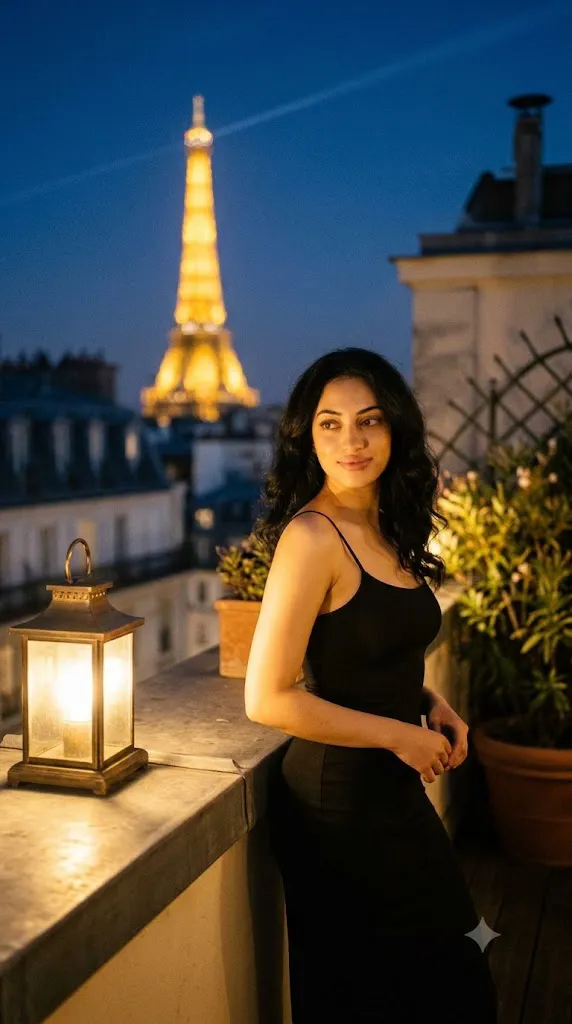
“Midnight Paris Glow Prompt”
A cinematic nighttime medium-shot of a young woman (matching the facial features, dark wavy hair, and warm skin tone of the reference) standing poised on an intimate Paris rooftop terrace, positioned slightly to the right of the frame. She wears an elegant, form-fitting black slip dress with delicate thin straps. Warm, directional golden tungsten lantern light illuminates her skin from the side, casting soft, flattering shadows across her face and serene slight smile. In the shallow-depth-of-field background, the softly glowing silhouette of the Eiffel Tower shines with golden light amidst deep night sky bokeh and lush terrace foliage. Rich tactile textures, 35mm film aesthetic, warm gold and deep obsidian tones, photorealistic, 8k resolution, shot on Arri Alexa with master prime lens --ar 9:16 --style raw.
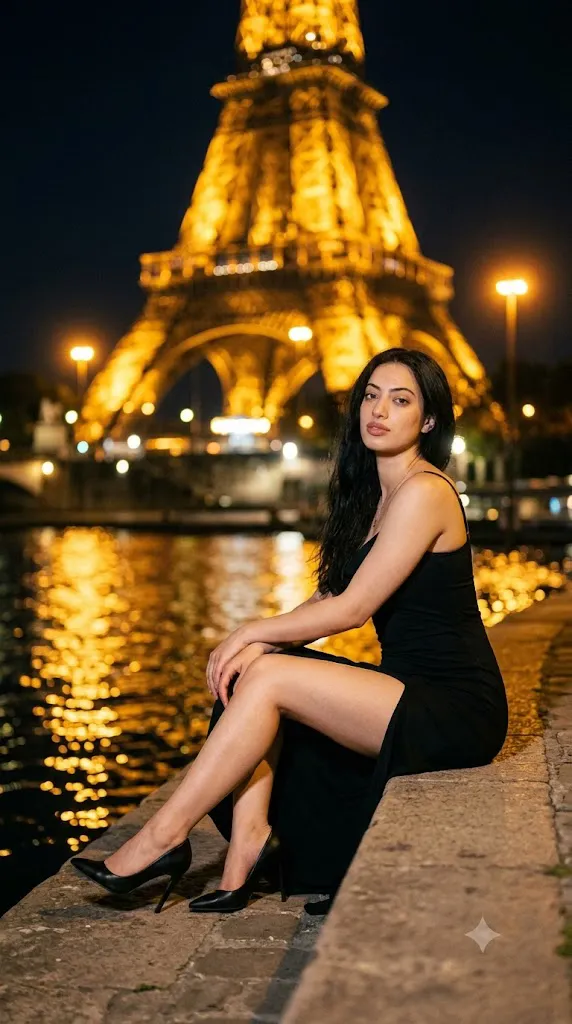
"Midnight Paris Glow Prompt"
Editorial fashion photography of the woman from the reference photo, sitting on a stone riverbank ledge in Paris at night, glowing Eiffel Tower in soft bokeh background, sleek black dress with daring leg slit, black pointed high heels, warm amber street lamp lighting, cinematic golden reflections on water, low-angle medium shot, 85mm lens, natural makeup, ultra-realistic skin texture, 35mm film grain, 8k --ar 9:16 --style raw --v 6.1.
How To Use Photo Editing?
Unlike conventional photo-editing applications that mainly adjust brightness, saturation, and contrast, the Midnight Paris Glow trend uses AI image-generation and editing technology to create a new cinematic environment around your reference image.
Here’s the typical workflow:
1. Upload a clear reference photo
Choose a high-quality image where your face and important features are clearly visible. A sharp portrait with natural lighting usually works well.
2. Copy or create a detailed prompt
Describe the Parisian environment, outfit, lighting, weather, camera angle, background, and cinematic mood.
3. Generate the image
The AI combines your reference image with the instructions to create a nighttime Paris-inspired portrait.
4. Compare multiple variations
Generate different versions and compare facial likeness, lighting, clothing, background, reflections, and overall realism.
5. Refine the image
If the street is too bright, the face is too dark, or the Parisian atmosphere is not strong enough, give the AI a specific follow-up instruction.
Specific descriptions usually produce better results. Instead of saying “make my photo look like Paris at night,” use phrases such as “wet Parisian pavement, warm French street lamps, glowing café windows, midnight blue shadows, cinematic bokeh, and subtle rain atmosphere.”
Tools You Can Use For Prompt Copy and Create Photo
Several AI platforms can help you create a Midnight Paris Glow portrait.
1. Midjourney
Midjourney is popular for cinematic environments, atmospheric lighting, fashion photography, and highly detailed backgrounds. It can be useful for creating dramatic Parisian streets and nighttime compositions.
2. Leonardo AI
Leonardo AI provides image-generation and editing features that allow users to experiment with different lighting, outfits, backgrounds, and cinematic effects.
3. Google Gemini
Gemini-based image tools can offer a convenient natural-language workflow for creating and editing images, depending on the features available to the user.
4. Canva AI
Canva can combine AI image generation with traditional editing features. After generating your portrait, you can adjust cropping, brightness, contrast, filters, and other visual elements.
5. ChatGPT With Image Generation
ChatGPT can help create detailed prompts and refine them according to your desired aesthetic. Where image-generation features are available, users can also work with reference images and refine the generated result through follow-up instructions.
Many creators begin with a ready-made Midnight Paris Glow Prompt and customize elements such as the outfit, weather, street location, lighting intensity, and color grading.
How To Edit Photo?
Creating a cinematic Paris-at-midnight portrait is simple when you follow a few steps.
Step 1: Choose a strong reference photo
Use a clear, high-resolution photograph with visible facial details. Avoid heavily blurred images or extreme filters.
Step 2: Copy the Midnight Paris Glow Prompt
Paste the prompt into your selected AI image tool. Customize the outfit, location, and lighting according to your preferred style.
Step 3: Build the Parisian environment
Mention specific visual elements such as historic French architecture, café windows, classic street lamps, wet pavement, distant headlights, and Parisian streets to make the environment more convincing.
Step 4: Control the nighttime lighting
Use a combination of warm and cool lighting. Warm street lamps can illuminate the subject, while subtle blue ambient light creates the feeling of midnight.
Step 5: Generate multiple versions
Create several variations and compare the facial likeness, composition, background, reflections, and overall cinematic quality.
Step 6: Request targeted refinements
If the image needs improvement, ask for specific changes. For example, you can request “make the wet pavement reflections more realistic,” “increase warm streetlight illumination,” “soften the background bokeh,” or “preserve the original facial identity.”
Step 7: Add final touches
After selecting the best version, use a photo-editing application for minor adjustments to brightness, contrast, sharpness, highlights, shadows, and cropping. A subtle amount of film grain can help complete the cinematic appearance.
Conclusion
The Midnight Paris Glow Prompt provides a creative way to transform an ordinary portrait into an elegant and atmospheric nighttime photograph inspired by Paris. The combination of historic architecture, warm street lamps, wet pavement, glowing cafés, cool midnight shadows, and cinematic bokeh creates a visually rich environment.
The concept is highly customizable. You can create a romantic Parisian portrait, a luxury fashion editorial, a mysterious nighttime scene, or a sophisticated travel-inspired photograph. Changing the outfit, weather, lighting, camera angle, and background can completely change the mood while keeping the core aesthetic intact.
The key to achieving a convincing result is using a clear reference photograph and a detailed prompt. Instead of relying on general instructions, describe the environment, lighting, clothing, camera settings, and atmosphere as specifically as possible. After generating the first result, make small targeted refinements until the image matches your vision.
With modern AI photo-editing tools, you don’t need to travel to Paris or arrange a professional nighttime photoshoot to experience this aesthetic. A well-written Midnight Paris Glow Prompt, a suitable reference photo, and a little creativity can turn an ordinary image into a sophisticated cinematic portrait that captures the romance and mystery of Paris after dark.