Introduction
There's something timeless about a perfectly tailored black suit. It exudes confidence, mystery, and quiet power — the kind of look you'd expect from a spy thriller or a high-fashion editorial spread. That exact aesthetic is now one of the hottest AI photo trends sweeping Instagram, Pinterest, and TikTok: the "Mysterious Black Suit Prompt." With just a reference photo and a carefully crafted text prompt, anyone can transform an ordinary selfie into a moody, cinematic portrait that looks like it belongs on the cover of a fashion magazine.
The appeal of this trend lies in its dramatic contrast. Instead of bright, cheerful lighting, these portraits lean into shadow, fog, and low-key lighting to create an air of intrigue. The subject is usually dressed in a sharply tailored black suit, sometimes paired with a turtleneck, dress shirt, or statement accessory like leather gloves or dark sunglasses. The background is often minimal — a dark studio, a rain-soaked street, or a foggy alley — all designed to keep the focus entirely on the subject's expression and presence.
What makes this trend so widely adopted is how accessible it has become. You don't need an actual designer suit, a professional photographer, or expensive studio equipment. All it takes is a clear photo of your face and a well-written AI prompt describing the suit style, lighting mood, and camera settings you want. The AI handles the rest, generating a polished, editorial-quality image within minutes. This article will walk you through how the editing process works, which tools are best for creating this look, and a simple step-by-step guide to generating your own mysterious black suit portrait.
"Mysterious Black Suit Prompt"
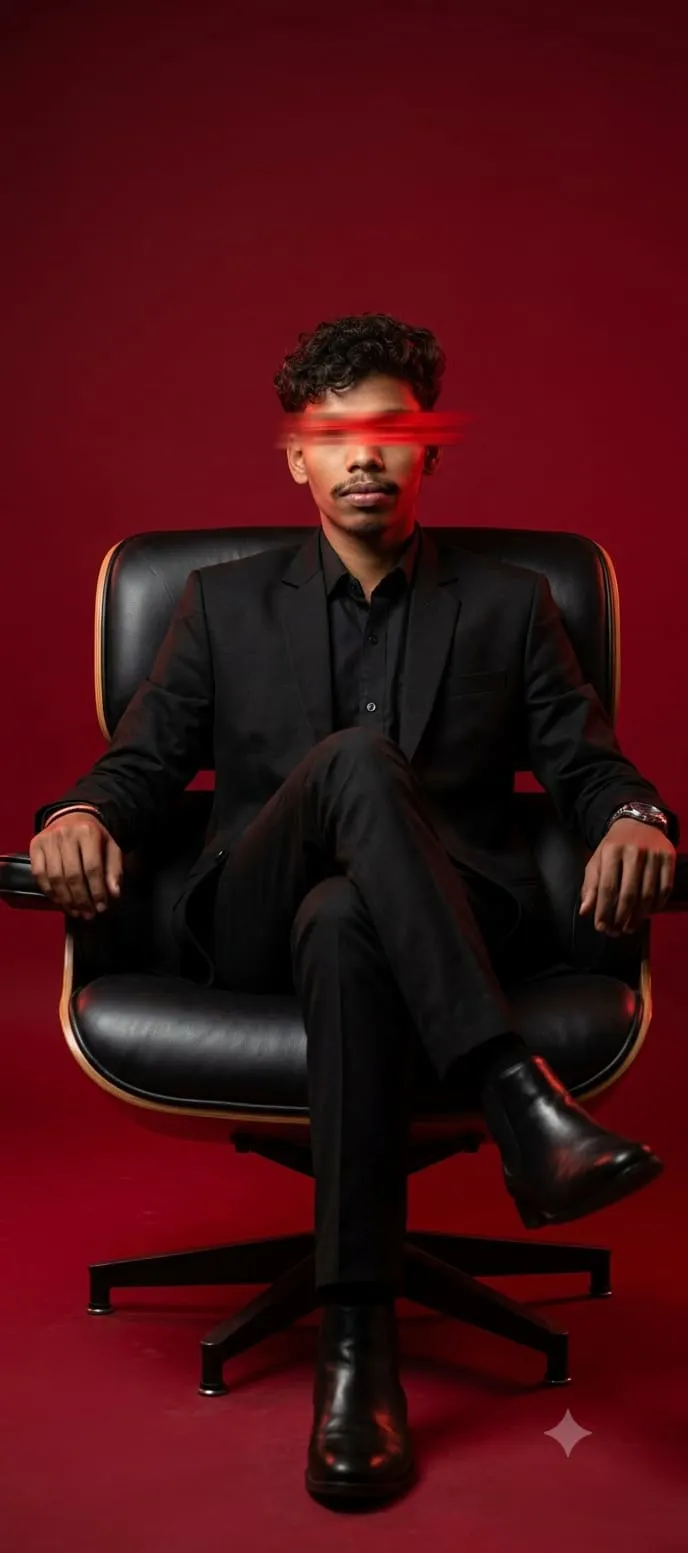
A cinematic medium full shot of a stylish man seated confidently in a modern black leather chair, captured from a slightly low angle to enhance presence and authority. He has curly black hair with a natural texture and a well-groomed beard and mustache. A bold red horizontal motion blur obscures his eyes, adding mystery and a futuristic, edgy vibe. He is dressed in a sleek all-black suit with a black shirt underneath, exuding sophistication and power. The background is a rich, solid deep red, creating a dramatic and intense contrast with his black outfit. The lighting is studio-style with a strong directional key light that sculpts his face and suit, and a subtle red rim light that outlines his hair and shoulders, separating him from the background. The compoction follows the rule of thirds, with the subject slightly off-center, leaving negative space for impact. The mood is bold, mysterious, and cinematic with a fashion-editorial tone. Shot with a prime lens (85mm), shallow depth of field, ultra sharp focus on the subject, smooth skin and fabric textures, high contrast, rich blacks and deep reds, ultra detailed, photorealistic, premium editorial photography.
How To Use Photo Editing?
Unlike conventional photo editing apps that simply enhance an existing picture, the mysterious black suit trend relies on AI image generation models that create an entirely new stylized portrait based on your written description and a reference photo. Understanding this process helps you get sharper, more consistent results.
Here's the typical workflow:
1. Upload a clear reference photo
Ideally a front-facing shot with good lighting so the AI can accurately preserve your facial features.
2. Write or copy a detailed prompt
Describing the suit style, fabric texture, lighting direction, background setting, and overall mood.
3. Generate the portrait
The AI merges your facial likeness with the described suit, lighting, and cinematic atmosphere.
4. Compare multiple versions
Most tools produce several variations, allowing you to select the one with the best expression and most realistic detail.
5. Refine using follow-up prompts
You can ask for adjustments like deeper shadows, sharper jawline lighting, or a foggier background.
The key to a convincing, high-quality output is specificity. Instead of a vague prompt like "make me look mysterious in a suit," successful results come from detailed descriptions such as "matte black tailored suit, dramatic side lighting, dark smoky background, cinematic film grain, 50mm lens, shallow depth of field." The more precise the prompt, the more control you have over the final cinematic look.
Tools You Can Use For Prompt Copy and Create Photo
Several AI platforms have become favorites among users for creating this moody, editorial-style portrait:
1. Midjourney
Renowned for producing rich, cinematic lighting and realistic fabric textures, making it ideal for achieving that dramatic magazine-cover look.
2. Leonardo AI
Offers strong facial consistency across multiple generations, which is especially useful when experimenting with different lighting styles or backgrounds.
3. Google Gemini-based tools
Great for quick, straightforward photo-to-portrait transformations, especially for users who want fast results without complicated settings.
4. Canva AI Image Generator
A convenient all-in-one option, combining prompt-based generation with simple post-editing tools like cropping, contrast adjustment, and filters.
5. ChatGPT with image generation
Many users copy a ready-made mysterious suit prompt directly into ChatGPT, upload their photo, and generate the final portrait within the same conversation.
Rather than crafting prompts from scratch, most people find trending "Mysterious Black Suit Prompt" templates shared across Pinterest, Reddit, and prompt-sharing communities. They then copy these templates and tweak small details — suit cut, background setting, or lighting angle — to match their personal style. This copy-and-customize method has made the trend approachable even for people with no prior experience writing AI prompts.
How To Edit Photo?
Creating your own mysterious black suit portrait is a straightforward process once you understand the basic steps:
Step 1: Choose a strong reference photo
Select an image with clear, even lighting and a front-facing or slightly angled pose so the AI can accurately capture your facial structure.
Step 2: Copy a trending suit prompt template
Adjust the details to fit your preference — suit style, background setting, or overall color grading.
Step 3: Add cinematic styling keywords
Phrases like "dramatic low-key lighting," "matte black tailored suit," "foggy background," "film noir aesthetic," and "shallow depth of field" help guide the AI toward a polished, editorial result.
Step 4: Generate multiple variations
Don't settle for the first output — comparing a few versions helps you find the one with the most natural expression and cleanest detail.
Step 5: Request specific refinements
If the lighting feels too harsh or the suit texture looks unrealistic, ask the AI to adjust just that element, such as "soften the shadows" or "add more texture to the suit fabric."
Step 6: Polish with light post-editing
Once satisfied with the AI-generated portrait, use a tool like Canva or Lightroom for final touches such as contrast balancing, subtle vignetting, or grain adjustment before sharing.
Conclusion
The Mysterious Black Suit Prompt trend proves that dramatic, high-fashion photography no longer requires a professional studio or expensive wardrobe. With a clear reference photo, a well-crafted prompt, and the right AI tool, anyone can generate a striking, cinematic portrait that feels straight out of a fashion editorial. Whether you're aiming for a moody profile picture, a creative portfolio piece, or simply want to try something new, this trend offers a powerful way to explore a bold, mysterious aesthetic with nothing more than your imagination and a few carefully chosen words.