Introduction
The No Limits Luxury Studio Prompt is a premium AI photo-editing concept designed to create a sophisticated, realistic, and cinematic fashion portrait. The style combines quiet luxury, modern studio photography, refined clothing, controlled cinematic lighting, and a striking wall-mounted artwork to create an editorial-quality composition.
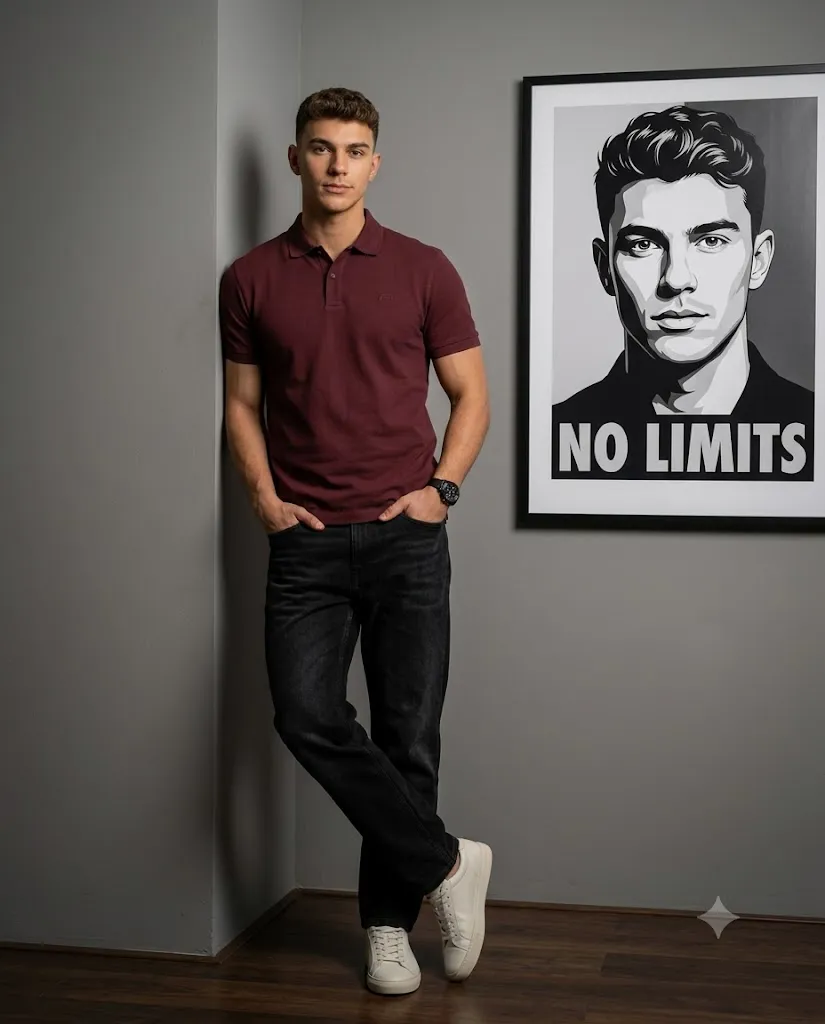
The main subject is a confident man with an athletic build, neatly styled hair, and a calm, self-assured expression. He wears a burgundy slim-fit polo shirt, black relaxed-fit denim jeans, clean white leather sneakers, and a black chronograph watch. His relaxed pose against a matte grey wall gives the image a natural yet luxurious fashion-campaign appearance.
A particularly interesting element of this concept is the large wall-mounted poster on the right side. The poster features a black-and-white vector-style portrait of the same person with the bold text “NO LIMITS.” This creates a visual connection between the real subject and the artwork behind him.
The composition is designed for a vertical 4:5 format, making it suitable for Instagram posts, fashion portfolios, profile content, and other social-media platforms. The subject remains slightly left of center, while the poster creates visual balance and negative space on the right. The most important goal is photorealism. Skin should remain natural, clothing should have realistic textures, and the lighting should appear physically consistent. The image should not look like an artificial CGI render.
"No Limits Luxury Studio Prompt"
Hyper-realistic studio portrait, athletic confident man, neatly styled hair, calm neutral expression, direct eye contact, natural skin (no smoothing/overexposure). Composition: Full-body, vertical 4:5, subject slightly left of center (45-55% frame), negative space right, no cropping of head/feet/limbs, full wall poster visible with margins. Pose: Leaning against matte grey wall corner, legs crossed naturally, both hands in jean pockets, relaxed confident posture, body slightly angled to camera. Outfit: Burgundy slim-fit polo (pique texture, small chest logo), black relaxed-fit denim (subtle fade), white low-top sneakers, black chronograph watch (left wrist), realistic fabric texture/folds. Background: Minimalist matte grey wall, dark polished wood floor with reflections, right side — large black-framed poster of same person (B&W vector-style portrait, "NO LIMITS" text), clean/no extra objects. Focus: Deep depth of field — both subject AND poster sharply focused/readable, no background blur/bokeh. Lighting: Cinematic low-key, single soft directional side light, controlled highlights, gentle shadow falloff, no harsh overexposure. Color/Mood: Quiet luxury palette — burgundy, matte grey, indigo, black, white; clean editorial look. Camera: Eye-level, Sony A7R IV, 85mm lens, f/4–f/5.6, ISO 100, 1/200 shutter, deep focus clarity, 8K, ultra-detailed, realistic lighting/global illumination. Quality: No blur/distortion/CGI look, no extra people, no cropping errors, realistic proportions.
How To Use Photo Editing?
Using the No Limits Luxury Studio Prompt is straightforward when your AI editor supports reference images and detailed text instructions.
Step 1: Choose a High-Quality Reference Image
Start with a clear photograph of the person you want to transform. A high-resolution image with visible facial details works best. Avoid heavily filtered images because excessive filters can make it harder for AI tools to preserve natural facial characteristics. If identity preservation is important, clearly instruct the AI to maintain the person's original facial structure, skin tone, hairstyle, and natural appearance.
Step 2: Upload the Reference Image
Upload your image into an AI photo-editing or image-generation platform that supports image references. The reference photograph should be treated as the primary identity source. The prompt can then describe the new outfit, studio, lighting, pose, and composition.
Step 3: Paste the Prompt
Paste the No Limits Luxury Studio Prompt into the tool's prompt field. Make sure the important instructions are included, especially:
- Full-body composition
- Vertical 4:5 format
- Burgundy polo shirt
- Black denim jeans
- White sneakers
- Matte grey studio walls
- Dark wooden floor
- “NO LIMITS” poster
- Equal focus on subject and poster
- Cinematic low-key lighting
- Natural skin texture
- No unnecessary background objects
These details help the AI understand the intended visual hierarchy.
Step 4: Generate and Compare Variations
Generate several versions if your tool allows it. Compare them carefully for facial accuracy, body proportions, clothing texture, poster visibility, and lighting. The strongest result should look like a professionally photographed fashion campaign rather than an obviously AI-generated image.
Tools You Can Use For Prompt Copy and Create Photo
There are several categories of tools that can help you create this type of AI portrait.
1. AI Image Generation Tools
Text-to-image and image-to-image platforms can generate sophisticated fashion portraits from detailed prompts. They are useful when you want complete control over the environment, clothing, pose, lighting, and camera style. For this particular concept, an image-to-image workflow is generally more suitable when you want to preserve the identity of an existing person.
2. AI Photo Editing Tools
AI photo editors are useful for transforming an existing photograph. Depending on the platform, you may be able to replace clothing, modify the background, improve lighting, or create a completely new studio environment. Choose a tool that provides good control over reference images and identity consistency.
3. Professional Photo Editing Software
After generating the AI image, professional editing software can be used for final corrections. Brightness, contrast, sharpness, exposure, cropping, shadows, and highlights can all be adjusted manually. This is particularly useful when the poster text or small clothing details need additional refinement.
4. Upscaling and Enhancement Tools
AI enhancement tools can help improve the final resolution and restore fine details. They can be useful for preparing an image for large displays, websites, or high-quality social-media uploads. However, avoid excessive enhancement because over-sharpening can make skin, hair, and clothing look unnatural.
How To Edit Photo?
After generating the image, carefully inspect each important part before publishing.
Step 1: Check the Face
The face should remain natural and recognizable. Look for unwanted changes in the eyes, nose, lips, jawline, skin texture, and hairstyle. Avoid excessive AI beauty effects. The original concept specifically requires natural skin rather than artificial smoothing.
Step 2: Check the Full-Body Composition
Make sure the entire body is visible. The head, feet, hands, and legs should not be accidentally cropped. The subject should occupy approximately half of the frame and remain slightly left of center. This leaves enough negative space for the poster on the right.
Step 3: Check the Pose
The subject should lean naturally against the corner of the matte grey wall. One leg should cross naturally over the other, while both hands remain inside the front pockets. The shoulders should appear relaxed and the body should be slightly angled toward the camera. Avoid unnatural hand placement, distorted fingers, or exaggerated body proportions.
Step 4: Check the Clothing
The burgundy polo shirt should have realistic pique texture and natural folds. The black jeans should have subtle fading without looking artificially painted. The white sneakers should have clean soles and realistic leather texture. The black chronograph watch should remain proportional to the wrist.
Step 5: Check the Poster
The wall-mounted poster is a critical part of this composition. Ensure that the entire poster is visible with proper margins. There should be no accidental cropping around its edges. The black-and-white portrait should remain sharp, and the “NO LIMITS” text should be readable.
Step 6: Keep Both Subject and Poster Sharp
Unlike many portrait images, this concept requires the foreground subject and background poster to remain in sharp focus. Avoid excessive background blur or bokeh. A deeper depth of field helps maintain clarity across the complete scene.
Step 7: Adjust the Lighting
Use cinematic low-key lighting with a soft directional light coming from the side. The face should be clearly visible without becoming overexposed. Gentle shadows should provide depth while maintaining the quiet-luxury mood.
Step 8: Final Color Grading
Use a refined palette consisting of burgundy, matte grey, black, deep indigo, and white. Keep the color grading subtle. The final image should feel elegant, modern, premium, and realistic rather than heavily stylized.
Conclusion
The No Limits Luxury Studio Prompt is an excellent choice for creating a sophisticated, cinematic, and high-end fashion portrait. Its combination of a burgundy polo shirt, black denim, white sneakers, matte grey studio walls, dark wooden flooring, and the dramatic “NO LIMITS” wall poster creates a distinctive editorial identity.
For the best results, begin with a high-quality reference image and provide clear instructions for identity preservation, full-body framing, realistic clothing, natural skin texture, and deep focus. Pay particular attention to the poster because it is an important storytelling element of the composition.
After generating the image, inspect the face, body proportions, clothing, hands, footwear, poster edges, text readability, lighting, and background. Final color correction and subtle sharpening can further improve the professional appearance. When these elements work together, the result becomes more than a simple AI portrait. It becomes a polished luxury fashion editorial image with a strong visual message—modern, confident, minimal, and built around the idea of “NO LIMITS.”